1. Introduzione e oltreview
The J-Tech Digital JTECH-WEX200V3 is a wireless HDMI extender receiver designed to work with the JTECH-WEX200 transmitter. This device allows for the wireless extension of HDMI audio and video signals up to 200 feet (61 meters) through interior walls and other obstructions. It supports full HD 1080P resolution and includes IR passthrough functionality for remote control of source devices. The innovative 1x2 function enables a single transmitter to broadcast an HDMI signal to two receivers simultaneously, providing flexibility for multi-display setups.
This receiver is part of a system that enhances signal stability and transmission range, offering a reliable solution for distributing home entertainment or commercial audio/video content without the need for extensive cabling. It is important to note that this receiver is specifically designed to operate with the JTECH-WEX200 transmitter model.
2. Contenuto della confezione
Si prega di verificare che tutti gli articoli siano presenti nel pacco:
- J-Tech Digital Wireless HDMI Extender Receiver (JTECH-WEX200V3)
- Manuale d'uso
- Adattatore di alimentazione CC 5 V/2 A
- Cavo ricevitore IR
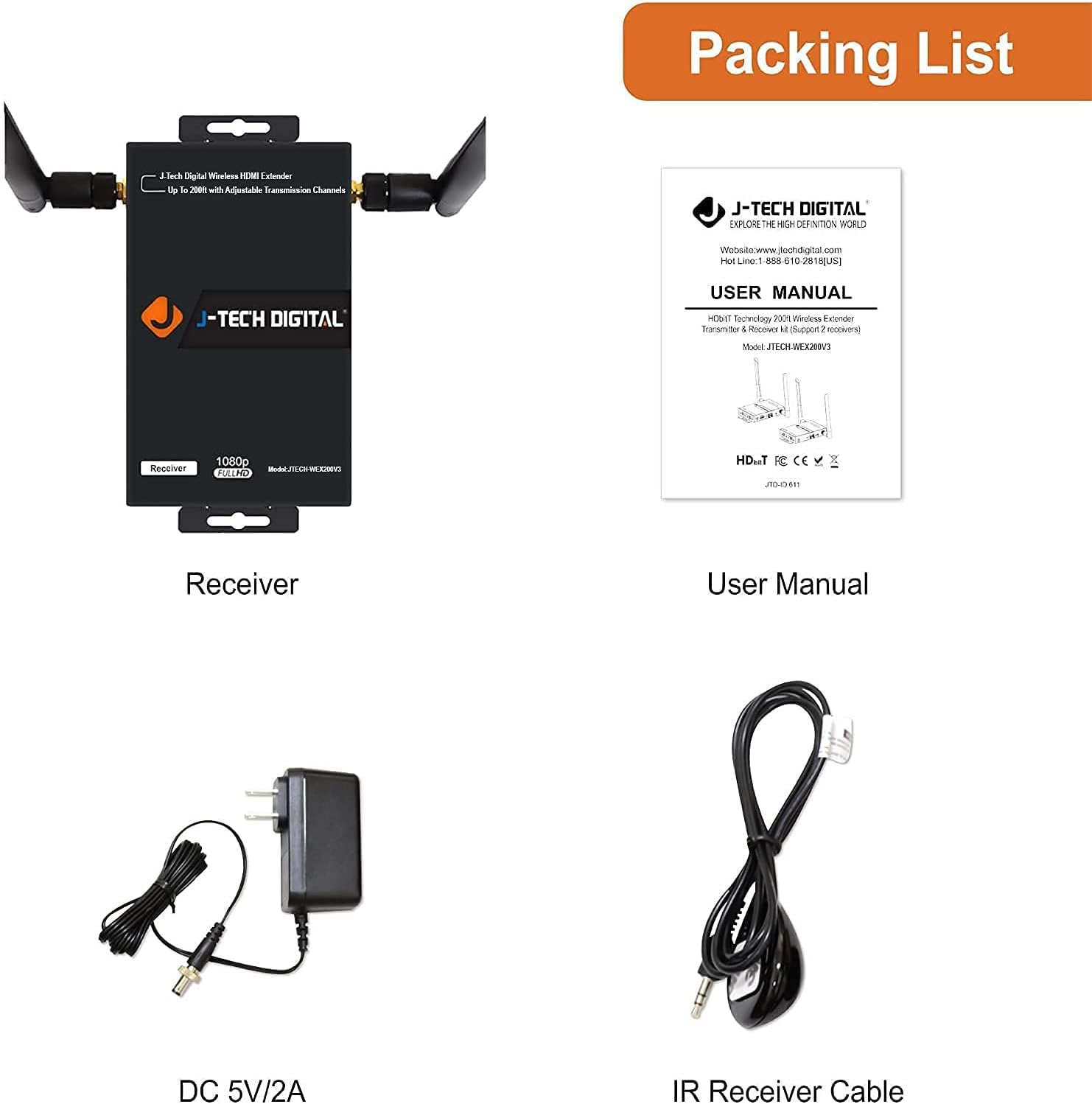
Image: Contents of the J-Tech Digital Wireless HDMI Extender Receiver package, including the receiver unit, user manual, power adapter, and IR receiver cable.
3. Caratteristiche e diagrammi del prodotto
The JTECH-WEX200V3 receiver features a compact design with dual antennas for enhanced signal stability. It includes essential ports and indicators for easy setup and operation.
3.1. Receiver Dimensions

Image: J-Tech Digital Wireless HDMI Extender Receiver showing approximate dimensions: 5.3 inches (13.5 cm) in length, 3.2 inches (8 cm) in width, and 6.9 inches (17.5 cm) in height (including antennas).
3.2. Receiver Interface
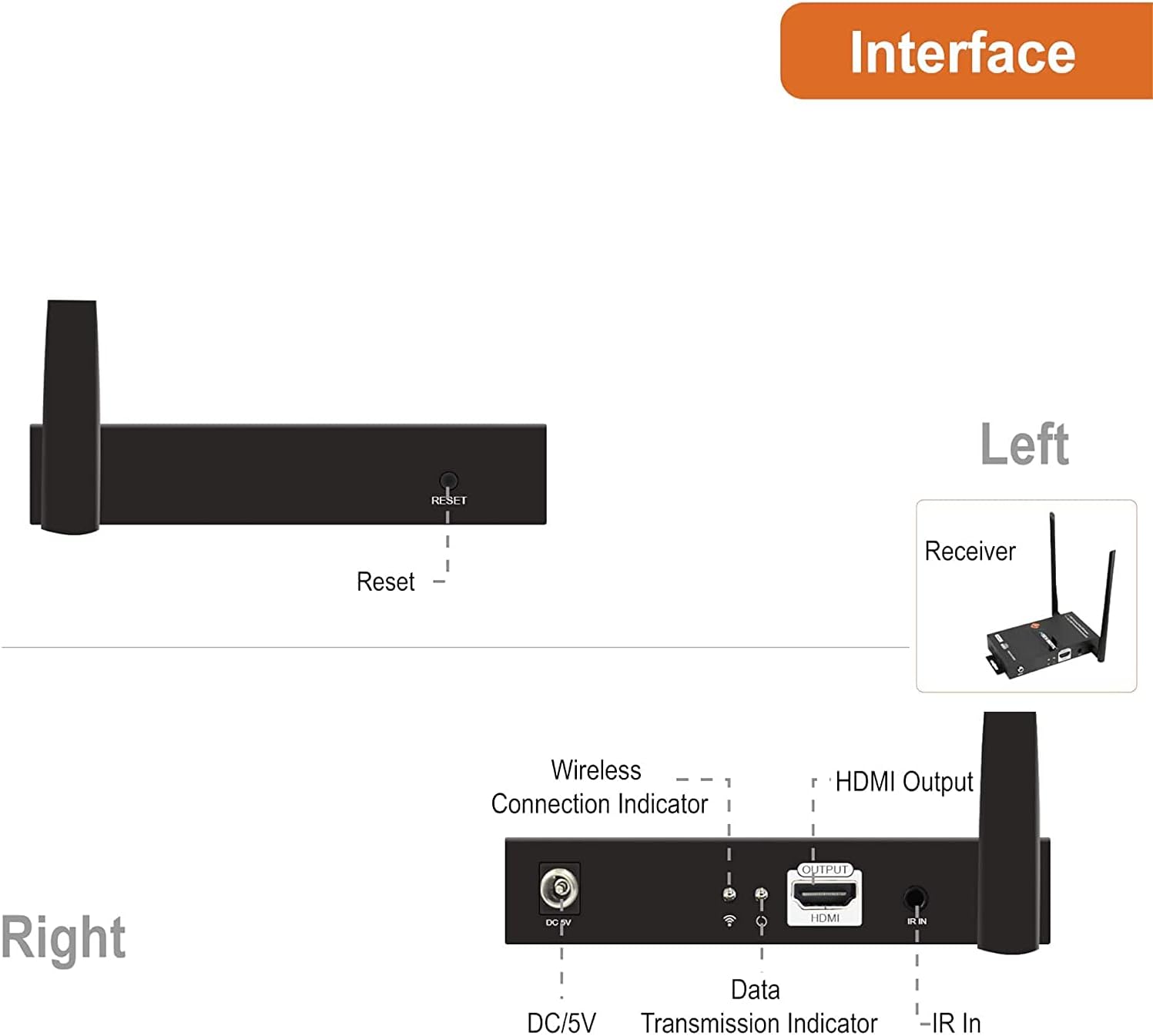
Image: Diagram illustrating the interface of the J-Tech Digital Wireless HDMI Extender Receiver. Key components include the DC/5V power input, Wireless Connection Indicator, Data Transmission Indicator, HDMI Output port, and IR In port.
4. Istruzioni per l'installazione
This section outlines the steps for setting up your J-Tech Digital Wireless HDMI Extender system. Remember that this receiver unit requires a compatible JTECH-WEX200 transmitter (sold separately) to function.
4.1. 1-to-1 Connection Setup
- Connect your HDMI source device (e.g., Blu-ray player, cable box) to the HDMI input of the JTECH-WEX200 transmitter using an HDMI cable.
- Connect the HDMI output of the JTECH-WEX200V3 receiver to your HD TV or display using an HDMI cable.
- Connect the provided DC 5V/2A power adapters to both the transmitter and receiver units, then plug them into power outlets.
- Ensure both units are powered on. The Wireless Connection Indicator on both units should illuminate, indicating a successful wireless link.
- For IR remote control functionality, connect the IR Blaster cable to the IR Out port on the transmitter and position the IR emitter near the IR sensor of your source device. Connect the IR Receiver cable to the IR In port on the receiver and position the IR receiver in a location where it can receive signals from your remote control.

Image: Diagram illustrating a 1-to-1 wireless HDMI connection. An HDMI source connects to the transmitter, which wirelessly sends the signal to the receiver, connected to an HD TV. IR repeating is also shown.
4.2. 1-to-2 Connection Setup
The JTECH-WEX200V3 system supports connecting one transmitter to two receivers simultaneously.
- Follow steps 1-3 from the 1-to-1 connection setup for the first receiver.
- Connect the second JTECH-WEX200V3 receiver to another HD TV or display using an HDMI cable.
- Connect the DC 5V/2A power adapter to the second receiver and plug it into a power outlet.
- Ensure both receivers are powered on. The transmitter will automatically detect and connect to both receivers, broadcasting the HDMI signal to both displays.
- IR control can be set up for both receivers as described in the 1-to-1 setup.

Image: Diagram illustrating a 1-to-2 wireless HDMI connection. A single transmitter sends a wireless signal to two separate receivers, each connected to an HD TV, allowing simultaneous display.
5. Istruzioni per l'uso
5.1. Wireless Signal Transmission
Once properly set up, the transmitter will automatically send the HDMI signal to the connected receiver(s). The system is designed for seamless video playback and content sharing.
5.2. IR Remote Control Passthrough
The IR passthrough feature allows you to control your source device from the location of your display. Point your remote control at the IR Receiver cable connected to the receiver unit. The signal will be transmitted wirelessly back to the transmitter, which then relays it via the IR Blaster cable to your source device.
5.3. Customizing SSID and Channel (for multiple units)
If you are using multiple JTECH-WEX200V3 extender kits in the same environment, you can customize their SSID (Service Set Identifier) and 5GHz operating frequency to prevent interference. This allows up to four pairs of transmitter and receiver units to operate independently.
- Connect a PC or mobile device to the extender's web interface (refer to the full user manual for specific IP address and login details).
- Access the wireless settings to change the SSID and 5GHz operating channel. Assign unique SSIDs to each extender pair.
- To manually cycle through 5GHz wireless channels on the receiver, press the 'Reset Channel' button. A brief press will display the current channel ID on the connected display. Holding the button will cycle through available 5GHz wireless channels (e.g., Channel 36 (5.18GHz), Channel 165 (5.825GHz)). This helps in finding a clear channel to avoid interference from other devices.
Video: Official product video demonstrating the features and setup of the J-Tech Digital Wireless HDMI Extender Kit, including its wireless capabilities, 1-to-2 connection, and channel customization options.
6. Risoluzione Dei Problemi
If you encounter issues with your J-Tech Digital Wireless HDMI Extender Receiver, please refer to the following common troubleshooting steps:
- No Signal/Connection Loss: Ensure both the transmitter and receiver are powered on and within the specified 200ft range. Check for significant physical obstructions (thick walls, metal objects, large appliances) between the units, as these can degrade signal quality. Even windows can impact signal strength.
- Compatibilità: Verify that you are using the correct JTECH-WEX200 transmitter with this receiver. This receiver is designed to work exclusively with that specific transmitter model.
- Interferenza: Other wireless devices operating on the 5GHz frequency band can cause interference. Try changing the wireless channel of your extender system using the 'Reset Channel' button on the receiver or through the web interfaccia (come descritto nella Sezione 5.3).
- Problemi di qualità dell'immagine: Ensure all HDMI cables are securely connected. If the image is flickering or distorted, try adjusting the channel to avoid interference.
- Alta latenza/ritardo: This extender is optimized for video playback and content sharing. It is generally not suitable for real-time applications such as PC gaming or live camera feeds where minimal latency is critical. Expect a latency of less than 0.3 seconds, which may be noticeable in interactive scenarios.
- Device Unresponsive/Blank Image: If the unit becomes unresponsive or displays a blank image, try power cycling the device (unplugging and re-plugging the power adapter). Some users report that occasional restarts can resolve such issues.
- Surriscaldamento: Assicurarsi che le unità abbiano una ventilazione adeguata e non siano posizionate in spazi chiusi che potrebbero causare surriscaldamento.
7. Specifiche
| Caratteristica | Specificazione |
|---|---|
| Numero di modello | JTECH-WEX200V3 |
| Dimensioni del prodotto | 5.3 x 3.2 x 6.9 pollici |
| Peso dell'articolo | 1.15 libbre |
| Tecnologia di connettività | Cavo HDMI |
| Tipo di controllore | IR |
| Caratteristica speciale | Multisala |
| Dispositivi compatibili | Personal computer |
| Porte HDMI totali | 2 (on receiver: 1 HDMI Output, on transmitter: 1 HDMI Input, 1 HDMI Loop Output) |
| Modalità di uscita audio | Stereo |
| Configurazione del canale audio surround | 5.1 |
| Codifica video | H.264, MPEG-2 |
| Risoluzione massima supportata | 1080P at 60Hz |
| Latenza | <0.3 secondi |
| Gamma di trasmissione | Up to 200 feet (61 meters) through walls |
8. Manutenzione
To ensure the longevity and optimal performance of your J-Tech Digital Wireless HDMI Extender Receiver, follow these maintenance guidelines:
- Pulizia: Use a soft, dry cloth to clean the exterior of the unit. Avoid using liquid or aerosol cleaners, as they may damage the device.
- Ventilazione: Ensure the unit is placed in a well-ventilventilated area to prevent overheating. Do not block any ventilation openings.
- Energia: Always use the provided DC 5V/2A power adapter. Disconnect the power adapter during lightning storms or when unused for long periods.
- Gestione: Maneggiare l'unità con cura. Evitare di farla cadere o di sottoporla a forti urti.
9. Garanzia e supporto
All J-Tech Digital products, including the JTECH-WEX200V3 Wireless HDMI Extender Receiver, come with a One-Year Manufacturer Warranty. Additionally, J-Tech Digital provides free lifetime technical support from their Customer Support Team. The support team is located in Houston, Texas, and is available Monday through Friday, 9 AM to 6 PM CST.
For technical assistance or warranty inquiries, please refer to the contact information available on the Pagina del venditore digitale J-Tech o il loro funzionario websito.


