1. Introduzione
The Denon DCD-800NE is a single-disk CD player designed for high-resolution audio playback. It features an integrated USB port for playing various digital file formats. The player incorporates Advanced AL32 Processing Plus and an innovative circuitry structure to ensure accurate and interference-free sound reproduction, faithful to the original recording. It supports hi-res playback up to PCM192/24 and DSD 2.8 MHz/5.6 MHz via its USB port. The Pure Direct Mode allows for direct sound output to amplifiers, bypassing additional processing for clean and detailed audio. Its vibration-resistant design minimizes adverse audio effects, maintaining Denon's sound quality standards.

Figura 1: Davanti view of the Denon DCD-800NE CD Player with its remote control. The display shows track information and playback status.
2. Impostazione
2.1 Disimballaggio
Rimuovere con cautela tutti i componenti dall'imballaggio. Assicurarsi che siano presenti i seguenti elementi:
- Lettore CD Denon DCD-800NE
- Telecomando (RC-1223)
- Two "AAA" batteries for the remote
- 47" Stereo RCA cable
- Owner's Manual on CD-ROM (for detailed instructions)
- Guida rapida
- Informazioni sulla garanzia
- Istruzioni di sicurezza
2.2 Posizionamento
Posizionare il DCD-800NE su una superficie stabile e piana, lontano dalla luce solare diretta, da fonti di calore e da vibrazioni eccessive. Assicurarsi che vi sia un'adeguata ventilazione attorno all'unità.
2.3 Connessioni
Connect the DCD-800NE to your amplifier or receiver using the provided RCA cable or a digital audio cable (optical or coaxial, not included). For optimal sound quality, ensure all connections are secure.
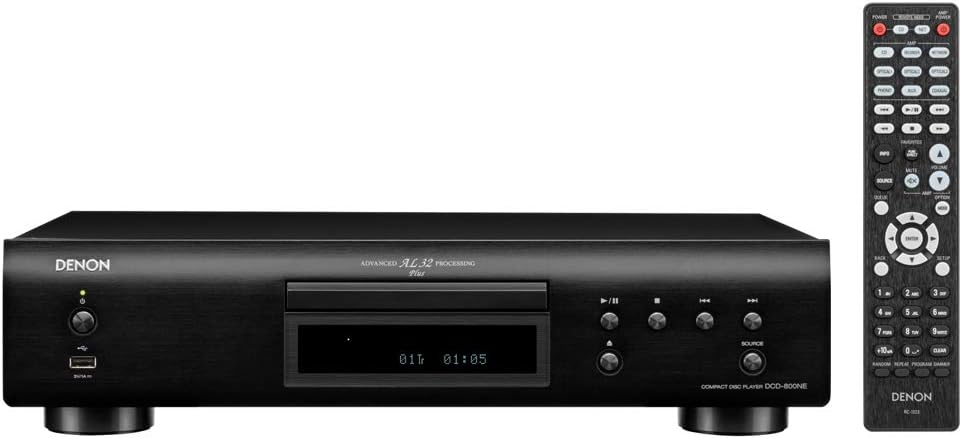
Figura 2: Rear panel connections of the DCD-800NE, including analog audio out (RCA), digital audio out (optical and coaxial), and IR control ports.
- Uscita audio analogica: Connect the RCA cables from the "AUDIO OUT" jacks on the DCD-800NE to the corresponding analog input jacks on your amplifier (e.g., "CD IN").
- Uscita audio digitale: For digital connection, use an optical or coaxial digital cable (not supplied) to connect the "DIGITAL AUDIO OUT" (OPTICAL or COAXIAL) jack on the DCD-800NE to a digital input on your amplificatore o DAC.
- Collegamento elettrico: Once all audio connections are made, connect the power cord to the DCD-800NE and then to an AC power outlet.
2.4 Installazione della batteria del telecomando
Open the battery compartment on the back of the remote control and insert the two "AAA" batteries, ensuring correct polarity (+/-). Close the compartment.
3. Funzionamento
3.1 Accensione/spegnimento
Premere il pulsante di accensione sul pannello frontale o sul telecomando per accendere o spegnere l'unità.
3.2 Riproduzione CD
- Premere il tasto APRI/CHIUDI pulsante per aprire il vassoio del disco.
- Inserire un CD nel vassoio con l'etichetta rivolta verso l'alto.
- Premere il tasto APRI/CHIUDI nuovamente il pulsante per chiudere il vassoio. Il lettore leggerà il disco.
- Premere il tasto GIOCARE pulsante per avviare la riproduzione.
- Utilizzare il SALTARE buttons to navigate between tracks and the PAUSA or FERMARE pulsanti per controllare la riproduzione.
3.3 Riproduzione USB
The DCD-800NE features a front USB-A port for playing audio files from USB storage devices (e.g., USB flash drives, external hard drives).
- Inserire un dispositivo di archiviazione USB nella porta USB sul pannello frontale.
- Premere il tasto USB button on the front panel or remote to select the USB input.
- Use the navigation buttons on the remote to browse folders and select desired audio files.
- Premere GIOCARE to begin playback. The player supports hi-res formats like PCM192/24 and DSD 2.8 MHz/5.6 MHz, as well as MP3, WMA, and FLAC.
3.4 Modalità puramente diretta
Activate Pure Direct Mode to bypass digital processing circuits that can color the audio signal. This provides a cleaner, more direct sound path, ideal for critical listening. Refer to the full Owner's Manual for instructions on enabling this mode.
3.5 Integration with Denon 800NE Series
The DCD-800NE is designed to integrate seamlessly with other Denon 800NE series components, such as the PMA-800NE Integrated Amplifier and DNP-800NE Network Audio Player, for a complete high-fidelity system. A single remote control can operate the entire 800NE series.
1 video: Un oltreview of the Denon 800NE series, demonstrating the DCD-800NE CD player's features, including its integration with the PMA-800NE amplifier and DNP-800NE network player, advanced processing, and vibration-resistant design. It highlights CD and USB playback capabilities.
4. Manutenzione
4.1 Pulizia dell'unità
Pulire l'esterno dell'unità con un panno morbido e asciutto. Non utilizzare detergenti abrasivi, cere o solventi poiché potrebbero danneggiare la finitura. Evitare di spruzzare liquidi direttamente sull'unità.
4.2 Pulizia dei dischi
Handle CDs by their edges. If a disc is dirty, wipe it gently from the center outwards with a soft, lint-free cloth. Do not use harsh chemicals or abrasive materials, as these can scratch the disc surface and affect playback quality.
4.3 Ventilazione
Ensure that the ventilation openings on the unit are not blocked. Proper airflow is essential to prevent overheating and maintain optimal performance.
5. Risoluzione Dei Problemi
If you experience issues with your DCD-800NE, consult the following common troubleshooting steps before seeking professional service.
- Nessun potere:
- Check if the power cord is securely plugged into the unit and the AC outlet.
- Assicurarsi che la presa di corrente sia funzionante.
- Nessun suono:
- Verify that the audio cables are correctly connected between the DCD-800NE and your amplificatore/ricevitore.
- Assicurati che sia selezionata la sorgente di input corretta sul tuo amplificatore/ricevitore.
- Check the volume level on both the DCD-800NE and your amplificatore/ricevitore.
- Disc Does Not Play / Disc Error:
- Assicurarsi che il disco sia pulito e privo di graffi o macchie.
- Make sure the disc is inserted correctly with the label side up.
- Prova a riprodurre un disco diverso per verificare se il problema riguarda il lettore o il disco.
- Some discs may not be compatible (e.g., certain recordable CD-R/RW formats).
- USB Device Not Recognized / Files Not Playing:
- Ensure the USB device is formatted correctly (FAT16/FAT32).
- Controlla che l'audio files are in a supported format (MP3, WMA, FLAC, WAV, DSD).
- The player supports up to 255 folders on a USB drive.
- Some USB devices may require external power or may not be compatible.
- Il telecomando non funziona:
- Controllare che le batterie siano inserite correttamente e non siano scariche.
- Ensure there are no obstructions between the remote control and the unit's IR sensor.
- Puntare il telecomando direttamente verso l'unità.
For more detailed troubleshooting, refer to the Owner's Manual on CD-ROM.
6. Specifiche
| Caratteristica | Dettaglio |
|---|---|
| Dimensioni del prodotto | 10.5 x 17.12 x 4.5 pollici |
| Peso dell'articolo | 9.48 libbre |
| Numero di modello | DCD-800NE |
| Tecnologia di connettività | USB |
| Componenti inclusi | CD player, Remote control (RC-1223), Two "AAA" batteries, 47" Stereo RCA cable, Owner's Manual on CD-ROM, Quick Start Guide, Warranty Information, Safety Instructions |
| Data prima disponibilità | 13 settembre 2018 |
Nota: le specifiche sono soggette a modifiche senza preavviso.
7. Informazioni sulla garanzia
Denon products are manufactured to the highest quality standards. This product is covered by a limited warranty. Please refer to the "Warranty Information" document included in your product packaging or on the Owner's Manual CD-ROM for specific terms, conditions, and duration of the warranty applicable to your region. Keep your proof of purchase for warranty service.
8. Assistenza clienti
For technical assistance, product inquiries, or service requests, please contact Denon customer support. You can find contact information on the official Denon website or in the "Quick Start Guide" included with your product.
Risorse online: Visita il sito ufficiale Denon websito per FAQ, aggiornamenti software e materiale di supporto aggiuntivo.


