1. Introduzione
The King Gates STARG8 24 is an advanced electronic control board designed for automated gate systems. This new generation board replaces previous electronic control units, offering enhanced functionality and reliability for various gate automation applications. This manual provides essential information for the proper installation, operation, and maintenance of your STARG8 24 board.
2. Informazioni sulla sicurezza
Please read all safety warnings and instructions carefully before installing or operating the STARG8 24 electronic board. Failure to follow these instructions may result in serious injury or damage to the product.
- L'installazione deve essere eseguita da personale qualificato nel rispetto delle normative locali in materia di elettricità e sicurezza.
- Disconnect power to the gate operator before performing any installation, maintenance, or troubleshooting.
- Assicurarsi che tutti i collegamenti elettrici siano sicuri e correttamente polarizzati.
- Tenere bambini e animali domestici lontani dall'area del cancello durante il funzionamento.
- Do not modify the electronic board or its components. Use only original King Gates spare parts.
- Proteggere la scheda da umidità, polvere e temperature estreme.
3. Prodotto finitoview
The STARG8 24 electronic board is the central control unit for your gate automation system. It manages motor operation, safety devices, and remote controls. Below is an image of the board, highlighting its key features and connections.

Figura 3.1: Davanti view of the King Gates STARG8 24 electronic board. This image displays the various terminals for connections, DIP switches for configuration, and control buttons for programming and manual operation. Key areas include motor type selection, photocell settings, and functional DIP switches.
The board is typically supplied in a protective packaging, ensuring its integrity during transport. The packaging also contains essential product identification labels.
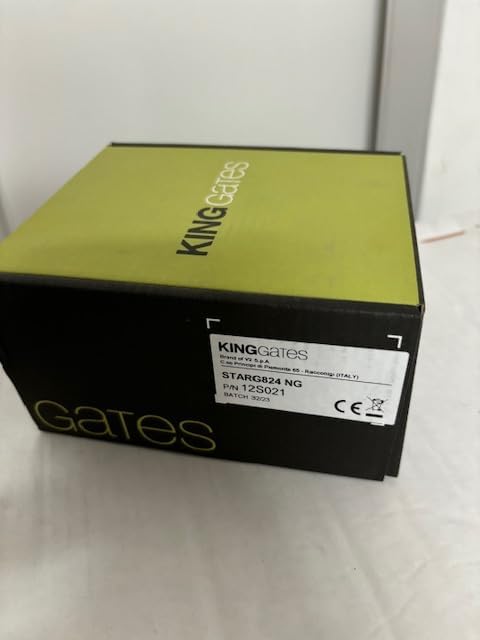
Figura 3.2: The retail packaging for the King Gates STARG8 24 electronic board. The box is primarily black with a distinctive lime green top, featuring the 'KING GATES' logo prominently. This packaging protects the sensitive electronic components during shipping and storage.
4. Configurazione e installazione
4.1 Disimballaggio
Carefully remove the STARG8 24 board from its packaging. Inspect the board for any visible damage that may have occurred during transit. If any damage is found, do not proceed with installation and contact your supplier.

Figura 4.1: The King Gates STARG8 24 electronic board partially removed from its packaging. This view shows the board's orientation within the box and the protective material, indicating careful handling is required during unpacking.
4.2 Montaggio
Mount the STARG8 24 board inside a suitable, weather-resistant enclosure, ensuring it is protected from direct exposure to elements, dust, and moisture. The enclosure should allow for adequate ventilation to prevent overheating. Use appropriate fasteners to secure the board firmly.
4.3 Collegamenti di cablaggio
Refer to the wiring diagram provided with your gate operator system for specific connection points. Ensure all power connections (24V DC), motor connections, safety device inputs (photocells, safety edges), and accessory connections (flashing light, antenna) are made correctly and securely. Pay close attention to polarity.
5. Istruzioni per l'uso
5.1 Accensione iniziale
Once all wiring is complete and checked, apply power to the STARG8 24 board. The board will perform a self-test. Observe any indicator lights or error codes that may appear.
5.2 Impostazioni dell'interruttore DIP
The STARG8 24 board features several DIP switches for configuring various operational parameters. Adjust these switches according to your specific gate system requirements. The image below shows the product label, which may contain model-specific information.

Figura 5.1: The product label on the King Gates STARG8 24 packaging. This label provides critical information such as the model number (STARG824 NG), part number (P/N 12S021), and batch number (BATCH 3223), along with manufacturing details and certifications.
Refer to the following tables for common DIP switch configurations:
Motor Type Configuration
| Interruttore DIP | Setting (ON) | Descrizione |
|---|---|---|
| MOTOR TYPE 1 | ON | Configures for 2.8m / 4.2m gate length/type |
| MOTOR TYPE 2 | ON | Configures for 2m gate length/type |
Photocell (PHOTO-2) Configuration
| Interruttore DIP | Setting (ON) | Descrizione |
|---|---|---|
| PHOTO-2 1 | ON | Fast photocell response |
| PHOTO-2 2 | ON | Hazard mode for photocell |
Function (FUNC) Configuration
| Interruttore DIP | Setting (ON) | Descrizione |
|---|---|---|
| FUNZIONE 1 | ON | Automatic closing enabled |
| FUNZIONE 2 | ON | Step-by-step operation enabled |
| FUNC 3-8 | Varia | Advanced configuration. Refer to the complete programming manual for detailed settings. |
5.3 Funzioni dei pulsanti
The STARG8 24 board includes several buttons for programming and manual control:
- IMPOSTATO: Utilizzato per accedere alla modalità di programmazione e confermare le impostazioni.
- RADIO: For programming remote controls and radio receivers.
- INIZIO: Initiates a gate cycle (open/close) for testing or manual operation.
- FOTO: Tests the photocell safety devices.
- FERMARE: Halts the gate movement immediately.
- ERRORE: Indicates an error condition. May also be used to clear errors or access diagnostic information.
6. Manutenzione
Regular maintenance ensures the longevity and optimal performance of your STARG8 24 electronic board and the entire gate automation system.
- Ispezione annuale: Have a qualified technician inspect the board and all connections annually.
- Pulizia: Mantenere la scheda e il suo involucro puliti e privi di polvere, insetti e detriti. Utilizzare una spazzola morbida e asciutta o aria compressa. Non utilizzare liquidi.
- Controllo del cablaggio: Controllare periodicamente tutti i collegamenti elettrici per verificarne la tenuta e l'assenza di segni di usura o corrosione.
- Dispositivi di sicurezza: Regularly test all safety devices (photocells, safety edges) to ensure they are functioning correctly.
7. Risoluzione Dei Problemi
This section provides solutions to common issues you might encounter with your STARG8 24 electronic board. For complex problems, contact a qualified technician.
| Problema | Possibile causa | Soluzione |
|---|---|---|
| Il cancello non si muove | No power; Safety device activated; Motor fault | Check power supply; Inspect safety devices (photocells); Consult technician for motor check. |
| Il cancello si apre ma non si chiude | Photocells obstructed or misaligned; Automatic closing disabled | Clear photocell path, realign; Check FUNC DIP switch 1 setting. |
| Il telecomando non funziona | Remote battery low; Remote not programmed; Receiver fault | Replace battery; Reprogram remote using RADIO button; Consult technician. |
| Spia di errore accesa | System fault; Overload; Sensor error | Refer to specific error codes in the full manual; Disconnect power, wait, reconnect; Consult technician. |
8. Specifiche tecniche
Below are the key technical specifications for the King Gates STARG8 24 electronic board:
| Caratteristica | Specificazione |
|---|---|
| Alimentazione motore | 24 Volts (max 70 W / motor) |
| Integrated Radio Receiver | 433.92 MHz |
| Temperatura di esercizio | da -20 °C a +55 °C |
| Peso dell'articolo | 500 grammi |
| Colore | Nero |
| Batterie incluse/richieste | NO |
| Produttore | Cancelli del Re |
| ASIN | B07HM5GC2H |
| Data prima disponibilità | 24 settembre 2018 |
9. Garanzia e supporto
King Gates products are manufactured to high quality standards. For information regarding warranty coverage, terms, and conditions, please refer to the documentation provided at the time of purchase or contact your authorized King Gates dealer.
For technical support, spare parts, or service, please contact your local King Gates distributor or a qualified gate automation technician. Always provide the product model (STARG8 24) and any relevant serial or batch numbers (e.g., P/N 12S021, BATCH 3223) when seeking support.


