1. Introduzione
Grazie per l'acquistoasing the SENCOR SSS 3200 Kids Bluetooth Speaker with Karaoke Microphone. This portable speaker is designed to provide entertainment with its Bluetooth connectivity, karaoke function, and vibrant LED lighting. Please read this manual carefully before using the product to ensure proper operation and to maximize its lifespan. Keep this manual for future reference.
2. Istruzioni di sicurezza
- Non esporre il dispositivo a temperature estreme, alla luce solare diretta o a elevata umidità.
- Use only the supplied charger to recharge the product.
- Evitare di far cadere o di sottoporre l'altoparlante a forti urti.
- Non smontare o tentare di riparare il dispositivo autonomamente. Per qualsiasi intervento di assistenza, rivolgersi a personale qualificato.
- Keep the speaker away from water or other liquids to prevent electric shock.
- Assicurare una ventilazione adeguata attorno all'altoparlante durante l'uso.
3. Contenuto della confezione
Carefully unpack your SENCOR SSS 3200 Kids speaker and check that all items are present and in good condition. The package should include:
- SENCOR SSS 3200 Kids Bluetooth Speaker
- Microfono cablato
- Cavo audio da 3.5 mm (cavo AUX)
- Cavo di ricarica USB
- Adattatore di alimentazione
- Tracolla
- Manuale dell'utente (questo documento)

Image 3.1: Included accessories for the SENCOR SSS 3200 Kids speaker, including the wired microphone, various cables, power adapter, and shoulder strap.
4. Prodotto finitoview
4.1 Pannello frontale

Immagine 4.1: anteriore view of the SENCOR SSS 3200 Kids Bluetooth Speaker, showcasing the main speaker grille with LED backlighting and the SENCOR logo.
The front of the speaker features the main speaker grille, which is equipped with multi-color flashing LED backlighting for an enhanced visual experience. The SENCOR brand logo is prominently displayed.
4.2 Pannello posteriore e controlli

Image 4.2: Rear panel of the SENCOR SSS 3200 Kids Bluetooth Speaker, showing various input ports, control buttons, and adjustment knobs.
The rear panel houses all the essential controls and connectivity ports:
- INGRESSO MICROFONO: Jack da 6.3 mm per il collegamento del microfono cablato.
- GUITAR-IN: 6.3mm jack for connecting a guitar (if applicable).
- LINE IN EAR MIC: Ingresso AUX da 3.5 mm.
- Porta USB: Per la riproduzione tramite unità flash USB.
- Slot per schede TF: Per la riproduzione su scheda microSD.
- CC 9V: Ingresso di alimentazione per la ricarica.
- Interruttore di alimentazione: Per accendere/spegnere l'altoparlante.
- Display: Digital display for mode and track information.
- Pulsanti di controllo: Play/Pause, Skip tracks, Mode/Shift, Record/Delete.
- Manopole: VOLUME+, -TREBLE+, -ECHO+, -MIC VOL+ for audio adjustments.
- Indicatore della batteria: Mostra lo stato della batteria.
5. Impostazione
5.1 Caricamento della batteria
Before first use, fully charge the speaker's built-in rechargeable battery. Connect the supplied power adapter to the DC 9V input on the rear panel and plug it into a power outlet. The battery indicator will show charging status. A full charge typically takes 3-5 hours. Ensure the product is fully charged before initial operation to ensure proper functionality.
5.2 Collegamento del microfono
Insert the plug of the wired microphone into the MIC-IN jack on the rear panel of the speaker. Ensure the microphone's ON/OFF switch is in the 'ON' position when in use.
6. Istruzioni per l'uso
6.1 Accensione/spegnimento
To turn the speaker ON, slide the Power switch on the rear panel to the 'ON' position. To turn it OFF, slide the switch to the 'OFF' position.
6.2 Associazione Bluetooth
- Turn on the speaker. It will automatically enter Bluetooth pairing mode, indicated by a flashing Bluetooth icon on the display.
- Abilita il Bluetooth sul tuo smartphone, tablet o altro dispositivo compatibile.
- Cercare available Bluetooth devices and select "SSS 3200 Kids" from the list.
- Una volta effettuato l'accoppiamento, l'altoparlante emetterà un suono di conferma e l'icona Bluetooth sul display smetterà di lampeggiare.
- Ora puoi riprodurre l'audio dal tuo dispositivo tramite l'altoparlante.
6.3 Riproduzione tramite scheda USB/TF
Insert a USB flash drive or a TF (microSD) card into the respective port/slot on the rear panel. The speaker will automatically detect the storage device and begin playing audio files. Use the control buttons (Play/Pause, Skip tracks) to manage playback.
6.4 Ingresso AUX
Connect an external audio device (e.g., MP3 player, laptop) to the LINE IN EAR MIC (3.5mm AUX) port using the supplied 3.5mm audio cable. Press the 'MODE/SHIFT' button to switch to AUX input mode. Audio will then play from your connected device.
6.5 Karaoke Function and Recording
With the microphone connected to the MIC-IN port, you can sing along to music playing from any source (Bluetooth, USB, TF, AUX). Adjust the microphone volume using the 'MIC VOL+' knob and add echo effects with the '-ECHO+' knob. The speaker also supports recording your karaoke performance. Refer to the 'REC/DEL' button for recording and deleting functions.
6.6 modalità di illuminazione a LED
The speaker features multi-color flashing LED backlighting. These lights automatically activate when the speaker is on, enhancing the party atmosphere. There may be a dedicated button or a combination of buttons to cycle through different light modes or turn them off, if available (refer to specific product documentation for details).
6.7 Regolazioni audio
Use the 'VOLUME+' knob to adjust the overall speaker volume. The '-TREBLE+' knob allows you to fine-tune the treble levels for clearer sound. The '-ECHO+' and '-MIC VOL+' knobs are specifically for microphone effects and volume, respectively.
7. Manutenzione
7.1 Pulizia
Pulisci l'esterno dell'altoparlante con un panno morbido e asciutto. Non utilizzare detergenti abrasivi, cere o solventi. Assicurati che nessun liquido penetri nelle aperture dell'altoparlante.
7.2 Conservazione
When not in use for extended periods, store the speaker in a cool, dry place, away from direct sunlight and extreme temperatures. It is recommended to fully charge the battery every few months to maintain its health.
8. Risoluzione Dei Problemi
- Nessun potere: Ensure the speaker is charged. Connect the power adapter and allow it to charge for a few hours. Check the power switch is in the 'ON' position.
- Nessun suono: Check the volume levels on both the speaker and the connected device. Ensure the correct input mode (Bluetooth, USB, AUX) is selected.
- Bluetooth non si connette: Make sure the speaker is in pairing mode. Disable and re-enable Bluetooth on your device. Move your device closer to the speaker.
- Microfono non funzionante: Ensure the microphone is securely plugged into the MIC-IN jack and its ON/OFF switch is in the 'ON' position. Adjust the 'MIC VOL+' knob.
- Suono distorto: Ridurre il volume sia sull'altoparlante che sul dispositivo collegato. Assicurarsi che l'audio files non sono danneggiati.
9. Specifiche
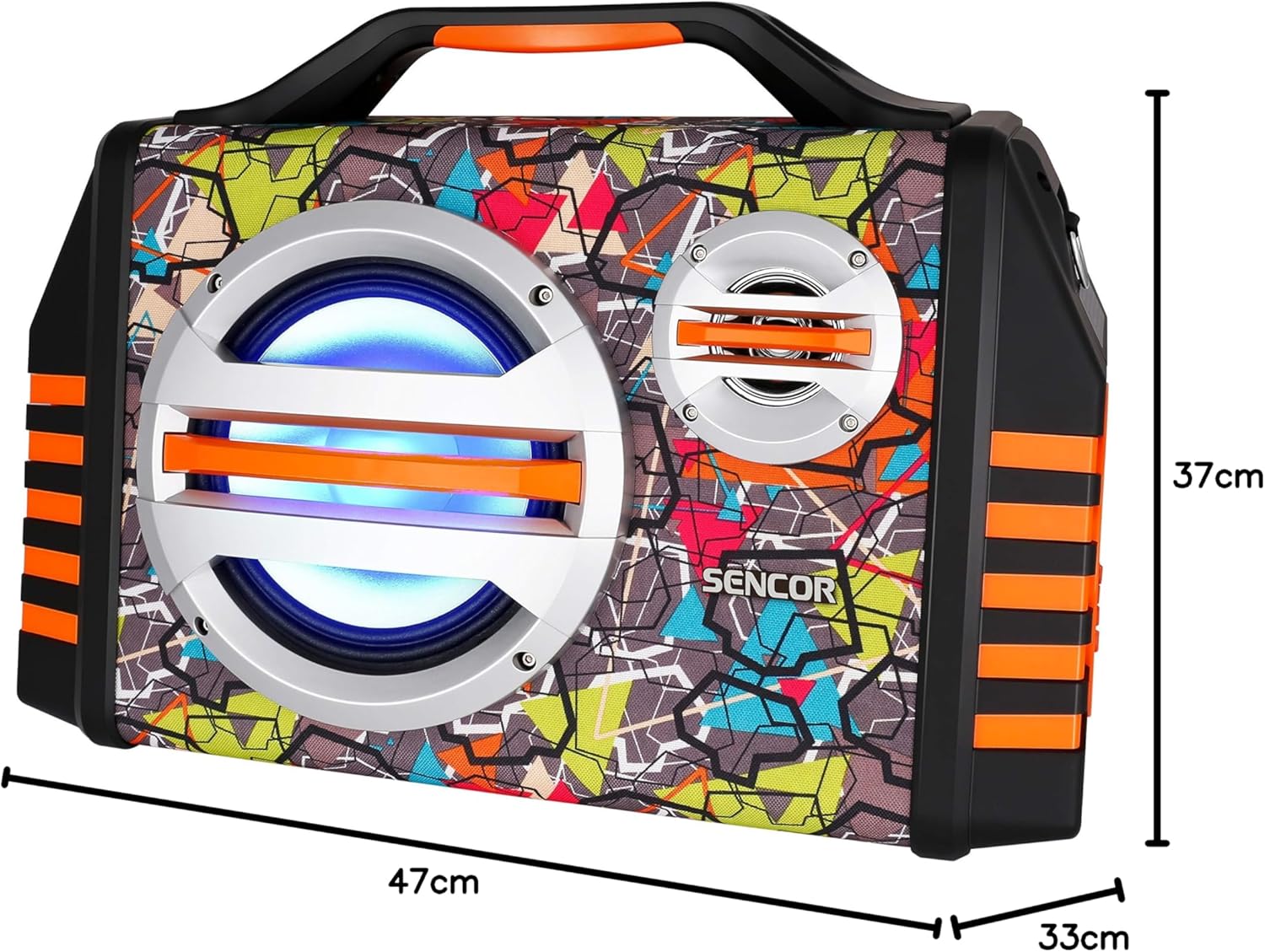
Image 9.1: Dimensions of the SENCOR SSS 3200 Kids Bluetooth Speaker, showing approximate measurements of 47cm (width), 37cm (height), and 33cm (depth).
| Caratteristica | Specificazione |
|---|---|
| Marca | SENCOR |
| Numero di modello | SSS3200KIDS |
| Colore | Multicolore |
| Tecnologia di connettività | Bluetooth |
| Porte di connettività | Jack da 3.5 mm, USB |
| Caratteristiche speciali | Integrated Microphone, Multi-color LED Backlight |
| Porte USB totali | 1 |
| Impedenza | 4 Ohm |
| Dispositivi compatibili | Computer portatile, smartphone, tablet |
| Usi consigliati | Children's Entertainment, Music Activities |
| Fonte di alimentazione | Alimentato a batteria |
| Numero di altoparlanti | 1 |
10. Garanzia e supporto
SENCOR products are designed and manufactured to the highest quality standards. For warranty information, please refer to the warranty card included with your purchase or contact your local SENCOR distributor. For technical support or service inquiries, please visit the official SENCOR websito o contattare il loro servizio clienti.


