Introduzione
This manual provides detailed instructions for the installation, operation, and maintenance of your Defiant Electronic Deadbolt Door Lock. Please read this manual thoroughly before installation and use to ensure proper function and safety.
The Defiant Electronic Deadbolt offers convenient keyless access with a touch keypad, along with the security of a traditional mechanical key. It is designed for use on garage, entry, home office, computer room, or utility room doors.
Informazioni sulla sicurezza
Per ridurre il rischio di lesioni o danni, seguire sempre le precauzioni di sicurezza di base durante l'installazione e l'utilizzo di questo prodotto.
- Non tentare di smontare o modificare la serratura se non seguendo le istruzioni fornite nel presente manuale.
- Utilizzare solo il tipo di batteria specificato (non incluso).
- Conservare le chiavi in un luogo sicuro, lontano dalla serratura.
- Assicurarsi che tutti i componenti siano fissati saldamente durante l'installazione.
Contenuto della confezione
Verificare che tutti i componenti siano presenti prima di iniziare l'installazione:
- Gruppo tastiera esterna
- Interior Assembly with Thumb Turn
- Chiavistello a catenaccio
- Piastra d'urto
- Viti di montaggio
- Chiavi (2)
- Modello di installazione (se applicabile)

Image: Included components such as keys, strike plate, and the cylinder housing.
Guida all'installazione
Strumenti necessari: Philips screwdriver (included), measuring tape, pencil.
- Prepara la porta: Ensure your door has the standard bore holes for a deadbolt. If not, use the provided template (if applicable) to drill necessary holes.
- Installa il fermo: Insert the deadbolt latch into the edge of the door. Ensure the "UP" arrow on the latch is pointing upwards. Secure with screws.
- Installare la tastiera esterna: Feed the cable from the exterior keypad through the cross bore hole. Align the keypad with the latch and press it firmly against the door.
- Installa il gruppo interno: Connect the cable from the exterior keypad to the interior assembly. Align the interior assembly with the mounting posts from the exterior keypad and secure with screws. Ensure the thumb turn operates smoothly.
- Installare la piastra di battuta: Install the strike plate on the door frame, aligning it with the deadbolt latch. Secure with screws.
- Inserire le batterie: Open the battery cover on the interior assembly and insert 4 AA batteries (not included), observing polarity.
- Operazione di prova: Test the lock with the mechanical key and by entering a default code (if any) or a newly programmed code.
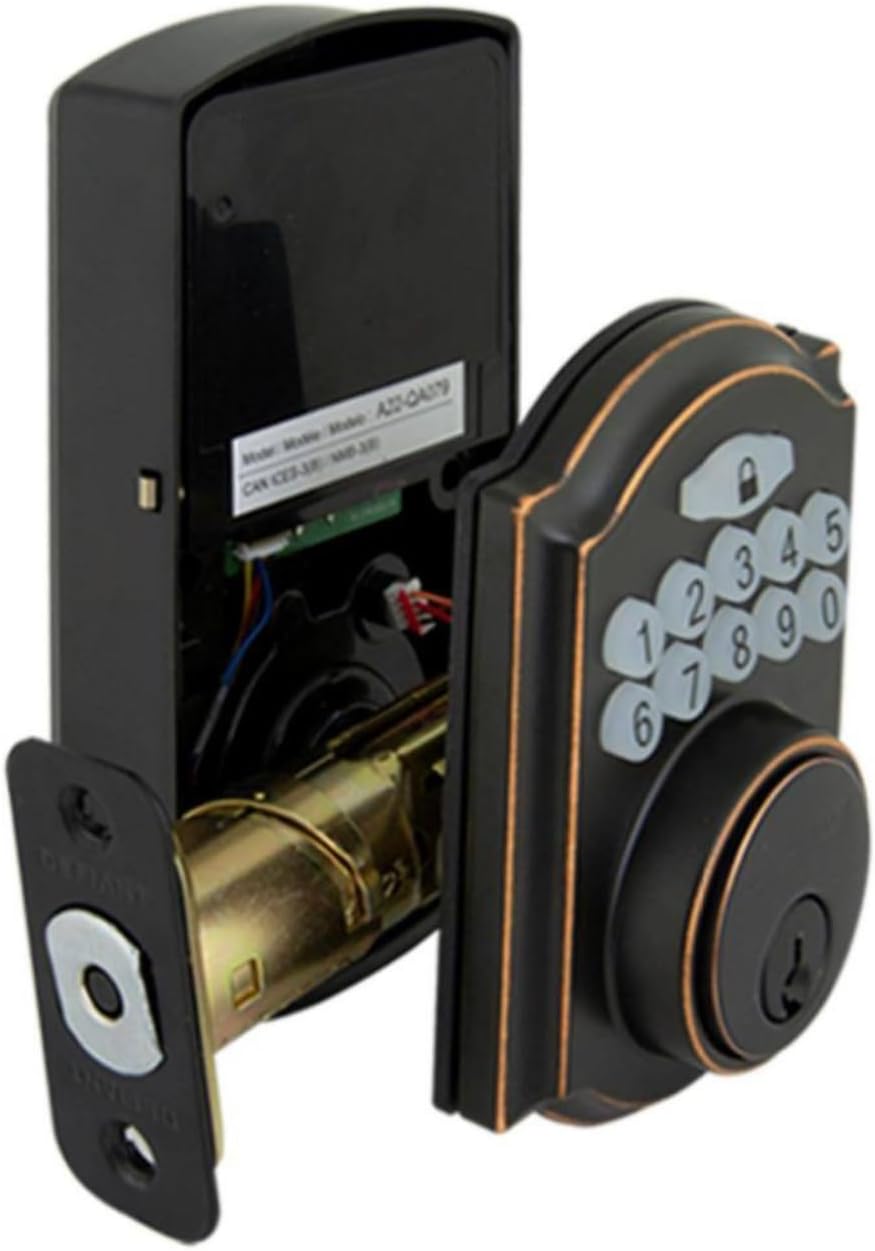
Image: The electronic deadbolt assembly, showing the interior mechanism and exterior keypad.

Immagine: Esterno view of the electronic deadbolt installed on a door, showcasing the keypad.
Istruzioni per l'uso
Programmazione dei codici utente
The lock can hold up to 10 user codes and 5 single-entry codes.
- Entra in modalità di programmazione: Locate the program button on the interior assembly (usually on the battery cover or near the battery compartment). Press it once. The keypad will illuminate.
- Aggiungi nuovo codice utente: Enter your desired 4-digit user code. Press the Lock button (padlock icon) to confirm. The lock will beep to confirm successful programming.
- Elimina codice utente: Enter programming mode. Enter the 4-digit user code you wish to delete. Press the Lock button. The lock will beep to confirm deletion.
Blocco e sblocco
- Per sbloccare: Enter your 4-digit user code on the keypad. The keypad will illuminate, and the deadbolt will retract after a few seconds.
- To Lock (from outside): Press the Lock button (padlock icon) on the keypad. The deadbolt will extend after a few seconds.
- To Lock (from inside): Ruotare la manopola sul gruppo interno in posizione di blocco.
Funzione di blocco automatico
The lock features an auto-lock function with an adjustable delay from 10 to 99 seconds. Refer to the full programming guide (usually a separate sheet or detailed section in the manual) for instructions on enabling and adjusting this feature.

Image: Close-up of the electronic keypad for code entry.
Manutenzione
- Pulizia: Pulisci la serratura con un panno morbido eamp panno. Evitare detergenti abrasivi o solventi che potrebbero danneggiare la finitura o i componenti elettronici.
- Sostituzione della batteria: When the battery indicator light flashes or the lock makes a low battery warning sound, replace all four AA batteries. Use only new, high-quality alkaline batteries.
- Lubrificazione: Periodically lubricate the deadbolt mechanism with a silicone-based lubricant to ensure smooth operation. Do not lubricate the keypad.
Risoluzione dei problemi
| Problema | Possibile causa | Soluzione |
|---|---|---|
| La tastiera non si accende. | Batterie scariche o installazione errata delle batterie. | Sostituire le batterie assicurandosi che la polarità sia corretta. |
| Lock does not respond to code. | Incorrect code entered, code not programmed, or lock is jammed. | Verify code, reprogram code, check for obstructions in door frame or latch. |
| Il catenaccio non si estende/ritrae completamente. | Misalignment of strike plate or latch, low battery. | Adjust strike plate, replace batteries. |
| La serratura emette un segnale acustico continuo. | Avviso di batteria scarica. | Sostituire immediatamente le batterie. |
Specifiche
- Marca: Ribelle
- Numero modello: 9a843b7d-eaac-472e-b6d2-4b1006f6f6a5
- Tipo di blocco: Catenaccio elettronico
- Materiale: Bronzo
- Stile: Moderno
- Caratteristica speciale: Keyless Entry, Back-up Mechanical Key
- Codici utente: Fino a 10
- Single Entry Codes: Fino a 5
- Ritardo di blocco automatico: 10-99 secondi (regolabile)
- Fonte di energia: 4 batterie AA (non incluse)
- Peso dell'articolo: 2.26 libbre
- Dimensioni della confezione: 7.48 x 5.51 x 4.61 pollici
- Codice UPC: 050134991163
Garanzia e supporto
For warranty information or technical support, please refer to the official Defiant websito o contattare il servizio clienti. Conservare la ricevuta d'acquisto per eventuali reclami in garanzia.
Risorse online: Visit the Defiant websito per FAQ, guide aggiuntive e registrazione del prodotto.
Assistenza clienti: Contact Defiant customer support for assistance with installation, programming, or troubleshooting issues.


