1. Introduzione
The CEL-FI DUO+ is a wireless smart signal booster designed to strengthen Verizon cellular signals in your home or small office. It effectively amplifies weak cellular signals, overcoming interference from building materials like glass, cement, and metal. This system provides improved voice and data connectivity for multiple users, ensuring uninterrupted service. The DUO+ is network-safe, FCC-approved, and features Intelliboost signal processing for up to 100 dB gain, covering up to 13,000 square feet.
2. Cosa è incluso
Your CEL-FI DUO+ package includes the following components:
- Network Unit (NU): Receives the cellular signal from outside.
- Coverage Unit (CU): Boosts the signal inside for better cellular coverage.
- Power Plugs/Adapters: Two standard AC power plugs for both units.

Figure 1: CEL-FI DUO+ Components
3. Configurazione e installazione
Follow these steps to set up your CEL-FI DUO+ Smart Signal Booster:
3.1. Guida video all'installazione
Video: How to Install Your Cel-Fi DUO+
This video provides a visual guide to the installation process, covering unboxing, unit placement, and power connection for your Cel-Fi DUO+ Smart Signal Booster.
3.2. Installazione passo passo
The installation process is designed to be straightforward, requiring no external antennas or cables. The system is self-contained and self-configuring.
- Find the Best Cellular Signal: Use your mobile phone to identify the location in your home or office with the strongest existing 3G or 4G LTE signal. This is typically near a window, and often on an upper floor if applicable. Ensure your phone displays the 3G or 4G LTE icon. If no such signal is present, the booster cannot function.
- Place the Network Unit (NU): Position the Network Unit in the area where you found the best cellular signal. Plug it into a convenient power outlet. Ensure the unit is upright and its display faces towards the inside of the room. The NU will take a few minutes to complete its wake-up sequence and acquire the signal.
- Place the Coverage Unit (CU): Place the Coverage Unit in the area where you need improved cellular coverage. Plug it into a power outlet. The CU will establish communication with the NU.
- Optimize Setup with the Cel-Fi WAVE App: For final setup and activation, use the Cel-Fi WAVE app. This app helps you fine-tune the placement of your units for maximum coverage.

Figure 2: 4 Easy Setup Steps
3.3. Optimizing Unit Placement
The distance between the Network Unit (NU) and the Coverage Unit (CU) is crucial for maximizing coverage. The further apart these units are, the larger the area of improved coverage will be. The total coverage area can be up to twice the distance between the NU and CU, with a maximum distance of up to 100 dB path loss.

Figure 3: How to Get the Best Signal
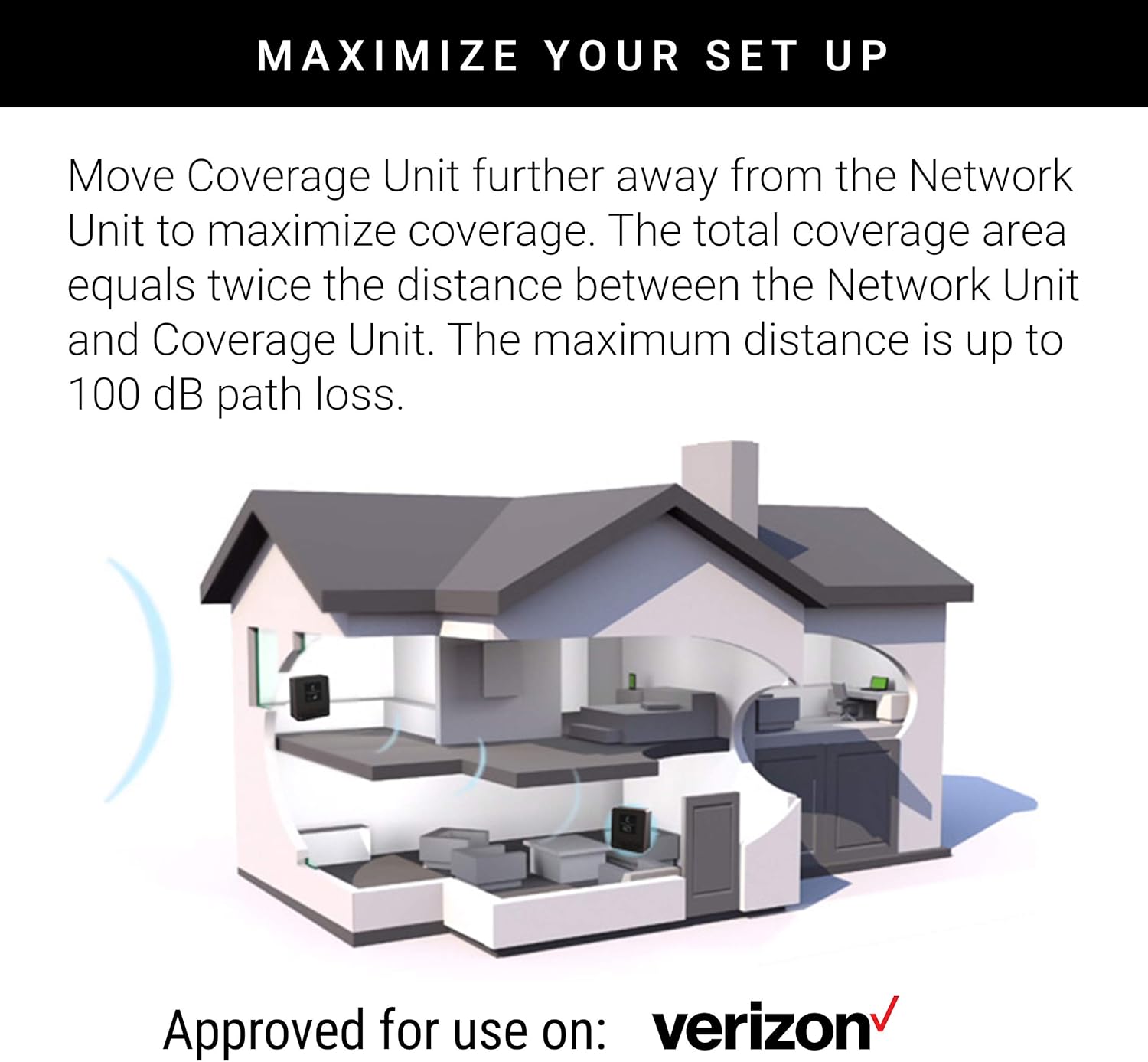
Figure 4: Maximize Your Setup
4. Principi operativi
The CEL-FI DUO+ operates by capturing an existing cellular signal from a nearby tower via the Network Unit (NU). This signal is then passed to the Coverage Unit (CU), which amplifies it and broadcasts it throughout your desired indoor area. For the system to function, there must be at least one bar of 3G or 4G LTE service available at the NU's placement location.

Figure 5: How the CEL-FI DUO+ Works
The Coverage Unit's numeric display indicates the size of the coverage area. Aim for a reading of 8 or 9 for optimal performance. A '0' indicates the units are too close, while a red icon (instead of green) suggests they are too far apart. Adjust placement accordingly to achieve the best signal amplificazione.
5. Manutenzione
To ensure optimal performance and longevity of your CEL-FI DUO+ system, consider the following maintenance tips:
- Keep both the Network Unit and Coverage Unit clean and free from dust. Use a soft, dry cloth for cleaning.
- Ensure proper ventilation around both units to prevent overheating. Do not block ventilation openings.
- Regularly check power connections to ensure they are secure.
- Avoid placing units in direct sunlight or in areas with extreme temperatures or humidity.
6. Risoluzione Dei Problemi
If you encounter issues with your CEL-FI DUO+ Smart Signal Booster, refer to the following common troubleshooting steps:
- No Signal or Low Bars:
- Verify that there is an existing 3G or 4G LTE signal at the Network Unit's location using your mobile phone. The booster requires an existing signal to amplificare.
- Re-evaluate the placement of both the Network Unit and Coverage Unit. Try adjusting their distance to achieve an optimal reading (8 or 9) on the Coverage Unit's display.
- Check that both units are properly plugged into working power outlets.
- Coverage Unit Display Shows '0': This indicates the Network Unit and Coverage Unit are too close to each other. Move the Coverage Unit farther away from the Network Unit.
- Coverage Unit Display Shows Red Icon: This indicates the Network Unit and Coverage Unit are too far apart or there's an obstruction. Move the Coverage Unit closer to the Network Unit.
- Cel-Fi WAVE App Issues: If the app is not connecting or functioning correctly, try reinstalling the app or checking your device's Bluetooth connection.
- Intermittent Coverage: Ensure there are no large metal objects or thick walls directly between the Network Unit and Coverage Unit that could interfere with their communication.
7. Specifiche
| Caratteristica | Dettaglio |
|---|---|
| Numero di modello | 4351533601 |
| Marca | CELFI |
| Dispositivi compatibili | Smartphone |
| Caratteristiche speciali | Intelliboost signal processing, Self-configuring, Cel-Fi WAVE app support |
| Guadagno massimo | 100 dB |
| Area di copertura | Fino a 13,000 piedi quadrati (1,200 m²) |
| Peso dell'articolo | 3.3 libbre |
| Dimensioni del pacco | 12.8 x 9.76 x 3.03 pollici |
| Produttore | Prossimità |
8. Conformità FCC
The CEL-FI DUO+ is FCC approved and meets all FCC requirements. It is designed to be network-safe and will not harm the carrier network. As a consumer device, you must register this device with your wireless provider (Verizon) and have your provider's consent. Most wireless providers consent to the use of signal boosters. You must operate this device with approved antennas and cables as specified by the manufacturer. Antennas must be installed at least 20 cm (8 inches) from any person.

Figure 6: FCC Certified and Approved
9. Informazioni sulla garanzia
For detailed warranty information regarding your CEL-FI DUO+ Smart Signal Booster, please refer to the warranty card included in your product packaging or visit the official CEL-FI websito. Conservare la prova d'acquisto per eventuali reclami in garanzia.
10. Supporto
If you require further assistance or have questions not covered in this manual, please contact CEL-FI customer support. Support contact details can typically be found on the product packaging, the official CEL-FI website, or through your Verizon service provider.


