Introduzione
This manual provides essential information for the safe and efficient use of your ASUS ZenBook UX333FA-DH51 laptop. Please read this guide thoroughly before operating your device to ensure proper setup, operation, and maintenance.

Image: The ASUS ZenBook UX333FA-DH51 laptop in its royal blue finish, showcasing its sleek, closed design.
Cosa c'è nella scatola
Verify that all items are present in your product packaging. If any item is missing or damaged, contact your retailer or ASUS support.
- ASUS ZenBook UX333FA-DH51 Notebook
- Adattatore di alimentazione
- Cavo di alimentazione
- Documentazione (Guida rapida, Scheda di garanzia)
Impostare
1. Collegamento dell'adattatore di alimentazione
Before first use, or if the battery is low, connect the power adapter to the laptop and a power outlet.
- Plug the AC adapter into the power connector on the side of your ZenBook.
- Collegare il cavo di alimentazione all'adattatore CA.
- Plug the other end of the power cord into a wall power outlet.

Immagine: Lato view of the laptop, highlighting the various ports including the power input, USB ports, and HDMI.
2. Accensione iniziale e configurazione di Windows
Once connected to power, open the laptop lid and press the power button. Follow the on-screen instructions to complete the Windows 10 setup process. This includes selecting your region, language, accepting terms, and setting up user accounts.
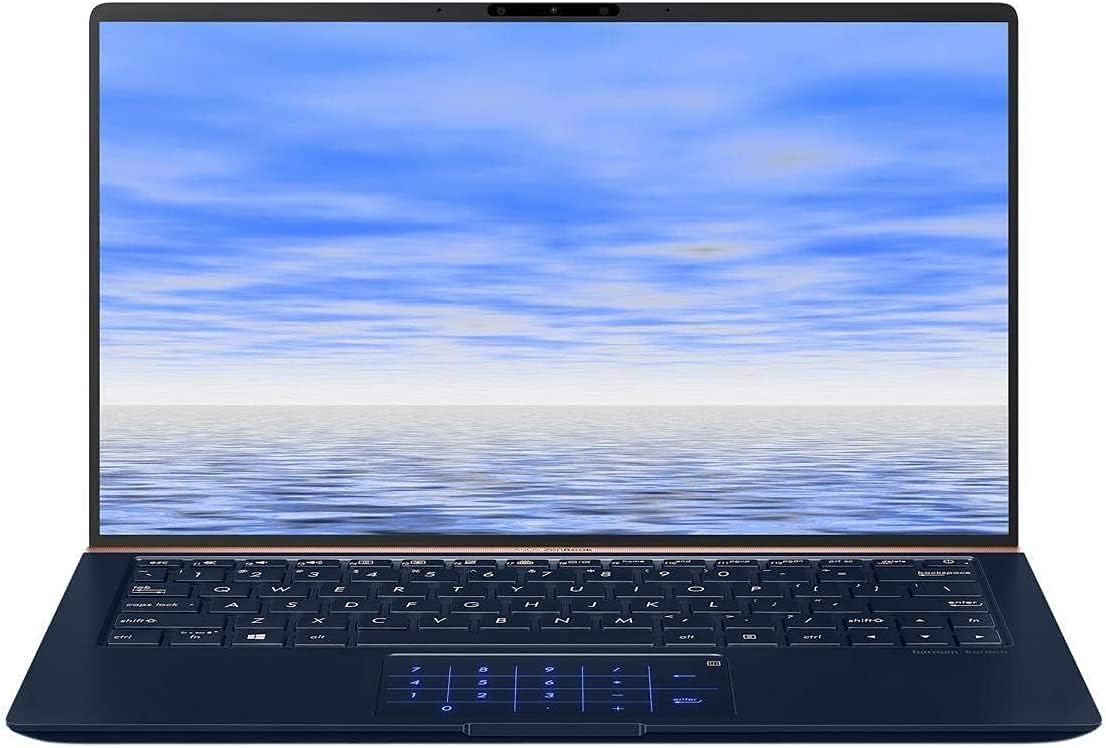
Image: The ASUS ZenBook UX333FA-DH51 with its display open, ready for initial setup or use.
Utilizzo del computer portatile
Tastiera e touchpad
Your ZenBook features a full-sized keyboard and a precision touchpad. The unique ErgoLift hinge automatically tilts the keyboard for a more comfortable typing experience when the lid is opened.

Immagine: un primo piano view of the laptop's keyboard and the innovative NumberPad integrated into the touchpad.
- Tasti funzione: Utilizzare il Fn key in combination with the F1-F12 keys for quick access to system functions like volume control, brightness adjustment, and Wi-Fi toggle.
- Tastierino numerico: The touchpad can transform into an LED-illuminated numeric keypad for data entry. Refer to the on-screen instructions or the ASUS utility for activation and usage.
Caratteristiche dello schermo
The ZenBook UX333FA-DH51 features a 13.3-inch Full HD (1920x1080) NanoEdge display with ultra-slim bezels, providing an immersive visual experience.

Image: The laptop open, emphasizing the expansive, near-borderless NanoEdge display.
Gestione dell'alimentazione
Manage your laptop's power settings through Windows 10 to optimize battery life or performance.
- Modalità risparmio: Chiudere il coperchio o premere brevemente il pulsante di accensione per entrare in modalità sospensione.
- Fermare: Vai a Start > Alimentazione > Spegnimento per spegnere completamente il portatile.
- Ricomincia: Vai a Start > Alimentazione > Riavvia per riavviare il sistema.
Manutenzione
Pulizia del tuo computer portatile
- Utilizzare un panno morbido e privo di lanugine dampcon acqua o con un detergente specifico per schermi.
- Per la tastiera e lo chassis, utilizzare un panno morbido e asciutto. Evitare prodotti chimici aggressivi o materiali abrasivi.
- Prima di pulirlo, assicurarsi che il computer portatile sia spento e scollegato.
Cura della batteria
- Evitare di scaricare completamente la batteria frequentemente.
- Se non si utilizza il computer portatile per lunghi periodi, conservarlo in un luogo fresco e asciutto.
- Calibrare periodicamente la batteria scaricandola e ricaricandola completamente.
Aggiornamenti software
Aggiorna regolarmente il sistema operativo Windows e i driver ASUS per garantire prestazioni e sicurezza ottimali.
- Aggiornamenti di Windows: Vai a Impostazioni > Aggiornamento e sicurezza > Windows Update.
- ASUS Driver Updates: Visita il supporto ufficiale ASUS websito per il tuo modello da cui scaricare i driver e le utilità più recenti.
Risoluzione dei problemi
Questa sezione affronta i problemi più comuni che potresti riscontrare. Per problemi più complessi, fai riferimento al supporto ASUS. websito o contattare il servizio clienti.
| Problema | Possibile soluzione |
|---|---|
| Il portatile non si accende. |
|
| Lo schermo è vuoto o nero. |
|
| Il touchpad non risponde o funziona in modo irregolare. |
|
| La batteria si scarica rapidamente. |
|
Specifiche
Key technical specifications for the ASUS ZenBook UX333FA-DH51.
| Caratteristica | Dettaglio |
|---|---|
| Nome del modello | ZenBook UX333FA-DH51 |
| Display | 13.3 pollici Full HD (1920x1080) |
| Processore | Intel Core i5-8265U (1.6GHz, Turbo up to 3.9GHz) |
| Memoria RAM | 8GB LPDDR3 (On Board) |
| Magazzinaggio | 256GB PCIe G3x2 SSD + TPM |
| Grafica | Grafica Intel HD (integrata) |
| Sistema operativo | Di Windows 10 (64bit) |
| Connettività wireless | 802.11g |
| Porte USB | 1x USB 2.0, 1x USB 3.0 (Note: Specific port types may vary, refer to physical device) |
| Peso dell'articolo | 2.6 libbre |
| Dimensioni (LxWxH) | 15 x 1 x 10 pollici |
| Colore | Blu Reale |
Informazioni sulla garanzia
Your ASUS ZenBook UX333FA-DH51 comes with a limited manufacturer's warranty. The specific terms and duration of the warranty may vary by region and retailer. Please refer to the warranty card included in your product packaging or visit the official ASUS websito per informazioni dettagliate sulla garanzia. Conservare la prova d'acquisto per eventuali reclami in garanzia.
Supporto
For technical assistance, driver downloads, or further information regarding your ASUS ZenBook UX333FA-DH51, please visit the official ASUS support websito:
Supporto ufficiale ASUS Websito
You may also find helpful resources and contact information for customer service on the websito.