1. Introduzione
Thank you for choosing the Setty Power Bank with Solar Panels. This portable power bank is designed to provide convenient charging for your electronic devices on the go, featuring a 5000 mAh battery capacity and an integrated solar panel for supplementary charging. Please read this manual carefully before using the product to ensure safe and optimal performance.
2. Informazioni sulla sicurezza
- Do not expose the power bank to extreme temperatures, direct sunlight for prolonged periods (beyond charging), or fire.
- Avoid contact with water or other liquids. This device is not fully waterproof.
- Non smontare, modificare o tentare di riparare il dispositivo autonomamente. Contattare personale di assistenza qualificato.
- Tenere fuori dalla portata dei bambini.
- Utilizzare solo cavi di ricarica e adattatori compatibili.
- Smaltire il power bank in modo responsabile, nel rispetto delle normative locali.
3. Contenuto della confezione
- Setty Power Bank with Solar Panels (5000 mAh)
- Cavo di ricarica USB (Micro-USB)
- Manuale d'uso
4. Prodotto finitoview
Familiarize yourself with the components of your Setty Power Bank.
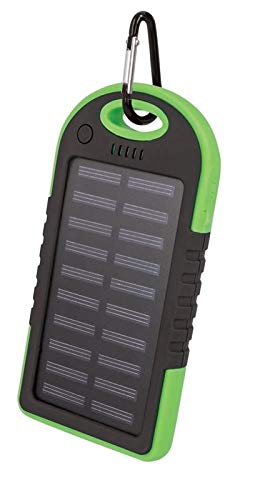
Immagine 1: Setty Power Bank with Solar Panels. The image displays the power bank in its packaging, highlighting its green and black design, solar panel, and a carabiner clip for portability. The packaging also indicates "SOLAR TRAVEL BATTERY 5000 mAh".
- Pannello solare: Converts sunlight into electrical energy to slowly charge the internal battery.
- USB Output Ports (2): Per caricare dispositivi esterni.
- Porta di ingresso Micro-USB: Per caricare il power bank stesso.
- Indicatori LED: Mostra il livello della batteria e lo stato di carica.
- Pulsante di accensione: To turn on/off the device and activate the flashlight.
- Torcia elettrica: Luce LED integrata per l'illuminazione.
- Moschettone: For attaching the power bank to bags or gear.
5. Impostazione
5.1 Ricarica iniziale del Power Bank
Before first use, it is recommended to fully charge the power bank via a USB power source.
- Connect the provided Micro-USB cable to the power bank's input port.
- Connect the other end of the USB cable to a USB wall adapter (not included), computer USB port, or other compatible USB power source.
- The LED indicators will illuminate to show the charging progress. Once all LEDs are solid, the power bank is fully charged.
- Una volta completata la ricarica, scollegare il cavo.
Nota: Solar charging is a supplementary feature and is significantly slower than wall charging. For optimal performance, always fully charge the power bank via USB before extended use.
6. Istruzioni per l'uso
6.1 Ricarica di dispositivi esterni
- Collega il cavo di ricarica del tuo dispositivo a una delle porte di uscita USB del power bank.
- Collega l'altra estremità del cavo al tuo dispositivo elettronico (ad esempio, smartphone, tablet).
- Il power bank dovrebbe iniziare automaticamente a caricare il dispositivo. In caso contrario, premere una volta il pulsante di accensione per avviare la ricarica.
- Gli indicatori LED mostreranno il livello di carica rimanente della batteria del power bank.
- Scollegare il dispositivo una volta che è completamente carico o quando non è più necessario caricarlo.
6.2 Ricarica solare
The integrated solar panel allows for emergency or supplementary charging when no other power source is available.
- Posizionare il power bank in modo che il pannello solare sia rivolto verso la luce solare diretta.
- A dedicated LED indicator (if present) or the main battery indicators may show that solar charging is active.
- Solar charging is slow and dependent on sunlight intensity. It is not intended as the primary charging method.
6.3 LED Indicator Functions
The LED lights indicate the power bank's status:
- LED fissi: Indicate remaining battery capacity. (e.g., 4 LEDs = 75-100%, 3 LEDs = 50-75%, etc.)
- LED lampeggianti: Indicate the power bank is currently being charged.
6.4 Funzione torcia
To use the integrated flashlight:
- Attiva: Tenere premuto il pulsante di accensione per circa 2-3 secondi.
- Spegnere: Press and hold the power button again for approximately 2-3 seconds.
7. Manutenzione
- Pulisci il power bank con un panno morbido e asciutto. Non utilizzare prodotti chimici aggressivi o detergenti abrasivi.
- Keep the solar panel clean and free of dust or debris for optimal solar charging efficiency.
- Conservare il power bank in un luogo fresco e asciutto quando non viene utilizzato.
- If storing for extended periods, charge the power bank to at least 50% every 3 months to prolong battery life.
8. Risoluzione Dei Problemi
| Problema | Possibile causa | Soluzione |
|---|---|---|
| Il power bank non si carica. |
|
|
| Il dispositivo non si carica tramite power bank. |
|
|
| La ricarica solare è molto lenta. |
|
|
9. Specifiche
- Marca: Setty
- Numero modello: 5900495682062
- Capacità della batteria: 5000 mAh (Milliampprima di un'ora)
- Ingresso: USB (Micro-USB)
- Produzione: 2 x porte USB
- Corrente di uscita: 1 A
- Fonte di energia: Solar Powered, USB
- Dispositivi compatibili: Computer (and other USB-chargeable devices)
10. Informazioni sulla garanzia
Setty products are manufactured to high-quality standards. For specific warranty terms and conditions, please refer to the warranty card included with your purchase or contact your retailer. Keep your proof of purchase for any warranty claims.
11. Supporto
If you encounter any issues or have questions regarding your Setty Power Bank that are not covered in this manual, please contact the retailer where you purchased the product or visit the official Setty websito per ulteriore assistenza.


