Introduzione
The Soundcore Spirit X Bluetooth Sports Headphones are designed for active lifestyles, offering robust sweat protection and powerful audio performance. This manual provides essential information for setting up, operating, and maintaining your headphones.
Cosa c'è nella scatola
- Soundcore Spirit X Headphones
- XS/S/M/L/XL EarTips (various sizes for optimal fit)
- S/M/L EarWings (various sizes for secure fit)
- 2 x clip per cavi
- 1 x Shirt Clip
- Cavo micro USB (per la ricarica)
- Borsa da viaggio
- Moschettone
- Manuale dell'utente (questo documento)
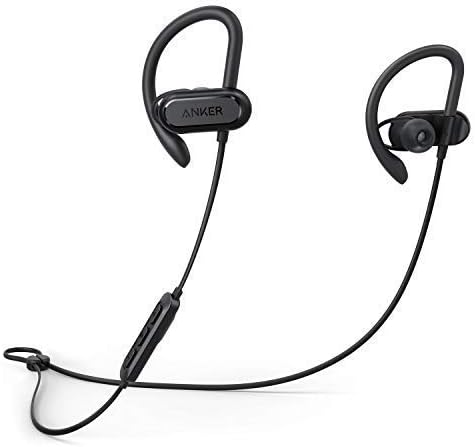
Image: The Soundcore Spirit X headphones, featuring the earbuds connected by a cable with an inline remote control.
Impostare
1. Ricarica delle cuffie
Before first use, fully charge your Soundcore Spirit X headphones. Connect the provided Micro USB cable to the charging port on the inline remote and to a USB power source. The LED indicator will show charging status. A full charge takes approximately 1.5 hours and provides up to 12 hours of playtime.
2. Selecting EarTips and EarWings
For optimal sound quality and a secure fit, choose the EarTips and EarWings that best suit your ears. Experiment with different sizes (XS/S/M/L/XL EarTips and S/M/L EarWings) to find the most comfortable and stable combination. A proper seal is crucial for bass performance and noise isolation.

Immagine: un primo piano view of an earbud, highlighting the flexible earwing design for a secure and comfortable fit during activity.
3. Accoppiamento Bluetooth
- Assicurati che le cuffie siano spente.
- Press and hold the multi-function button on the inline remote until the LED indicator flashes blue, indicating pairing mode.
- Sul tuo dispositivo (smartphone, tablet, ecc.), attiva il Bluetooth e cerca i dispositivi disponibili.
- Select "Soundcore Spirit X" from the list of devices.
- Una volta connesso, l'indicatore LED diventerà blu fisso.
Utilizzo delle cuffie
Controlli
The inline remote provides convenient control over your music and calls:
- Accensione/spegnimento: Premere e tenere premuto il pulsante multifunzione.
- Riproduci/Pausa: Premi una volta il pulsante multifunzione.
- Traccia successiva: Tieni premuto il pulsante Volume +.
- Traccia precedente: Premere e tenere premuto il pulsante Volume -.
- Aumenta volume: Premi il pulsante Volume +.
- Volume basso: Premere il pulsante Volume -.
- Rispondi/Termina chiamata: Premi una volta il pulsante multifunzione.
- Rifiuta chiamata: Premere e tenere premuto il pulsante multifunzione.
- Attiva l'assistente vocale: Premere due volte il pulsante multifunzione.
Prestazioni audio
The Spirit X headphones feature 10mm dynamic drivers and BassUp technology, delivering powerful bass, lush mids, and clear treble for an immersive audio experience during your workouts.
Sweatproof Technology
Equipped with IPX7 water resistance and Sweat Guard technology, the Spirit X headphones are designed to withstand the corrosive effects of sweat and water splashes, making them ideal for intense workouts.

Image: The Soundcore Spirit X headphones shown with water droplets, illustrating their IPX7 water-resistant design.

Image: A person wearing the Soundcore Spirit X headphones while engaged in a strenuous workout, demonstrating their secure fit and sweat resistance.
Manutenzione
- Pulizia: After each use, especially after workouts, gently wipe the earbuds and cable with a soft, dry cloth to remove sweat and dirt.
- EarTips/EarWings: Periodically remove the EarTips and EarWings and clean them with mild soap and water. Ensure they are completely dry before reattaching.
- Magazzinaggio: When not in use, store your headphones in the provided travel pouch to protect them from dust and damage. Avoid storing them in extreme temperatures.
- Porta di ricarica: Keep the Micro USB charging port free from dust and debris to ensure proper charging.
Risoluzione dei problemi
- Cannot power on the headphones:
- Assicurati che le cuffie siano completamente cariche. Collegale a una fonte di alimentazione tramite il cavo Micro USB.
- Cannot pair with your device:
-
- Assicurati che il Bluetooth sia abilitato sul tuo dispositivo.
- Assicurarsi che le cuffie siano in modalità di associazione (LED blu lampeggiante).
- Avvicina le cuffie al dispositivo.
- Prova a disaccoppiare e riassociare le cuffie dalle impostazioni Bluetooth del tuo dispositivo.
- Nessun suono o volume basso:
-
- Adjust the volume on both your headphones and your connected device.
- Assicurati che le cuffie siano collegate correttamente al dispositivo.
- Check if the correct audio output is selected on your device.
- Scarsa qualità del suono:
-
- Assicurati che non ci siano ostacoli tra il dispositivo e le cuffie.
- Allontanarsi dalle fonti di interferenza (ad esempio, router Wi-Fi, altri dispositivi Bluetooth).
- Try different EarTips to ensure a proper seal in your ear canal.
Specifiche
| Numero di modello | A3451 |
| Tecnologia di connettività | Wireless (Bluetooth) |
| Tecnologia di comunicazione wireless | Bluetooth |
| Posizionamento dell'orecchio | Sopra l'orecchio |
| Fattore di forma | Sopra l'orecchio |
| Livello di resistenza all'acqua | Impermeabile (IPX7) |
| Peso dell'articolo | 5.4 once (0.34 libbre) |
| Dimensioni del prodotto | 27.17 x 1.69 x 1.1 pollici |
| Tipo di batteria | 1 batteria ai polimeri di litio (necessaria) |
| Tempo di gioco | Up to 12 hours (from 1.5 hour charge) |
| Tipo di controllo | Controllo multimediale |
| Materiale | Silicone |
| Colore | Nero |
| Produttore | Ancora |
| Codice UPC | 034722597265 |
Garanzia e supporto
Your Soundcore Spirit X headphones come with a 3-month worry-free warranty. For technical support, warranty claims, or general inquiries, please contact Soundcore customer service. Contact information can typically be found on the official Soundcore websito o tramite il tuo rivenditore.
Please note that this product is a renewed item, and warranty terms may differ from new products. Refer to your purchase documentation for specific warranty details.
Informazioni aggiuntive
In base ai dati forniti, non erano disponibili video ufficiali del prodotto del venditore da incorporare.


