Introduzione
This manual provides essential instructions for the safe and effective use of your Turtlebox Speaker Replacement Charger (Gen 1). Please read this manual thoroughly before use and retain it for future reference.
Informazioni sulla sicurezza
- Use only the specified charger for your Turtlebox Gen 1 speaker.
- Non esporre il caricabatterie a temperature estreme o alla luce solare diretta.
- Keep the charger away from water or liquids. Ensure the speaker's charging port cover is securely closed when not charging to maintain its waterproof integrity.
- Non tentare di smontare o modificare il caricabatterie.
- Scollegare il caricabatterie dalla presa di corrente quando non è in uso o durante i temporali.
Contenuto della confezione
- 1 x Turtlebox Replacement Charger (Gen 1)
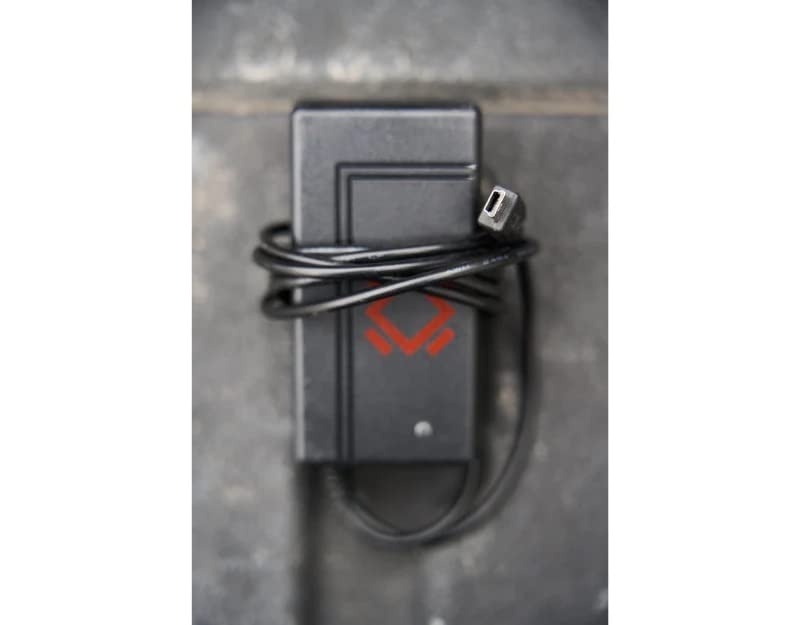
This image displays the Turtlebox Gen 1 Replacement Charger, a compact black power adapter with an attached cable ending in a barrel connector. The charger features the Turtlebox logo.
Impostare
- Individuare la porta di ricarica: On your Turtlebox Gen 1 speaker, find the waterproof cover on the side or back panel. Open this cover to reveal the charging port.
- Collegare il caricabatterie: Insert the barrel connector of the replacement charger into the charging input port on your Turtlebox speaker.
- Collegare all'alimentazione: Collegare l'adattatore di alimentazione del caricabatterie a una presa a muro standard da 110 V CA.
This video demonstrates the physical characteristics of the charger and how it connects to the speaker. It highlights the barrel connector and the power adapter, showing the process of plugging it into a wall outlet.
Operativo
Once connected to power, the charging indicator lights on your Turtlebox speaker will illuminate, typically showing green LEDs to indicate the battery level and charging status. Allow the speaker to charge until all indicator lights are solid green, signifying a full charge.
After charging, disconnect the charger from the speaker and the wall outlet. Ensure the waterproof cover on the speaker's charging port is securely closed to maintain its IP67 rating.
Manutenzione
- Mantenere il caricabatterie pulito e privo di polvere e detriti. Utilizzare un panno asciutto e morbido per la pulizia.
- Conservare il caricabatterie in un luogo fresco e asciutto quando non in uso.
- Regularly inspect the charger cable and connector for any signs of damage. If damaged, discontinue use and replace with an official Turtlebox charger.
Risoluzione dei problemi
| Problema | Possibile causa | Soluzione |
|---|---|---|
| L'altoparlante non si carica | Charger not properly connected; Power outlet issue; Damaged charger. | Ensure the charger is fully inserted into the speaker and wall outlet. Test the outlet with another device. Inspect the charger for damage and replace if necessary. |
| Ricarica lenta | Using a non-standard charger; Power fluctuations. | Ensure you are using the official Turtlebox Gen 1 Replacement Charger. Try a different power outlet. |
Specifiche
- Marca: Turtlebox
- Modello: Gen 1 Replacement Charger
- Vol. uscita caricabatteriatage: 14 Volt
- Ingresso caricabatterie: Standard AC Wall Outlet
- Materiale: Plastica
- Peso dell'articolo: 6.7 ounces (Note: This weight is likely for the speaker, not the charger itself.)
- Dimensioni del prodotto: 11.5 x 6.5 x 8.75 inches (Note: These dimensions are likely for the speaker, not the charger itself.)
- Codice UPC: 861053002621
- Produttore: Turtlebox Audio, LLC
Garanzia e supporto
The Turtlebox Speaker Replacement Charger (Gen 1) comes with a Limited Warranty. For specific warranty details, claims, or technical support, please refer to the official Turtlebox Audio, LLC websito o contattare direttamente il servizio clienti.
Per ulteriore assistenza, visitare il Turtlebox Store on Amazon.


