Introduzione
The Forge Doosl DSER102 is a versatile device designed to enhance your audio experience. It functions as both a Bluetooth receiver, allowing you to stream audio wirelessly to non-Bluetooth devices, and an FM transmitter, enabling you to broadcast audio to your car radio. This manual provides detailed instructions for setup, operation, and maintenance to ensure optimal performance.
Informazioni sulla sicurezza
- Tenere il dispositivo lontano da acqua, umidità e temperature estreme.
- Non tentare di smontare o riparare il dispositivo da soli. Rivolgersi a personale qualificato.
- Utilizzare solo il cavo di ricarica fornito o un equivalente certificato.
- Evitare l'esposizione prolungata alla luce solare diretta.
- Smaltire il dispositivo e la batteria in modo responsabile, nel rispetto delle normative locali.
Contenuto della confezione
Si prega di controllare la confezione per verificare la presenza dei seguenti elementi:
- Forge Doosl DSER102 Bluetooth Receiver & FM Transmitter
- Cavo di ricarica micro USB
- Cavo audio da 3.5 mm
- Manuale dell'utente (questo documento)
Prodotto finitoview
Familiarizzare con i componenti del dispositivo:
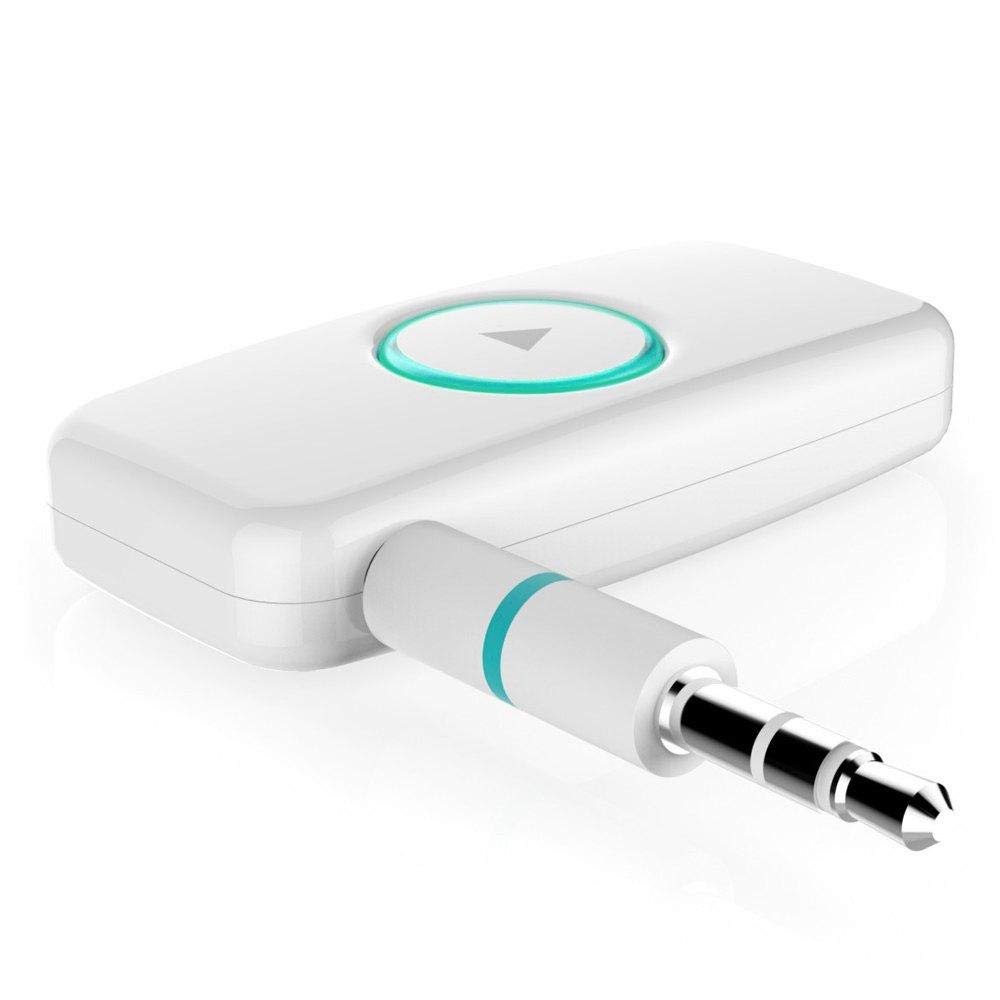
Figura 1: Fronte view of the DSER102 device.
- Pulsante multifunzione: Power on/off, Play/Pause, Answer/End Call, Mode Switch.
- Indicatore LED: Mostra lo stato di alimentazione, carica e connessione.
- 3.5mm Audio Output/Input Port: Connects to audio devices.
- Porta di ricarica micro USB: Per caricare la batteria interna.
Impostare
1. Carica del dispositivo
Before first use, fully charge the DSER102.
- Connect the Micro USB charging cable to the device's charging port.
- Collegare l'altra estremità del cavo a un adattatore di alimentazione USB (non incluso) o alla porta USB di un computer.
- The LED indicator will show red during charging and turn off when fully charged. A full charge takes approximately 2 hours and provides up to 16 hours of music playback.
2. Bluetooth Receiver Mode Setup
Use this mode to stream audio from your Bluetooth-enabled phone to a non-Bluetooth speaker or car stereo.
- Accensione: Press and hold the Multi-function Button for 3 seconds until the LED indicator flashes blue rapidly, indicating pairing mode.
- Connetti al dispositivo audio: Plug the DSER102 into the 3.5mm AUX input of your car stereo, home stereo, or speaker using the 3.5mm audio cable.
- Abbinamento al telefono: On your mobile phone, enable Bluetooth and search for "DSER102" in the list of available devices. Select it to pair.
- Connessione confermata: Once paired, the LED indicator will flash blue slowly. You can now play music from your phone through the connected audio device.
3. FM Transmitter Mode Setup
Use this mode to broadcast audio from the DSER102 to your car's FM radio.
- Accensione: Tieni premuto il pulsante multifunzione per 3 secondi.
- Switch to FM Transmitter Mode: Double-press the Multi-function Button to switch modes. The LED indicator will change color or pattern (refer to device for specific indication).
- Tune FM Radio: On your car's FM radio, tune to an unused FM frequency (e.g., 87.5 MHz or 108.0 MHz).
- Set DSER102 Frequency: The DSER102 will transmit on a specific FM frequency. If adjustable, match the DSER102's frequency to your car radio's frequency. If not adjustable, find the frequency the DSER102 is broadcasting on and tune your car radio to it.
- Collega la sorgente audio: Connect your audio source (e.g., phone via Bluetooth) to the DSER102. The audio will now be transmitted to your car's FM radio.
Istruzioni per l'uso
Accensione/spegnimento
- Accensione: Tenere premuto il pulsante multifunzione per circa 3 secondi finché l'indicatore LED non si accende.
- Spegni: Tenere premuto il pulsante multifunzione per circa 3 secondi finché l'indicatore LED non si spegne.
Music Playback (Bluetooth Receiver Mode)
- Riproduci/Pausa: Premere brevemente il pulsante multifunzione.
Call Management (Bluetooth Receiver Mode)
- Rispondi/Termina chiamata: Premere brevemente il pulsante multifunzione.
- Rifiuta chiamata: Tieni premuto il pulsante multifunzione per 2 secondi.
- Ricomponi l'ultimo numero: Premere due volte il pulsante multifunzione.
Manutenzione
- Pulire il dispositivo con un panno morbido e asciutto. Non utilizzare detergenti liquidi o spray.
- Conservare il dispositivo in un luogo fresco e asciutto quando non viene utilizzato.
- Evitare di far cadere o sottoporre il dispositivo a forti impatti.
Risoluzione dei problemi
| Problema | Soluzione |
|---|---|
| Il dispositivo non si accende. | Ensure the device is fully charged. Connect it to a power source using the Micro USB cable. |
| Impossibile accoppiarsi con il dispositivo Bluetooth. | Make sure the DSER102 is in pairing mode (rapidly flashing blue LED). Ensure your phone's Bluetooth is enabled and within range. Try restarting both devices. |
| No audio in Bluetooth Receiver mode. | Check if the 3.5mm audio cable is securely connected to both the DSER102 and your audio system's AUX input. Ensure your audio system is set to the correct AUX input. Adjust volume on both devices. |
| Poor audio quality in FM Transmitter mode. | Find a clear, unused FM frequency on your car radio and match the DSER102's frequency to it. Avoid frequencies used by local radio stations. Reduce interference by moving the device away from other electronics. |
Specifiche
- Modello: DSER102
- Versione Bluetooth: V4.0
- Capacità della batteria: Li-batteria 250mAh
- Tempo di riproduzione musicale: Fino a 16 ore
- Porta di ricarica: Micro USB
- Uscita audio: AUX da 3.5 mm
- Dimensioni: Dimensioni: 1.4 x 4.6 x 3.7 cm
- Peso: 200 grammi
- Dispositivi compatibili: Cuffia, Smartphone, Altoparlante
Garanzia e supporto
For warranty information or technical support, please refer to the retailer where the product was purchased or visit the official Forge websito. Conserva la ricevuta d'acquisto come prova d'acquisto.


