Introduzione
Thank you for choosing the EZQuest USB C Hub Docking Station 8-in-1. This manual provides detailed instructions for setting up, operating, and maintaining your device. Please read this manual thoroughly before use to ensure optimal performance and longevity of your product.
Prodotto finitoview
The EZQuest USB C Hub Docking Station 8-in-1 is designed to expand the connectivity of your USB-C enabled devices, offering a comprehensive solution for various peripherals and display needs. It features multiple ports for data transfer, video output, network connection, and power delivery.
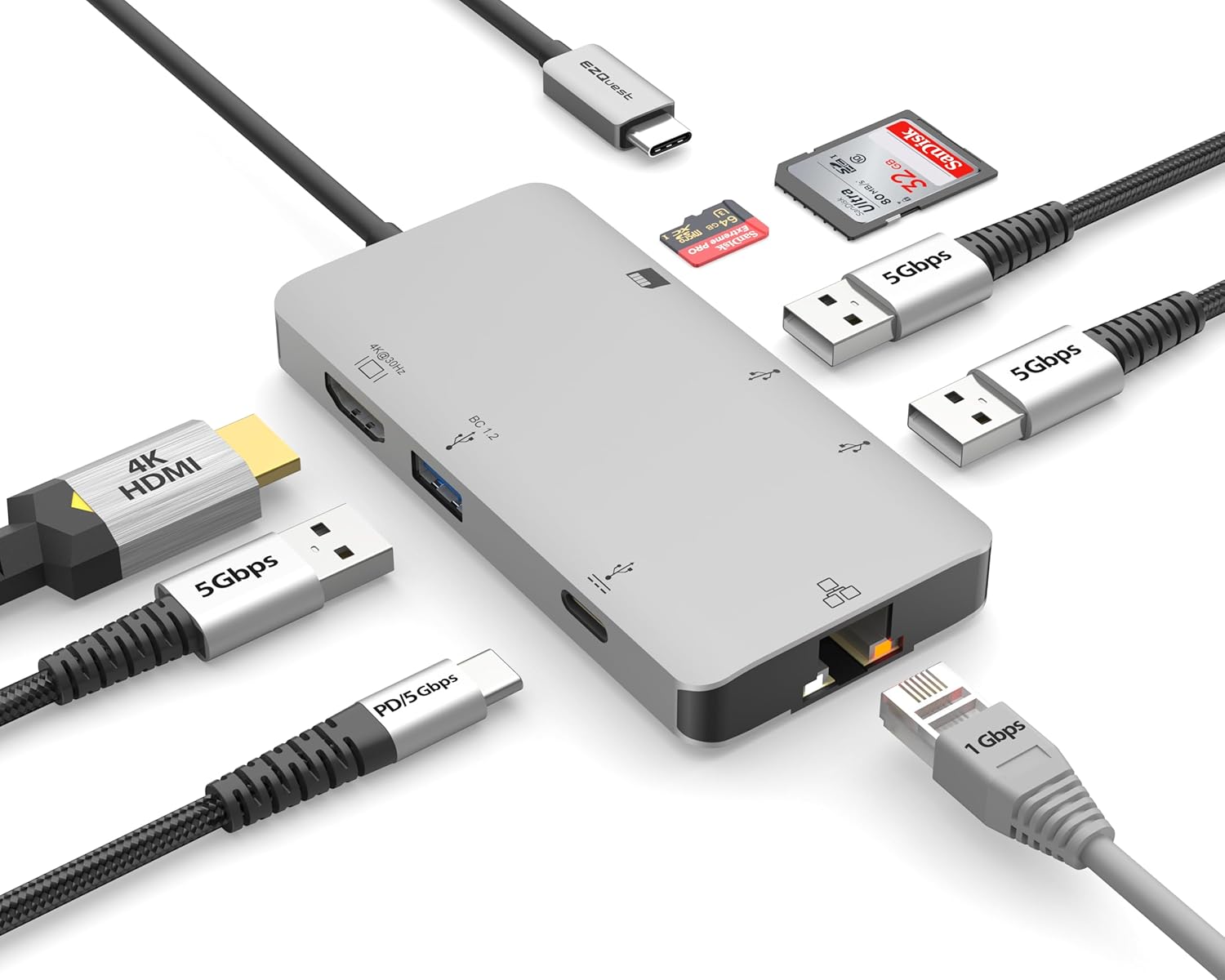
Image: The EZQuest USB C Hub Docking Station 8-in-1, showcasingrazie al suo design compatto e al cavo USB-C integrato.

Image: A diagram illustrating the 8-in-1 expansion capabilities of the hub, including HDMI, USB-C PD, USB 3.0, Ethernet, and card readers.
Istruzioni di installazione
- Connetti al dispositivo host: Plug the integrated USB-C cable of the EZQuest hub into an available USB-C/Thunderbolt 3/4 port on your laptop, tablet, or smartphone.
- Erogazione di potenza (opzionale): For charging your host device, connect your USB-C power adapter to the USB-C Power Delivery port on the hub. The hub supports up to 100W input with 85W pass-through charging.
- Schermo HDMI: Connect an HDMI cable from your monitor to the HDMI port on the hub for 4K 30Hz video output.
- Connessione Ethernet: For a stable wired network, connect an Ethernet cable to the Gigabit Ethernet port on the hub.
- Periferiche USB: Connect your USB-A devices (e.g., mouse, keyboard, external hard drive) to the three USB-A 3.0 ports.
- SD/Micro SD Cards: Insert your SD or Micro SD cards into the respective slots for data transfer.

Image: A user connecting the EZQuest USB C Hub to a laptop's USB-C port.

Image: Illustrates connecting a power adapter to the hub for pass-through charging of a laptop.
Istruzioni per l'uso
Uscita video (HDMI)
The HDMI port supports 4K resolution at 30Hz. Connect an HDMI-enabled display to extend or mirror your desktop for enhanced productivity or multimedia viewing. Ensure your display and device support 4K 30Hz for optimal performance. Note that the USB-C ports on the hub are for data and power delivery, not for connecting a monitor.
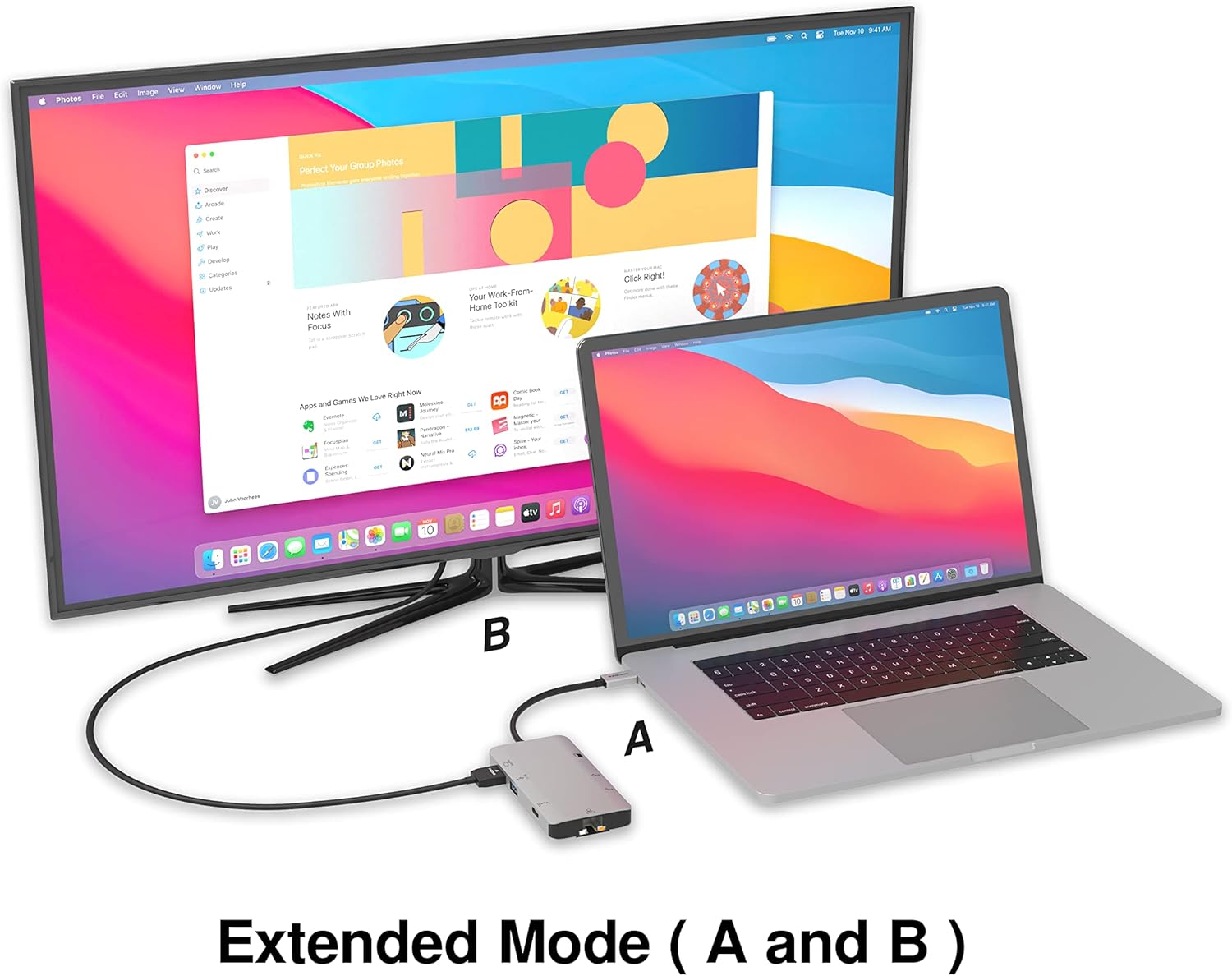
Image: A laptop connected to an external monitor via the hub, demonstrating extended display mode.
Data Transfer (USB-A & SD/Micro SD)
The three USB-A 3.0 ports offer data transfer speeds up to 5Gbps. The SD and Micro SD card slots allow for simultaneous read and write operations, facilitating quick file transfers from memory cards.

Image: Various devices like USB drives, SD cards, and an Ethernet cable connected to the EZQuest hub.
Network Connection (Gigabit Ethernet)
The Gigabit Ethernet port provides a stable and high-speed wired internet connection, ideal for large downloads, uploads, or streaming where Wi-Fi might be unreliable. An LED indicator confirms network activity.
Distribuzione di energia
The USB-A ports distribute power efficiently. One USB-A port with BC1.2 outputs 5V/1.5A (7.5W), while the other two USB-A ports deliver 5V/0.9A (4.5W) each. The total shared power when all ports are in use is 10 watts.

Image: A diagram detailing the power output and data transfer speeds of the USB-A ports on the hub.
Caratteristiche e porte
| Tipo di porta | Quantità | Funzionalità |
|---|---|---|
| Cavo HDMI | 1 | 4K @ 30Hz Video Output (Extended/Mirror Mode) |
| USB-C Power Delivery/Data | 1 | Up to 100W Power Input (85W Pass-Through), 5Gbps Data Transfer |
| USB-A 3.0 | 3 | 5Gbps Data Transfer (One port BC1.2 5V/1.5A, two ports 5V/0.9A) |
| Ethernet Gigabit | 1 | 10/100/1000 Mbps Wired Network Connection with LED Indicator |
| Lettore di schede SD | 1 | SDHC/SDXC Read/Write |
| Lettore di schede Micro SD | 1 | Micro SDHC/SDXC Read/Write |
Compatibilità
This USB C Hub is compatible with a wide range of devices:
- Computers featuring USB-C, USB 4, Thunderbolt 4, or Thunderbolt 3 ports.
- USB-C smartphones and tablets equipped with OTG (On-The-Go) support.
Unsupported Device:
- The USB-A ports on this docking station do not support Apple SuperDrive. For connecting an Apple SuperDrive, an alternative adapter (e.g., EZQuest X40100 USB-C to USB-A Female Mini Adapter) directly to your Mac is recommended.
Risoluzione dei problemi
- Nessuna uscita di visualizzazione:
- Assicurati che la porta USB-C del dispositivo host supporti l'uscita video (modalità alternativa DisplayPort).
- Controllare tutti i collegamenti dei cavi (USB-C dall'hub al dispositivo, HDMI dall'hub al monitor).
- Verify your monitor input source is set correctly to HDMI.
- Se disponibile, provare un altro cavo HDMI o un altro monitor.
- Problemi di ricarica:
- Ensure your USB-C power adapter is connected to the hub's USB-C PD port.
- Verificare che l'adattatore di alimentazione fornisca watt sufficientetage (up to 100W recommended for laptops).
- Check if the host device's USB-C port supports Power Delivery.
- Trasferimento dati lento:
- Per ottenere velocità ottimali, assicurati di utilizzare dispositivi e cavi compatibili con USB 3.0.
- The total shared power for USB-A ports is 10W; excessive power draw from multiple devices may affect performance.
- Ethernet non funzionante:
- Controllare la connessione del cavo Ethernet sia all'hub che al router/modem.
- Verifica le impostazioni di rete sul tuo dispositivo host.
- Ensure the LED indicator on the Ethernet port is active.
- SD/Micro SD Card Not Recognized:
- Assicurarsi che la scheda sia inserita completamente nello slot corretto.
- Prova a reinserire la scheda o a usarne una diversa.
- Controllare se la scheda è danneggiata o corrotta.
Specifiche
| Caratteristica | Dettaglio |
|---|---|
| Numero di modello | X40030 |
| Dimensioni del prodotto | 0.81 x 1.63 x 0.2 pollici |
| Peso dell'articolo | 1.6 once |
| Interfaccia Hardware | USB tipo C |
| Uscita HDMI | 4K a 30Hz |
| Ingresso USB-C PD | Fino a 100W |
| Uscita USB-C PD | Fino a 85W |
| Velocità dati USB-A 3.0 | 5 Gbps |
| Velocità Ethernet | 1 Gigabit (10/100/1000 Mbps) |
| Supporto per lettori di schede | SDHC, SDXC, Micro SDHC, Micro SDXC |
| Materiale | Anodized Aluminum Housing |
Manutenzione
- Pulizia: Utilizzare un panno morbido e asciutto per pulire il mozzo. Evitare detergenti liquidi o spray.
- Magazzinaggio: Conservare l'hub in un luogo fresco e asciutto, lontano dalla luce solare diretta e da temperature estreme.
- Gestione: Avoid dropping the device or subjecting it to strong impacts. Do not attempt to disassemble the hub.
Garanzia e supporto
The EZQuest USB C Hub Docking Station 8-in-1 comes with a Garanzia senza pensieri di 1 annoQuesta garanzia copre i difetti di fabbricazione e garantisce la tranquillità del tuo investimento.
For technical support, warranty claims, or any product-related inquiries, please visit the official EZQuest website or contact their customer service team through the contact information provided with your product packaging.


