Introduzione
The GoXtreme GX1 Dual Gimbal is a versatile 3-axis stabilizer designed to capture smooth, professional-quality video footage using either a smartphone or an action camera. This manual provides essential information for setting up, operating, and maintaining your GX1 Dual Gimbal to ensure optimal performance and longevity.
Prodotto finitoview
Caratteristiche principali
- Stabilizzazione a 3 assi: Provides smooth, shake-free video recording.
- Doppia compatibilità: Supports both smartphones and action cameras with an included adapter.
- Design ergonomico: Impugnatura comoda per un uso prolungato.
- Controlli integrati: Easy access to gimbal modes and zoom functions.
Componenti
Familiarize yourself with the main components of your GoXtreme GX1 Dual Gimbal:
- Gimbal Handle with Control Panel
- Smartphoneclamp
- Action Camera Adapter Plate
- Batteria ricaricabile agli ioni di litio
- USB Charging Cable (not explicitly listed but implied)

Figura 1: The GoXtreme GX1 Dual Gimbal with a smartphone securely mounted, ready for use. The image shows the overall design and the smartphone clamp.

Figura 2: Un dettagliato view of the gimbal's control panel, showing the joystick, mode buttons (M, L, H), and zoom controls (W-T). A smartphone is mounted in the clamp.
Impostare
1. Carica della batteria
- Assicurarsi che il gimbal sia spento.
- Connect the USB charging cable to the gimbal's charging port.
- Collegare l'altra estremità del cavo a una fonte di alimentazione USB (ad esempio, un adattatore da parete, una porta USB del computer).
- The charging indicator light will illuminate. Once fully charged, the light will change or turn off (refer to specific indicator behavior in the quick start guide if available).
Nota: For first-time use, fully charge the battery before operation.
2. Montaggio di uno smartphone
- Gently extend the smartphone clamp.
- Posizionare con attenzione lo smartphone nel clamp, assicurandosi che sia centrato e tenuto saldamente.
- Regolare la clamp to balance the smartphone as evenly as possible. Proper balancing is crucial for optimal gimbal performance and battery life.

Figura 3: The GoXtreme GX1 Dual Gimbal's universal mounting clamp, designed to securely hold smartphones. The image shows the clamp in una posizione aperta.
3. Mounting an Action Camera
- Attach your action camera to the provided action camera adapter plate. Ensure it is securely fastened.
- Insert the action camera adapter plate (with the camera attached) into the gimbal's smartphone clamp.
- Adjust the position of the adapter plate within the clamp to achieve optimal balance for your action camera.

Figura 4: The dedicated adapter plate for mounting an action camera onto the gimbal's smartphone clamp.

Figura 5: An action camera securely attached to the adapter plate, demonstrating how it prepares for gimbal mounting.
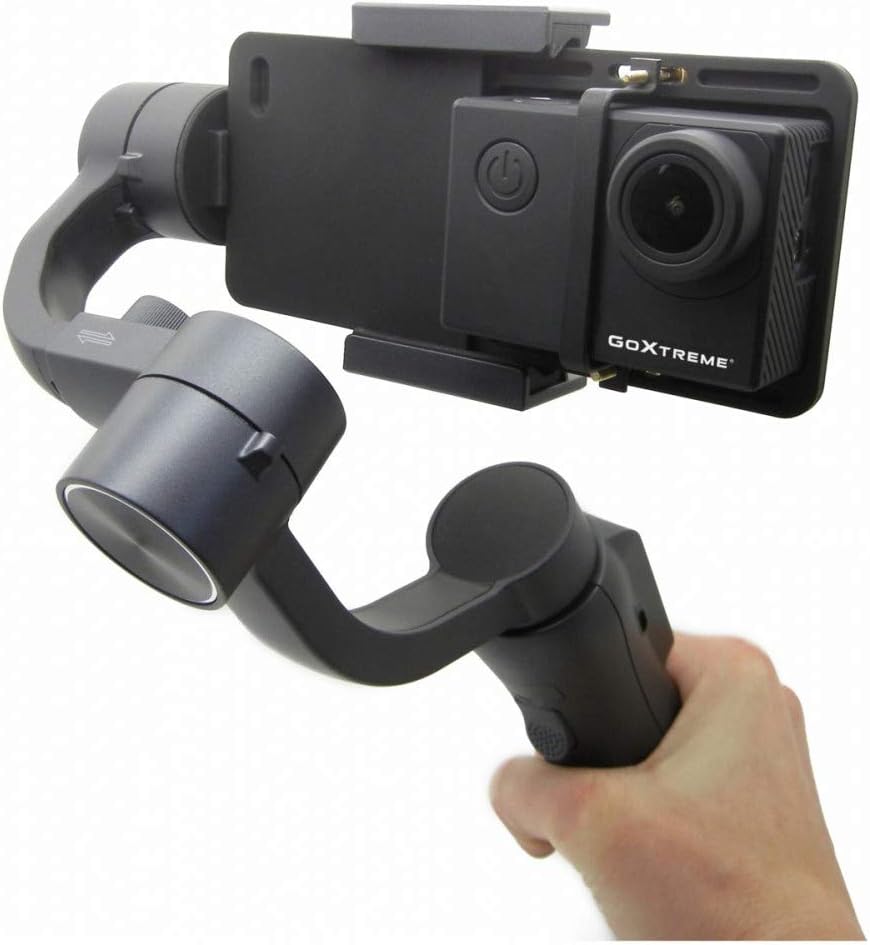
Figura 6: The GoXtreme GX1 Dual Gimbal in use with an action camera, held by a hand, illustrating its compact and portable nature.
Istruzioni per l'uso
1. Accensione/spegnimento
- Accensione: Press and hold the power button (usually located on the handle) for a few seconds until the indicator lights illuminate and the gimbal initializes.
- Spegni: Premere e tenere premuto nuovamente il pulsante di accensione finché le spie non si spengono.
2. Modalità Gimbal
The GX1 Dual Gimbal typically offers various stabilization modes, accessible via the mode buttons (M, L, H) on the control panel:
- Pan Follow Mode (M): The camera pans left and right following your hand movements, while the tilt and roll axes remain locked.
- Modalità di blocco (L): All three axes (pan, tilt, roll) are locked, keeping the camera pointed in a fixed direction regardless of your hand movements.
- Full Follow Mode (H): The camera follows both your pan and tilt movements, while the roll axis remains locked.
Nota: Specific mode names and functionalities may vary slightly. Refer to the quick start guide for precise details.
3. Funzioni del pannello di controllo
- joystick: Used to manually control the pan and tilt direction of the camera.
- Mode Buttons (M, L, H): Cycle through different gimbal stabilization modes.
- Zoom Slider (W-T): Controls the digital zoom function of your connected smartphone or action camera (if supported).
- Pulsante di registrazione: Initiates and stops video recording on the connected device (requires Bluetooth pairing for smartphones).
Manutenzione
- Pulizia: Utilizzare un panno morbido e asciutto per pulire il gimbal. Evitare l'uso di prodotti chimici aggressivi o materiali abrasivi.
- Magazzinaggio: Conservare il gimbal in un luogo fresco e asciutto, lontano dalla luce solare diretta e da temperature estreme.
- Cura della batteria: Per una conservazione a lungo termine, caricare la batteria a circa il 50-60% ogni tre mesi per mantenerla in buone condizioni.
- Evitare l'impatto: Proteggere il gimbal da cadute o urti, poiché potrebbero danneggiare i motori e i componenti interni.
Risoluzione dei problemi
Problemi comuni e soluzioni
- Il gimbal non si accende: Assicurati che la batteria sia completamente carica.
- Gimbal vibrating or unstable: Check if the smartphone or action camera is properly balanced in the clamp. Recalibrate the gimbal if necessary (refer to the quick start guide for calibration steps).
- I controlli non rispondono: Ensure the gimbal is powered on and properly connected (if using Bluetooth for smartphone control).
- Poor stabilization: Verify that the device is securely mounted and balanced. Avoid overloading the gimbal with excessively heavy devices.
Se i problemi persistono, contatta l'assistenza clienti per ulteriore assistenza.
Specifiche
| Caratteristica | Specificazione |
|---|---|
| Marca | EASYPIX |
| Modello | 55238 (GX1) |
| Colore | Nero |
| Dispositivi compatibili | Mobile Phone, Action Camera |
| Dimensioni del prodotto (L x P x A) | Dimensioni: 10.8 x 7 x 29 cm |
| Peso dell'articolo | 1.1 kg |
| Tipo di batteria | 1 agli ioni di litio (inclusa) |
| Anno del modello | 2019 |
Garanzia e supporto
For warranty information, technical support, or service inquiries, please refer to the documentation included with your purchase or visit the official Easypix websito. Conservare la prova d'acquisto per eventuali reclami in garanzia.


