1. Introduzione
This manual provides detailed instructions for the proper use and maintenance of your Traceable Calibrated Thermohygrometer with RS-232. This device is designed for accurate measurement of temperature and humidity, featuring microprocessor-based technology for easy calibration and an RS-232 output for data communication. For optimal performance and longevity, please read these instructions thoroughly before operation.
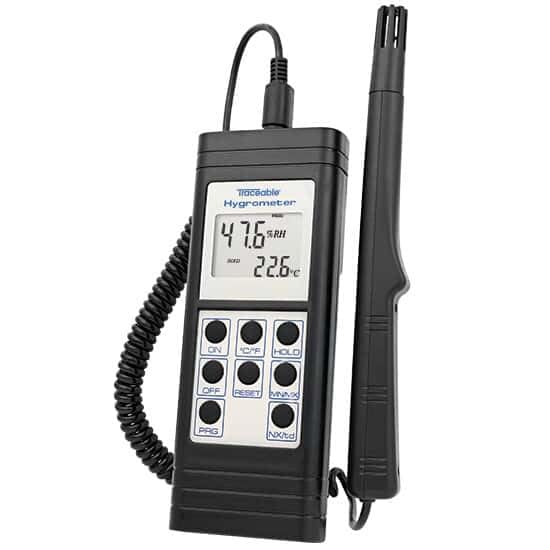
Image 1: The Traceable Calibrated Thermohygrometer. The device features a digital display showing humidity and temperature, with several control buttons below. A probe is connected via a coiled cable.
2 Caratteristiche
- Accurately measures temperature and relative humidity.
- Includes a NIST-Traceable certificate from an A2LA accredited calibration laboratory (1750.01), ensuring measurement accuracy.
- Microprocessor-based design facilitates quick and straightforward calibration procedures.
- Equipped with RS-232 output for data transmission to compatible systems.
3. Cosa c'è nella scatola
Upon unpacking, verify that the following items are present:
- Traceable Calibrated Thermohygrometer unit
- Humidity/Temperature Probe
- NIST-Traceable Calibration Certificate
- Manuale di istruzioni
4. Impostazione
- Installazione della batteria: Open the battery compartment (typically on the back of the unit) and insert the required batteries, observing correct polarity.
- Connessione sonda: Connect the humidity/temperature probe to the designated port on the main unit. Ensure a secure connection.
- Accensione iniziale: Premere il tasto ON button to power on the device. The display should illuminate and show initial readings.
- Unit Selection (if applicable): If your model allows, select your preferred temperature unit (Celsius or Fahrenheit) using the ° C / ° F pulsante.
- Posizionamento: Position the thermohygrometer in the environment where measurements are required. Ensure the probe is exposed to the air and not obstructed.
5. Istruzioni per l'uso
5.1 Funzionamento di base
- Accensione/spegnimento: Premere il tasto ON button to turn the unit on. Press the SPENTO pulsante per spegnerlo.
- Visualizzazione della lettura: The display will show current relative humidity (RH%) and temperature (°C/°F).
- Unità di temperatura: Toggle between Celsius (°C) and Fahrenheit (°F) by pressing the ° C / ° F pulsante.
- Data Hold: Premere il tasto PRESA button to freeze the current readings on the display. Press again to release.
- Letture minime/massime: Premere il tasto MINIMO MASSIMO pulsante per view the minimum and maximum temperature and humidity readings recorded since the last reset. Press repeatedly to cycle through MIN, MAX, and current readings.
- Reset MIN/MAX: Mentre viewing MIN/MAX readings, press the RESET button to clear the stored minimum and maximum values.
5.2 RS-232 Output
The device is equipped with an RS-232 port for connecting to a computer or data logger. This allows for real-time data acquisition and analysis. Refer to the specific software or interface instructions for your data collection system for details on establishing communication and data transfer protocols.

Image 2: A hand in a blue glove interacting with a Traceable device, demonstrating typical laboratory use. This image illustrates the practical application of Traceable instruments in a controlled environment.
6. Manutenzione
- Pulizia: Wipe the unit and probe with a soft, damp panno. Non usare detergenti abrasivi o solventi.
- Sostituzione della batteria: Replace batteries when the low battery indicator appears on the display. Ensure proper battery type and polarity.
- Magazzinaggio: Quando non si utilizza il dispositivo per lunghi periodi, rimuovere le batterie e conservarlo in un luogo fresco e asciutto, lontano dalla luce solare diretta e da temperature estreme.
- Ricalibrazione: Due to the nature of humidity sensors, periodic recalibration is recommended to maintain accuracy. Refer to the NIST-Traceable certificate for recommended recalibration intervals.
7. Risoluzione Dei Problemi
| Problema | Possibile causa | Soluzione |
|---|---|---|
| Nessun display o display debole | Dead or weak batteries; incorrect battery installation. | Sostituire le batterie con batterie nuove, assicurandosi che la polarità sia corretta. |
| Letture imprecise | Sensor contamination; need for recalibration; probe not properly connected. | Clean the probe gently; perform recalibration; ensure probe is securely connected. |
| RS-232 communication failure | Incorrect cable; software settings mismatch; port issue. | Verify cable connection and type; check software communication settings (baud rate, parity); try a different USB/serial port. |
8. Specifiche
| Parametro | Valore |
|---|---|
| Numero di modello | B07R5N7QYS |
| Produttore | COLE-PARMER |
| Calibrazione | NIST-Traceable (A2LA accredited 1750.01) |
| Interfaccia | Tipo RS-232 |
| Data prima disponibilità | 29 aprile 2019 |
9. Garanzia e supporto
For warranty information and technical support, please contact the manufacturer, Cole-Parmer, or your authorized distributor. Keep your purchase receipt and NIST-Traceable certificate for reference.
Produttore: COLE-PARMER
Marca: MATERIA
Per ulteriore assistenza, visitare il Traceable Brand Store on Amazon.


