1. Introduzione
The Transcend DrivePro 550 is a dual-lens dash camera designed to provide comprehensive recording of both the road ahead and the vehicle's interior. Equipped with a front lens featuring a Sony image sensor and a rear lens with infrared LEDs, it ensures clear video capture in various lighting conditions. This manual provides detailed instructions for setting up, operating, and maintaining your DrivePro 550 dash camera.
2. Contenuto della confezione
Verifica che tutti gli articoli elencati di seguito siano inclusi nel tuo pacchetto:
- Transcend DrivePro 550 Dash Camera Unit
- microSD Memory Card (64GB)
- Car Mount (Suction Mount)
- Car Lighter Power Adapter
- Hardwire Power Cable

Image: Retail box of the Transcend DrivePro 550 Dash Camera, showing included accessories.
3. Prodotto finitoview
Familiarize yourself with the components of your DrivePro 550 dash camera.
3.1 Front View

Immagine: Frontale view of the DrivePro 550, showing the main screen displaying live dual-channel recording.
- Lente frontale: Records the road ahead. Features a Sony image sensor for high-quality video.
- Lente posteriore: Records the vehicle's interior. Equipped with four infrared LEDs for enhanced night vision.
- Schermo LCD da 2.4 pollici: Visualizza in diretta view, cibo registratotage, and menu options.
- Pulsanti di controllo: For navigation and selection within the menu.
3.2 Lato View e porti

Immagine: Lato view of the DrivePro 550, highlighting the power input and microSD card slot.
- Porta CC IN: Per collegare l'adattatore di alimentazione.
- Slot per scheda microSD: Per inserire la scheda di memoria.
3.3 Dimensioni
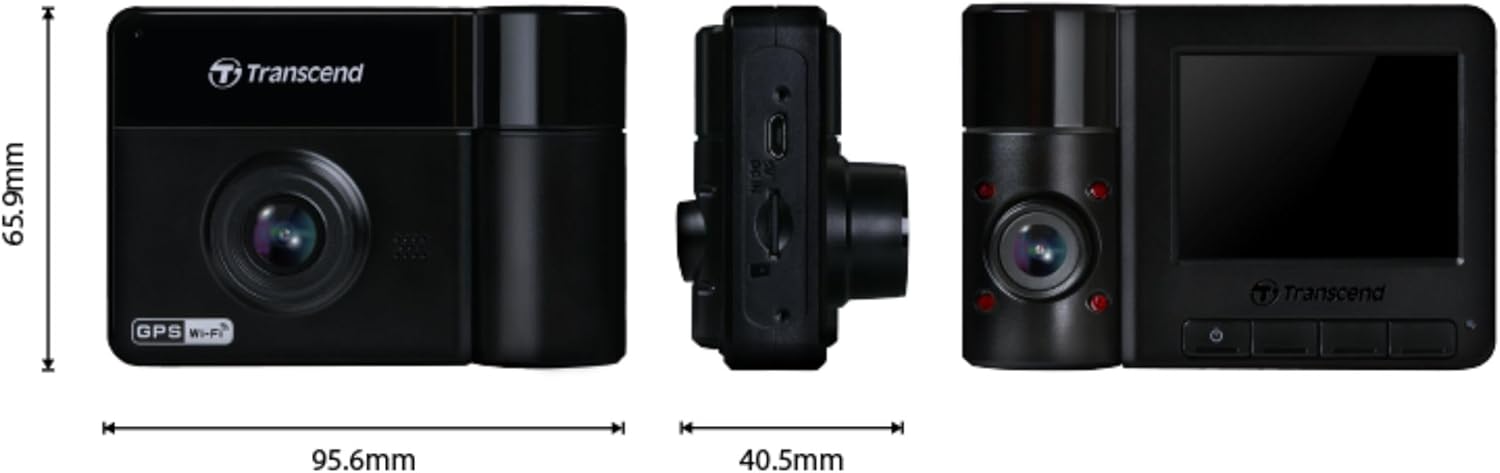
Image: Technical drawing showing the dimensions of the DrivePro 550 unit.
4. Installazione
Follow these steps to properly install your DrivePro 550 in your vehicle.
4.1 Montaggio della Dash Camera
- Scegli una posizione sul parabrezza che non ostruisca il tuo view della strada. La zona dietro la parte posterioreview mirror is often ideal.
- Clean the chosen area on the windshield thoroughly to ensure a strong suction.
- Attach the suction cup mount to the windshield and secure it by flipping the lever.
- Slide the DrivePro 550 onto the mount until it clicks into place. Adjust the camera angle to ensure both front and interior lenses have a clear view.

Image: The DrivePro 550 dash camera securely mounted on a car windshield.
4.2 Inserimento della scheda microSD
- Assicurarsi che la dashcam sia spenta.
- Individuare lo slot per la scheda microSD sul lato del dispositivo.
- Insert the provided 64GB microSD card into the slot with the gold contacts facing the back of the camera until it clicks into place.
4.3 Collegamento dell'alimentazione
- Connect the car lighter power adapter or the hardwire power cable to the DC IN port on the dash camera.
- Plug the other end of the power adapter into your vehicle's 12V power outlet (cigarette lighter socket). If using the hardwire cable, follow professional installation guidelines.
- Instradare il cavo di alimentazione ordinatamente lungo il parabrezza e il cruscotto per evitare di ostruire il view o interferire con i comandi di guida.
5. Funzionamento di base
5.1 Accensione/Spegnimento
- The DrivePro 550 will automatically power on and begin recording when your vehicle's engine starts and power is supplied.
- Per accendere/spegnere manualmente, tenere premuto il pulsante di accensione.
5.2 Modalità di registrazione
- Registrazione continua: The camera records continuously in a loop. When the memory card is full, the oldest filevengono sovrascritti.
- Registrazione di emergenza: Activated automatically by the built-in G-sensor upon detecting an impact or sudden movement. These files are protected from being overwritten. You can also manually trigger emergency recording by pressing the designated button.

Image: Split-screen view showing simultaneous recording from the front and interior lenses.
5.3 Taking Snapshots
During recording, press the snapshot button to capture a still image of the current view. This can be useful for documenting incidents or scenic views.
6. Funzionalità avanzate
6.1 Wi-Fi Connectivity and DrivePro App
The DrivePro 550 features built-in Wi-Fi, allowing you to connect it to your smartphone or tablet via the Transcend DrivePro App. The app enables:
- Diretta in tempo reale view di entrambi i feed della fotocamera.
- Playback of recorded videos.
- Downloading video filedirettamente sul tuo dispositivo mobile.
- Adjusting camera settings.
Download the DrivePro App from the App Store (iOS) or Google Play Store (Android).

Image: Smartphone screen showing the Transcend DrivePro App interface, connected to the dash camera.
6.2 Visione notturna migliorata
The DrivePro 550 is designed for superior low-light performance:
- The front lens utilizes a Sony image sensor to capture high-resolution images with rich color, even in low light. It supports 1440P 2K QHD recording at 30fps for smooth and crisp footage.
- The rear lens is equipped with four infrared LEDs, significantly improving recording quality in dark interior environments.

Image: Visual comparison of video quality captured by the DrivePro 550 during daytime and nighttime conditions.
6.3 Modalità parcheggio
When enabled, Parking Mode activates recording when motion is detected, even when your vehicle is parked and the engine is off. This feature requires a continuous power supply to the dash camera (e.g., via the hardwire power cable).
6.4 Registrazione time-lapse
Time-lapse recording allows you to condense hours of footage into a shorter video, providing continuous surveillance without consuming excessive storage space.
6.5 Driver Assistance Systems (ADAS)
The DrivePro 550 includes several ADAS features to enhance driving safety:
- Head-up Display: Shows current speed and driver safety alerts.
- Sistema di avviso di deviazione dalla corsia (LDWS): Ti avvisa se il tuo veicolo esce dalla corsia.
- Sistema di avviso di collisione frontale (FCWS): Warns you if you are getting too close to the vehicle ahead.
- Allarme velocità: Notifies you if your vehicle's speed exceeds a preset limit.
- Headlight Reminder: Automatically activates when the DrivePro detects poor lighting conditions.
- Avviso di affaticamento del conducente: Reminds the driver to rest after driving for a set period.
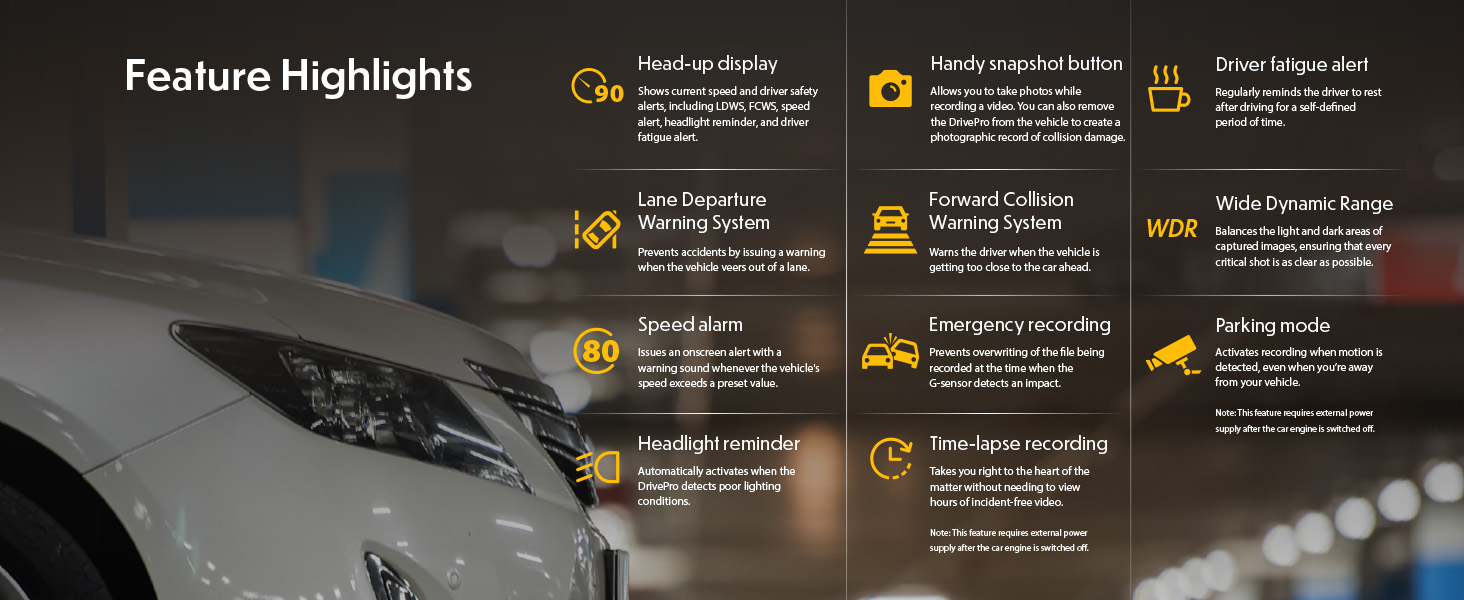
Image: Graphic illustrating the various feature highlights and ADAS functions of the DrivePro 550.
7. Manutenzione
7.1 Formatting the microSD Card
Regularly format the microSD card to ensure optimal performance and prevent data corruption. This can typically be done through the camera's menu settings. Formatting will erase all data on the card, so back up any important fileè il primo.
7.2 Pulizia della fotocamera
Use a soft, dry cloth to clean the camera body and screen. For lenses, use a specialized lens cleaning cloth and solution to avoid scratches. Do not use harsh chemicals or abrasive materials.
8. Risoluzione Dei Problemi
If you encounter issues with your DrivePro 550, refer to the following common problems and solutions:
- La fotocamera non si accende:
- Assicurarsi che il cavo di alimentazione sia collegato saldamente sia alla telecamera sia alla presa di corrente del veicolo.
- Controllare se la presa di corrente da 12 V del veicolo funziona.
- Camera is not recording:
- Verificare che la scheda microSD sia inserita correttamente.
- Check if the microSD card is full; format it if necessary (after backing up important fileS).
- Ensure the recording function is enabled in the camera settings.
- Scarsa qualità video:
- Pulisci le lenti della fotocamera.
- Ensure the windshield area in front of the camera is clean.
- Check video resolution settings; ensure it's set to the desired quality (e.g., 1440P 2K QHD for front lens).
- Problemi di connessione Wi-Fi:
- Assicurati che il Wi-Fi sia abilitato sulla fotocamera e sul tuo dispositivo mobile.
- Riavvia sia la fotocamera che il dispositivo mobile.
- Ensure you are within range of the camera's Wi-Fi signal.
9. Specifiche
| Caratteristica | Descrizione |
|---|---|
| Marca | Trascendere |
| Nome del modello | Drive Pro 550 |
| Numero di modello | TS-DP550A-64G |
| Tipo di servizio del veicolo | Auto |
| Tecnologia di connettività | Infrarossi, Wi-Fi |
| Risoluzione di acquisizione video | Front: 1440P 2K QHD (30fps), Rear: 1080p (30fps) |
| Componenti inclusi | Dash Camera, 64GB microSD Card, Car Mount, Car Lighter Adapter, Hardwire Power Cable |
| Tipo di montaggio | Surface Mount (Suction Cup) |
| Colore | Nero |
| campo di View | Anteriore: 150 gradi, posteriore: 140 gradi |
| Dimensioni dello schermo | 2.4 pollici |
| Tecnologia dei sensori ottici | Sony (Front Lens) |
| Tipo di memoria flash | microSD |
| Peso dell'articolo | 107 grammi |
| Dimensioni dell'articolo (P x L x A) | 7.1" x 5.5" x 2.6" |
10. Garanzia e supporto
10.1 Informazioni sulla garanzia
The Transcend DrivePro 550 Dash Camera comes with a Garanzia limitata di 2 anni. Please retain your proof of purchase for warranty claims. For detailed terms and conditions, refer to the warranty card included in your package or visit the official Transcend websito.
10.2 Assistenza clienti
For further assistance, technical support, or to download the latest firmware updates and user manuals, please visit the official Transcend website or contact their customer service department. Contact information can typically be found on the Transcend websito o nella confezione del prodotto.


