1. Importanti istruzioni di sicurezza
Please read all instructions carefully before using the UNIC UC28+ projector. Keep this manual for future reference.
- Alimentazione elettrica: Utilizzare solo l'adattatore di alimentazione specificato. Assicurarsi che la presa di corrente sia carica.tage corrisponde ai requisiti del proiettore.
- Ventilazione: Non ostruire le aperture di ventilazione. Lasciare spazio sufficiente attorno al proiettore per garantire un corretto flusso d'aria ed evitare il surriscaldamento.
- Calore: Il proiettore lamp generates heat. Avoid touching the lens or ventilation areas immediately after use.
- Umidità: Do not expose the projector to rain, moisture, or immerse it in water. Keep liquids away from the device.
- Pulizia: Scollegare il proiettore prima di pulirlo. Utilizzare un panno morbido e asciutto. Non utilizzare detergenti liquidi o spray.
- Sicurezza degli occhi: Non guardare direttamente nell'obiettivo del proiettore quando lamp è acceso. La luce intensa può causare danni agli occhi.
- Posizionamento: Posizionare il proiettore su una superficie stabile e piana. Evitare di esporlo alla luce diretta del sole o vicino a fonti di calore.
- Manutenzione: Non tentare di riparare questo prodotto da soli. Affidare tutte le operazioni di manutenzione a personale di assistenza qualificato.
2. Prodotto finitoview
The UNIC UC28+ is a portable LED projector designed for home cinema and entertainment. It supports a native resolution of 1920x1080 and offers multiple input options for versatile connectivity.
2.1 Componenti del proiettore

Immagine 1: Superiore view of the UNIC UC28+ projector. This image displays the manual control buttons located on the top panel, including 'ENTER', navigation arrows, 'INPUT' for source selection, and 'ESC' for exiting menus. The focus ring is also visible at the front.

Immagine 2: Davanti e di lato view of the UNIC UC28+ projector. This image highlights the main projection lens and the ventilation grilles on the side, essential for heat dissipation during operation.
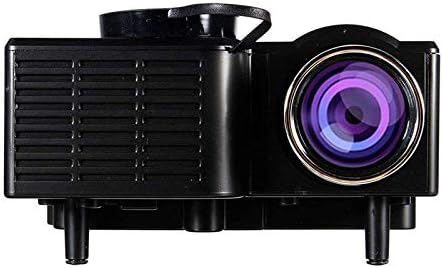
Immagine 3: Lato view of the UNIC UC28+ projector. This image clearly shows the various input ports available: HDMI, USB, AV, SD card slot, and VGA, providing multiple options for connecting external devices.
3. Impostazione
3.1 Contenuto della confezione
- UNIC UC28+ LED Projector
- Adattatore di alimentazione
- Telecomando
- cavo AV
- Manuale d'uso
3.2 Posizionamento del proiettore
Position the projector on a stable, flat surface. Ensure the projection surface (screen or wall) is clean and smooth. The optimal projection distance will vary based on desired screen size. Adjust the projector's angle to achieve a rectangular image.
3.3 Collegamento di alimentazione
- Collegare l'adattatore di alimentazione alla porta di ingresso dell'alimentazione del proiettore.
- Collegare l'alimentatore a una presa elettrica adeguata.
- La spia di alimentazione sul proiettore si illuminerà.
3.4 Collegamento dei dispositivi di input
The UC28+ supports various input sources:
- HDMI: Connect a device (e.g., laptop, Blu-ray player, gaming console) using an HDMI cable to the HDMI port.
- USB: Inserire un'unità flash USB nella porta USB per riprodurre i contenuti multimediali filedirettamente.
- AV: Use the provided AV cable to connect older devices (e.g., DVD player, VCR) to the AV port.
- Scheda SD: Insert an SD card into the SD card slot to play media files.
- VGA: Connect a computer or laptop using a VGA cable to the VGA port.

Immagine 4: Connectivity diagram for the UNIC UC28+ projector. This illustration demonstrates how various external devices such as computers, gaming consoles, smartphones, and media players can be connected to the projector using its multiple input options.
3.5 Regolazione della messa a fuoco
After powering on and selecting an input source, rotate the focus ring located around the lens until the projected image appears clear and sharp.
4. Istruzioni per l'uso
4.1 Accensione/Spegnimento
- Accensione: Press the power button on the projector or the remote control. The projector will start up, and the lamp si illuminerà.
- Spegni: Press the power button again. The projector will initiate a shutdown sequence. Allow the projector to cool down completely before unplugging or moving it.
4.2 Selezione della sorgente di input
Press the 'INPUT' button on the projector or remote control to cycle through available input sources (HDMI, USB, AV, SD, VGA). Select the source corresponding to your connected device.
4.3 Navigazione nel menu
Use the navigation arrows on the projector or remote control to move through menu options. Press 'ENTER' to confirm a selection and 'ESC' to go back or exit the menu.
4.4 Impostazioni di base
- Modalità Immagine: Regola luminosità, contrasto, colore e nitidezza.
- Proporzioni: Select between 16:9, 4:3, or Auto to match your content.
- Suono: Adjust volume or mute the audio output.
5. Manutenzione
Una manutenzione regolare garantisce prestazioni ottimali e prolunga la durata del proiettore.
- Pulizia delle lenti: Use a soft, lint-free cloth or lens cleaning paper to gently wipe the lens. Avoid abrasive materials or excessive pressure.
- Projector Body Cleaning: Wipe the exterior of the projector with a soft, dry cloth. Do not use harsh chemicals or solvents.
- Ventilazione: Controllare e pulire periodicamente le griglie di ventilazione per evitare accumuli di polvere, che possono ostacolare il flusso d'aria e causare surriscaldamento. Utilizzare una spazzola morbida o aria compressa.
- Magazzinaggio: Quando non viene utilizzato per lunghi periodi, conservare il proiettore in un ambiente fresco, asciutto e privo di polvere. Utilizzare l'imballaggio originale o una custodia protettiva.
6. Risoluzione Dei Problemi
Se riscontri problemi con il proiettore, fai riferimento ai seguenti problemi comuni e alle relative soluzioni:
| Problema | Possibile causa | Soluzione |
|---|---|---|
| Nessun potere | Cavo di alimentazione scollegato, problema con la presa di corrente | Controllare il collegamento del cavo di alimentazione. Provare una presa di corrente diversa. |
| Nessuna immagine | Incorrect input source, cable not connected, device not powered on | Select correct input source. Ensure all cables are securely connected. Power on the source device. |
| Immagine sfocata | Focus not adjusted, incorrect projection distance | Adjust the focus ring. Reposition the projector for optimal distance. |
| Nessun suono | Volume too low, audio cable disconnected, source device muted | Increase projector volume. Check audio cable connections. Unmute source device. |
| Avviso di surriscaldamento | Ventilazione bloccata, uso prolungato | Ensure ventilation openings are clear. Allow the projector to cool down. |
7. Specifiche
| Caratteristica | Dettaglio |
|---|---|
| Marca | UNICO |
| Numero di modello | UC28+ |
| Tipo di visualizzazione | GUIDATO |
| Risoluzione nativa | 1920 x 1080 pixel |
| Risoluzione massima dello schermo | 1920 x 1080 pixel |
| Luminosità | 400 lumen |
| Tecnologia di connettività | HDMI, USB, AV, SD, VGA |
| Fattore di forma | Portatile |
| Tipo di montaggio | Supporto da tavolo |
| Consumo energetico | 70 Watt |
8. Garanzia e supporto
For warranty information or technical support, please refer to the warranty card included with your product or contact the retailer where the product was purchased. Keep your proof of purchase for warranty claims.


