
1. Prodotto finitoview
The COOAU 4MP 5G Wi-Fi Network Camera is designed for indoor monitoring, offering high-resolution video and a wide range of features to keep your home or office secure. It supports both 2.4GHz and 5GHz Wi-Fi networks for stable connectivity.
Contenuto della confezione
- COOAU 4MP 5G Wi-Fi Network Camera
- Adattatore di alimentazione
- Cavo USB
- Accessori di montaggio (viti, tasselli)
- Manuale d'uso

Image: The COOAU 4MP 5G Wi-Fi Network Camera, power adapter, USB cable, and mounting hardware.
Componenti della fotocamera
- Lente: Cattura video e immagini.
- Spia luminosa: Shows camera status (e.g., red for power on, blue for connected).
- Pulsante di reset: Utilizzato per ripristinare le impostazioni di fabbrica della fotocamera.
- Slot per scheda SD: Per l'archiviazione locale delle registrazioni (supporta fino a 128 GB).
- Microfono: Per l'ingresso audio durante la comunicazione bidirezionale.
- Oratore: Per l'uscita audio durante le comunicazioni bidirezionali e gli avvisi.
- Porta di alimentazione: Si collega all'alimentatore.
Video: An ANRAN camera, similar to the COOAU 827, highlighting its lens, indicator light, reset button, and SD card slot. This video demonstrates the physical components of the camera.
2. Guida all'installazione
2.1 Configurazione iniziale e installazione dell'app
- Accensione: Collegare la fotocamera a una fonte di alimentazione utilizzando il cavo USB e l'adattatore di alimentazione in dotazione. La spia luminosa diventerà rossa.
- Reimposta fotocamera: Press and hold the reset button for approximately 10 seconds until you hear a 'beep' sound and the red indicator light starts blinking slowly. This indicates the camera is ready for pairing.
- Scarica l'app: Download the dedicated COOAU app (or compatible app like ANRAN) from the App Store (iOS) or Google Play Store (Android).
- Abilita autorizzazioni: Ensure Bluetooth and Location Services are enabled on your smartphone for the app to detect the camera.
- Aggiungi dispositivo: Open the app, tap 'Add Device' or the '+' icon. The app should automatically detect the camera ID. Tap on the detected camera ID.
- Connettiti al Wi-Fi: Enter your Wi-Fi network password. The camera supports both 2.4GHz and 5GHz Wi-Fi. Confirm the password and proceed.
- Conferma: Wait for the camera to connect to Wi-Fi. Once successfully connected, the indicator light will turn blue.
Video: Step-by-step guide on connecting the camera to your smartphone via Bluetooth, including powering on, resetting, enabling Bluetooth/location, adding the device, and entering Wi-Fi credentials.
2.2 Alternative Setup: QR Code Scan
- Accensione e ripristino: Follow steps 1 and 2 from Section 2.1.
- Add Device (QR Code): In the app, select 'Add Device' and choose the option to scan a QR code.
- Genera codice QR: The app will generate a QR code containing your Wi-Fi information.
- Scansiona il codice QR: Hold your smartphone with the QR code approximately 15-25 cm (6-10 inches) in front of the camera lens. The camera will scan the code.
- Conferma: You will hear a 'beep' sound from the camera, indicating successful scanning. The camera will then connect to Wi-Fi, and the indicator light will turn blue upon successful connection.

Image: Illustrates three connection methods: LAN cable, QR code scanning, and voice connection, emphasizing ease of setup.
3. Istruzioni per l'uso
3.1 telecomando Viewing and Pan/Tilt/Zoom
Una volta connesso, puoi view cibo vivotage from your camera anytime, anywhere via the app on your smartphone, iPad, or PC. The camera features a 134-degree wide-angle lens and can rotate horizontally 350 degrees and vertically 100 degrees, providing comprehensive coverage. Use the app to control the camera's movement and utilize the 8x digital zoom.

Immagine: Una panoramica view from the COOAU 4MP camera, demonstrating its wide coverage and remote pan/tilt control via a smartphone.

Immagine: una persona viewing the live camera feed on their smartphone, illustrating remote monitoring capabilities.
3.2 Rilevamento del movimento e tracciamento automatico
The camera is equipped with advanced detection features, including face, sound, and motion detection. You can adjust the detection sensitivity in the app. When unusual movement or sound is detected, the camera will automatically record the event and send an alert notification to your smartphone. The AI human detection lens also features auto-tracking, allowing the camera to automatically adjust its angle to follow detected movement.
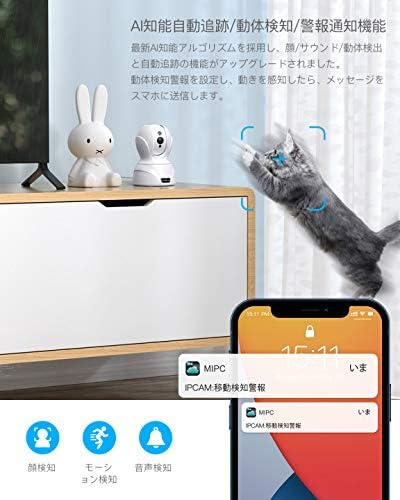
Image: The camera detecting a cat's movement and sending a notification to a smartphone, demonstrating motion detection and alert features.

Image: A smartphone screen showing a notification from the camera, indicating a motion detection alert.
Video: An aosu camera (similar to COOAU 827) demonstrating motion detection, auto-tracking, and alert notifications. It also shows app playback of recorded events.
3.3 Audio bidirezionale
The camera features a built-in microphone and speaker with noise filter technology, enabling clear two-way communication. You can speak to family members, pets, or visitors through the camera using the app, even when you are away from home.
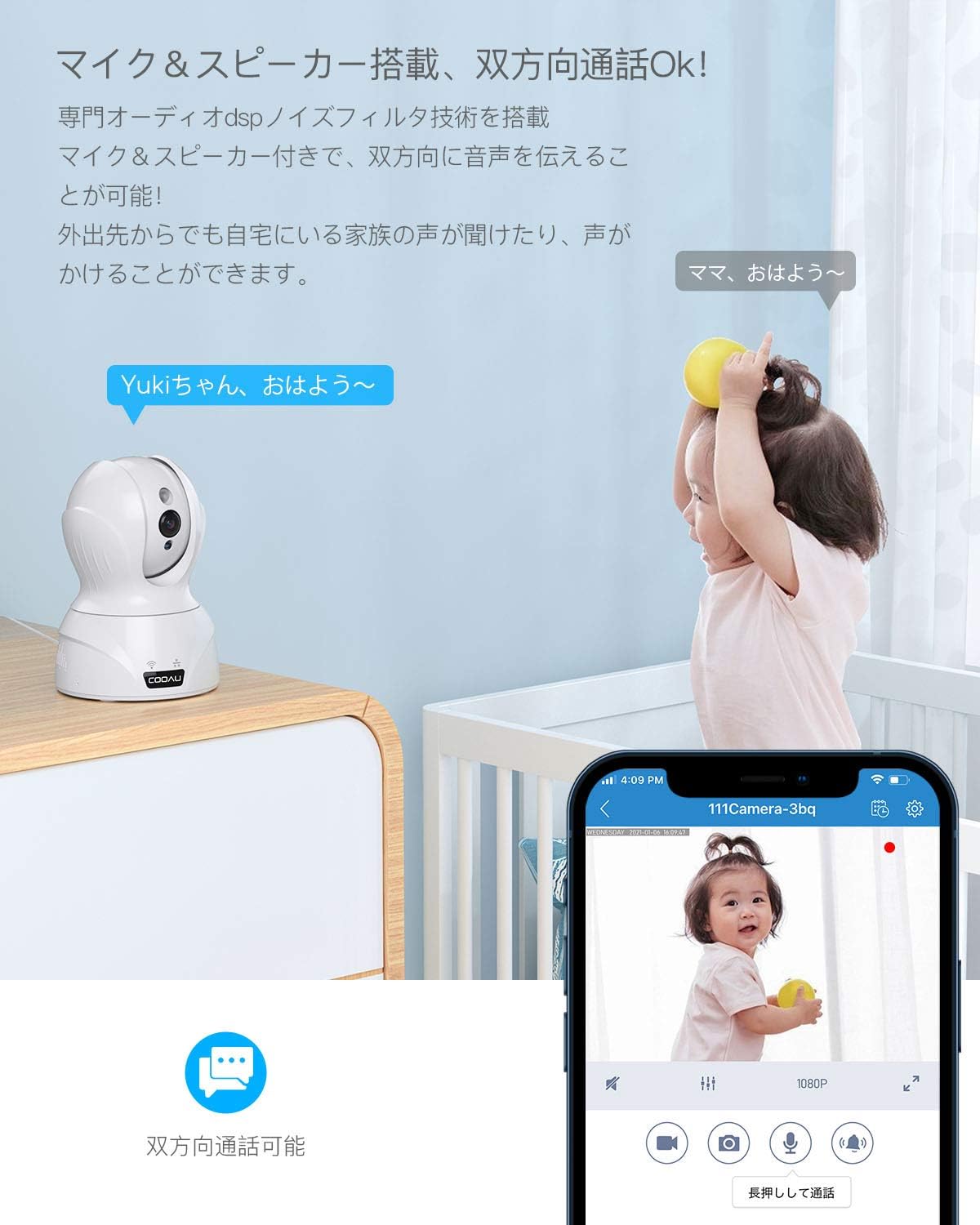
Image: A COOAU camera facilitating two-way communication between an adult on a smartphone and a child in the room.

Image: Children interacting with the camera, illustrating the two-way audio function for communication.
3.4 Visione notturna
With smart IR-CUT technology and 850nm infrared LEDs, the camera automatically switches between day and night modes based on ambient light. It provides clear black-and-white images in complete darkness, with a night vision range of approximately 12 meters (39 feet).

Image: Demonstrates the camera's enhanced night vision capability, showing a clear image of a sleeping baby in a dark room.
3.5 Recording Options and Storage
The camera supports continuous recording, event-triggered recording (motion/sound detection), and scheduled recording. Recordings can be stored on a local SD card (up to 128GB) or via cloud storage (subscription may be required). The camera uses H.265 video compression for efficient storage.

Image: Illustrates the three main recording options available: continuous recording, event-triggered recording, and scheduled recording.

Image: A visual comparison demonstrating the efficiency of H.265 video compression over H.264, resulting in clearer images with less data.
3.6 Multi-Device and Family Sharing
La fotocamera supporta il telecomando viewing and control from multiple devices (smartphones, PCs, tablets) running iOS, Android, or Mac operating systems. You can manage multiple cameras simultaneously within the app. The app also allows for secure sharing of camera access with family members by logging into the same account.

Image: A woman using a laptop with a camera feed, illustrating the camera's compatibility with various operating systems (iOS, Android, Mac, Windows).

Image: A smartphone app showing multiple camera feeds, demonstrating the ability to manage several cameras simultaneously.
4. Opzioni di installazione
The COOAU 4MP camera offers flexible installation options to suit various indoor environments. It can be placed on a table, mounted on a wall, or installed on the ceiling.

Image: Illustrates various applications for the camera, including baby monitoring, pet care, elderly supervision, home security, store surveillance, and office security.

Image: Shows the camera installed in different indoor settings, demonstrating its versatility for table placement, wall mounting, and ceiling installation.
5. Manutenzione
- Pulizia: Utilizzare un panno morbido e asciutto per pulire l'obiettivo e il corpo della fotocamera. Evitare l'uso di prodotti chimici aggressivi o materiali abrasivi.
- Aggiornamenti del firmware: Controlla regolarmente l'app per verificare la disponibilità di aggiornamenti del firmware, per garantire prestazioni e sicurezza ottimali.
- Gestione della scheda SD: Se si utilizza una scheda SD per l'archiviazione, ripetere periodicamenteview e cancella il vecchio footage to free up space. Consider formatting the SD card every few months.
- Alimentazione elettrica: Assicurarsi che la telecamera sia collegata a una fonte di alimentazione stabile. Evitare frequenti interruzioni di corrente.
6. Risoluzione Dei Problemi
| Problema | Possibile causa | Soluzione |
|---|---|---|
| La fotocamera non riesce a connettersi al Wi-Fi. | Incorrect Wi-Fi password, weak signal, or incorrect Wi-Fi band. | Verify Wi-Fi password. Ensure camera is within router range. Confirm your router supports 2.4GHz or 5GHz (if using 5G Wi-Fi). Reset the camera and try again. |
| Offline status in app. | No power, Wi-Fi disconnected, or network issues. | Check power connection. Verify Wi-Fi router is working. Restart the camera and router. |
| Avvisi di rilevamento del movimento non ricevuti. | Detection sensitivity too low, app notifications disabled, or incorrect detection zone settings. | Adjust detection sensitivity in app. Enable notifications for the app in your phone settings. Configure detection zones correctly. |
| Qualità dell'immagine scadente. | Lenti sporche, condizioni di scarsa illuminazione o problemi di larghezza di banda della rete. | Pulisci l'obiettivo della telecamera. Assicurati che l'illuminazione sia adeguata o controlla le impostazioni per la visione notturna. Verifica la stabilità della connessione internet. |
| L'audio bidirezionale non funziona. | Microphone/speaker muted in app, volume too low, or network delay. | Check mute settings and volume levels in the app. Ensure a stable network connection. |
Se riscontri problemi persistenti, consulta la sezione di supporto per le informazioni di contatto.
7. Specifiche
| Caratteristica | Specificazione |
|---|---|
| Marca | COOAU |
| Numero di modello | 827 |
| Risoluzione del sensore di immagine | 4 MP (2602*1472P) |
| Tecnologia di connettività | Wired & Wireless (2.4G WiFi / 5G WiFi) |
| Uso interno/esterno | Al chiuso |
| Dispositivi compatibili | Smartphone, PC, Tablet (iOS, Android, Mac) |
| Fonte di alimentazione | Elettrico con cavo (5 V) |
| Tipo di controllore | Amazon Alexa |
| Tipo di montaggio | Table, Wall, Ceiling |
| Tipo di avviso | Face Recognition, Motion Detection, Sound Detection, Alarm Notification, Auto Tracking |
| Gamma di visione notturna | Circa 12 metri (39 piedi) |
| Digital Zoom | 8x |
| Campo di View | 134 gradi (orizzontale) |
| Rotazione panoramica/inclinazione | Orizzontale 350°, Verticale 100° |
| Magazzinaggio | Scheda Micro SD (max 128 GB), archiviazione cloud |
| Compressione video | MPEG-4 (H.265) |
8. Garanzia e supporto
Questo prodotto viene fornito con un Garanzia di qualità di 24 mesi. We are committed to providing excellent customer support.
Contatta il supporto
If you have any questions or require assistance, please contact us through one of the following methods:
- Indirizzo email ufficiale: (Please refer to your product packaging or official COOAU website for the latest email address.)
- Cronologia ordini Amazon: Contact us directly through your Amazon order history for prompt assistance.
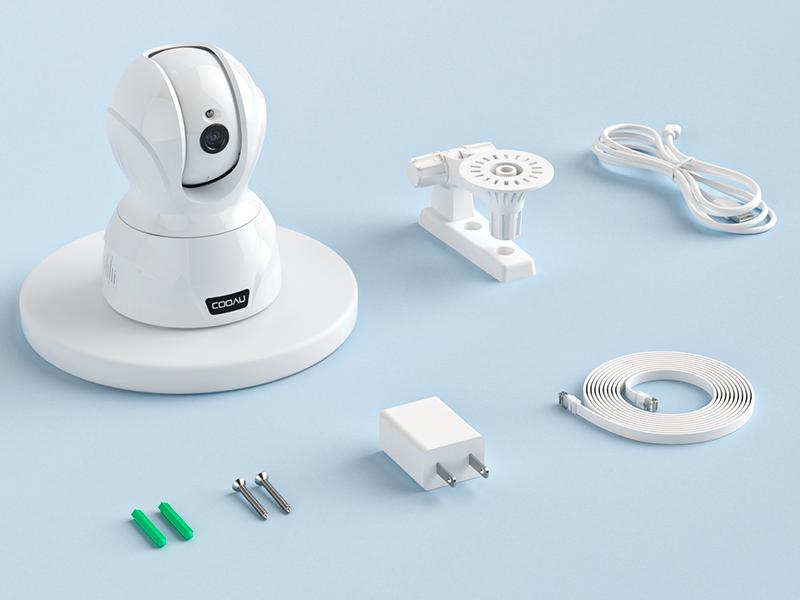
Image: Highlights COOAU's commitment to customer satisfaction with a 24-month warranty and dedicated support.