Introduzione
The TENMIYA A200 Portable Bluetooth Speaker is designed to provide high-quality audio with versatile connectivity options. Featuring Bluetooth 5.0, FM radio, TF card, USB, and AUX input, this speaker offers a comprehensive audio experience for various environments, from home to outdoor gatherings. Its compact design and remote control functionality ensure ease of use and portability.

Image: The TENMIYA A200 speaker in beech color, showcasing its front panel with a large speaker grille, digital display, control buttons, and a remote control placed in front.
Cosa c'è nella scatola
Si prega di controllare il contenuto della confezione per assicurarsi che tutti gli articoli siano presenti e in buone condizioni:
- 1 x TENMIYA A200 Bluetooth Speaker
- 1 x telecomando
- 1 cavo AUX (3.5 mm)
- 1 cavo di ricarica USB
- 1 x Manuale utente (questo documento)
Impostare
1. Ricarica dell'altoparlante
Before first use, fully charge the speaker. Connect the provided USB charging cable to the speaker's DC 5V input port and the other end to a USB power adapter (not included) or a computer USB port. The charging indicator will show the charging status. A full charge typically takes about 3-4 hours.
2. Accensione/spegnimento
Locate the power switch on the side of the speaker. Slide it to the "ON" position to power on the speaker. Slide it to the "OFF" position to power off.
3. Connessione Bluetooth
- Power on the speaker. It will automatically enter Bluetooth pairing mode, indicated by a flashing Bluetooth icon on the digital display.
- Sul tuo dispositivo (smartphone, tablet, laptop), attiva il Bluetooth e cerca i dispositivi disponibili.
- Select "TENMIYA A200" from the list of devices.
- Once connected, the speaker will emit a confirmation sound, and the Bluetooth icon on the display will stop flashing.

Image: The TENMIYA A200 speaker displaying "Bluetooth 4.1" (note: product specs state 5.0, this image might be older) and a smartphone screen showing music playback, illustrating Bluetooth connectivity.
4. Collegamento ingresso AUX
For devices without Bluetooth, use the provided 3.5mm AUX cable. Connect one end to the speaker's AUX input port and the other end to the audio output jack of your device (e.g., MP3 player, computer, TV). The speaker will automatically switch to AUX mode.
5. Riproduzione tramite scheda TF e USB
Insert a TF (MicroSD) card or a USB flash drive containing MP3 music files into the respective slots on the side of the speaker. The speaker will automatically detect the storage device and begin playing music.
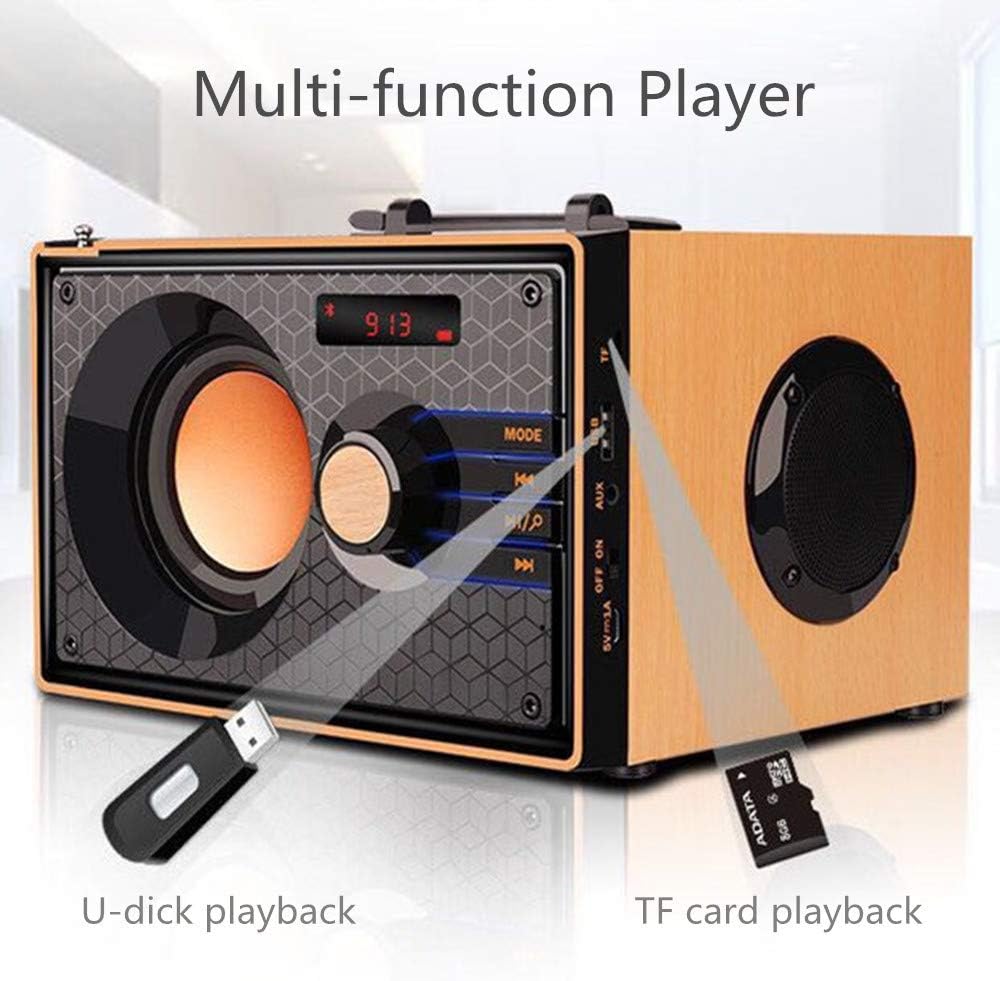
Image: A close-up of the side panel of the TENMIYA A200 speaker, highlighting the USB and TF card input slots with a USB drive and TF card inserted, demonstrating multi-function playback.
Istruzioni per l'uso
1. Selezione della modalità
Premere il tasto MODALITÀ button on the speaker's front panel or the remote control to cycle through available modes: Bluetooth, FM Radio, AUX, TF Card, and USB.
2. Controllo del volume
Rotate the large knob on the front panel clockwise to increase volume and counter-clockwise to decrease volume. Alternatively, use the Volume+ E vol- pulsanti sul telecomando.
3. Playback Control (Bluetooth, TF Card, USB)
- Premere il tasto Riproduci/Pausa pulsante (▶▶) per riprodurre o mettere in pausa la traccia corrente.
- Premere il tasto Traccia precedente pulsante (◀◀) to go to the beginning of the current track or the previous track.
- Premere il tasto Traccia successiva pulsante (▶▶) per passare al brano successivo.
4. Funzionamento della radio FM
- Passare alla modalità FM utilizzando il MODALITÀ pulsante.
- Per scansionare e salvare automaticamente le stazioni disponibili, tenere premuto il tasto Riproduci/Pausa button. The speaker will scan and store stations with strong signals.
- To manually tune or navigate through saved stations, use the Traccia precedente E Traccia successiva pulsanti.
- Extend the telescopic antenna on the back of the speaker for improved FM reception.

Image: A man relaxing on a couch, listening to the TENMIYA A200 speaker which has its telescopic antenna extended, indicating FM radio functionality.
5. Utilizzo del telecomando
The included remote control provides convenient access to all speaker functions from a distance of up to 10 feet. Functions include power on/off, mode selection, volume control, track navigation, play/pause, and direct station input for FM radio (if supported by the remote's number pad).
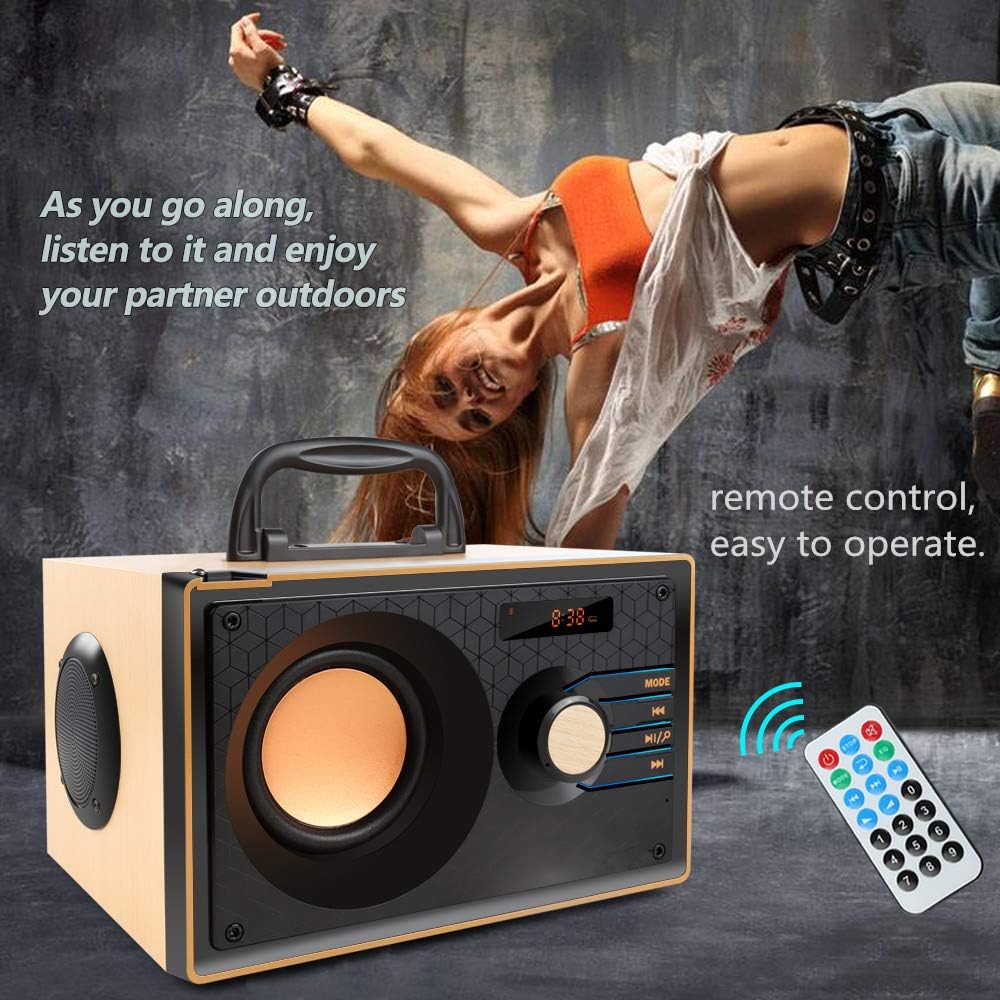
Image: The TENMIYA A200 speaker with its remote control, emphasizing the ease of operation from a distance.
Manutenzione
- Tenere l'altoparlante lontano da acqua, umidità e luce solare diretta.
- Pulire l'altoparlante con un panno morbido e asciutto. Non utilizzare detergenti abrasivi o solventi.
- Evitare di far cadere l'altoparlante o di sottoporlo a forti urti.
- Quando non si utilizza l'altoparlante per lunghi periodi, conservarlo in un luogo fresco e asciutto.
Risoluzione dei problemi
| Problema | Possibile causa | Soluzione |
|---|---|---|
| L'altoparlante non si accende. | Batteria scarica; l'interruttore di alimentazione è spento. | Caricare l'altoparlante; assicurarsi che l'interruttore di alimentazione sia in posizione "ON". |
| Nessun suono. | Volume troppo basso; Modalità selezionata non corretta; Dispositivo non collegato correttamente. | Aumentare il volume; Premere il pulsante MODE per selezionare l'ingresso corretto; Ricollegare il dispositivo. |
| La connessione Bluetooth non riesce. | Altoparlante non in modalità di associazione; Bluetooth del dispositivo disattivato; Troppo lontano dall'altoparlante. | Ensure speaker is in Bluetooth mode and flashing; Turn on device Bluetooth; Move device closer (within 10 meters/33 feet). |
| Scarsa ricezione radio FM. | Antenna non estesa; area con segnale debole. | Fully extend the telescopic antenna; Try repositioning the speaker for better signal. |
| Telecomando non funzionante. | Battery depleted; Obstruction between remote and speaker; Too far from speaker. | Replace remote battery; Remove obstructions; Move closer to speaker (within 10 feet). |
Specifiche
| Caratteristica | Dettaglio |
|---|---|
| Marca | TENMIYA |
| Modello | A200 |
| Potenza di uscita dell'altoparlante | 10W (5W + 2.5W x 2) |
| Unità altoparlante | 3" + 2" x 2 |
| Risposta in frequenza | 60Hz - 20KHz |
| Versione Bluetooth | 5.0 |
| Portata Bluetooth | Fino a 10 metri (33 piedi) |
| Capacità della batteria | 2200mAh |
| Tempo di ricarica | Circa 3-4 ore |
| Tempo di gioco | ca. 8 ore (al 40% del volume) |
| Potenza in ingresso | CC 5V |
| Dimensioni (L x P x A) | 7.5 x 6.1 x 4.7 pollici (190 x 155 x 120 mm) |
| Peso dell'articolo | 2.91 libbre |
| Funzioni supportate | Bluetooth, FM Radio, TF Card, USB, AUX Input |
| Metodo di controllo | Manual buttons, Remote Control |

Image: The TENMIYA A200 speaker with its dimensions labeled (190mm length, 155mm depth, 120mm height), illustrating its compact size.
Garanzia e supporto
The TENMIYA A200 Portable Bluetooth Speaker comes with a worry-free 12-month warranty. If you encounter any issues or have questions regarding your product, please contact our customer service team. We are committed to providing the best customer service and will respond to your inquiries within 24 hours.
For support, please refer to the contact information provided on the product packaging or the seller's page where you purchased the item.


