Introduzione
The Godox X2T-N is a 2.4G wireless flash trigger designed for Nikon cameras, offering comprehensive control over Godox flashes and other compatible lighting equipment. This device supports i-TTL autoflash, high-speed sync, multi-flash, and manual flash modes, providing versatile lighting solutions for photographers. Its user-friendly interface and robust wireless capabilities ensure reliable performance for various photographic needs.
Caratteristiche principali
- Built-in 2.4G Wireless Transmission: Offers an operating distance of up to 100 meters.
- Group and Channel Control: Supports up to 5 groups and 32 channels for flexible flash management.
- Multiple Trigger Functions: Can act as a wireless Godox Flash Trigger, wireless Speedlite Trigger for Nikon, wireless Shutter Release Trigger, or a Flash Trigger with a 2.5mm sync cord jack.
- Clear LCD Panel: Large and clear LCD panel for convenient operation and settings display.
- Aggiornamento del firmware: Supports firmware updates via a Type-C USB cable.
- Funzioni versatili: Includes sync delay setting, wireless shutter release, zoom setting, and customizable C.Fn functions.
- Supporto TTL completo: Features TTL autoflash, 1/8000s High-Speed Sync (HSS), Multi Flash, Manual Flash, Flash Exposure Compensation (FEC), TCM transform function, Magnification function, One-Shoot and Multi-Shoot settings, Modeling Lamp Group Control, Group Zoom, and simultaneous adjustment of all groups' output values.
- Supporto Bluetooth: Connects to smartphones (iPhone, Android) via the "GodoxPhoto" APP for remote control of flash mode, power output, modeling light mode, and beep sound.
Impostare
1. Installazione della batteria
The Godox X2T-N requires two AA batteries (not included) for operation. To install, slide open the battery compartment cover located on the side of the unit. Insert the batteries according to the polarity indicators (+/-) inside the compartment. Close the cover securely.

Immagine: Lato view of the Godox X2T-N, highlighting the Type-C USB port, 3.5mm sync cord jack, and the open battery compartment for two AA batteries.
2. Montaggio sulla telecamera
Slide the X2T-N's hot shoe onto your Nikon camera's hot shoe. Ensure it is fully seated. Lock the trigger in place by rotating the locking ring or lever on the trigger's base. This secures the connection and prevents accidental dislodging.
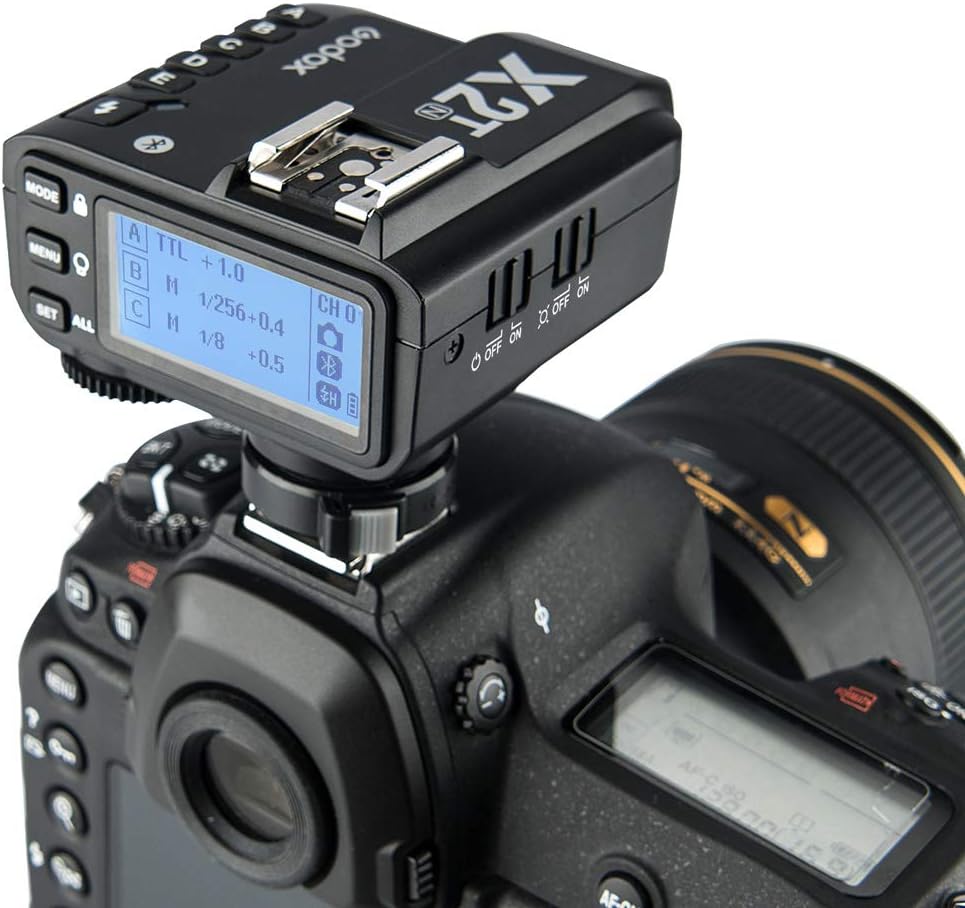
Image: The Godox X2T-N flash trigger securely mounted on the hot shoe of a Nikon DSLR camera.
3. Accensione/spegnimento
To power on the X2T-N, slide the power switch located on the side of the unit to the 'ON' position. The LCD screen will illuminate. To power off, slide the switch to the 'OFF' position.
4. Initial Settings (Channel, Group, ID)
Before use, ensure the trigger and your flashes are set to the same channel and wireless ID. Use the 'CH' button to select a channel (1-32) and the 'ID' button to set a wireless ID (01-99). The X2T-N features a scan setting function to automatically detect the channel with the least interference, improving wireless stability. Access this function through the menu.

Immagine: un primo piano view of the Godox X2T-N's LCD screen, displaying current settings for groups (A, B, C), flash modes (TTL, M), power levels, and channel (CH 01).
Istruzioni per l'uso
1. Mode Selection (TTL, Manual, Multi)
Premere il tasto MODALITÀ button to cycle through TTL (Through-The-Lens), Manual (M), and Multi (Stroboscopic) flash modes. The selected mode will be displayed on the LCD screen.
2. Controllo di gruppo
The X2T-N supports up to 5 groups (A, B, C, D, E). Press the corresponding group button (A, B, C, D, E) on the left side of the trigger to select a group. Use the dial and IMPOSTATO button to adjust the flash mode and power output for the selected group. Press the TUTTO button to adjust all groups simultaneously.

Image: A hand holding the Godox X2T-N, illustrating the placement of the group selection buttons (A, B, C, D, E) on the left side of the unit.
3. Sincronizzazione ad alta velocità (HSS)
The X2T-N supports High-Speed Sync up to 1/8000s. When HSS is enabled on your camera and compatible flash, the trigger will automatically activate HSS mode, allowing you to use wider apertures in bright conditions.
4. Compensazione dell'esposizione del flash (FEC)
In TTL mode, use the dial to adjust Flash Exposure Compensation (FEC) from -3 to +3 stops in 1/3 stop increments. This allows fine-tuning of flash output for optimal exposure.
5. Funzione di trasformazione TCM
The TCM (TTL Converted to Manual) function allows you to quickly convert a TTL exposure value into a manual power output. This is useful for maintaining consistent lighting when switching from TTL to manual mode.
6. Controllo zoom
The X2T-N can control the zoom position of compatible flashes. Access the zoom setting through the menu and use the dial to adjust the zoom head position to match your lens focal length.
7. Scatto senza fili
Connect the X2T-N to your camera's remote control port using an appropriate cable (sold separately) to use it as a wireless shutter release. This allows you to trigger your camera remotely.

Image: Illustrations demonstrating the Godox X2T-N's versatility as a trigger for various lighting setups, including Godox flashes, Nikon Speedlites, a camera shutter, and flashes connected via a 3.5mm sync cord.
8. Bluetooth Control via GodoxPhoto APP
Download the "GodoxPhoto" APP on your iPhone or Android device. Enable Bluetooth on your smartphone and pair it with the X2T-N. Through the app, you can remotely control flash modes, power output, modeling light settings, and the beep sound of compatible Godox flashes.

Image: A visual representation of the Bluetooth connectivity, showing a smartphone running the GodoxPhoto app wirelessly controlling the X2T-N, which in turn controls multiple Godox flashes.
9. Aggiornamento del firmware
To update the firmware, connect the X2T-N to a computer using a Type-C USB cable. Download the latest firmware from the official Godox website and follow the provided instructions for the update process. Regular firmware updates can improve performance and add new features.
Manutenzione
1. Cura della batteria
- Rimuovere le batterie quando l'unità non viene utilizzata per lunghi periodi per evitare perdite.
- Use high-quality AA alkaline or rechargeable Ni-MH batteries.
- Replace both batteries simultaneously; do not mix old and new batteries or different types.
2. Pulizia
Pulire l'unità con un panno morbido e asciutto. Per lo sporco ostinato, utilizzare un panno leggermenteamp cloth and then dry thoroughly. Avoid using solvents or abrasive cleaners. Keep the hot shoe contacts clean and free of debris.
3. Conservazione
Store the X2T-N in a cool, dry place away from direct sunlight, high temperatures, and humidity. Protect it from dust and physical shocks.
Risoluzione dei problemi
- Trigger not firing flashes:
- Ensure the X2T-N and all flashes are powered on.
- Verify that the channel and wireless ID settings match on both the trigger and the flashes.
- Check battery levels in both the trigger and flashes.
- Assicurarsi che il grilletto sia montato saldamente sulla slitta a contatto caldo della fotocamera.
- Confirm that the camera's flash settings are correctly configured for external flash.
- Inconsistent firing or interference:
- Use the scan function to find a less congested channel.
- Ensure there are no large metallic objects or other 2.4G devices causing interference between the trigger and flashes.
- Reduce the distance between the trigger and flashes if operating near the maximum range.
- Camera battery drains quickly when trigger is mounted:
- Some camera models may experience increased battery drain if the trigger's display remains active. Ensure the trigger is powered off when not in active use, or remove it from the hot shoe if the issue persists.
- Check for any camera firmware updates that might address power management with accessories.
- Problemi di connessione Bluetooth:
- Ensure Bluetooth is enabled on both the X2T-N and your smartphone.
- Restart both the trigger and the smartphone.
- Reinstall the GodoxPhoto APP if necessary.
Specifiche
| Marca | DIO OX |
| Modello | Modello X2T-N |
| Fotocamere compatibili | Nikon DSLR or mirrorless cameras (i-TTL Autoflash) |
| sistema senza fili | Trasmissione wireless 2.4G |
| Gamma di trasmissione | Fino a 100 metri |
| Canali | 32 |
| ID wireless | 01-99 |
| Gruppi | 5 (LA, SI, DO, RE, MI) |
| Modalità flash | i-TTL II / M / Multi |
| Sincronizzazione ad alta velocità (HSS) | Sì, fino a 1/8000s |
| Compensazione dell'esposizione flash (FEC) | ±3 stop con incrementi di 1/3 di stop |
| Alimentazione elettrica | 2 batterie AA (non incluse) |
| Dimensioni (L x P x A) | 72 x 70 x 58 mm (approx. 11.2 x 10.6 x 7.2 cm packaged) |
| Peso | 90 g (unit only, approx. 140 g packaged) |
| Connettività | 2.4G, Type-C USB, 2.5mm Sync Cord Jack |
Garanzia e supporto
Per informazioni sulla garanzia e supporto tecnico, fare riferimento alla documentazione inclusa con il prodotto o visitare il sito ufficiale Godox website. Keep your proof of purchase for any warranty claims. Godox is committed to providing professional and high-quality lighting solutions.


