Introduzione
Thank you for choosing the NEDIS Wi-Fi Smart Fan Heater. This manual provides essential information for the safe and efficient operation of your new device. Please read these instructions carefully before use and retain them for future reference. Proper use and maintenance will ensure optimal performance and longevity of the product.
Istruzioni di sicurezza
Per ridurre il rischio di incendi, scosse elettriche o lesioni, seguire sempre queste precauzioni di sicurezza di base:
- Leggere tutte le istruzioni prima di utilizzare questo riscaldatore.
- Non utilizzare questo riscaldatore nelle immediate vicinanze di una vasca da bagno, una doccia o una piscina.
- Non coprire la stufa. Coprirla può causare surriscaldamento e incendio.
- Keep combustible materials such as furniture, pillows, bedding, papers, clothes, and curtains at least 1 meter (3 feet) from the front of the heater and keep them away from the sides and rear.
- Scollegare sempre la stufa quando non è in uso.
- Non azionare alcun riscaldatore con un cavo o una spina danneggiati o dopo che il riscaldatore non funziona correttamente, è caduto o è stato danneggiato in qualsiasi modo.
- Non far passare il cavo sotto la moquette. Non coprire il cavo con tappeti, passatoie o rivestimenti simili. Disporre il cavo lontano dall'area di passaggio e dove non ci si possa inciampare.
- È necessaria la massima cautela quando un riscaldatore viene utilizzato da bambini o invalidi o nelle loro vicinanze e quando il riscaldatore viene lasciato in funzione e incustodito.
- This heater is equipped with a tip-over protection switch that automatically shuts off the heater if it is accidentally knocked over.
- Assicurarsi che la stufa sia posizionata su una superficie stabile e piana.
- Solo per uso interno.
Prodotto finitoview
Familiarize yourself with the main components of your NEDIS Wi-Fi Smart Fan Heater.
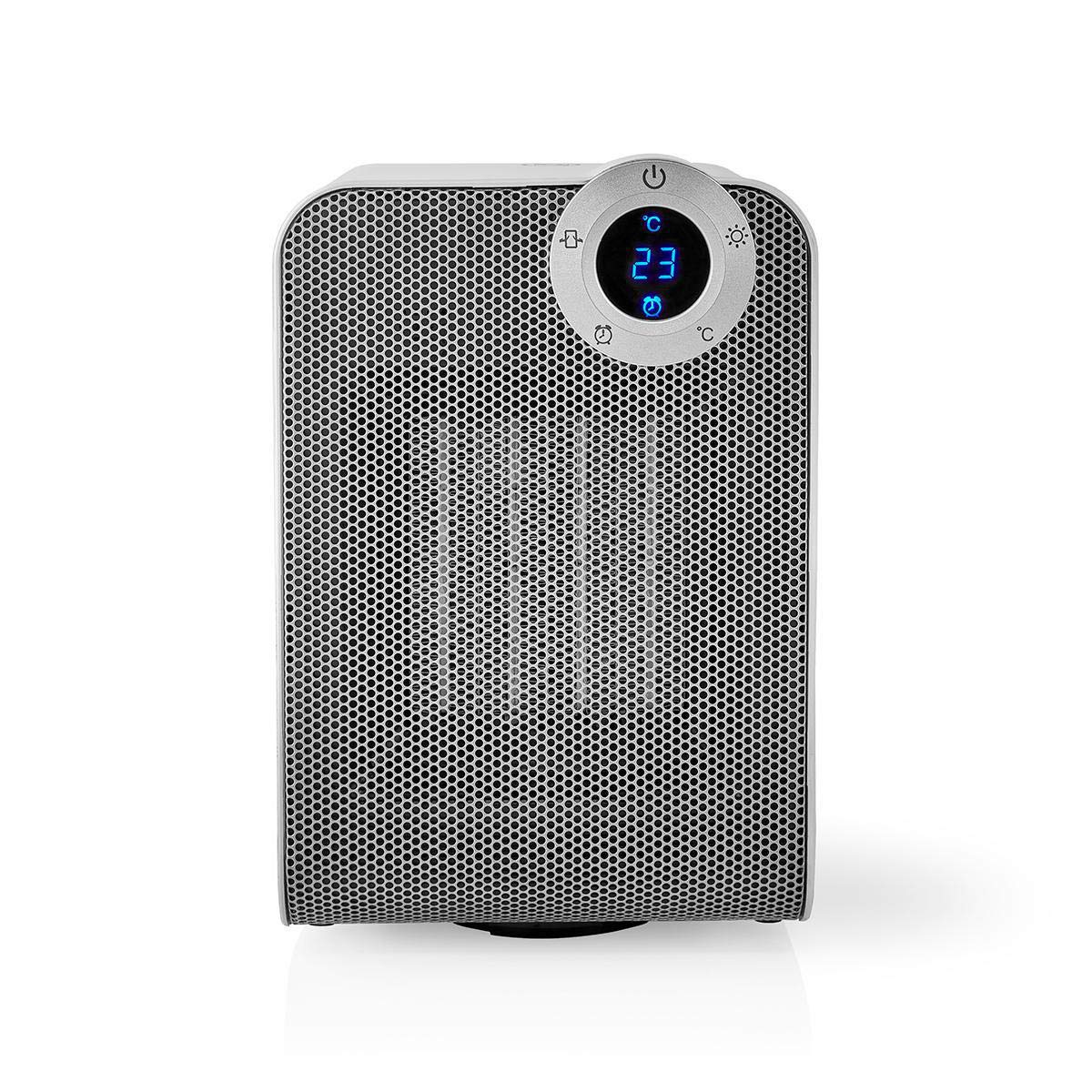
The front panel features a digital display that shows the current temperature and settings. Surrounding the display are touch-sensitive buttons for power, mode selection, oscillation, and timer functions.

The rear of the heater includes the main power switch (often a rocker switch) and the air intake grille. Ensure this area is not obstructed for proper airflow.

The compact design of the heater allows for easy placement in various indoor settings.
Impostare
Disimballaggio
- Estrarre con cautela la stufa dall'imballaggio.
- Verificare eventuali danni durante il trasporto. In caso di danni, non utilizzare il prodotto e contattare l'assistenza clienti.
- Conservare l'imballaggio per un eventuale stoccaggio o trasporto futuro.
Posizionamento
- Posizionare il riscaldatore su una superficie solida e piana.
- Ensure there is at least 1 meter (3 feet) of clear space around the heater to allow for proper air circulation and to prevent fire hazards.
- Do not place the heater near curtains, drapes, or other loose fabrics that could block the air intake or outlet.
- Assicurarsi che il cavo di alimentazione non venga schiacciato o posizionato sotto oggetti pesanti.
Accensione iniziale
- Plug the heater into a suitable electrical outlet (220-240V AC, 50/60Hz).
- Portare l'interruttore di alimentazione principale sul retro dell'unità in posizione "ON".
- The digital display on the front will illuminate, indicating the heater is in standby mode.
Wi-Fi Connection & App Setup
The NEDIS Wi-Fi Smart Fan Heater can be controlled via the Nedis SmartLife app, offering advanced features and remote control.
- Scarica il Nedis SmartLife app dall'App Store (iOS) o dal Google Play Store (Android).
- Registrati per un nuovo account o accedi se ne hai già uno.
- Assicurati che il tuo smartphone sia connesso a una rete Wi-Fi a 2.4 GHz.
- Nell'app, tocca l'icona '+' per aggiungere un nuovo dispositivo.
- Follow the on-screen instructions in the app to connect your heater to your Wi-Fi network. This usually involves putting the heater into pairing mode (refer to the app for specific instructions, often by pressing and holding a button on the heater).
- Once connected, you can control the heater from anywhere using the app.
Istruzioni per l'uso
Controllo manuale
The heater can be operated directly using the touch buttons on the front panel:
- Pulsante di accensione: Premere per accendere o spegnere il riscaldatore.
- Pulsante Modalità: Cycle through heating modes (e.g., High Heat 1800W, Low Heat 900W, Fan Only).
- Regolazione della temperatura: Use the '+' and '-' buttons (or similar) to set the desired temperature. The heater will operate at 1800W for rapid heating and automatically switch to 900W once the set temperature is approached.
- Pulsante di oscillazione: Press to activate or deactivate the horizontal oscillation feature, distributing heat across a wider area.
- Pulsante Timer: Set a timer for the heater to automatically turn off after a specified duration.
SmartLife App Control
Once connected to the Nedis SmartLife app, you can access advanced control features:
- Accensione/spegnimento remoto: Controlla il riscaldatore da qualsiasi luogo.
- Regolazione della temperatura: Precisely set and monitor the room temperature.
- Selezione della modalità: Choose between different heating levels or fan-only mode.
- Controllo delle oscillazioni: Attiva o disattiva la funzione di oscillazione.
- Pianificazione: Create custom heating schedules for different times of the day or week.
- Funzione timer: Set a countdown timer for automatic shutdown.
Controllo vocale
The heater supports voice control through popular smart assistants. To enable this, link your Nedis SmartLife account with your preferred voice assistant (Google Home or Amazon Alexa) via their respective apps. Once linked, you can use voice commands such as:
- "Hey Google, turn on the heater."
- "Alexa, set the heater to 22 degrees."
- "Ehi Google, spegni il riscaldamento."
Manutenzione
Pulizia
Una pulizia regolare aiuta a mantenere l'efficienza della stufa e ne prolunga la durata.
- Scollegare sempre la stufa e lasciarla raffreddare completamente prima di pulirla.
- Pulire le superfici esterne con un panno morbido, damp panno. Non usare detergenti abrasivi o solventi.
- Utilizzare un aspirapolvere con spazzola per rimuovere la polvere dalle griglie di aspirazione e di uscita dell'aria.
- Assicurarsi che non penetri acqua all'interno della stufa.
Magazzinaggio
Quando non in uso per periodi prolungati:
- Unplug the heater and clean it as described above.
- Store the heater in its original packaging or a suitable box to protect it from dust and damage.
- Conservare in un luogo fresco e asciutto, lontano dalla luce solare diretta e dall'umidità.
Risoluzione dei problemi
Se riscontri problemi con il tuo riscaldatore, fai riferimento ai seguenti problemi comuni e alle relative soluzioni:
| Problema | Possibile causa | Soluzione |
|---|---|---|
| Il riscaldatore non si accende. | No power, main switch off, tip-over switch activated. | Check power outlet, ensure main switch is ON, place heater upright on a stable surface. |
| Nessuna emissione di calore. | Modalità errata, impostazione del termostato troppo bassa. | Select a heating mode (High/Low), increase the thermostat setting above the current room temperature. |
| La connessione Wi-Fi non funziona. | Password Wi-Fi errata, rete a 5 GHz, distanza dal router. | Verify Wi-Fi password, ensure you are on a 2.4GHz network, move heater closer to the router, try re-pairing. |
| Il riscaldamento si spegne inaspettatamente. | Overheating protection, tip-over protection, timer activated. | Ensure heater is not covered, clear obstructions, place upright, check timer settings. Allow to cool before restarting. |
Specifiche
| Caratteristica | Specificazione |
|---|---|
| Numero di modello | WIFIFNH20CWT |
| Fonte di alimentazione | Elettrico con cavo |
| Potenza in uscita | 1800 W (alto), 900 W (basso) |
| Metodo di riscaldamento | Convezione |
| Dimensioni (L x P x A) | Dimensioni: 16.5 x 14.5 x 25 cm |
| Peso dell'articolo | 1.8 kg |
| Colore | Bianco / argento |
| Caratteristiche speciali | On/Off Timer, Oscillation, Tip-over Protection, Thermostat, Wi-Fi, App Control, Voice Control (Alexa, Google Home) |
| Tipo di installazione | Montaggio a pavimento |
| Uso consigliato | Interno, Casa, Sala Studio |
| Batterie richieste | NO |
Garanzia e supporto
Your NEDIS Wi-Fi Smart Fan Heater is covered by a manufacturer's warranty. Please refer to the warranty card included with your purchase for specific terms and conditions, including the warranty period and coverage details.
For technical support, troubleshooting assistance, or warranty claims, please contact NEDIS customer service. Contact information can typically be found on the product packaging, the NEDIS websito o la ricevuta d'acquisto.


