1. Introduzione
Grazie per l'acquistoasing the PRGR RED EYES POCKET HS-120 Speed Radar. This compact and portable device is designed to accurately measure various speeds, including golf club head speed, ball speed, and estimated carry distance. It is an invaluable tool for golfers and athletes looking to analyze and improve their performance during practice sessions. This manual provides detailed instructions on how to set up, operate, and maintain your device to ensure optimal performance and longevity.
2. Informazioni sulla sicurezza
Prima di utilizzare il dispositivo, leggere e comprendere le seguenti precauzioni di sicurezza:
- Non esporre il dispositivo a temperature estreme, alla luce solare diretta o a elevata umidità.
- Evitare di far cadere il dispositivo o di sottoporlo a forti impatti.
- Keep the device away from water and other liquids. If it gets wet, power it off immediately and allow it to dry completely before attempting to use it again.
- Non tentare di smontare o riparare il dispositivo da soli. Per qualsiasi intervento di assistenza, rivolgersi a personale qualificato.
- Use only the specified battery type (AAA batteries). Ensure correct polarity when inserting batteries.
- Rimuovere le batterie se il dispositivo non verrà utilizzato per un periodo prolungato per evitare perdite.
- Tenere fuori dalla portata dei bambini.
3. Contenuto della confezione
Verifica che tutti gli articoli siano presenti nel tuo pacco:
- PRGR RED EYES POCKET HS-120 Speed Radar Unit
- Borsa da trasporto
- Batterie AAA (4 pezzi)
- Manuale di istruzioni (questo documento)
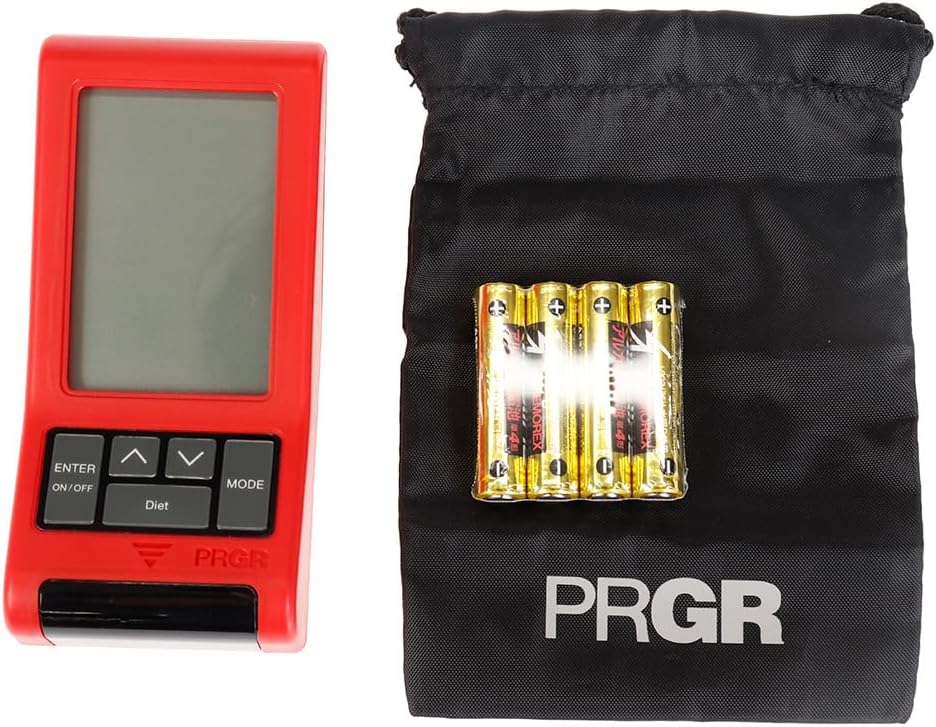
Figure 3.1: PRGR Red Eyes Pocket HS-120 with carrying pouch and batteries.
4. Prodotto finitoview
Familiarize yourself with the components of your PRGR RED EYES POCKET HS-120:
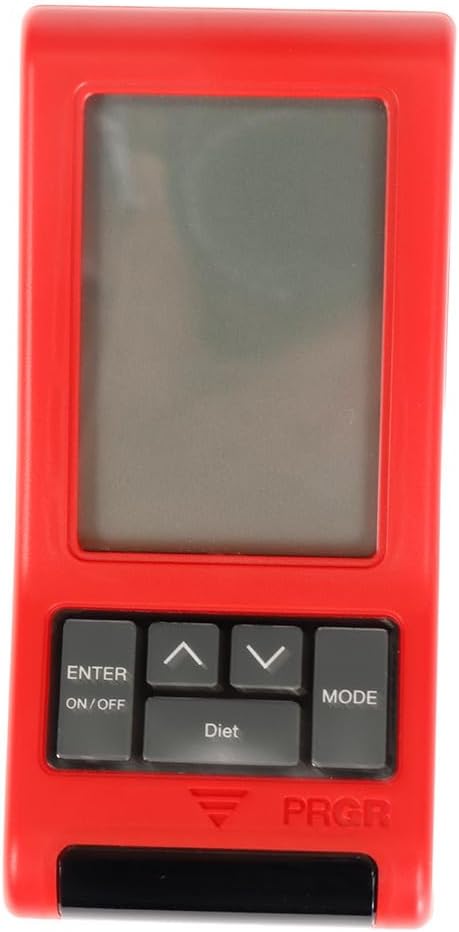
Figura 4.1: Fronte View (Display, Control Buttons)

Figura 4.2: Indietro View (Battery Compartment, Tripod Mount)

Figura 4.3: lato View

Figure 4.4: Control Buttons (ENTER/ON/OFF, Up/Down, MODE)
Componenti chiave:
- Schermo di visualizzazione: Shows measurement readings, mode, and settings.
- ENTER/ON/OFF Button: Powers the device on/off and confirms selections.
- Pulsanti su/giù: Navigare nei menu e regolare le impostazioni.
- Pulsante MODE: Switches between different measurement modes (e.g., Golf, Baseball) and settings.
- Finestra del sensore: The area where the radar detects speed. Keep clear of obstructions.
- Vano batteria: Located on the back, holds 4 AAA batteries.
- Supporto per treppiede: Allows for stable positioning on a tripod (tripod not included).
5. Impostazione
5.1. Installazione della batteria
- Individuare il coperchio del vano batteria sul retro del dispositivo.
- Far scorrere il coperchio per aprirlo.
- Inserire 4 batterie AAA, assicurandosi che la polarità (+/-) sia corretta, come indicato all'interno del vano.
- Chiudere saldamente il coperchio del vano batterie.
5.2. Accensione/Spegnimento
- Per accendere: tenere premuto il tasto ENTER/ON/OFF pulsante per circa 1 secondo.
- Per spegnere: tenere premuto il tasto ENTER/ON/OFF button for approximately 2 seconds until the display turns off. The device will also automatically power off after a period of inactivity to conserve battery life.
5.3. Impostazioni iniziali
Upon first power-on or after battery replacement, you may need to set the date, time, and preferred measurement units. Use the Up/Down buttons to adjust values and the ENTER button to confirm and move to the next setting.
6. Istruzioni per l'uso
6.1. Selezione della modalità di misurazione
Premere il tasto MODALITÀ button to cycle through available measurement modes. The PRGR RED EYES POCKET HS-120 supports various modes, including:
- Modalità golf: Measures club head speed, ball speed, and estimated carry distance.
- Baseball Mode: Measures bat swing speed and ball speed.
- Altre modalità: May include general speed measurement or calorie consumption tracking.
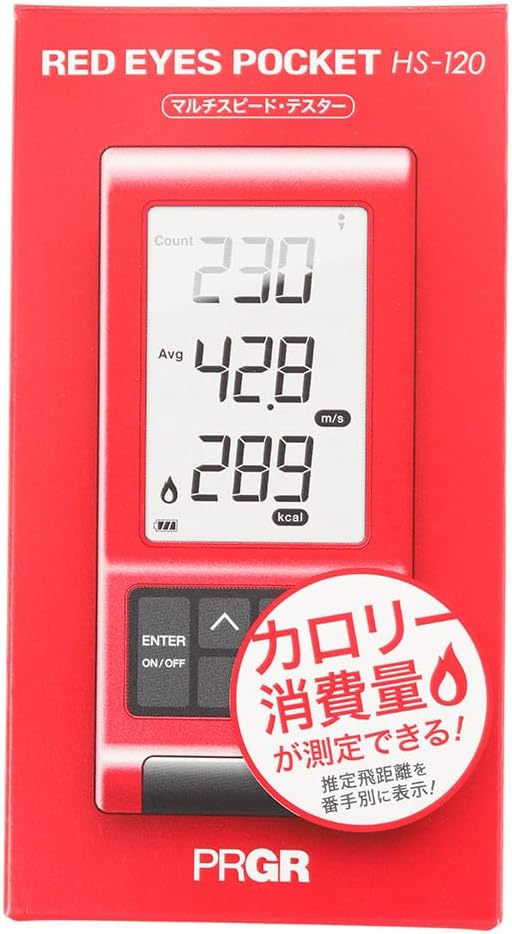
Figure 6.1: Retail packaging indicating multi-speed testing and calorie consumption features.
6.2. Taking a Measurement (Golf Mode Example)
- Place the device on a flat, stable surface approximately 1 meter (3 feet) behind the ball, aligned with your swing path. Ensure there are no obstructions between the device and the ball/club.
- Select 'Golf Mode' using the MODALITÀ pulsante.
- Prepare for your swing.
- Execute your swing. The device will automatically detect the club head speed and ball speed.
- The measured values (Head Speed, Ball Speed, Estimated Carry Distance) will be displayed on the screen.
- The device can also track calorie consumption, which may be displayed or accessible via a dedicated 'Diet' button as seen on the device.
6.3. Comprensione delle letture del display
Il display in genere mostra:
- HS (Head Speed): Your club head speed in meters per second (m/s) or miles per hour (mph).
- BS (Ball Speed): The speed of the ball immediately after impact.
- Trasportare: Estimated carry distance based on your swing and ball speed.
- Consumo calorico: An estimate of calories burned during your session (if applicable to the selected mode).
- Count/Avg: Number of swings taken and average speed.
6.4. Rifviewing Past Data
The device stores a certain number of past measurements. Use the Up/Down buttons to scroll through previous readings. Consult the on-screen prompts or the device's quick guide for specific instructions on data review.
7. Manutenzione
- Pulizia: Wipe the device with a soft, dry cloth. Do not use abrasive cleaners or solvents. Ensure the sensor window is clean and free of dust or smudges for accurate readings.
- Magazzinaggio: Store the device in its carrying pouch in a cool, dry place when not in use. Avoid storing in areas with extreme temperatures or high humidity.
- Cura della batteria: Replace batteries when the low battery indicator appears. If the device will not be used for an extended period, remove the batteries to prevent potential leakage and damage.
8. Risoluzione Dei Problemi
| Problema | Possibile causa | Soluzione |
|---|---|---|
| Il dispositivo non si accende. | Batterie scariche o inserite in modo errato. | Controllare la polarità delle batterie. Sostituirle con nuove batterie AAA. |
| No reading or inaccurate reading. | Incorrect device placement; sensor obstructed; environmental interference. | Ensure device is 1 meter behind the ball and aligned. Clean sensor window. Avoid using near strong electromagnetic fields. Ensure sufficient distance from other objects. |
| Il display è scuro o tremolante. | Batteria scarica. | Sostituire le batterie. |
| I pulsanti non rispondono. | Problema software temporaneo; batteria scarica. | Remove and reinsert batteries. Replace batteries if low. |
Se il problema persiste dopo aver provato queste soluzioni, contattare l'assistenza clienti.
9. Specifiche
| Caratteristica | Dettaglio |
|---|---|
| Numero di modello | HS-120 (GM042) |
| Colore | Gray, Red |
| Misurare | Dimensioni libere |
| Manualità | Ambidestro |
| Materiale | Plastica |
| Batterie | 4 x AAA (incluse) |
| Nome della serie | RED EYES |
| Dimensioni del pacco | Dimensioni: 14.6 x 8 x 4.6 cm |
| Peso | 162 grammi |
| Disponibile per la prima volta su Amazon.co.jp | 18 giugno 2019 |
10. Garanzia e supporto
This product comes with a manufacturer's warranty. Please refer to the warranty card included in your package for specific terms and conditions. For technical support, troubleshooting assistance, or warranty claims, please contact PRGR customer service through their official websito o il rivenditore presso cui hai acquistato il prodotto. Conserva la ricevuta d'acquisto come prova d'acquisto.
For more information, visit the official PRGR websito o contattare il distributore locale.


