1. Prodotto finitoview
The Bluedio Hi(Hurricane) Wireless Earbuds feature advanced Bluetooth 5.0 technology, 13mm dynamic speakers, and intelligent face recognition for music control. This manual provides essential information for setup, operation, and maintenance.

Figura 1: Contenuto della confezione e oltreview Diagramma
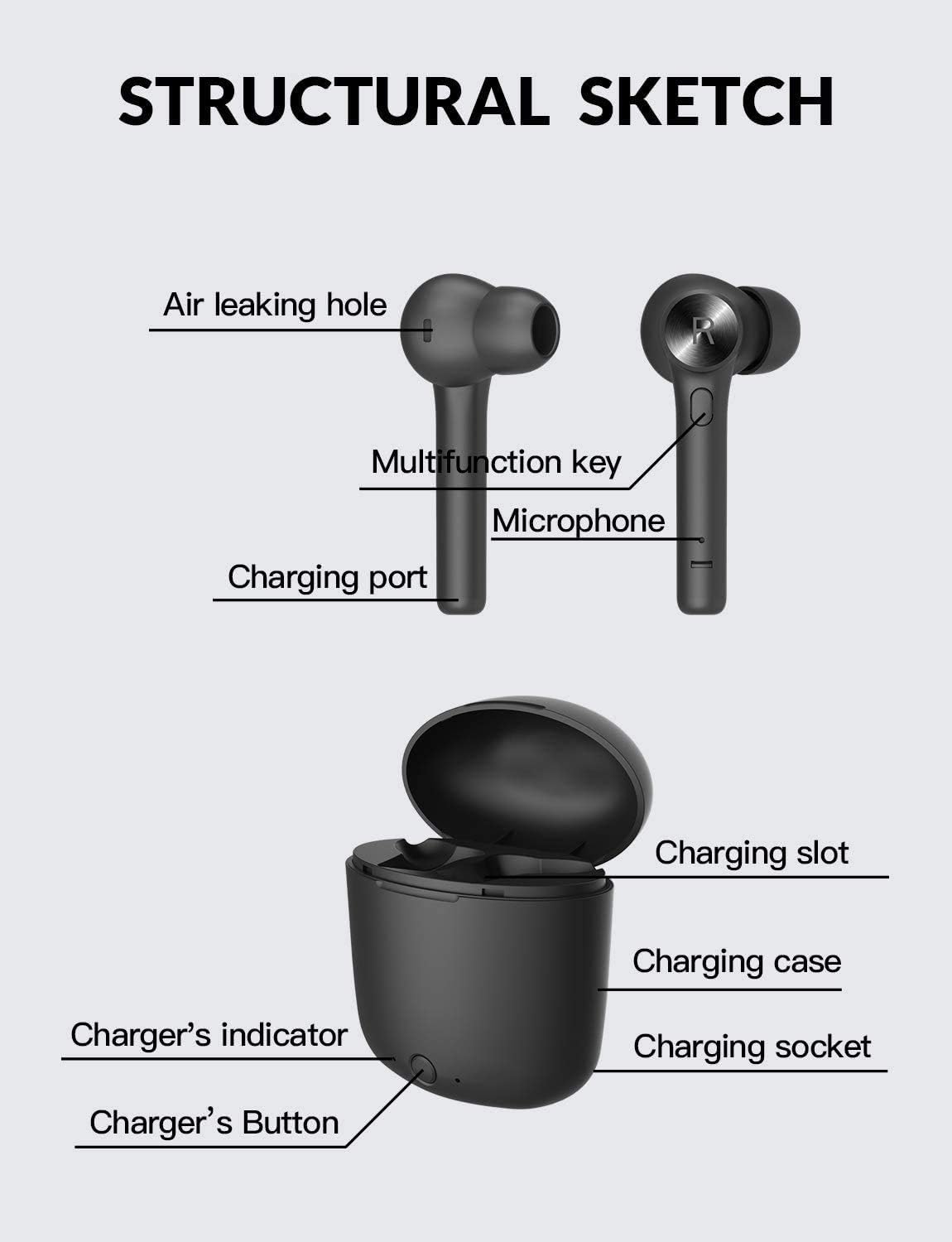
Figure 2: Structural Sketch of Earbuds and Charging Case
2. Impostazione
2.1 Carica iniziale
Before first use, ensure the charging case and earbuds are fully charged. Connect the provided USB-C cable to the charging case and a power source. The charger's indicator light will show charging status.
2.2 Associazione con il dispositivo
The Bluedio Hi(Hurricane) earbuds offer one-step pairing for convenience.
- Ensure Bluetooth is spento sul tuo cellulare.
- Aprire la custodia di ricarica.
- Long-press the multi-function button on both the left and right earbuds simultaneously until they power on.
- Attiva il Bluetooth sul tuo cellulare.
- Cercare available devices and select "Hi" to connect. The two earbuds will automatically pair with your phone.
Video: Bluedio Hi True Wireless Earbuds - Demonstrates product features and basic operation.
3. Istruzioni per l'uso
3.1 Riproduzione musicale e chiamate
The earbuds feature a multi-function button for various controls:
- Riproduci/Pausa: Premere una volta il pulsante multifunzione.
- Traccia successiva: Premere due volte il pulsante multifunzione sull'auricolare destro.
- Traccia precedente: Premere due volte il pulsante multifunzione sull'auricolare sinistro.
- Rispondi/Termina chiamata: Premere una volta il pulsante multifunzione durante una chiamata in arrivo o una chiamata attiva.
- Rifiuta chiamata: Long-press the multi-function button during an incoming call.
3.2 Tecnologia di riconoscimento facciale
The earbuds incorporate face recognition technology for intelligent music control:
- When you take down the GIUSTO earbud from your head, the music will automatically pause.
- When you wear the GIUSTO earbud, the music will continue to play.
3.3 Durata della batteria e ricarica
The earbuds provide approximately 5 hours of playtime on a single charge. The portable charging case holds roughly 4 full charges, extending total playtime to about 20 hours.
- Ricarica degli auricolari: Approximately 1 hour to fully charge from empty.
- Ricarica della custodia: Approximately 2 hours to fully charge the case.
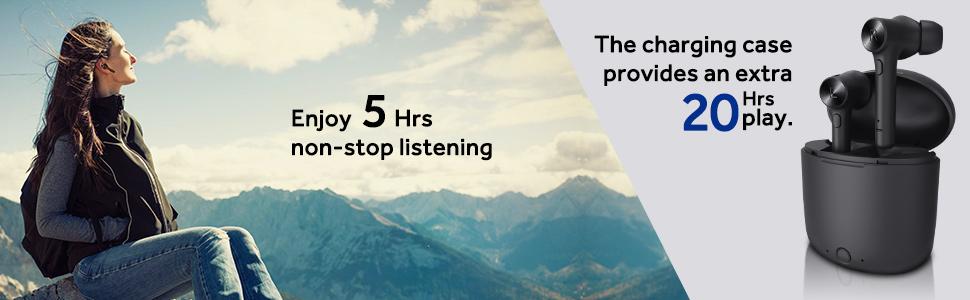
Figura 3: Tempo di riproduzione prolungato con custodia di ricarica
4. Manutenzione
4.1 Pulizia
Regularly clean the earbuds and charging case with a soft, dry cloth. Avoid using liquids or abrasive cleaners. Ensure the charging contacts on both the earbuds and case are free from dust and debris.
4.2 Conservazione
Quando non li usi, riponi gli auricolari nella loro custodia di ricarica per proteggerli e assicurarti che rimangano carichi. Conservali in un luogo fresco e asciutto, lontano da temperature estreme.
5. Risoluzione Dei Problemi
5.1 Only One Earbud Has Sound or Connects
If only one earbud has sound or connects, you may need to reset and manually re-pair the earbuds. Follow these steps:
- Ensure Bluetooth is spento sul tuo cellulare.
- Long-press the multi-function button on both earbuds for 10 seconds to turn them on. Then, press the multi-function button on each earbud three times quickly. Both earbuds will turn off automatically.
- Place both earbuds back into the charging case. Close the cover.
- Press the power button on the charging box to activate charging. Meanwhile, clear any previous pairing records of "Hi" from your phone's Bluetooth settings.
- Restart the earbuds by taking them out of the case and turn on Bluetooth on your phone to search for "Hi" and pair again.
5.2 Problemi di addebito
If the earbuds or case are not charging:
- Assicurarsi che il cavo di ricarica sia collegato saldamente sia alla custodia sia alla fonte di alimentazione.
- Verificare che la fonte di alimentazione sia attiva.
- Check the charging contacts on the earbuds and inside the case for any obstructions or dirt.
- Ensure the charging case button is pressed to initiate charging for the earbuds if they do not start automatically.
6. Specifiche
| Caratteristica | Dettaglio |
|---|---|
| Nome del modello | Hi(Hurricane) |
| Versione Bluetooth | 5.0 |
| Tecnologia di connettività | Bluetooth |
| Tecnologia di comunicazione wireless | Bluetooth |
| Tipo di driver audio | Driver dinamico |
| Dimensioni del driver audio | 13 millimetri |
| Risposta in frequenza | Frequenza 20000 Hz |
| Impedenza | 16 Ohm |
| Controllo del rumore | Cancellazione attiva del rumore |
| Posizionamento dell'orecchio | Nell'orecchio |
| Fattore di forma | Nell'orecchio |
| Caratteristica speciale | Face Recognition Technology, Microphone Included |
| Tipo di controllo | Controllo dei pulsanti |
| Livello di resistenza all'acqua | Resistente all'acqua |
| Auricolari per la riproduzione | 5 ore |
| Tempo di riproduzione totale (con custodia) | 20 ore |
| Porta di ricarica | USB-C (implied from video) |
7. Garanzia e supporto
7.1 Informazioni sulla garanzia
Please refer to the official Bluedio website or your purchase documentation for detailed warranty information regarding your Bluedio Hi(Hurricane) Wireless Earbuds. Keep your proof of purchase for warranty claims.
7.2 Assistenza clienti
For further assistance, technical support, or product inquiries, please visit the official Bluedio Store on Amazon: Bluedio Store.


