1. Introduzione
Thank you for choosing the Soundmaster Eliteline IR300SI Internet DAB+ FM Radio. This device offers a wide range of audio entertainment options, including Internet Radio, DAB+ digital radio, FM radio, Bluetooth connectivity, and USB playback. It also features Amazon Alexa compatibility for voice control and can be managed via the UNDOK app. This manual provides essential information for setting up, operating, and maintaining your radio.
2. Informazioni sulla sicurezza
- Leggere attentamente tutte le istruzioni prima dell'uso e conservarle per riferimento futuro.
- Non esporre il dispositivo a pioggia, umidità o temperature estreme.
- Assicurare una ventilazione adeguata; non ostruire le aperture di ventilazione.
- Utilizzare solo l'alimentatore fornito con l'unità.
- Non tentare di aprire o riparare l'unità da soli. Per qualsiasi intervento di assistenza, rivolgersi a personale qualificato.
- Tenere il dispositivo lontano da forti campi magnetici.
3. Contenuto della confezione
Si prega di verificare che tutti gli elementi siano presenti:
- Soundmaster Eliteline IR300SI Internet DAB+ FM Radio
- Adattatore di alimentazione
- Telecomando
- Manuale dell'utente (questo documento)
- Installation material (e.g., antenna, if separate)
4. Prodotto finitoview
Familiarize yourself with the various parts and controls of your Soundmaster IR300SI radio.

Figura 4.1: Angolato anteriore view of the Soundmaster IR300SI radio, showing the display, speakers, and control buttons.
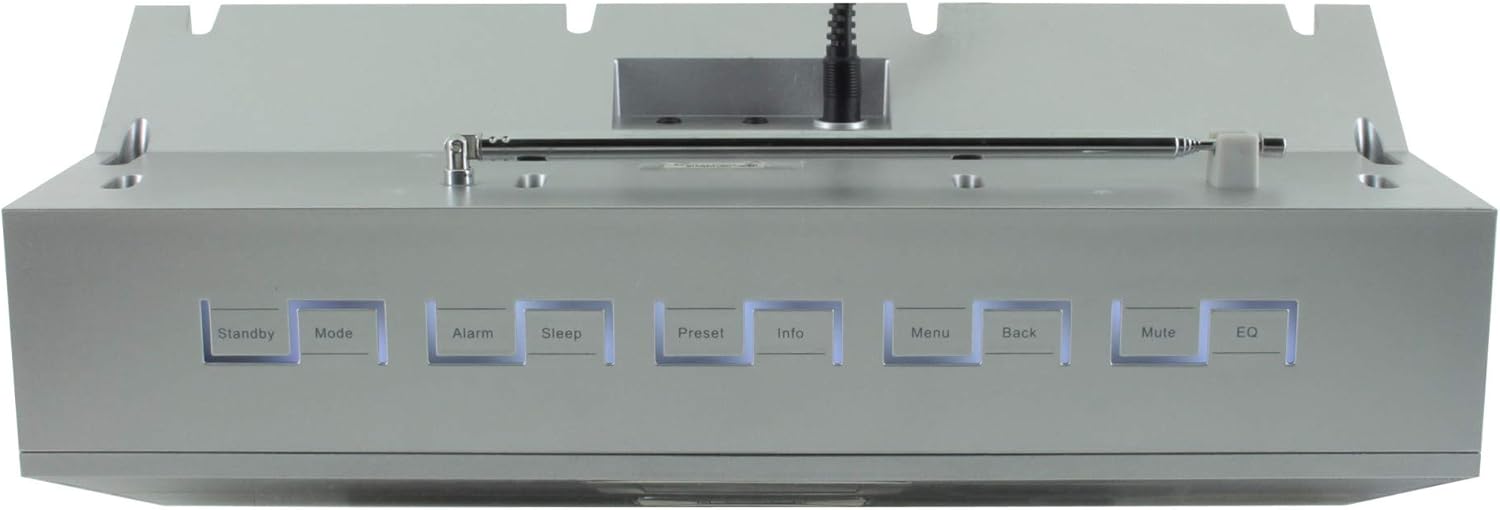
Figura 4.2: in alto view of the Soundmaster IR300SI radio, highlighting the control buttons: Standby, Mode, Alarm, Sleep, Preset, Info, Menu, Back, Mute, and EQ.
Pannello frontale
- 2.4" / 6 cm TFT Color Display: Shows station information, menus, and time.
- Relatori: Uscita audio stereo.
- Manopola/pulsanti di controllo: Per la navigazione e la selezione.
Controlli del pannello superiore
- Stand-by: Accensione/spegnimento.
- Modalità: Switch between Internet Radio, DAB+, FM, Bluetooth, USB, AUX.
- Allarme: Imposta e gestisci gli allarmi.
- Sonno: Activate sleep timer.
- Preimpostato: Accedi e salva le stazioni preferite.
- Informazioni: Visualizza informazioni aggiuntive sulla trasmissione corrente.
- Menu: Accedi alle impostazioni e alle opzioni del sistema.
- Indietro: Torna al menu precedente.
- Disattiva audio: Disattiva/riattiva l'audio.
- EQ: Seleziona le preimpostazioni dell'equalizzatore.
Rear/Side Panel Connections
- Potenza in ingresso: Collegare l'adattatore di alimentazione in dotazione.
- Antenna telescopica: Per la ricezione DAB+ e FM.
- Porta USB: Per la riproduzione di MP3 da dispositivi di archiviazione USB.
- 3.5mm Aux-In Port: Collegare sorgenti audio esterne.
- Jack per cuffie: Per l'ascolto privato.
5. Impostazione
5.1 Collegamento di alimentazione
- Connect the power adapter to the DC input on the rear of the radio.
- Collegare l'adattatore di corrente a una presa a muro.
- Premere il tasto Stand-by button on the top panel or remote control to turn on the radio.
5.2 Configurazione dell'antenna
Estendi completamente l'antenna telescopica per una ricezione radio DAB+ e FM ottimale.
5.3 Initial Wi-Fi Network Setup
Alla prima accensione, la radio ti guiderà attraverso la procedura guidata di configurazione iniziale:
- Select your preferred language using the control dial and confirm.
- La radio cercherà le reti Wi-Fi disponibili.
- Seleziona la tua rete dall'elenco.
- Enter your Wi-Fi password using the on-screen keyboard and control dial. Confirm to connect.
- Once connected, the radio will display the main menu.
6. Istruzioni per l'uso
Utilizzare il Modalità pulsante per passare da una sorgente audio all'altra.
6.1 Radio Internet
- Premere Modalità to select "Internet Radio".
- Navigate through categories (e.g., Location, Genre, Popular) using the control dial.
- Selezionare una stazione per iniziare la riproduzione.
- Per salvare una stazione come preimpostata, tenere premuto il tasto Preimpostato pulsante, quindi selezionare un numero preimpostato.
Radio DAB+ 6.2
- Premere Modalità to select "DAB+ Radio".
- La radio cercherà automaticamente le stazioni DAB+ disponibili.
- Use the control dial to browse and select stations.
- Premere e tenere premuto Preimpostato to save a station.
6.3 Radio FM
- Premere Modalità to select "FM Radio".
- La radio cercherà automaticamente le stazioni FM disponibili.
- Use the control dial to browse and select stations.
- Premere e tenere premuto Preimpostato to save a station.
6.4 Connettività Bluetooth
- Premere Modalità to select "Bluetooth". The radio will enter pairing mode.
- Sul tuo dispositivo mobile (smartphone, tablet), attiva il Bluetooth e cerca i dispositivi disponibili.
- Select "Soundmaster IR300SI" from the list to pair.
- Una volta effettuato il collegamento, puoi trasmettere in streaming l'audio dal tuo dispositivo alla radio.
6.5 Riproduzione USB
- Insert a USB storage device (formatted as FAT32) containing MP3 files nella porta USB.
- Premere Modalità to select "USB".
- Navigate through folders and select tracks using the control dial.
6.6 Ingresso AUX
- Connect an external audio device (e.g., MP3 player) to the 3.5mm Aux-In port using an audio cable (not supplied).
- Premere Modalità to select "AUX".
- Controlla la riproduzione dal tuo dispositivo esterno.
6.7 Sveglie e timer di spegnimento
- Allarmi: Premere il tasto Allarme button to set up to two alarms. Configure time, source (buzzer, radio), and frequency (daily, weekdays, weekends).
- Sveglia: Premere il tasto Sonno button to set a countdown timer (e.g., 15, 30, 60 minutes) after which the radio will automatically turn off.
6.8 Equalizzatore (EQ)
Premere il tasto EQ button to cycle through pre-programmed sound settings (e.g., Normal, Jazz, Rock, Classical, Pop, News) to optimize audio output for different content.
6.9 Amazon Alexa and UNDOK App Control
- Amazon Alexa: The radio is compatible with Amazon Alexa. Follow the instructions in the Alexa app to link your Soundmaster IR300SI for voice control functionalities.
- UNDOK App: Download the UNDOK app from your mobile device's app store. Ensure your mobile device and the radio are on the same Wi-Fi network. The app allows you to control the radio, browse stations, and manage settings remotely.
7. Manutenzione
7.1 Pulizia
- Prima di pulire la radio, scollegarla sempre dalla presa di corrente.
- Utilizzare un panno morbido e asciutto per pulire le superfici esterne.
- Non utilizzare detergenti abrasivi, cere o solventi poiché potrebbero danneggiare la finitura.
7.2 Conservazione
Se si prevede di non utilizzare la radio per un periodo prolungato, scollegarla dalla presa di corrente e conservarla in un luogo fresco e asciutto, lontano dalla luce solare diretta e da temperature estreme.
8. Risoluzione Dei Problemi
In caso di problemi, fare riferimento ai seguenti problemi comuni e alle relative soluzioni:
| Problema | Possibile causa | Soluzione |
|---|---|---|
| Nessun potere | Adattatore di alimentazione non collegato o presa difettosa. | Controllare i collegamenti elettrici. Provare una presa diversa. |
| Nessun suono | Volume troppo basso, disattivato o sorgente selezionata non corretta. | Aumentare il volume. Premere Muto. Ensure correct mode (Internet Radio, DAB+, etc.) is selected. |
| Impossibile connettersi al Wi-Fi | Password errata, segnale debole o problema con il router. | Verify password. Move radio closer to router. Restart router. |
| Scarsa ricezione DAB+/FM | Antenna non estesa o area con segnale debole. | Fully extend the telescopic antenna. Reposition the radio. |
| L'associazione Bluetooth non riesce | Radio not in pairing mode, or device too far. | Ensure radio is in Bluetooth mode. Move devices closer. Restart Bluetooth on both devices. |
9. Specifiche
| Caratteristica | Specificazione |
|---|---|
| Nome del modello | IR300SI |
| Marca | Maestro del suono |
| Tecnologia di connettività | Bluetooth, USB, Wi-Fi |
| Caratteristiche speciali | Integrated Clock, Internet Radio, DAB+, FM, Bluetooth, USB MP3 Playback, AUX-In, Headphone Jack, 2 Alarms with Weekend Function, Sleep Timer, Equalizer, Amazon Alexa Compatible, UNDOK App Control, Network Music Player (DLNA) |
| Modalità di uscita audio | Stereo |
| Potenza massima di uscita dell'altoparlante | 2 x 10 Watt RMS |
| Display | 2.4" / 6 cm TFT Color Display |
| Metodo di controllo | Remote Control, UNDOK App, On-device Buttons |
| Fonte di alimentazione | AC Powered (100 Volts input) |
| Dimensioni del prodotto (L x P x A) | Dimensioni: 17 x 18 x 15 cm |
| Peso dell'articolo | 2.3 chilogrammi |
| Colore | Argento |
| Dispositivi compatibili | Personal Computer, Televisione, Tablet, Smartphone, Laptop |
| Tipo di montaggio | Da tavolo |
10. Garanzia e supporto
The Soundmaster Eliteline IR300SI comes with a spare parts availability period of 1 year from the date of purchase. For technical support, warranty claims, or further assistance, please contact your retailer or the Soundmaster customer service department. Refer to the contact information provided with your purchase documentation.