Introduzione
The JBL Cruise Bluetooth Handlebar Speaker Kit is designed to provide audio entertainment for two-wheeled vehicles. This system features weather-resistant, Bluetooth-enabled speaker pods that mount to most motorcycles and scooters. It allows for wireless audio streaming from compatible devices and includes an integrated USB port for charging.

Immagine: Frontale view of the JBL Cruise Bluetooth Handlebar Speaker Kit, showing both speaker pods.
Contenuto della confezione
Verificare che tutti gli articoli siano presenti nel pacco:
- Two (2) Speakers: One speaker with an attached 9.5-foot harness and the other with an attached 22-inch harness.
- Guida Rapida
- Istruzioni di sicurezza
- Informazioni sulla garanzia
Note: Mirror integration mount kits are sold separately and are required for installation. These kits are available for various motorcycle makes, including Harley-Davidson models, and most scooters.
Configurazione e installazione
- Mounting Kit Selection: Obtain the appropriate JBL mirror integration mount kit for your specific vehicle (sold separately). Ensure compatibility with standard (right-handed) threaded mirrors.
- Posizionamento dei relatori: Position the speaker pods on your vehicle's handlebars using the selected mounting kit.
- Collegamento del cablaggio: Connect the speaker harnesses. The speaker with the longer 9.5-foot harness typically connects to the main power source or amplifier, while the speaker with the shorter 22-inch harness connects to the other speaker.
- Installazione sicura: Ensure all mounting hardware is securely fastened to prevent movement during operation.

Immagine: View of the JBL Cruise speakers showing the wiring harness connection point between the two pods.
Important: The JBL Cruise audio system is designed to work exclusively with standard (right-handed) threaded mirrors. Verify your vehicle's mirror type before purchasing a mounting kit.
Istruzioni per l'uso
Accensione/spegnimento
Refer to the Quickstart Guide for specific power button location and operation. Typically, a long press on the power button will turn the unit on or off.
Accoppiamento Bluetooth
- Ensure the JBL Cruise speakers are powered on.
- Attiva il Bluetooth sul tuo smartphone o altro dispositivo audio.
- Cercare available Bluetooth devices and select "JBL Cruise" from the list.
- Once paired, the speakers will indicate a successful connection (e.g., via an LED indicator or audio prompt).
The system uses Bluetooth 3.0 for connectivity, allowing wireless audio streaming from any Bluetooth-enabled device.
Riproduzione audio e controllo del volume
Control audio playback (play/pause, skip tracks) and adjust volume directly from the speaker pods. The controls are designed for ease of use, even when wearing gloves.
Porta di ricarica USB
An integrated USB port is available to charge your smartphone or other USB-powered devices while riding.
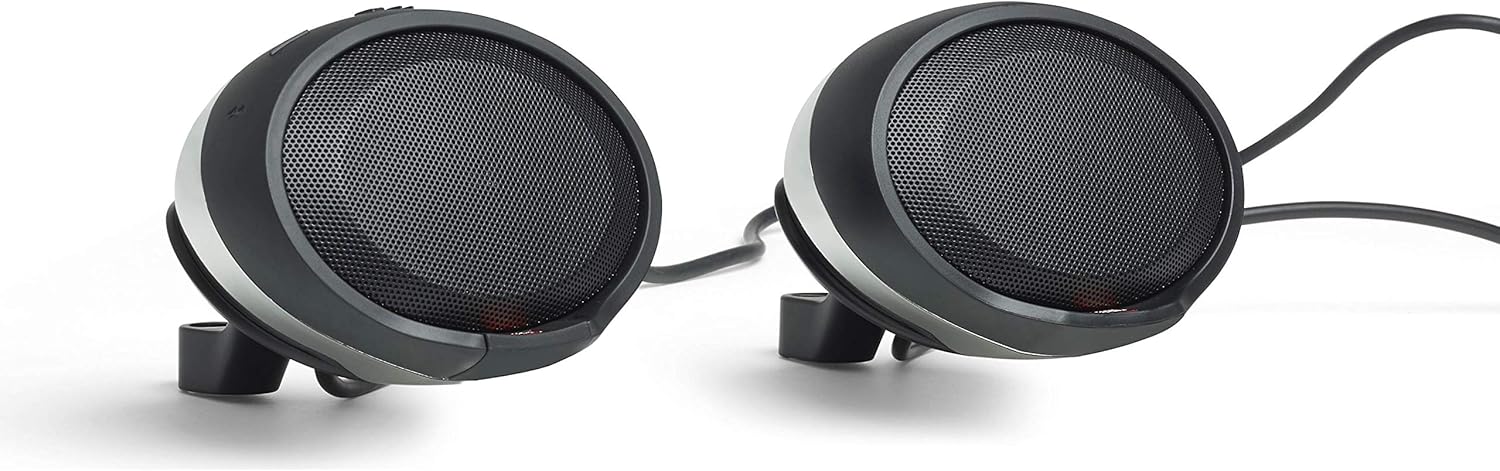
Immagine: Primo piano view of a JBL Cruise speaker pod, highlighting the control buttons and speaker grille.
Manutenzione e cura
The JBL Cruise speakers are IPX5-rated for weather resistance, meaning they are protected against low-pressure water jets from any direction. This rating ensures durability against rain and splashes during normal use.
- Pulizia: Utilizzare un morbido, damp cloth to clean the speaker pods. Avoid abrasive cleaners or solvents that could damage the finish or internal components.
- Esposizione all'acqua: While weather-resistant, avoid submerging the speakers in water or exposing them to high-pressure water jets.
- Magazzinaggio: When not in use for extended periods, store the speakers in a dry, cool environment.
- Ispezione: Periodically check all connections and mounting hardware for tightness and signs of wear.
Risoluzione dei problemi
- Nessun potere:
- Ensure the speakers are properly connected to a power source.
- Controllare tutti i collegamenti elettrici per motivi di sicurezza.
- Verify the vehicle's power supply is active.
- Nessun suono/Volume basso:
- Confirm Bluetooth is successfully paired and connected to your device.
- Adjust the volume on both the speakers and your connected device.
- Ensure no audio cables are loose or damaged.
- In noisy environments, the perceived volume may be reduced. The speakers are designed to provide clear audio but may be affected by extreme external noise.
- Disconnessione Bluetooth:
- Assicurati che il tuo dispositivo si trovi entro un raggio di 10 metri dal Bluetooth.
- Verificare la presenza di interferenze da altri dispositivi elettronici.
- Prova a disaccoppiare e riassociare il dispositivo.
- Problemi di ricarica:
- Verify the USB cable is securely connected to both the speaker and the device.
- Ensure the speakers are powered on for the USB charging function to operate.
For more detailed troubleshooting steps, refer to the included Quickstart Guide.
Specifiche
| Nome del modello | PWSSPKCRUISECHAM |
| Tipo di altoparlante | Woofer, Tweeter |
| Dimensioni dell'altoparlante | 2.5 Inches (65 mm Audio Driver) |
| Potenza massima in uscita | 20 Watt per altoparlante |
| Risposta in frequenza | 90 - 15,000 Hz |
| Tecnologia di connettività | Bluetooth 3.0 |
| Portata Bluetooth | 10 metri |
| Livello di resistenza all'acqua | IPX5 (resistente alle intemperie) |
| Metodo di controllo | Tocco |
| Materiale | Metallo, Plastica |
| Dimensioni del prodotto | 17"P x 15.25"L x 9.75"A |
| Peso dell'articolo | 3 libbre |
| Componenti inclusi | 2x Speakers, Quickstart guide, Safety instructions, Warranty information |
Informazioni sulla garanzia
This JBL Cruise Bluetooth Handlebar Speaker Kit is covered by a Garanzia del produttore JBL di 1 anno. Please refer to the included Warranty Information document for full terms and conditions, including details on coverage, limitations, and how to make a claim.
Keep your proof of purchase for warranty service.
Supporto
For further assistance, technical support, or to inquire about replacement parts, please consult the Quickstart Guide provided with your product. You may also visit the official JBL support websito per ulteriori risorse e informazioni di contatto.
Ensure you have your product model number (PWSSPKCRUISECHAM) and proof of purchase available when contacting support.


