1. Introduzione
This manual provides essential information for the safe and efficient use of your Epson EP-882AW Inkjet Multifunction Printer. It covers setup, operation, maintenance, and troubleshooting. Please read this manual thoroughly before using the product and keep it for future reference.
The Epson EP-882AW is an A4 color multifunction printer from the Colorio series. It features a compact design and utilizes 6-color dye ink for high-quality photo and document printing. Key functionalities include copying, scanning, and printing.
2. Informazioni sulla sicurezza
Per ridurre il rischio di incendi, scosse elettriche o lesioni, seguire sempre queste precauzioni di sicurezza di base:
- Non tentare di riparare da soli il prodotto. Affidare tutti gli interventi di manutenzione a personale di assistenza qualificato.
- Utilizzare solo il cavo di alimentazione fornito con il prodotto.
- Do not place the product in a location where it may be exposed to water or moisture.
- Assicurarsi che il prodotto sia posizionato su una superficie stabile e piana.
- Tenere il prodotto lontano da fonti di calore e dalla luce solare diretta.
3. Contenuto della confezione
Verificare che tutti gli articoli siano inclusi nella scatola:
- Epson EP-882AW Printer Unit
- Setup Ink Cartridges (6 colors)
- Disco del software
- Guida per l'utente (questo manuale)
- Vassoio del disco
- Cavo di alimentazione
- Scheda di garanzia
4. Impostazione
4.1 Disimballaggio e posizionamento
Carefully remove the printer from its packaging. Remove all protective tapes and materials. Place the printer on a flat, stable surface with adequate space around it for ventilation and operation.

Immagine: Frontale view of the Epson EP-882AW printer, showcasing its compact white design and central touch panel.
4.2 Collegamento di alimentazione
Connect the supplied power cord to the printer's power input and then to a wall outlet. Press the power button to turn on the printer.
4.3 Installazione della cartuccia d'inchiostro
Follow the on-screen instructions on the printer's 4.3-inch touch panel to install the setup ink cartridges. Ensure each cartridge is inserted into its correct color slot until it clicks into place.
4.4 Installazione del software
Insert the software disc into your computer's CD/DVD drive and follow the on-screen instructions to install the printer drivers and utility software. Alternatively, download the latest software from the official Epson support websito.
4.5 Connessione di rete
The EP-882AW supports wired LAN, wireless LAN (Wi-Fi), and USB connections.
4.5.1 Connessione Wi-Fi
On the printer's touch panel, navigate to the Wi-Fi setup menu. Select your network and enter the password. The printer also supports easy connection via QR code for smartphones.

Image: A smartphone screen displaying a QR code for quick Wi-Fi connection to the Epson printer, simplifying the setup process.
Example Wi-Fi connection details (for reference, actual details will vary): WIFI:S:DIRECT-FEDCBA98;T:WPA;P:12345678;;
4.5.2 Connessione USB
Connect the printer to your computer using a USB cable (not included). The necessary drivers will be installed automatically or can be installed manually using the software disc.
5. Istruzioni per l'uso
The EP-882AW features a 4.3-inch wide touch panel for intuitive operation.

Image: The Epson EP-882AW printer positioned on a wooden shelf, demonstrating its compact and space-saving design.
5.1 Caricamento della carta
The printer features a front two-stage paper feed, allowing two types of frequently used paper (e.g., plain paper and photo paper) to be loaded simultaneously. There is also a rear single-sheet manual feed for specialty media.
5.2 Stampa di documenti e foto
From your computer or smartphone, select the print function in your application. Choose the Epson EP-882AW as your printer, adjust print settings (paper size, type, quality), and initiate printing. The printer supports automatic duplex printing for two-sided documents.

Image: A composite image illustrating the Epson EP-882AW's capabilities: printing a document, utilizing the front paper feed, printing on a disc label, and direct printing from an SD card or USB memory.
5.3 Copia
Place the document face down on the scanner glass. On the printer's touch panel, select the 'Copy' function. Adjust settings such as number of copies, color/mono, and paper size, then press 'Start'.
5.4 Scansione
Place the document face down on the scanner glass. On the printer's touch panel, select the 'Scan' function. Choose your scan destination (e.g., computer, cloud service, memory card) and settings, then press 'Start'.
5.5 Direct Printing from Memory Card/USB
Insert an SD memory card or USB memory device into the designated slot on the printer. Use the touch panel to browse and select photos or documents for direct printing.
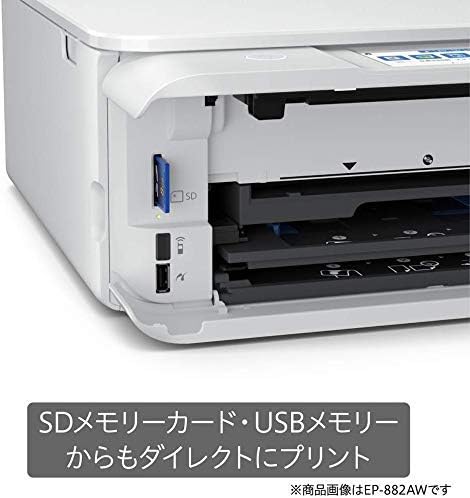
Immagine: un primo piano view of the Epson EP-882AW's side panel, showing the slots for an SD memory card and a USB memory stick, enabling direct printing without a computer.
5.6 Disc Label Printing
Attach the disc tray to the printer as instructed. Use the software provided or the printer's touch panel to design and print directly onto compatible CDs/DVDs.

Image: The Epson EP-882AW printer actively printing a label onto a CD/DVD using its dedicated disc tray, highlighting its disc label printing capability.
5.7 Using Epson Smart Panel App
Download the Epson Smart Panel app on your smartphone or tablet. This app allows you to control the printer remotely, print, scan, and check printer status.

Image: A person using the Epson Smart Panel app on a smartphone to control the Epson EP-882AW printer, which is visible in the background on a shelf.
6. Manutenzione
6.1 Pulizia della stampante
Pulire regolarmente l'esterno della stampante con un panno morbido eamp cloth. Clean the scanner glass with a lint-free cloth and glass cleaner. Avoid using abrasive cleaners.
6.2 Sostituzione delle cartucce d'inchiostro
When an ink cartridge is low or empty, a message will appear on the touch panel. Follow the on-screen instructions to replace the individual ink cartridge. Use genuine Epson ink cartridges for optimal performance.
6.3 Sostituzione della scatola di manutenzione
The EP-882AW features a replaceable maintenance box that collects waste ink. When the maintenance box is full, a message will appear. Refer to the printer's on-screen guide or the full user manual for instructions on how to replace it.
7. Risoluzione Dei Problemi
Questa sezione affronta i problemi più comuni che potresti incontrare.
7.1 La stampante non risponde
- Controllare che la stampante sia accesa.
- Verify all cables (power, USB, LAN) are securely connected.
- Ensure the printer is connected to the correct Wi-Fi network.
- Riavviare sia la stampante che il computer/dispositivo.
7.2 Scarsa qualità di stampa
- Controllare i livelli di inchiostro e sostituire le cartucce vuote o quasi vuote.
- Perform a nozzle check and head cleaning using the printer's utility software or touch panel.
- Assicurati di utilizzare le impostazioni della carta appropriate per il tuo lavoro di stampa.
7.3 Inceppamenti della carta
- Turn off the printer and carefully remove any jammed paper from the paper trays or output slot.
- Ensure paper is loaded correctly and not over the maximum fill line.
- Utilizzare carta conforme alle specifiche della stampante.
8. Specifiche
| Caratteristica | Specificazione |
|---|---|
| Nome del modello | EP-882AW |
| Funzioni | Stampa, Copia, Scansiona |
| Tecnologia di stampa | Inkjet (6-color dye ink) |
| Risoluzione massima di stampa (colore) | 4800 x 1200 dpi |
| Maximum Print Resolution (Monochrome) | 600 dpi |
| Formato carta massimo | A4 (8.5 x 11 pollici) |
| Stampa fronte-retro | Automatico |
| Alimentazione della carta | Front 2-stage, Rear 1-sheet manual |
| Tipo di scanner | Foto |
| Metodo di funzionamento | 4.3-inch Wide Touch Panel |
| Connettività | Wired LAN, Wireless LAN (Wi-Fi), USB |
| Dispositivi compatibili | Smartphone, Computer |
| Dimensioni del prodotto (L x P x A) | Dimensioni: 34.9 x 34 x 14.2 cm |
| Peso dell'articolo | 8.36 kg |
| Colore | Bianco |
9. Garanzia e supporto
9.1 Informazioni sulla garanzia
Your Epson EP-882AW printer comes with a limited warranty. Please refer to the warranty card included in your package for specific terms, conditions, and duration of coverage. Keep your purchase receipt as proof of purchase for warranty claims.
9.2 Assistenza clienti
For technical assistance, troubleshooting beyond this manual, or warranty service, please contact Epson customer support. Visit the official Epson websito per informazioni di contatto, FAQ e download di driver.
Official Epson Support Websito: www.epson.com/support


