1. Introduzione
The ELEPHAS BL128 Mini Projector is a compact and versatile device designed for home entertainment, gaming, and portable presentations. Featuring advanced projection technology, it delivers a high-quality visual and audio experience in a small, lightweight package.
This manual provides detailed instructions for setting up, operating, and maintaining your projector to ensure optimal performance and longevity.
2. Contenuto della confezione
Si prega di selezionare la casella per i seguenti elementi:
- ELEPHAS BL128 Mini Projector x1
- Telecomando x1
- Copriobiettivo x1
- Cavo di alimentazione CA x1
- Cavo HDMI x1
- Cavo AV 3 in 1 x1
- Manuale utente (giapponese) x1
- Treppiede x1
- Dedicated Carry Bag x1

Image: All items included in the ELEPHAS BL128 Mini Projector package.
3. Caratteristiche del prodotto
- Design ultracompatto e leggero: Measuring 15.4 x 12 x 6 cm and weighing only 420g, this projector is highly portable, offering a home theater experience in a palm-sized device.
- High-Quality 1080P Native Resolution: Equipped with German LED projection technology and the latest LCD display, it delivers native 1080P resolution with an 8000:1 contrast ratio and 24-bit color support for vivid, detailed images.
- Large Screen Projection & Zoom Function: Project images from 30 to 200 inches. The 50% to 100% zoom function allows for flexible screen size adjustment. Ceiling projection is also supported.
- Built-in HIFI Stereo Speaker: Enjoy immersive audio with the integrated HIFI stereo speaker, providing a surround sound effect for movies, games, and videos.
- Ampia compatibilità: Features HDMI, USB, AV, and 3.5mm ports for connection to various devices including Fire Stick TV, Chromecast, PCs, laptops, external speakers, TV Boxes, DVD players, PS3, PS4, and USB memory.
- Sistema di raffreddamento avanzato: An upgraded cooling system with an innovative fan ensures low noise operation and excellent quietness, allowing for focused viewing.

Image: Internal components illustrating the advanced lens and display technology.
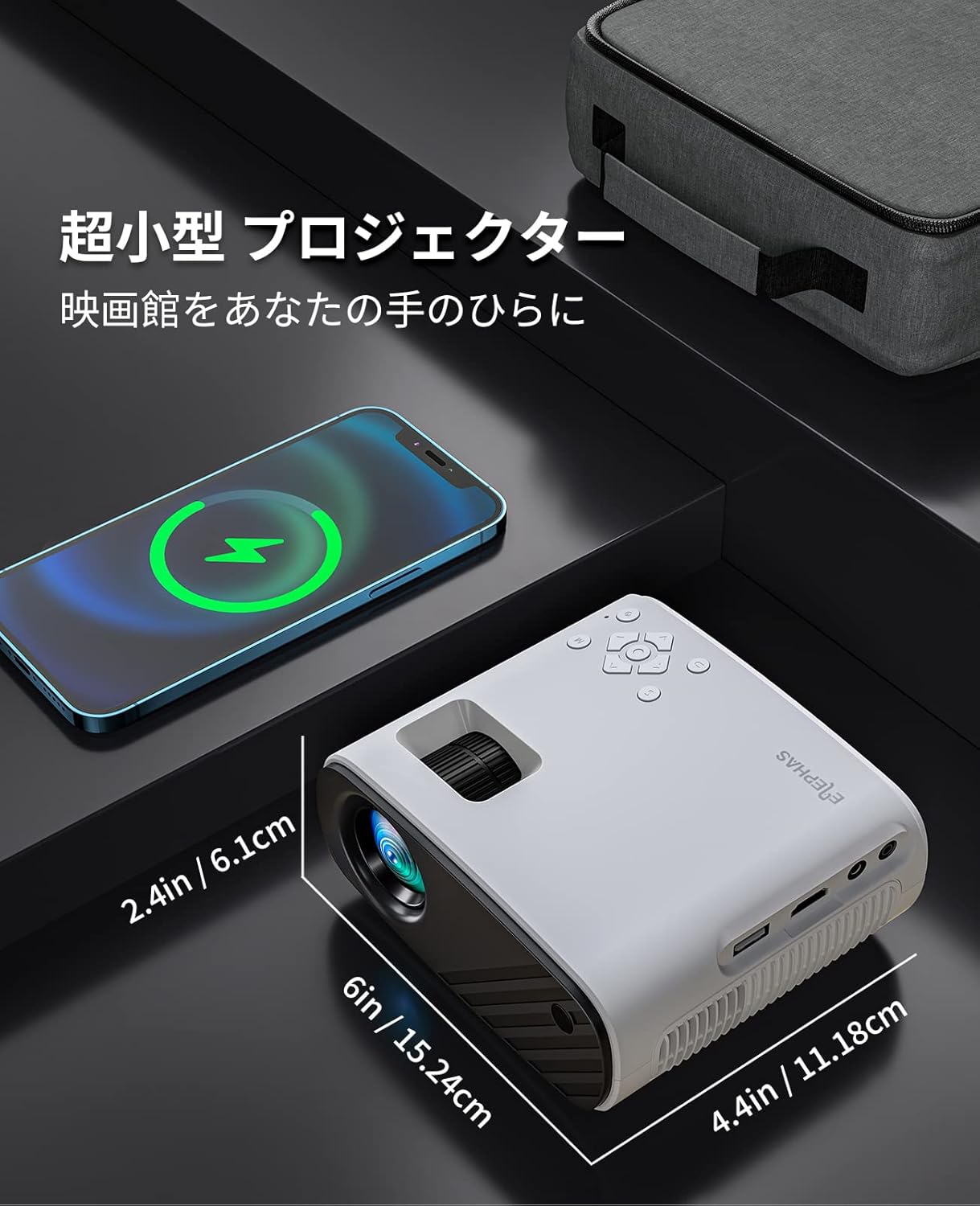
Image: The compact size of the ELEPHAS BL128 Mini Projector compared to a smartphone.

Image: Illustration of the projector's efficient heat dissipation system.
4. Impostazione
- Disimballare il proiettore: Rimuovere con attenzione tutti i componenti dalla confezione.
- Collegamento elettrico: Connect the AC power cable to the projector and then to a power outlet.
- Posizionamento:
- Posizionare il proiettore su una superficie stabile e piana.
- For ceiling projection, use the included tripod or a compatible ceiling mount.
- Ensure the projector lens is facing the desired projection surface (wall or screen).
- Accensione: Premere il pulsante di accensione sul proiettore o sul telecomando per accenderlo.
- Regolazione della messa a fuoco: Ruotare l'anello di messa a fuoco sull'obiettivo del proiettore finché l'immagine non risulta chiara e nitida.
- Correzione trapezoidale: Adjust the keystone setting (if available, typically in the menu) to correct any trapezoidal distortion of the image.

Image: Projector setup in a living room demonstrating large screen projection.

Image: Visual representation of the projector's 50-100% zoom function.
5. Istruzioni per l'uso
- Accensione/spegnimento: Premere il pulsante di alimentazione sul proiettore o sul telecomando.
- Selezione della sorgente di ingresso: Use the 'Source' button on the remote or projector to cycle through available input options (HDMI, USB, AV).
- Navigazione nel menu: Use the arrow keys and 'OK' button on the remote or projector to navigate the on-screen menu for settings adjustments.
- Controllo del volume: Adjust the volume using the '+' and '-' buttons on the remote or projector.
- Funzione zoom: Access the zoom function through the projector's menu to adjust the screen size from 50% to 100% without moving the projector.
Video: A demonstration of the KITELY M8 projector, showcasing its features and operation. This video is relevant for understanding general projector functionality.
Video: A product display for the HY300Ultra projector, illustrating its design and projection capabilities. This video provides a visual overview of a similar projector type.
Video: An actual product display video for the HY300 Pro+ projector, showing its physical aspects and projection quality. This video helps visualize the projector in use.
6. Connettività
The ELEPHAS BL128 Mini Projector offers multiple connectivity options to suit various devices:
- Porta HDMI: Connect to laptops, PCs, game consoles (PS3, PS4), streaming devices (Fire Stick TV, Chromecast), and TV Boxes using the included HDMI cable.
- Porta USB: Insert a USB memory stick to play media filedirettamente.
- Porta AV: Use the 3-in-1 AV cable to connect to older devices like DVD players.
- Jack audio da 3.5 mm: Collega altoparlanti o cuffie esterni per un audio migliorato.
- Wireless Connectivity (Screen Mirroring): The projector supports screen mirroring via Miracast (Android) and AirPlay (iOS) for smartphones and tablets. Navigate to the 'My Apps' section and select the appropriate screen mirroring option.
Nota:
- Due to HDCP copyright protection, direct playback of content from Netflix, Amazon Prime, and Hulu is not supported. Please connect a Fire TV Stick or similar streaming device to the HDMI port for viewing these services.
- For iOS/Android smartphone connection, an HDMI adapter (Lightning to HDMI or Micro USB/Type-C to HDMI) may be required and is sold separately.

Immagine: Oltreview delle porte di connettività del proiettore e dei dispositivi compatibili.

Image: Demonstrating compatibility with Fire TV Stick for streaming services.
Video: A guide on how to connect a projector to a PC, useful for beginners. This video demonstrates the connection process for external devices.
7. Manutenzione
- Pulizia delle lenti: Use a soft, lint-free cloth or lens cleaning paper to gently wipe the projector lens. Avoid using abrasive cleaners or excessive force.
- Pulizia del filtro antipolvere: Regularly check and clean the dust filter (if accessible) to prevent overheating and maintain optimal performance. Refer to the Japanese user manual for specific instructions on filter access.
- Magazzinaggio: When not in use, store the projector in a cool, dry place, preferably in its dedicated carry bag, to protect it from dust and damage.
8. Risoluzione Dei Problemi
| Problema | Possibile causa | Soluzione |
|---|---|---|
| Nessuna immagine proiettata |
|
|
| L'immagine è sfocata |
|
|
| Nessun suono |
|
|
| Il telecomando non funziona |
|
|
9. Specifiche
| Caratteristica | Dettaglio |
|---|---|
| Marca | ELEFE |
| Numero di modello | BL128 |
| Tipo di visualizzazione | LCD |
| Risoluzione nativa | 1920 x 1080 (1080P Full HD) |
| Rapporto di contrasto | 8000:1 |
| Dimensioni della proiezione | 30 - 200 pollici |
| Distanza di proiezione consigliata | 0.8 - 2.2 metri |
| Funzione di zoom | 50% - 100% |
| Tecnologia di connettività | HDMI, USB, AV, 3.5mm Audio Jack, Wireless (Screen Mirroring) |
| Porte HDMI | 1 |
| Porte USB | 1 |
| Altoparlante incorporato | Yes (HIFI Stereo) |
| Dimensioni del prodotto (L x P x A) | Dimensioni: 15.4 x 12 x 6 cm |
| Peso del prodotto | 0.42 chilogrammi |
| Frequenza di aggiornamento | Frequenza 60 Hz |
| Fonte di alimentazione | Cavo di alimentazione CA |
10. Garanzia e supporto
The ELEPHAS BL128 Mini Projector comes with a Garanzia di 2 anno dalla data di acquisto.
During the warranty period, ELEPHAS provides dedicated customer service and technical support. In the event of repair difficulties, we offer a free exchange or refund.
For any inquiries, technical assistance, or warranty claims, please contact our customer support team through the following channels:
- E-mail: support@elephas.com (Example)
- Websito: www.elephas.com/support (Example)
Please have your product model number (BL128) and purchase date ready when contacting support.


