1. Introduzione
This manual provides detailed instructions for the setup, operation, and maintenance of your Targus M610 AKM610AP Wireless Mouse and Keyboard Combo. This combo offers a reliable 2.4GHz wireless connection, a full-sized keyboard, and a high-definition 1600 DPI optical mouse for efficient and comfortable use.

Figure 1: Targus M610 AKM610AP Wireless Mouse and Keyboard Combo. This image shows the full-sized black wireless keyboard and the matching black wireless mouse.
2. Contenuto della confezione
Verifica che tutti gli articoli siano presenti nel tuo pacco:
- Targus Wireless Keyboard
- Mouse senza fili Targus
- Ricevitore USB
- 1 batteria AA (per il mouse, inclusa)

Figure 2: The wireless mouse shown alongside its compact USB receiver. The receiver enables wireless connectivity for both the mouse and keyboard.
3. Istruzioni per l'installazione
Follow these steps to set up your Targus Wireless Mouse and Keyboard Combo:
- Installa le batterie:
- For the mouse: Open the battery compartment cover on the underside of the mouse. Insert the provided AA battery, ensuring correct polarity (+/-). Close the cover.
- For the keyboard: Open the battery compartment cover on the underside of the keyboard. Insert the required batteries (typically AAA, not included for keyboard based on JSON). Ensure correct polarity (+/-). Close the cover.
- Collegare il ricevitore USB:
Locate an available USB port on your computer. Insert the USB receiver firmly into the USB port. Your computer should automatically detect and install the necessary drivers. This is a plug-and-play device, requiring no additional software installation.

Figura 3: Un primo piano view of the compact USB receiver, which facilitates the wireless connection for both the keyboard and mouse.
- Accensione:
Ensure the power switch on both the mouse and keyboard (if present) is in the "ON" position. The devices should now be ready for use.
4. Istruzioni per l'uso
4.1. Utilizzo della tastiera
The Targus M610 keyboard features a full-sized layout for comfortable typing.
- Digitazione standard: Utilizzare i tasti alfanumerici per l'inserimento del testo.
- Tasti funzione (F1-F12): These keys may have secondary multimedia functions (e.g., volume control, media playback) accessible by pressing the Fn tasto contemporaneamente.
- Tastiera numerica: The dedicated numeric keypad on the right provides quick entry for numbers and calculations.
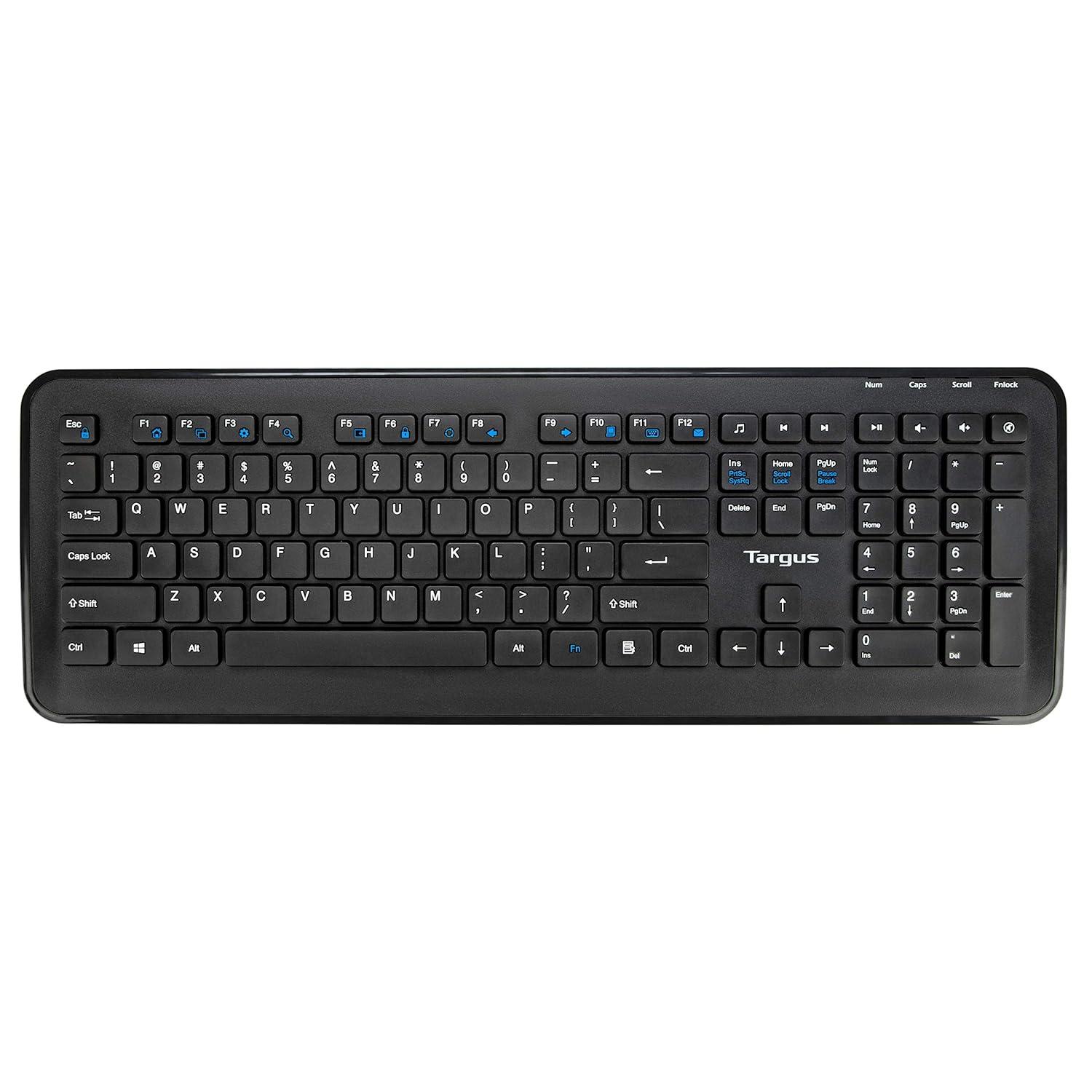
Figura 4: Dall'alto verso il basso view of the full-sized Targus wireless keyboard, highlighting its layout and function keys.
4.2. Utilizzo del mouse
The Targus M610 mouse is equipped with a high-definition 1600 DPI optical sensor for precise tracking.
- Pulsante sinistro del mouse: Selezione e attivazione primaria.
- Pulsante destro del mouse: Accede ai menu contestuali.
- Rotella di scorrimento: Naviga verticalmente attraverso i documenti e web pagine. Può anche funzionare come pulsante centrale.
- DPI Sensor: The 1600 DPI optical sensor provides accurate and responsive cursor movement.

Figura 5: in alto view of the Targus wireless mouse, showing the left and right click buttons and the scroll wheel.
5. Manutenzione e cura
To ensure the longevity and optimal performance of your Targus Wireless Combo, follow these maintenance guidelines:
- Pulizia: Utilizzare un panno morbido e asciutto per pulire le superfici della tastiera e del mouse. Per lo sporco ostinato, leggermente dampPulire il panno con acqua o una soluzione detergente delicata. Evitare prodotti chimici aggressivi o materiali abrasivi.
- Sostituzione della batteria: Replace batteries when performance degrades or the low battery indicator (if present) illuminates. Always use fresh, high-quality batteries of the specified type (AA for mouse, typically AAA for keyboard).
- Magazzinaggio: When not in use for extended periods, store the combo in a cool, dry place. Consider removing batteries to prevent leakage.
- Evitare i liquidi: Keep the keyboard and mouse away from liquids to prevent damage to internal components.
6. Risoluzione Dei Problemi
If you encounter issues with your Targus Wireless Combo, refer to the following common solutions:
| Problema | Soluzione |
|---|---|
| La tastiera o il mouse non rispondono. |
|
| Connessione intermittente o ritardo. |
|
| Il cursore del mouse è irregolare o non si muove fluidamente. |
|
7. Specifiche
Detailed technical specifications for the Targus M610 AKM610AP Wireless Mouse and Keyboard Combo:
| Caratteristica | Dettaglio |
|---|---|
| Marca | Targa |
| Numero di modello | AKM610AP |
| Tecnologia di connettività | Ricevitore USB wireless a 2.4 GHz |
| Colore | Nero |
| Sensore del mouse | Sensore ottico da 1600 DPI |
| Tipo di tastiera | Full-sized with Multimedia Keys |
| Dispositivi compatibili | Personal Computer, Laptop, Television, Projector |
| Fonte di alimentazione | Alimentato a batteria |
| Batterie richieste | 1 AA battery (for mouse, included) |
| Dimensioni del prodotto (tastiera) | Approximately 45.5 cm (Width) x 15.7 cm (Height) |
| Dimensioni del prodotto (mouse) | Circa 6.6 cm (lunghezza) x 3.8 cm (larghezza) x 1.1 cm (altezza) |
| Peso dell'articolo | 611 g (total combo weight) |

Figure 6: Diagram illustrating the approximate dimensions of the Targus wireless keyboard, including its width and height, and highlighting the 12 multimedia keys.

Figure 7: Diagram illustrating the approximate dimensions of the Targus wireless mouse (length, width, height) and indicating the high-precision nano receiver.
8. Garanzia e supporto
The Targus M610 AKM610AP Wireless Mouse and Keyboard Combo comes with a Garanzia di 3 anno.
For warranty claims, technical support, or further assistance, please contact Targus customer service through their official webo al rivenditore presso cui è stato acquistato il prodotto. Conservare la prova d'acquisto per la convalida della garanzia.
For more information, visit the official Targus websito: www.targus.com


