Introduzione
This manual provides instructions for the proper setup, operation, and maintenance of your Insignia NS-WHP314 Wireless Over-Ear Headphones with Charging Dock. Please read this manual thoroughly before using the product to ensure optimal performance and longevity.
Contenuto della confezione
- Insignia NS-WHP314 Wireless Over-Ear Headphones
- Stazione di ricarica
- Power Adapter (typically included)
- Audio Cable (typically included for wired option)
Note: Specific accessories may vary based on packaging.
Prodotto finitoview
The Insignia NS-WHP314 headphones offer wireless audio transmission and a comfortable over-ear design. They feature a built-in lithium-ion battery and come with a dedicated charging dock for convenient power and storage.
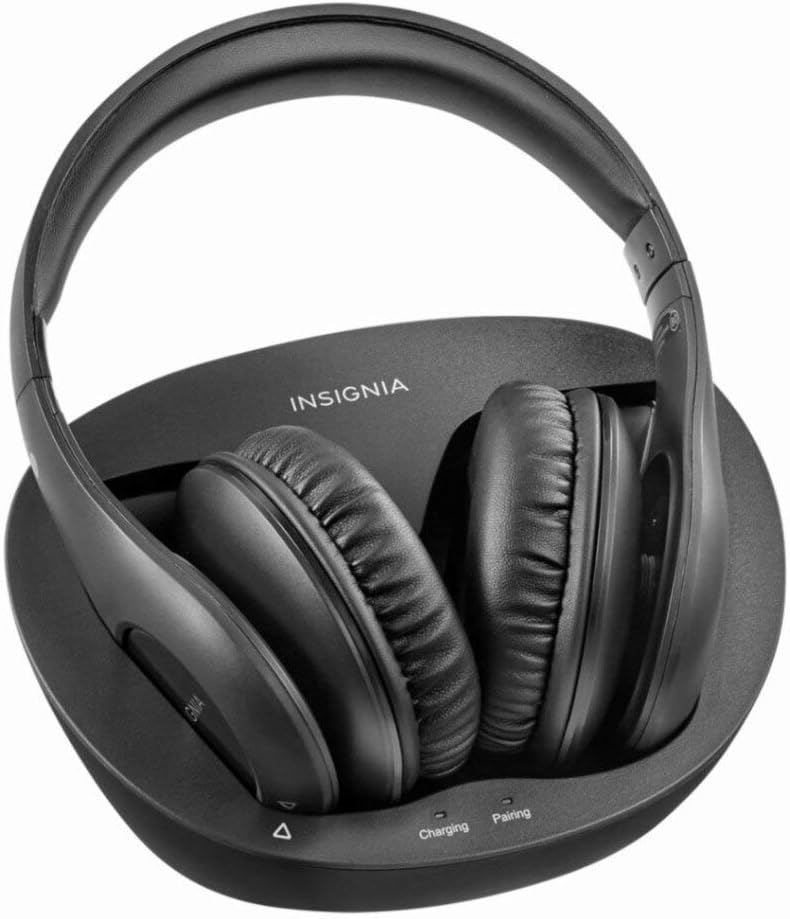
Figura 1: Insignia NS-WHP314 Wireless Over-Ear Headphones resting on their charging dock. The headphones are black with soft earcups, and the dock is also black, featuring "INSIGNIA" branding and indicator lights for "Charging" and "Pairing".
Caratteristiche principali:
- Connettività wireless: Utilizes Bluetooth and 2.4GHz digital wireless signal for audio transmission up to 45 feet.
- Integrated Charging Dock: Provides a convenient solution for charging and storing the headphones.
- Ascolto prolungato: Built-in lithium-ion battery offers up to 8 hours of wireless listening.
- Design confortevole: Over-ear style with an adjustable headband for extended wear.
- Controllo multimediale: Features remote control for media playback.
Impostare
1. Carica delle cuffie
- Connect the charging dock to a power source using the provided power adapter.
- Place the headphones onto the charging dock, ensuring the charging contacts align. The "Charging" indicator light on the dock should illuminate.
- Allow the headphones to fully charge before first use. A full charge provides approximately 8 hours of listening time.

Figura 2: Superiore view of the Insignia NS-WHP314 charging dock. The dock is black with the "INSIGNIA" logo. It features a recessed area designed to cradle the headphones, with charging pins visible. Labels for "Charging" and "Pairing" indicator lights are present at the front.
2. Associazione con un dispositivo Bluetooth
- Assicurarsi che le cuffie siano cariche e accese.
- Activate Bluetooth on your audio source device (e.g., smartphone, tablet, computer).
- Put the headphones into pairing mode. This typically involves holding a power or pairing button on the headphones until an indicator light flashes, or the "Pairing" light on the dock illuminates.
- On your device, search for available Bluetooth devices and select "NS-WHP314" or similar from the list.
- Once paired, the "Pairing" indicator light will typically become solid or turn off.

Figura 3: Davanti view of the Insignia NS-WHP314 Wireless Over-Ear Headphones. The headphones are black, featuring an adjustable headband and soft, cushioned earcups designed for over-ear comfort.
Istruzioni per l'uso
Accensione/spegnimento
- To power on, press and hold the Power button (refer to your headphone's physical controls for exact location).
- Per spegnere, tenere nuovamente premuto il pulsante di accensione.
Riproduzione audio
Once paired, audio from your connected device will transmit wirelessly to the headphones. Use the media control buttons on the headphones (if present) or your connected device to:
- Regola il volume
- Riproduci/Pausa
- Salta tracce
Note: The specific location and function of control buttons are not detailed in the provided product information. Refer to the physical product for button identification.
Regolazione della vestibilità
The headphones feature an adjustable headband. Extend or retract the headband slides to achieve a comfortable and secure fit over your ears.
Manutenzione
- Pulizia: Use a soft, dry cloth to clean the headphones and charging dock. Do not use liquid cleaners or solvents.
- Magazzinaggio: When not in use, store the headphones on the charging dock to keep them charged and organized.
- Cura della batteria: Per prolungare la durata della batteria, evitare di scaricare completamente le cuffie frequentemente. Ricaricarle regolarmente.
- Condizioni ambientali: Evitare di esporre le cuffie a temperature estreme, umidità o luce solare diretta.
Risoluzione dei problemi
| Problema | Possibile soluzione |
|---|---|
| Nessun audio dalle cuffie. |
|
| Headphones not charging on dock. |
|
| Poor audio quality or intermittent connection. |
|
Specifiche
| Caratteristica | Dettaglio |
|---|---|
| Numero di modello | NS-WHP314 |
| Marca | INSIGNIA |
| Tecnologia di connettività | Wireless (Bluetooth, 2.4GHz Digital) |
| Versione Bluetooth | 4.0 |
| wireless Range | Fino a 45 piedi |
| Tipo di batteria | Ioni di litio |
| Durata della batteria | Fino a 8 ore |
| Forma dell'auricolare | Over-ear cup |
| Tipo di controllo | Media Control (Remote) |
| Peso | 5 pounds (shipping weight) |
| Codice UPC | 042822190859 |
Informazioni sulla garanzia
Specific warranty details are not provided in the available product information. Please refer to the product packaging or the manufacturer's official websito per i termini e le condizioni della garanzia.
Assistenza clienti
For further assistance or support, please visit the official Insignia websito o contattare il servizio clienti. Le informazioni di contatto sono in genere disponibili sulla confezione del prodotto o sul cartellino del produttore. websito.
Note: Direct contact information was not available in the provided data.


