1. Introduzione e oltreview
This manual provides detailed instructions for the installation, operation, and maintenance of your Soundstream VRN-DD7HB Double DIN Bluetooth In-Dash Car Stereo Receiver. Please read this manual thoroughly before using the product to ensure proper functionality and to prevent damage.
The VRN-DD7HB is designed to enhance your in-car audio experience with features such as Smart Sense Glass Panel Touch Screen Technology, Bluetooth V4.0 for hands-free calling and A2DP wireless audio playback, and compatibility with OEM steering wheel controls and rear view telecamere.
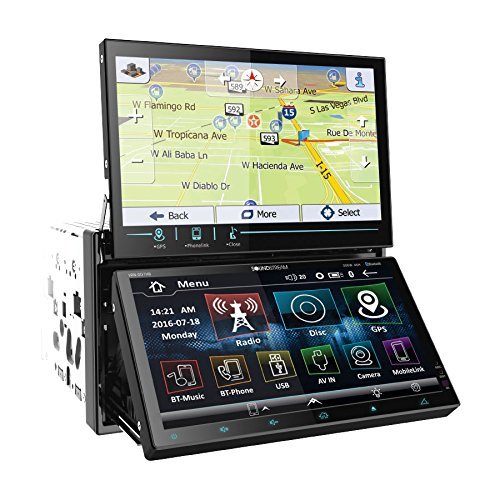
Figura 1.1: Davanti view of the Soundstream VRN-DD7HB Car Stereo Receiver, showcasing its double DIN form factor and touchscreen display.
2. Informazioni sulla sicurezza
Per garantire un funzionamento sicuro ed evitare lesioni o danni, osservare le seguenti precauzioni:
- Non utilizzare l'unità in modo da distrarti dalla guida. Dare sempre priorità alla sicurezza stradale.
- Per evitare danni elettrici o cablaggi impropri, consultare un professionista per l'installazione.
- Non smontare o modificare l'unità. Ciò potrebbe causare malfunzionamenti o scosse elettriche.
- Mantieni il volume a un livello tale da riuscire comunque a sentire i rumori del traffico esterno.
- Avvertenza sulla Proposta 65: Questo prodotto contiene sostanze chimiche note allo Stato della California come causa di cancro e malformazioni congenite o altri danni all'apparato riproduttivo.
3. Configurazione e installazione
Professional installation is highly recommended for this car stereo receiver. Incorrect wiring can cause severe damage to the unit or your vehicle's electrical system.
3.1 Collegamenti di cablaggio
Ensure all power, ground, speaker, and accessory wires are connected correctly according to your vehicle's wiring diagram and the unit's wiring harness. Pay close attention to the following:
- Potenza (Giallo): Collegare all'alimentazione costante da 12 V.
- Accessorio (rosso): Collegare all'alimentazione commutata da 12 V (accensione).
- Terra (Nero): Connect securely to a clean chassis ground point.
- Uscite altoparlanti: Collegare agli altoparlanti del veicolo, assicurandosi della corretta polarità.
- Posteriore View Ingresso telecamera: Connect the video output of your rear view camera to the designated input on the receiver. Ensure the reverse trigger wire is connected to your vehicle's reverse light circuit.
- Input di controllo del volante: Connect to your vehicle's OEM steering wheel control interface (if applicable). Refer to your vehicle's manual and the steering wheel control interface instructions for proper connection.
3.2 Montaggio
Mount the double DIN unit securely into your vehicle's dashboard using the provided mounting hardware. Ensure there is adequate space for ventilation and wiring.
4. Istruzioni per l'uso
4.1 Accensione/spegnimento
Press the power button (usually located on the front panel or a soft-touch button on the screen) to turn the unit on or off. The unit will also power on/off with your vehicle's ignition.
4.2 Funzionamento del touch screen
The VRN-DD7HB features a Smart Sense Glass Panel Touch Screen. Navigate menus, select functions, and adjust settings by touching the corresponding icons or areas on the display.
4.3 Connettività Bluetooth
- Associazione di un dispositivo:
- Assicurati che il Bluetooth sia abilitato sul tuo dispositivo mobile.
- On the VRN-DD7HB, navigate to the Bluetooth menu.
- Cercare available devices on your mobile phone. The unit should appear as "Soundstream VRN-DD7HB" or similar.
- Select the unit on your phone to pair. Enter the PIN (usually "0000") if prompted.
- Una volta effettuata l'associazione, l'unità confermerà la connessione.
- Chiamate in vivavoce: After pairing, you can make and receive calls directly through the unit using the built-in front panel Bluetooth microphone and your car's speakers.
- A2DP Audio Playback: Stream audio wirelessly from your paired device. Select the Bluetooth audio source on the receiver and control playback (play/pause, skip) from the unit or your phone.
4.4 Posteriore View Ingresso telecamera
When the vehicle is shifted into reverse, the unit will automatically display the image from the connected rear view camera on its 800x480 widescreen resolution display. This feature provides assistance for parking and maneuvering.
4.5 Controllo del volante
If an OEM steering wheel control interface is connected, you can program the unit to respond to your vehicle's steering wheel buttons for functions such as volume control, track skipping, and mode selection. Refer to the unit's settings menu for steering wheel control configuration.
5. Manutenzione
Proper maintenance ensures the longevity and optimal performance of your car stereo receiver.
- Pulizia dello schermo: Utilizzare un panno morbido e privo di lanugine per pulire delicatamente il touchscreen. Per le macchie ostinate, strofinare leggermenteampPulisci il panno con acqua o un detergente per schermi. Evita materiali abrasivi o sostanze chimiche aggressive.
- Pulizia generale: Mantenere l'unità libera da polvere e detriti. Utilizzare una spazzola morbida o aria compressa per pulire le prese d'aria e le aree dei pulsanti.
- Evitare temperature estreme: Non esporre l'unità a temperature estreme, poiché ciò potrebbe comprometterne le prestazioni e la durata.
6. Risoluzione Dei Problemi
If you encounter issues with your VRN-DD7HB, refer to the following common problems and solutions:
| Problema | Possibile causa/soluzione |
|---|---|
| L'unità non si accende. |
|
| Nessun suono dagli altoparlanti. |
|
| Il dispositivo Bluetooth non riesce ad associarsi. |
|
| Posteriore view l'immagine della telecamera non viene visualizzata. |
|
7. Specifiche
| Caratteristica | Dettaglio |
|---|---|
| Numero di modello | VRN-DD7HB |
| Display | Smart Sense Glass Panel Touch Screen, 800x480 Widescreen Resolution |
| Versione Bluetooth | V4.0 (Hands-Free Calling, A2DP Audio Playback) |
| Microfono | Built-in Front Panel Bluetooth Microphone |
| Tecnologia di connettività | Bluetooth, USB, jack da 3.5 mm |
| Dispositivi compatibili | Smartphone, Altoparlante |
| Tipo di controllore | Android (via Bluetooth/USB connection) |
| Modalità di uscita audio | Stereo |
| Configurazione del canale audio surround | 4.0 |
| Potenza di uscita | 220 Watt |
| Colore | NERO |
| Dimensioni del prodotto | 11.3 x 4.7 x 9.2 pollici |
| Peso dell'articolo | 9.01 libbre |
8. Garanzia e supporto
This product is offered as a renewed item. Renewed products are professionally inspected and tested to work and look like new. If not satisfied with the purchase, renewed products are typically eligible for replacement or refund under the Amazon Renewed Guarantee. Please refer to the specific terms and conditions of the Amazon Renewed Guarantee for details regarding your purchase.
For technical support or further assistance, please contact the seller or refer to the Soundstream official websito per informazioni generali sui prodotti.


