Introduzione
Grazie per l'acquistoasing the SINGING WOOD 030C Portable CD Player Boombox. This device offers versatile audio playback options, including CD, AM/FM radio, and auxiliary input. Designed for both indoor and outdoor use, it provides a portable audio experience with clear sound. Please read this manual thoroughly to ensure proper use and maintenance of your new boombox.
Incluso nella confezione:
- SINGING WOOD 030C Boombox
- Cavo di alimentazione CA


Informazioni sulla sicurezza
- Fonte di energia: Use only the specified AC power cord or 6 C batteries (sold separately). Do not mix old and new batteries, or different types of batteries.
- Acqua e umidità: To reduce the risk of fire or electric shock, do not expose this appliance to rain or moisture. Do not place objects filled with liquids, such as vases, on the apparatus.
- Ventilazione: Assicurare un'adeguata ventilazione. Non ostruire le aperture di ventilazione.
- Calore: Non posizionare l'unità vicino a fonti di calore quali radiatori, bocchette di riscaldamento, stufe o altri apparecchi (inclusi amplificatori) che producono calore.
- Pulizia: Scollegare l'unità dalla presa a muro prima di pulirla. Utilizzare un panno morbido e asciutto. Non utilizzare detergenti liquidi o spray.
- Manutenzione: Non tentare di riparare questo prodotto da soli poiché l'apertura o la rimozione delle coperture potrebbe esporvi a pericolitage o altri pericoli. Affidare tutti gli interventi di assistenza a personale qualificato.
Prodotto finitoview
Familiarize yourself with the various parts and controls of your SINGING WOOD 030C Boombox.
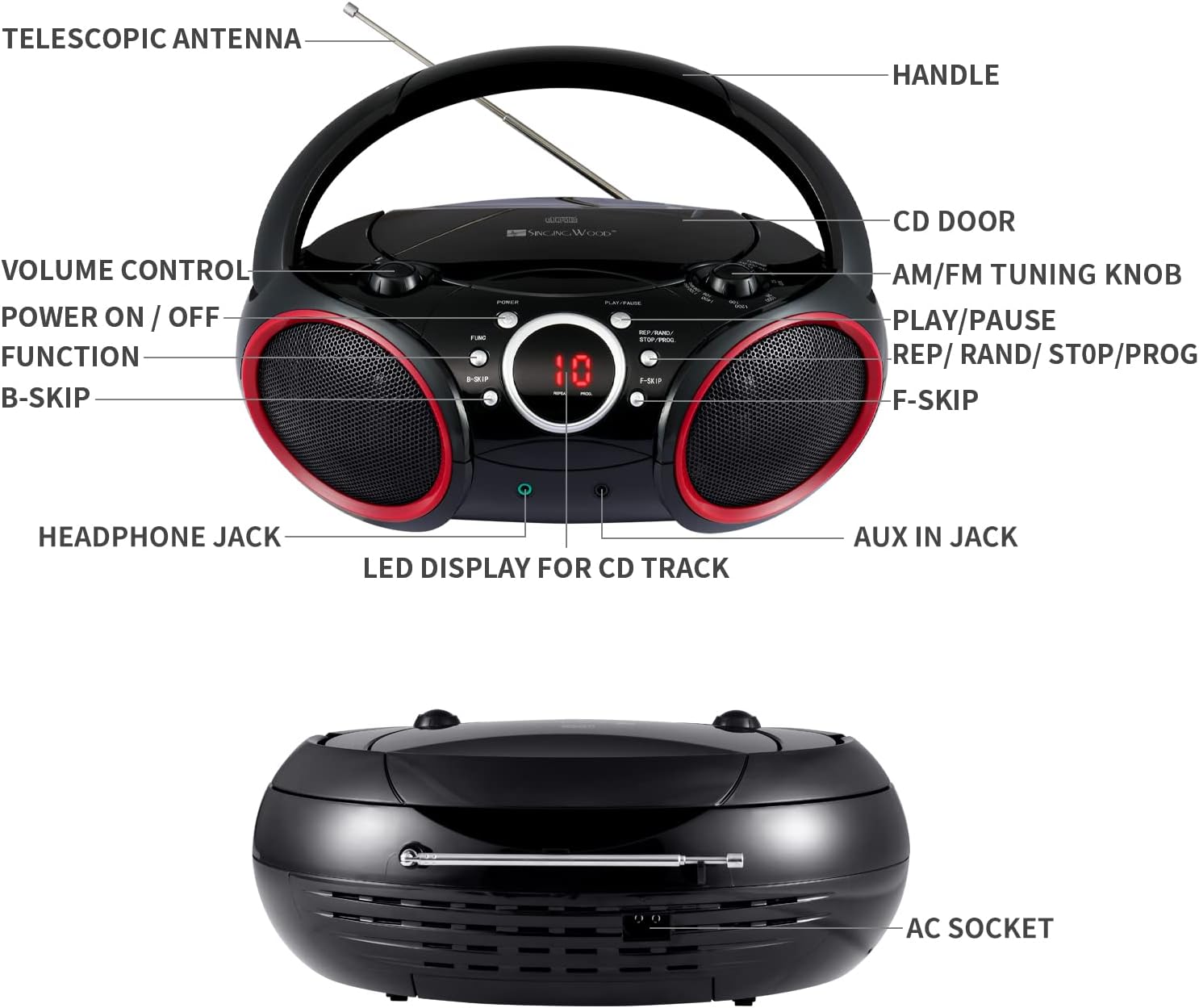
- Maniglia: For portable carrying.
- Antenna telescopica: Si estende per migliorare la ricezione della radio FM.
- Porta CD: Si apre per inserire o rimuovere i CD.
- AM/FM Tuning Knob: Regola la frequenza radio.
- Controllo del volume: Regola il livello di uscita audio.
- Accensione/Spegnimento: Accende o spegne l'unità.
- Pulsante funzione (FUNC): Selects between CD, AM, FM, and AUX modes.
- Pulsante Riproduci/Pausa: Avvia o mette in pausa la riproduzione del CD.
- REP / RAND / STOP / PROG Button: Controls repeat modes, random play, stops CD playback, and initiates program mode.
- B-SKIP Button: Skips to the previous track on a CD.
- F-SKIP Button: Skips to the next track on a CD.
- LED Display for CD Track: Shows the current CD track number or other status indicators.
- Jack per cuffie: For private listening with headphones (3.5mm).
- Presa AUX IN: For connecting external audio devices (3.5mm).
- Presa CA: Per collegare il cavo di alimentazione CA.
Impostare
Alimentare il Boombox
Il tuo boombox può essere alimentato tramite corrente alternata o batterie.
- Alimentazione CA: Connect the supplied AC power cord to the AC socket on the back of the unit and then plug it into a standard wall outlet.
- Potenza della batteria: For portable use, insert 6 C-size batteries (not included) into the battery compartment located on the bottom of the unit. Ensure correct polarity (+/-) as indicated inside the compartment.

Istruzioni per l'uso
Funzionamento generale
- Accensione/spegnimento: Premere il tasto ENERGIA pulsante per accendere o spegnere l'unità.
- Seleziona la funzione: Premere il tasto FUNC (Function) button repeatedly to cycle through modes: CD, AM, FM, AUX.
- Regola volume: Ruotare il CONTROLLO DEL VOLUME manopola per aumentare o diminuire il livello del suono.
Funzionamento del lettore CD
- Ensure the unit is powered off or in a non-CD mode (AM/FM/AUX).
- Aprire il PORTA CD by gently lifting it.
- Place a CD (CD-R/CD-RW compatible) onto the center spindle with the label side facing up.
- Chiudere il PORTA CD in modo sicuro.
- Premere il tasto FUNC button until the CD mode is selected. The LED display will show "-- --" indicating CD mode, then the total number of tracks.
- Premere il tasto RIPRODUCI/PAUSA button to start playback. The track number will appear on the LED display.
- Per mettere in pausa, premere RIPRODUCI/PAUSA di nuovo. Premerlo ancora una volta per riprendere.
- Per passare alla traccia successiva, premere il tasto F-SKIP pulsante.
- Per saltare all'inizio della traccia corrente o alla traccia precedente, premere il tasto B-SKIP pulsante.
- To stop playback, press and hold the REP/RAND/STOP/PROG button until the display changes (e.g., from track number to total tracks or "-- --"). This ensures the CD stops completely and the player resets for the next operation.
- Riproduzione ripetuta: Durante la riproduzione del CD, premere il tasto REP/RAND/STOP/PROG button once for "Repeat One" (repeats current track) or twice for "Repeat All" (repeats all tracks on the CD).
- Riproduzione del programma:
- In modalità di arresto, premere il tasto REP/RAND/STOP/PROG pulsante. Sul display lampeggerà la scritta "PROG".
- Utilizzo F-SKIP or B-SKIP to select your desired track.
- Premere REP/RAND/STOP/PROG di nuovo per confermare la traccia. Ripetere per un massimo di 20 tracce.
- Premere RIPRODUCI/PAUSA per avviare la riproduzione programmata.
Funzionamento della radio AM/FM
- Premere il tasto FUNC pulsante per selezionare la modalità radio AM o FM.
- Estendi il ANTENNA TELESCOPICA for optimal FM reception. For AM reception, rotate the unit for best signal.
- Ruotare il MANOPOLA SINTONIZZAZIONE AM/FM to tune into your desired radio station.
Auxiliary Input Operation
- Collegare un'estremità di un cavo audio da 3.5 mm (non incluso) al PRESA AUX IN sullo stereo.
- Collegare l'altra estremità del cavo audio alla presa delle cuffie o all'uscita audio del dispositivo audio esterno (ad esempio, smartphone, lettore MP3).
- Premere il tasto FUNC pulsante per selezionare la modalità AUX.
- Controlla la riproduzione e il volume dal tuo dispositivo esterno.

Utilizzo delle cuffie
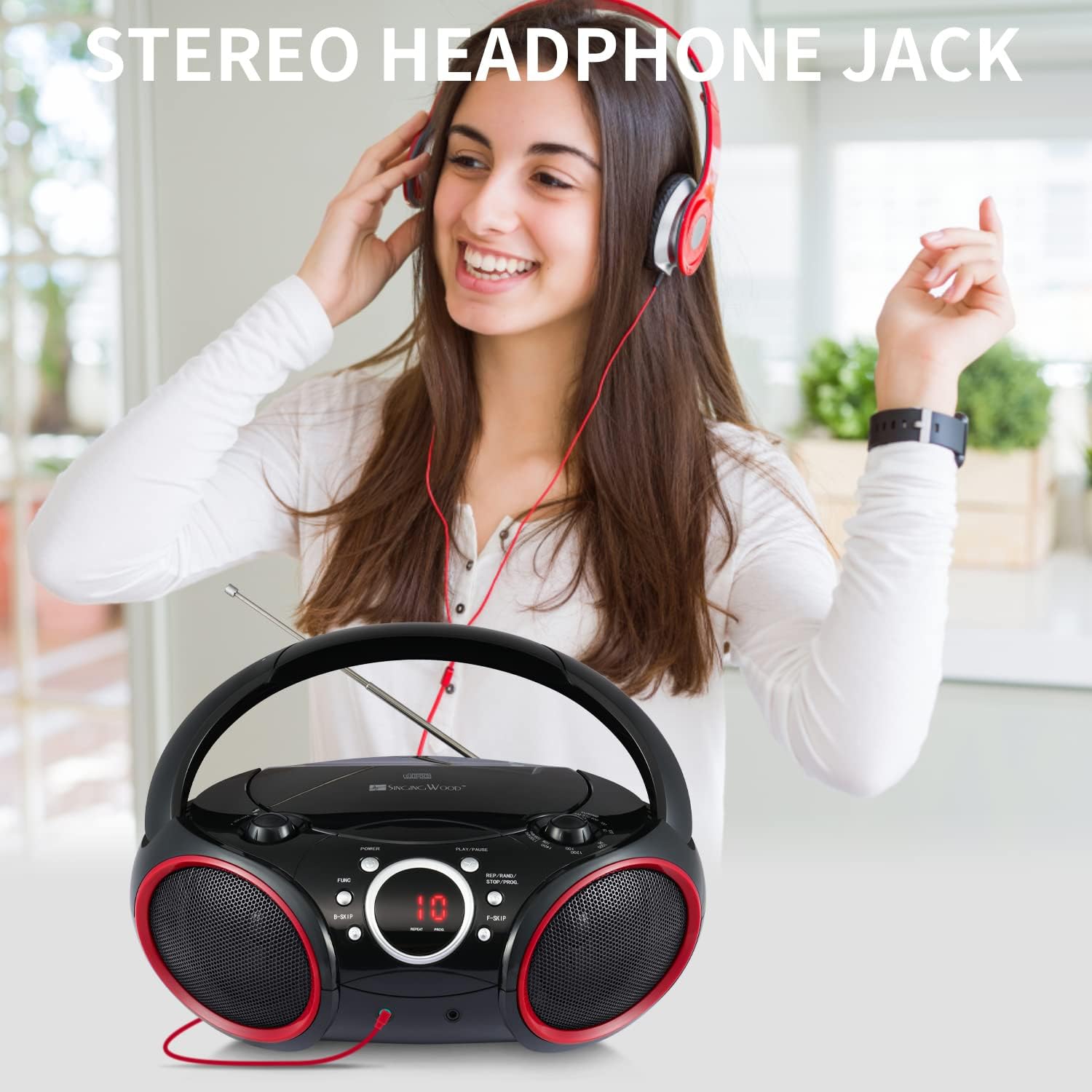
For private listening, plug any standard 3.5mm headphones (not included) into the PRESA PER CUFFIE. The speakers will automatically mute when headphones are connected.
Manutenzione
- Pulizia dell'unità: Wipe the exterior of the boombox with a soft, slightly damp panno. Non usare detergenti abrasivi o solventi.
- Cura delle lenti CD: To ensure optimal CD playback, occasionally clean the CD lens using a commercially available CD lens cleaner disc. Avoid touching the lens directly.
- Sostituzione della batteria: If using battery power, replace all 6 C-size batteries when the sound becomes distorted or the unit stops functioning. Remove batteries if the unit will not be used for an extended period.
Risoluzione dei problemi
If you encounter any issues with your boombox, please refer to the following common problems and solutions:
| Problema | Possibile causa | Soluzione |
|---|---|---|
| Nessun potere | Cavo CA non collegato; batterie scariche o inserite in modo errato. | Assicurarsi che il cavo CA sia collegato saldamente. Sostituire le batterie con batterie nuove, controllando la polarità. |
| Il CD non viene riprodotto / Errore "NESSUN DISCO" | CD inserted incorrectly; CD dirty or scratched; CD door not closed; Incorrect mode selected; CD player stuck. | Insert CD with label side up. Clean CD. Close CD door firmly. Press FUNC to select CD mode. If CD player is unresponsive, ensure you stop playback by pressing and holding the REP/RAND/STOP/PROG button until the display changes, then try again. |
| Scarsa ricezione radio | Antenna non estesa; posizione dell'unità. | Fully extend the telescopic antenna for FM. Rotate the unit for optimal AM reception. |
| Nessun suono dall'ingresso Aux | Aux cable not connected; Incorrect mode; Volume too low on external device. | Ensure Aux cable is fully inserted. Press FUNC to select AUX mode. Increase volume on both the boombox and the external device. |
| CD playback issues after previous use | CD player not properly stopped or reset. | Always ensure to stop CD playback by pressing and holding the REP/RAND/STOP/PROG button until the display indicates a full stop (e.g., total tracks or "-- --") before changing modes or turning off the unit. If the unit is on, cycle through AM, FM, then back to CD mode if needed. |
Specifiche
| Caratteristica | Dettaglio |
|---|---|
| Numero di modello | 030C (SBX030C-RD) |
| Dimensioni del prodotto (L x P x A) | 11.8 x 9 x 4.8 pollici |
| Peso dell'articolo | 3.2 libbre |
| Tecnologia di connettività | Ausiliario |
| Tipo di altoparlante | Stereo |
| Fonte di alimentazione | AC (120V, 60Hz) or 6 x C Batteries (not included) |
| Compatibilità CD | CD-R, CD-RW |
| Bande radiofoniche | Stereo AM/FM |

Garanzia e supporto
SINGING WOOD products are manufactured with quality and reliability in mind. For specific warranty information or technical support, please refer to the warranty card included with your purchase or visit the official SINGING WOOD websito.
Per ulteriore assistenza, puoi anche contattare il rivenditore presso cui hai acquistato il prodotto.


