1. Introduzione
Grazie per l'acquistoasing the Soundstream BTC-3100 Sound Tower Speaker. This device is designed to provide a versatile audio experience with its 360-degree sound output, integrated 20W subwoofer, and a unique detachable Bluetooth speaker for portable use. This manual provides essential information for safe operation, setup, and maintenance of your speaker system.
2. Istruzioni di sicurezza
- Leggere attentamente tutte le istruzioni prima di utilizzare il prodotto.
- Non esporre il dispositivo ad acqua, umidità o temperature estreme.
- Non tentare di smontare o riparare l'unità da soli. Per qualsiasi intervento di assistenza, rivolgersi a personale qualificato.
- Tenere l'altoparlante lontano da fonti di calore quali radiatori, bocchette di riscaldamento, stufe o altri apparecchi (inclusi amplificatori) che producono calore.
- Utilizzare solo gli accessori specificati dal produttore.
- Scollegare l'apparecchio durante i temporali o quando non viene utilizzato per lunghi periodi.
3. Contenuto della confezione
Si prega di verificare che i seguenti articoli siano inclusi nel pacchetto:
- Soundstream BTC-3100 Sound Tower Speaker (Main Unit)
- Altoparlante Bluetooth staccabile
- Adattatore di alimentazione
- Cavo audio ausiliario
- Manuale dell'utente (questo documento)
4. Prodotto finitoview
Familiarize yourself with the components of your Sound Tower Speaker system.

Figura 1: The Soundstream BTC-3100 Sound Tower Speaker, illustrating the main tower unit and the detachable portable speaker both connected and separated. The portable speaker sits atop the tower, and an arrow indicates its detachment.

Figura 2: Superiore view of the detachable speaker, showing the control panel. From left to right, buttons include 'M' (Mode), '-' (Volume Down/Previous Track), '+' (Volume Up/Next Track), and the Power button.
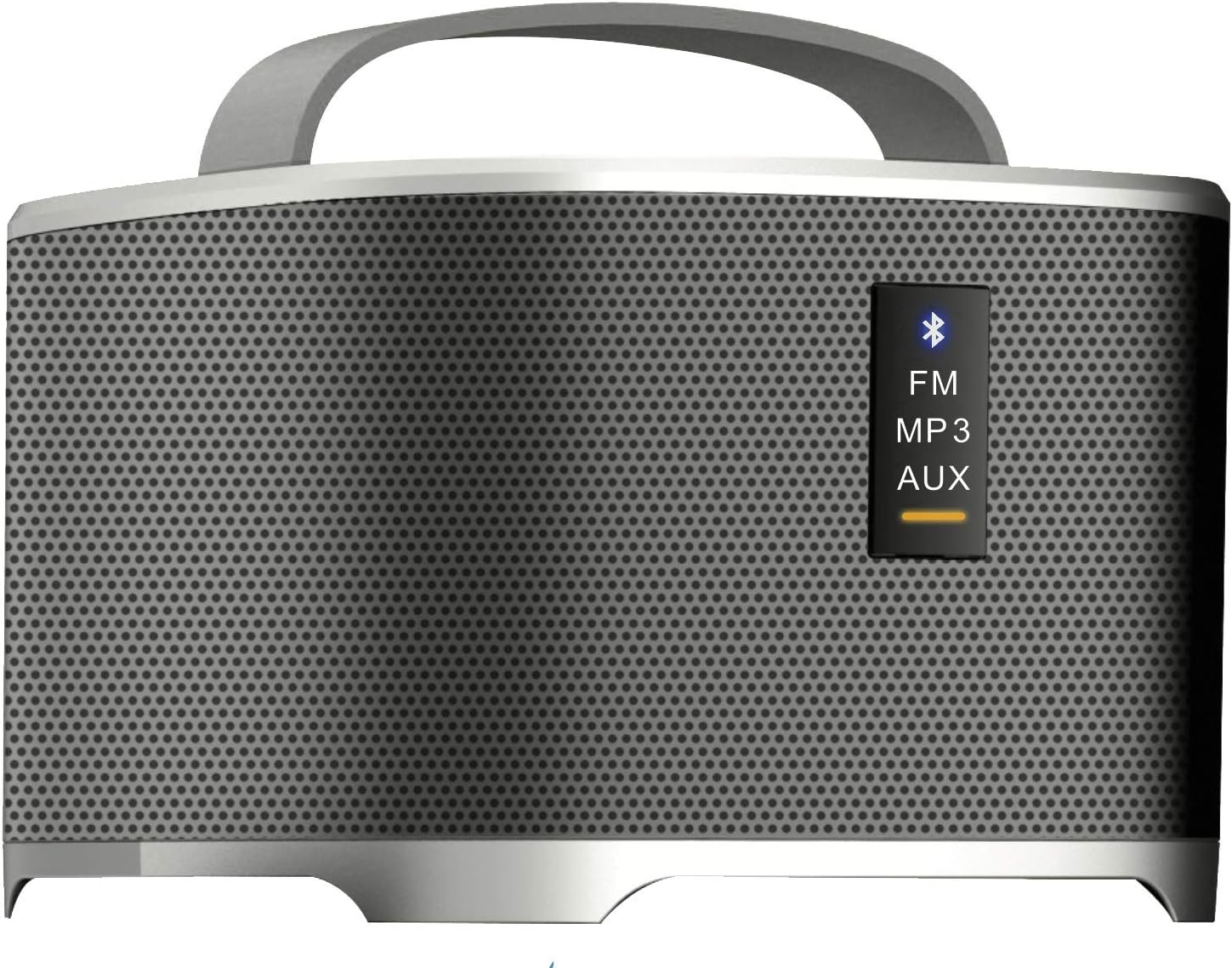
Figura 3: Front panel of the detachable speaker, displaying indicator lights for different modes: Bluetooth (blue icon), FM, MP3, and AUX. A yellow bar indicates the active mode.
Main Tower Unit
- Stazione di attracco: For charging and integrating the detachable speaker.
- Potenza in ingresso: Si collega all'alimentatore.
- Subwoofer: Provides enhanced bass audio.
Altoparlante Bluetooth staccabile
- Pulsante di accensione: Accende/spegne l'altoparlante.
- Pulsante Modalità (M): Switches between Bluetooth, FM, MP3, and AUX modes.
- Volume/Track Control (+/-): Adjusts volume with short presses; changes tracks/stations with long presses.
- Indicatore Bluetooth: Lampeggia durante l'associazione, è fisso quando è connesso.
- Porta di ricarica: For direct charging when detached.
- Ingresso AUX: Per la connessione audio cablata.
5. Impostazione
5.1 Configurazione iniziale
- Place the Sound Tower Speaker on a stable, flat surface.
- Ensure the detachable speaker is securely docked on top of the main tower unit.
- Connect the power adapter to the power input port on the main tower unit, then plug it into a wall outlet.
- The detachable speaker will begin charging automatically when docked and the main unit is powered.
5.2 Charging the Detachable Speaker
The detachable speaker has an internal rechargeable battery.
- While docked: The detachable speaker charges automatically when placed on the main tower unit, provided the tower is connected to power.
- While detached: Connect a compatible USB charging cable (not included, typically Micro-USB) to the charging port on the detachable speaker and a USB power source.
6. Istruzioni per l'uso
6.1 Accensione/Spegnimento
- Main Tower Unit: The main unit powers on when connected to an electrical outlet. There is no separate power button for the tower itself.
- Detachable Speaker: Press and hold the Power button on the top panel of the detachable speaker for 2-3 seconds to turn it on or off.
6.2 Bluetooth Pairing (Detachable Speaker)
- Ensure the detachable speaker is powered on and in Bluetooth mode. The Bluetooth indicator light will flash. If not, press the 'M' (Mode) button until the Bluetooth indicator flashes.
- Abilita il Bluetooth sul tuo dispositivo audio (smartphone, tablet, ecc.).
- Cercare available devices and select "BTC-3100" from the list.
- Una volta effettuata la connessione, la spia luminosa del Bluetooth diventerà fissa.
6.3 Using the Detachable Speaker Independently
When detached from the main tower, the portable speaker functions as a standalone Bluetooth speaker. All controls (power, mode, volume/track) are located on the speaker itself.
6.4 Modalità radio FM
- With the detachable speaker powered on, press the 'M' (Mode) button repeatedly until the FM indicator light is active.
- Long press the '+' or '-' buttons to scan for the next/previous available FM station.
- Short press the '+' or '-' buttons to fine-tune the frequency.
6.5 MP3/AUX Input Mode
- AUSILIARI: Connect one end of the auxiliary audio cable to the AUX input port on the detachable speaker and the other end to the audio output of your device. Press the 'M' button until the AUX indicator is active.
- Formato MP3: If the speaker supports USB or MicroSD card input (check product specifications for confirmation), insert the storage device. Press the 'M' button until the MP3 indicator is active.
6.6 Controllo del volume
Short press the '+' button to increase volume and the '-' button to decrease volume on the detachable speaker. Volume can also be controlled from your connected audio device.
7. Manutenzione
- Pulizia: Utilizzare un panno morbido e asciutto per pulire l'esterno dell'altoparlante. Non utilizzare detergenti liquidi o materiali abrasivi.
- Magazzinaggio: Quando non viene utilizzato per lunghi periodi, conservare l'altoparlante in un luogo fresco e asciutto, lontano dalla luce solare diretta e da temperature estreme.
- Cura della batteria: To prolong the life of the detachable speaker's battery, avoid fully discharging it frequently. Charge it regularly, even if not in use.
8. Risoluzione Dei Problemi
If you encounter issues with your Soundstream BTC-3100, refer to the following common problems and solutions:
- Nessun potere:
- Ensure the main tower unit's power adapter is securely plugged into both the speaker and a working wall outlet.
- For the detachable speaker, ensure it is charged or docked correctly.
- Nessun suono:
- Check the volume level on both the speaker and your connected audio device.
- Ensure the correct input mode (Bluetooth, AUX, FM, MP3) is selected on the detachable speaker.
- Se si utilizza il Bluetooth, assicurarsi che l'altoparlante sia correttamente associato e connesso al dispositivo.
- Bluetooth non si connette:
- Make sure the detachable speaker is in Bluetooth pairing mode (indicator flashing).
- Ensure your audio device's Bluetooth is enabled and within range (typically 10 meters/33 feet).
- Prova a disaccoppiare e riassociare l'altoparlante dalle impostazioni Bluetooth del tuo dispositivo.
- Spegni e riaccendi sia l'altoparlante che il dispositivo.
- Scarsa ricezione FM:
- Spostare l'altoparlante in una zona con una migliore ricezione del segnale.
- Ensure no large metal objects are obstructing the signal.
9. Specifiche
| Marca | Flusso sonoro |
| Numero di modello | CS-3100 |
| Tipo di altoparlante | Subwoofer, Surround Sound |
| Caratteristica speciale | Portable (Detachable Speaker) |
| Dispositivi compatibili | Computer portatile, smartphone, tablet |
| Configurazione del canale audio surround | 4.2 |
| Fonte di alimentazione | Battery Powered (Detachable Speaker) |
| Metodo di controllo | App (if supported), On-device buttons |
| Potenza massima in uscita dell'altoparlante | 20 Watt (Subwoofer) |
| Tecnologia di connettività | Bluetooth |
| Modalità di uscita audio | Stereo, Surround |
| Tipo di montaggio | Da terra |
| Peso dell'articolo | 11.13 libbre |
| Dimensioni del pacco | 36 x 8.8 x 7.9 pollici |
| Codice UPC | 709483059689 |
10. Garanzia e supporto
Soundstream products are designed and manufactured to the highest quality standards. For information regarding warranty coverage, please refer to the warranty card included with your product or visit the official Soundstream website. For technical support or customer service inquiries, please contact Soundstream customer support through their official channels.


