1. Importanti istruzioni di sicurezza
Please read all instructions carefully before using the ProfiCare PC-BSR 3043 Robot Vacuum Cleaner. Keep this manual for future reference.
- Questo apparecchio è destinato esclusivamente all'uso domestico.
- Do not immerse the robot, charging station, or power adapter in water or other liquids.
- Tenere il robot lontano da fiamme libere e fonti di calore.
- Garantire la potenza voltage matches the rating label on the charging adapter.
- Non utilizzare il robot su superfici bagnate o in aree con acqua stagnante.
- Sorvegliare i bambini per assicurarsi che non giochino con l'apparecchio.
- Only use original accessories and spare parts provided or approved by ProfiCare.
- The robot contains a lithium-ion battery. Do not expose it to high temperatures or direct sunlight.
- Se il cavo di alimentazione è danneggiato, deve essere sostituito dal produttore, da un suo agente di assistenza o da personale qualificato per evitare rischi.
2. Contenuto della confezione
Verificare che tutti i componenti siano presenti e in buone condizioni al momento del disimballaggio:
- ProfiCare PC-BSR 3043 Robot Vacuum Cleaner
- Stazione di ricarica
- Adattatore di alimentazione per stazione di ricarica
- Telecomando
- 2 x Side Brushes (one pair)
- 1 x filtro HEPA (preinstallato o di ricambio)
- Manuale di istruzioni (questo documento)

Image: The ProfiCare PC-BSR 3043 robot vacuum cleaner, showcasing its sleek design, along with its remote control and a smartphone displaying the companion app interface.
3. Prodotto finitoview
The ProfiCare PC-BSR 3043 is a high-quality robot vacuum cleaner designed for efficient and autonomous floor cleaning. It features rotating floor and side brushes to effectively remove dirt, dust, crumbs, and pet hair from various surfaces.
- Pulizia versatile: Suitable for all hard floors and short-pile carpets.
- Navigazione intelligente: Utilizes gyroscope technology for systematic and efficient cleaning paths.
- Design compatto: Extra-flat dimensions (only 7.5 cm high) allow cleaning under furniture.
- Filtrazione avanzata: Equipped with a HEPA filter for high-efficiency particle air filtration.
- Funzioni automatizzate: Automatic return to charging station, stair and obstacle detection.
- Opzioni di controllo multiple: Sensor touch display, multi-function remote control, and Wi-Fi app control.

Immagine: Lato view of the ProfiCare PC-BSR 3043 robot vacuum cleaner, highlighting its compact height of 75 mm and a diameter of 300 mm, ideal for cleaning under furniture.
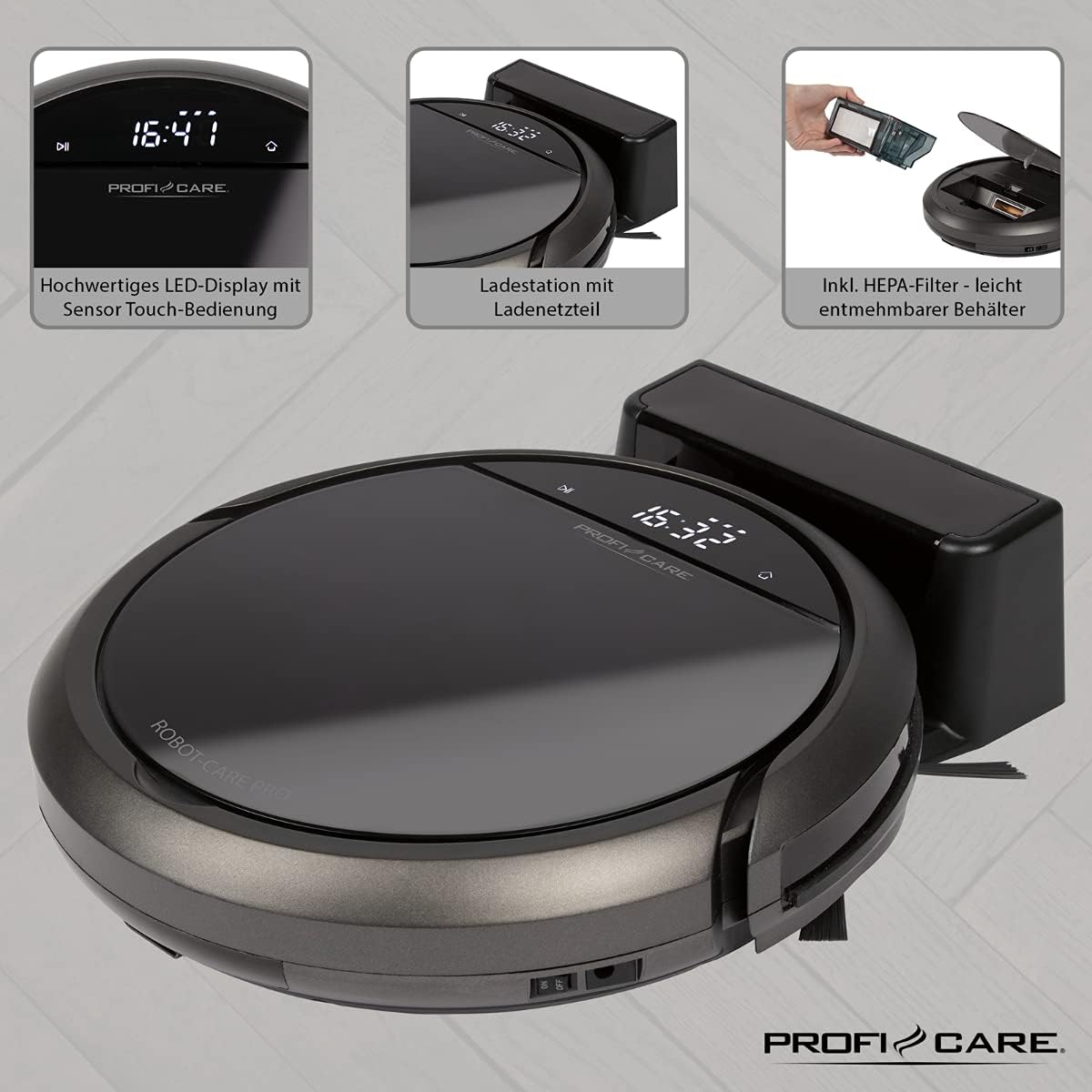
Immagine: in alto view of the ProfiCare PC-BSR 3043 robot vacuum cleaner with key features labeled, including LED display, sensor touch operation, Wi-Fi app control, auto-return function, 2600 mAh / 14.8 V Lithium-ion battery, and 120 minutes runtime.
4. Impostazione
4.1 Ricarica del robot
- Posizionare la stazione di ricarica contro una parete in un'area aperta, assicurandosi che non vi siano ostacoli entro 1 metro ai lati e 2 metri davanti.
- Connect the power adapter to the charging station and plug it into a power outlet. The indicator light on the charging station will illuminate.
- Place the robot vacuum onto the charging station. Ensure the charging contacts on the robot align with those on the station. The robot will emit a sound and the display will show charging status.
- Allow the robot to fully charge before first use (approximately 3 hours).

Image: The ProfiCare PC-BSR 3043 robot vacuum cleaner docked on its charging station, illustrating the automatic return and charging capability.
4.2 Installazione delle spazzole laterali
Gently push the side brushes onto the square posts on the underside of the robot until they click into place.
4.3 Configurazione Wi-Fi e app
- Download the ProfiCare app from the Google Play Store (for Android 4.4 or higher) or Apple App Store (for iOS 9.0 or higher).
- Open the app and follow the on-screen instructions to register an account and add your PC-BSR 3043 robot.
- Ensure your Wi-Fi network is 2.4 GHz, as 5 GHz is not supported.
5. Funzionamento del robot aspirapolvere
5.1 Accensione/Spegnimento
Press and hold the power button on the robot's display or the remote control to turn the robot on or off.
5.2 modalità di pulizia
The robot offers four distinct cleaning programs:
- Modalità automatica: Il robot pulisce in modo sistematico, coprendo l'intera area.
- Modalità spot: Il robot pulisce un'area concentrata con un movimento a spirale, ideale per le zone molto sporche.
- Corners Mode: The robot focuses on cleaning along walls and in corners.
- Systematic Mode (Gyroscope Controlled): Ensures independent orientation for faster and more efficient cleaning results.
5.3 Opzioni di controllo
- Sensor Touch Display: Use the integrated LED display with touch controls for basic operations.
- Telecomando: The multi-function remote allows for timer settings, individual control, and recalling the robot to the charging station.
- Controllo app: The smartphone app provides advanced features like 2D map function, live tracking, remote control functions, cleaning plan creation (day, time, frequency), cleaning program selection, and battery status display.
- Controllo vocale: The robot supports voice control for convenient operation.
5.4 Funzioni automatiche
- Ritorno automatico: The robot automatically returns to the charging station after completing a program or when the battery level is low.
- Rilevamento degli ostacoli: Infrared sensors detect obstacles, allowing the robot to navigate around furniture and other items. Mechanical soft protection is also included for sensitive furniture.
- Stair Detection: Infrared sensors prevent the robot from falling down stairs.
- Ripristino automatico: After recharging, the robot continues cleaning from the last cleaned position.

Image: The ProfiCare PC-BSR 3043 robot vacuum cleaner actively cleaning a wooden floor in a home environment, demonstrating its ability to navigate and clean open spaces.
6. Manutenzione
Una manutenzione regolare garantisce prestazioni ottimali e prolunga la durata del tuo robot aspirapolvere.
6.1 Svuotamento del cestino
- Press the dustbin release button and pull out the 400 ml dirt tank.
- Aprire il coperchio del bidone della spazzatura e svuotarne il contenuto nel cestino.
- Chiudere il coperchio del contenitore della polvere e reinserirlo nel robot finché non scatta in posizione.
6.2 Pulizia del filtro HEPA
The HEPA filter should be cleaned regularly and replaced periodically (e.g., every 3-6 months, depending on usage).
- Rimuovere il contenitore della polvere come descritto sopra.
- Rimuovere con cautela il filtro HEPA dal contenitore della polvere.
- Tap the filter gently over a trash can to remove loose dust. Do not wash the HEPA filter with water.
- Brush off any remaining debris with a soft brush.
- Reinserire il filtro pulito e il contenitore della polvere.
6.3 Pulizia delle spazzole laterali e della spazzola principale
Regularly check the side brushes and main brush for tangled hair or debris. Use scissors to cut away any tangled hair and pull out debris.
6.4 Pulizia dei sensori e dei contatti di ricarica
Wipe the infrared sensors (located around the robot's bumper and underside) and the charging contacts on both the robot and the charging station with a clean, dry cloth to ensure proper function.
7. Risoluzione Dei Problemi
If you encounter issues with your ProfiCare PC-BSR 3043, refer to the following common problems and solutions:
| Problema | Possibile causa | Soluzione |
|---|---|---|
| Il robot non si accende. | La batteria è scarica o esaurita. | Place the robot on the charging station and allow it to fully charge. |
| Il robot non si carica. | I contatti di ricarica sono sporchi o disallineati. | Clean the charging contacts on both the robot and the station. Ensure proper alignment. |
| Il robot si blocca spesso. | Too many obstacles or tangled cables. | Clear the cleaning area of excessive clutter, cables, and small objects. |
| Scarsa efficienza di pulizia. | Dustbin is full, filter is clogged, or brushes are tangled. | Empty the dustbin, clean or replace the HEPA filter, and clean the side and main brushes. |
| Il robot non si connette al Wi-Fi. | Incorrect Wi-Fi band (5 GHz not supported) or incorrect password. | Ensure your Wi-Fi network is 2.4 GHz. Re-enter Wi-Fi password carefully. Restart router and robot. |
| Il robot cade dalle scale. | I sensori delle scale sono sporchi o ostruiti. | Clean the stair sensors on the underside of the robot. |
For issues not listed here, or if problems persist, please contact ProfiCare customer support.
8. Specifiche tecniche
| Caratteristica | Specificazione |
|---|---|
| Numero di modello | PC-BSR 3043 |
| Marca | Assistenza Profi |
| Dimensioni (L x P x A) | 33 x 33 x 7 cm (circa 31 x 22 x 13 cm imballato) |
| Peso | 2.5 chilogrammi |
| Tipo di batteria | Agli ioni di litio |
| Capacità della batteria | 14.8 V, 2600 mAh |
| Tempo di funzionamento | Circa 120 minuti |
| Tempo di ricarica | Circa 3 ore |
| Capacità del bidone della spazzatura | 400 ml |
| Tipo di filtro | Filtro HEPA |
| Livello di rumore | Circa. 61 dB |
| Connettività | Wi-Fi 2.4 GHz (5 GHz not supported) |
| Tipo di controllo | App Control, Remote Control, Sensor Touch |
| Raccomandazione di superficie | Tiles, Hard Floors, Short-Pile Carpets |
9. Garanzia e supporto
ProfiCare products are manufactured with high quality standards. For information regarding warranty terms and conditions, please refer to the warranty card included with your product or visit the official ProfiCare websito.
If you require technical assistance, have questions about product operation, or need to order spare parts, please contact ProfiCare customer support. Contact details can typically be found on the product packaging, the official websito o tramite il tuo rivenditore.
Please note that information regarding the availability of spare parts for this specific model is currently unavailable through standard channels. It is recommended to contact ProfiCare directly for any spare part inquiries.


