1. Introduzione
Grazie per l'acquistoasing the Ematic LED Projector. This manual provides essential information for setting up, operating, and maintaining your projector to ensure optimal performance and longevity. Please read this manual thoroughly before using the product and retain it for future reference.
2. Informazioni sulla sicurezza
Per prevenire incendi o scosse elettriche, non esporre l'apparecchio a pioggia o umidità. Per evitare scosse elettriche, non aprire il mobile. Per l'assistenza, rivolgersi esclusivamente a personale qualificato.
- Non guardare direttamente nell'obiettivo del proiettore quando lamp è acceso.
- Assicurare una ventilazione adeguata attorno al proiettore. Non ostruire le aperture di ventilazione.
- Utilizzare solo l'adattatore di alimentazione fornito con il proiettore.
- Tenere il proiettore lontano dall'acqua o da altri liquidi.
- Non posizionare il proiettore su una superficie instabile.
- Scollegare il proiettore dalla presa di corrente durante i temporali o quando non viene utilizzato per lunghi periodi.
3. Contenuto della confezione
- Ematic LED Projector
- Telecomando
- Adattatore di alimentazione
- Manuale d'uso
- Cavo AV (se incluso)
4. Prodotto finitoview
4.1 Front View
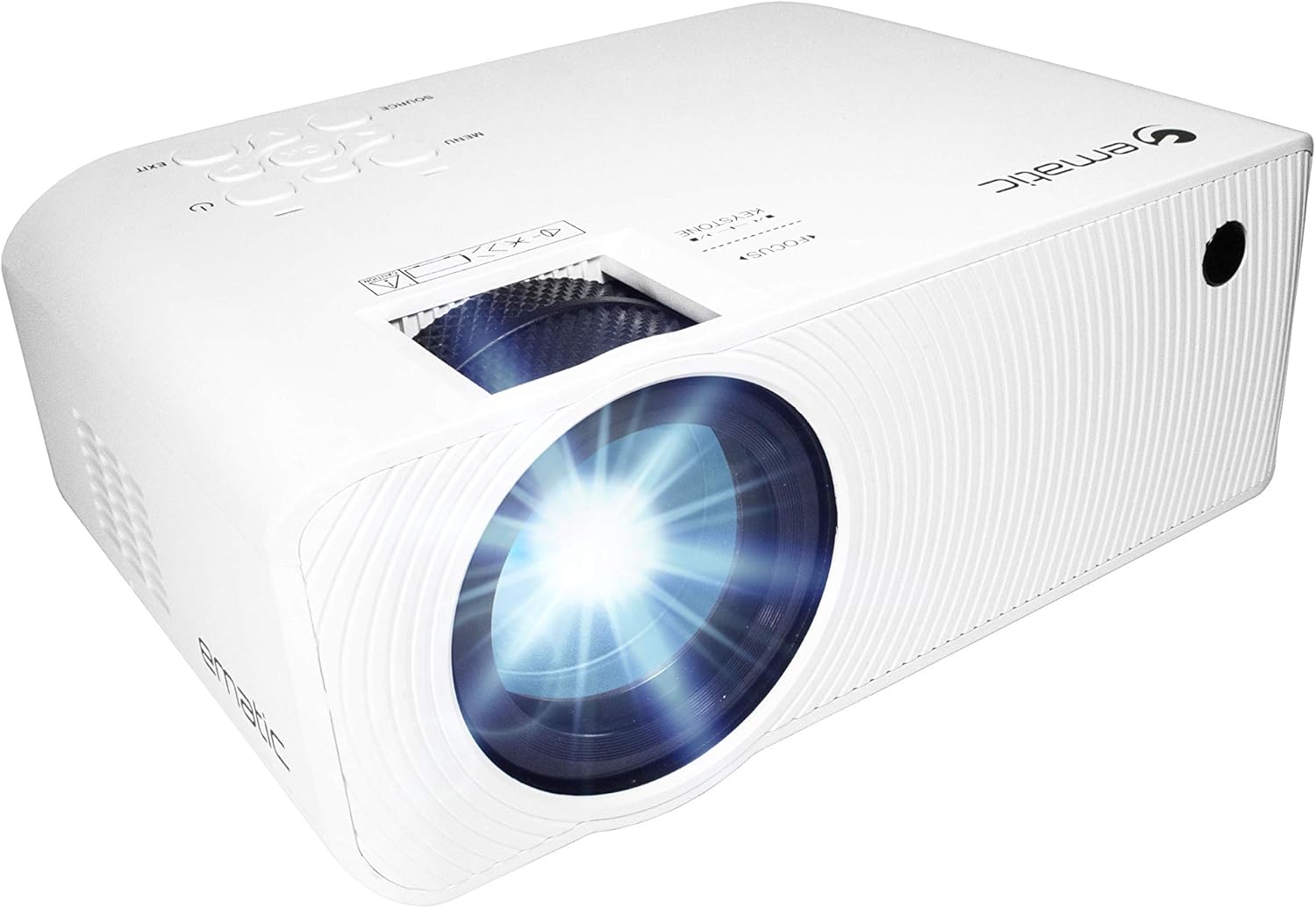
Figura 4.1: Fronte view of the Ematic LED Projector, highlighting the projection lens.
4.2 In alto View e controlli

Figura 4.2: in alto view of the projector showing the control panel (Menu, Source, Exit, Navigation buttons) and the Focus and Keystone correction dials. A remote control is also visible.
- Anello di messa a fuoco: Regola la nitidezza dell'immagine.
- Correzione trapezoidale: Corregge la distorsione trapezoidale dell'immagine.
- Pannello di controllo: Buttons for Menu, Source selection, Exit, and navigation.
4.3 Posteriore e laterale Views with Ports

Figure 4.3: Rear panel of the projector displaying the connectivity options: AUX audio output, AV input, MicroSD card slot, two HDMI inputs, USB port, and DC power input.

Figura 4.4: lato view of the projector, highlighting the VGA input port and the infrared (IR) receiver for the remote control.
- AUSILIARI: Uscita audio da 3.5 mm per altoparlanti esterni o cuffie.
- AV: Ingresso video composito e audio stereo.
- MicroSD: Slot for MicroSD memory cards.
- HDMI1/HDMI2: Ingressi High-Definition Multimedia Interface per audio/video digitale.
- USB: Porta USB per la riproduzione di contenuti multimediali da unità USB.
- DC IN: Ingresso di alimentazione per il proiettore.
- VGA: Ingresso Video Graphics Array per la connessione al computer.
5. Impostazione
- Posizionamento: Posizionare il proiettore su una superficie stabile e piana. Assicurarsi che ci sia spazio sufficiente intorno al proiettore per la ventilazione. Per una ventilazione ottimale viewing, position the projector perpendicular to the projection screen or wall.
- Collegamento elettrico: Connect the supplied power adapter to the DC IN port on the projector and then plug the adapter into a power outlet.
- Accensione iniziale: Premere il pulsante di accensione sul proiettore o sul telecomando per accendere l'unità. La spia di accensione si illuminerà.
- Regolazione della messa a fuoco: Once the projector is on, rotate the Focus Ring (refer to Figure 4.2) until the projected image is clear and sharp.
- Correzione trapezoidale: If the image appears trapezoidal (wider at the top or bottom), adjust the Keystone Correction dial (refer to Figure 4.2) until the image is rectangular.
6. Istruzioni per l'uso
- Accensione/spegnimento: Press the power button on the projector or remote control. Press again to turn off.
- Selezione della sorgente di ingresso: Press the "Source" button on the projector or remote control to cycle through available input sources (HDMI 1, HDMI 2, AV, VGA, USB, MicroSD). Select the desired input.
- Navigazione nel menu: Press the "Menu" button to access the projector's settings. Use the navigation buttons on the projector or remote to browse options and the "OK" button to confirm selections.
- Media Playback (USB/MicroSD): Insert a USB drive or MicroSD card into the respective port. Select "USB" or "MicroSD" as the input source. The projector will display a file browser. Navigate to your desired media file (video, photo, music, text) and press "OK" to play.
- Uscita audio: The projector has built-in speakers (refer to Figure 6.1). For external audio, connect headphones or external speakers to the AUX port (3.5mm audio jack).

Figure 6.1: Projector highlighting its built-in speaker functionality.
7. Connettività
The Ematic LED Projector offers multiple connection options to various devices, ensuring versatility for your entertainment and presentation needs.

Figure 7.1: Multimedia device compatibility chart for the projector.

Figura 7.2: Esamples of projector connections to a laptop and smartphone, highlighting supported input types.
- HDMI: Connect Blu-ray players, game consoles (PS4, Xbox), streaming devices (Amazon Fire TV Stick, Chromecast), laptops, and other HDMI-enabled devices.
- USB: Riproduci contenuti multimediali files (videos, photos, music) directly from USB flash drives.
- MicroSD: Riproduci contenuti multimediali files directly from MicroSD memory cards.
- AV: Connect older devices like DVD players or VCRs using the included AV cable.
- VGA: Collegare computer desktop o laptop più vecchi.
- Audio Out (AUX): Connect external speakers or headphones for enhanced audio experience.
8. Manutenzione
- Pulizia delle lenti: Utilizzare un panno morbido e privo di lanugine, specificamente progettato per lenti ottiche, per pulire delicatamente la lente del proiettore. Non utilizzare detergenti abrasivi o esercitare una forza eccessiva.
- Rimozione della polvere: Pulire regolarmente le griglie di ventilazione con una spazzola morbida o aria compressa per evitare l'accumulo di polvere, che può compromettere le prestazioni e la durata.
- Pulizia esterna: Pulire l'esterno del proiettore con un panno morbido eamp stoffa. Evitare l'uso di prodotti chimici aggressivi.
- Magazzinaggio: Quando non viene utilizzato per lunghi periodi, conservare il proiettore in un luogo fresco e asciutto, idealmente nella confezione originale o in una custodia protettiva, per evitare l'accumulo di polvere e danni.
9. Risoluzione Dei Problemi
| Problema | Possibile causa | Soluzione |
|---|---|---|
| Nessuna immagine proiettata | No power; Incorrect input source; Cable not connected properly. | Check power connection; Select correct input source; Reconnect cables securely. |
| L'immagine è sfocata | Messa a fuoco non regolata; proiettore troppo lontano/vicino allo schermo. | Adjust the Focus Ring; Adjust projection distance. |
| L'immagine è trapezoidale | Keystone not adjusted; Projector not level. | Adjust the Keystone Correction dial; Ensure projector is on a flat surface. |
| Nessun suono | Volume too low; Muted; External speakers not connected or off. | Increase volume; Unmute; Check external speaker connection and power. |
| Il telecomando non funziona | Batteries dead; Obstruction between remote and IR receiver. | Sostituire le batterie; rimuovere gli ostacoli; puntare il telecomando direttamente verso il ricevitore IR del proiettore. |
10. Specifiche
| Caratteristica | Dettaglio |
|---|---|
| Marca | Ematico |
| Modello | EMP-720 (Generic) |
| Risoluzione dello schermo | 1280 x 720 (nativo) |
| Tecnologia di connettività | HDMI, USB, AV, VGA, MicroSD, AUX |
| Caratteristica speciale | Portable, Built-in Speakers |
| Peso dell'articolo | 3.5 libbre |
| Dimensioni del prodotto | 13.85 x 5 x 8.8 pollici |
| Lamp Vita | Fino a 20,000 ore (modalità normale) |
11. Garanzia e supporto
For warranty information and technical support, please refer to the warranty card included with your product or visit the official Ematic websito. Conservare la prova d'acquisto per eventuali reclami in garanzia.
Ematic Customer Support: www.ematic.us/support (Exampil Link)


