1. Introduzione
The Code Reader 1500 (CR1500) is a compact, rugged, tethered barcode reader designed for efficient scanning of 1D, 2D, and postal barcodes. It features a high-performance scan engine and a patented dual-field optical platform for fast and accurate data capture, making it suitable for various point-of-sale and data collection applications.
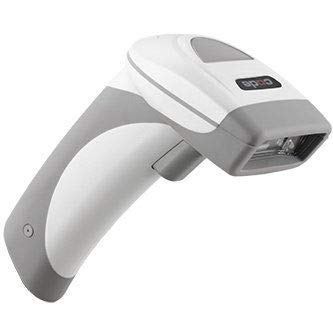
Image of the Code CR1500 barcode scanner, a compact device with a dark gray finish and a USB cable.
2. Impostazione
The CR1500 barcode scanner connects to your computer via a standard USB cable. No additional drivers are typically required for basic operation, as it functions as a USB HID (Human Interface Device) keyboard.
- Unpack the CR1500 scanner and its USB cable from the packaging.
- Connect the USB cable to the scanner's port, ensuring a secure fit.
- Collega l'altra estremità del cavo USB a una porta USB disponibile sul computer.
- The scanner will typically power on and be recognized by your operating system automatically. A successful connection is often indicated by a short beep or a status light on the scanner.
3. Istruzioni per l'uso
The CR1500 is designed for intuitive barcode scanning. Follow these steps for effective data capture:
- Assicurarsi che lo scanner sia collegato al computer e acceso.
- Open the application on your computer where you wish the scanned data to appear (e.g., a text editor, spreadsheet, or POS software). Ensure the cursor is in the desired input field.
- Point the scanner's window at the barcode you wish to read. Position the scanner so the entire barcode is within the aiming pattern.
- Press and hold the trigger button located on the handle of the scanner. The scanner will emit an aiming beam.
- A successful scan is typically indicated by an audible beep and/or a visual confirmation light. The scanned data will then be transmitted to your computer as if it were typed via a keyboard.
- Release the trigger button after a successful scan.
4. Manutenzione
Proper maintenance ensures the longevity and optimal performance of your CR1500 scanner.
- Pulizia: Utilizzare un panno morbido e privo di lanugine leggermente dampened with water or a mild, non-abrasive cleaner to wipe the scanner's exterior. Avoid harsh chemicals, abrasive materials, or solvents that could damage the device. Do not spray cleaning solutions directly onto the scanner or into any openings.
- Magazzinaggio: Store the scanner in a clean, dry environment away from extreme temperatures, high humidity, and direct sunlight when not in use.
- Cura del cavo: Avoid bending, twisting, or pulling the USB cable excessively to prevent internal damage to the cable or the scanner's port.
5. Risoluzione Dei Problemi
This section addresses common issues you might encounter with your CR1500 barcode scanner.
Lo scanner non risponde
Problema: The scanner does not power on or respond when the trigger is pressed.
Soluzione:
- Verify the USB cable is securely connected to both the scanner and the computer.
- Prova a collegare il cavo USB a una porta USB diversa del computer.
- Ensure your computer's USB ports are functional by testing with another device.
- Restart your computer to refresh USB device recognition.
Barcode Not Scanning
Problema: The scanner powers on but fails to read barcodes.
Soluzione:
- Assicurarsi che il codice a barre sia pulito, integro e chiaramente visibile.
- Adjust the distance and angle of the scanner relative to the barcode. Try scanning from different distances and angles.
- Check if the barcode type (1D, 2D) is supported by the CR1500 (it supports both).
- Ensure there is adequate lighting, but avoid direct glare or reflections on the barcode that could interfere with scanning.
Output dati non corretto
Problema: Scanned data appears incorrectly or is not in the expected format.
Soluzione:
- Verify the cursor is in the correct input field on your computer application before scanning.
- Check your computer's keyboard layout settings (e.g., US English, UK English), as this can sometimes affect scanner output.
- Consult the full product manual or manufacturer's website for advanced configuration options if specific data formatting or symbology settings are required.
6. Specifiche
| Specificazione | Dettaglio |
|---|---|
| Modello | CR1500 |
| Marca | Codice |
| Peso dell'articolo | 1 libbre |
| Dimensioni del pacco | 9.5 x 7.5 x 2.75 pollici |
| Colore | Grigio |
| Produttore | Codice |
| ASIN | B08175LZKH |
| Data prima disponibilità | 8 novembre 2019 |
| Dispositivi compatibili | Desktop, portatile |
| Tecnologia di connettività | Cavo USB |
| Volume di eserciziotage | 5 Volt |
| Codice UPC | 746175986717 |
7. Garanzia e supporto
Informazioni sulla garanzia: For details regarding the product warranty, including terms, conditions, and duration, please refer to the warranty card included with your purchase or visit the official Code websito per le informazioni più aggiornate.
Supporto tecnico: If you encounter issues not covered in this manual, require further assistance, or have questions about advanced configurations, please contact Code technical support. Support contact information can typically be found on the official Code websito o all'interno della confezione del prodotto.


