
1. Introduzione
Welcome to the NIVIAN NVS-RC2 Wireless Remote Control user manual. This guide provides essential information for the proper installation, operation, and maintenance of your remote control. This device is designed to enhance the management of your compatible NIVIAN alarm system, offering convenient control over its various functions.
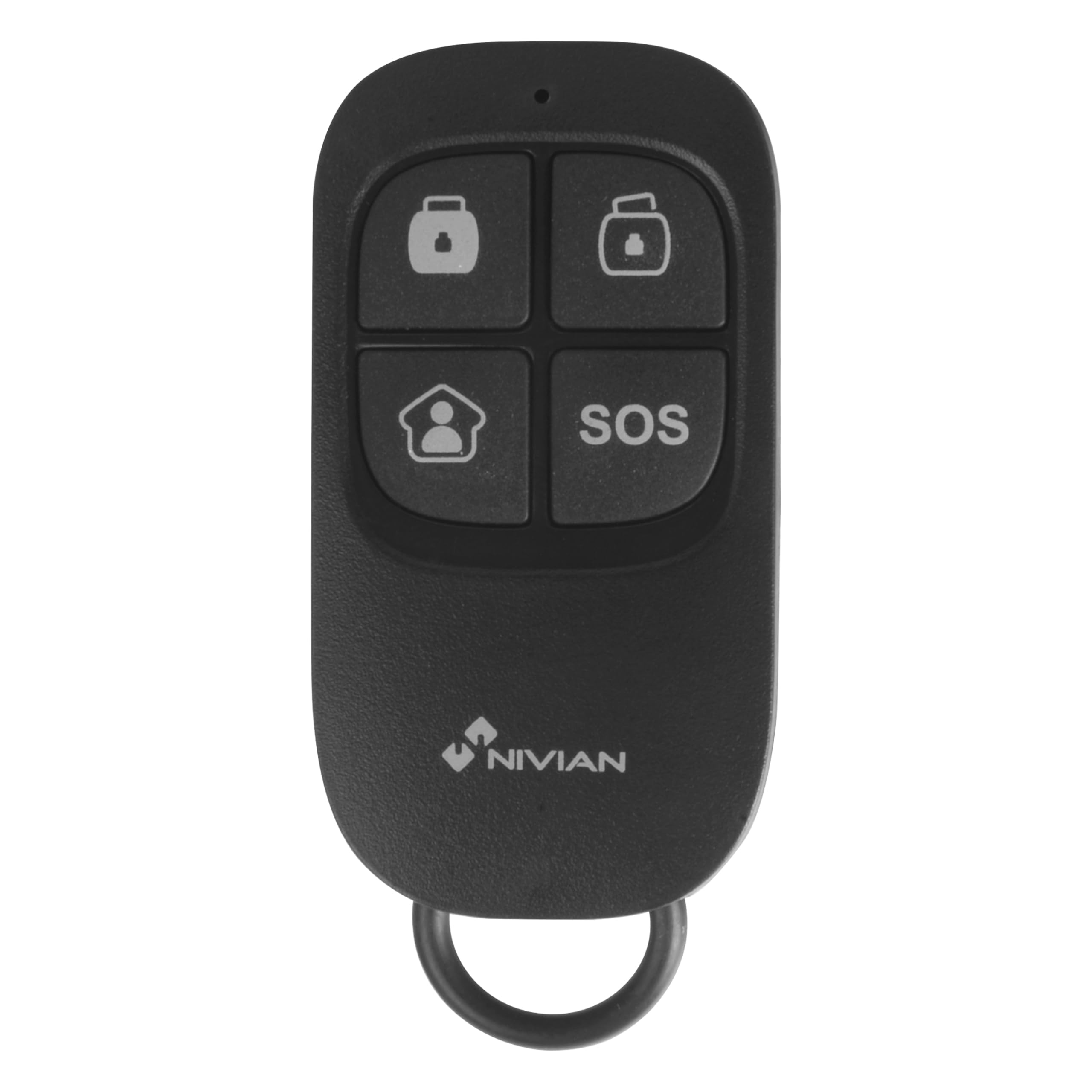
Image 1.1: The NIVIAN NVS-RC2 Wireless Remote Control.
2. Prodotto finitoview
The NIVIAN NVS-RC2 is a compact, multi-function wireless remote control for compatible NIVIAN alarm systems. It features four distinct buttons for quick access to key alarm functions.
Caratteristiche principali:
- Wireless operation up to 80 meters in open space.
- Four function buttons: Arm, Disarm, Partial Arm, and SOS (Panic).
- Powered by a single CR2025 3V battery.
- Compact design, suitable for carrying on a keychain.

Image 2.1: Features of the NIVIAN NVS-RC2 Remote Control.

Image 2.2: Button functions on the NIVIAN NVS-RC2 Remote Control.
3. Impostazione
3.1 Installazione della batteria
- Individuare il vano batterie sul retro del telecomando.
- Aprire con cautela il coperchio del vano.
- Inserire una batteria CR2025 da 3 V, assicurandosi della corretta polarità (+/-).
- Chiudere saldamente il coperchio del vano batterie.
3.2 Abbinamento al sistema di allarme
The NIVIAN NVS-RC2 remote control must be paired with a compatible NIVIAN alarm system. Refer to your specific NIVIAN alarm system's manual for detailed instructions on how to add new remote controls or accessories. Typically, this involves putting the alarm panel into a pairing mode and then activating the remote control.

Image 3.1: Remote control interacting with an alarm panel.
4. Istruzioni per l'uso
The remote control features four buttons, each corresponding to a specific alarm system function:
- Pulsante di attivazione (Closed Lock Icon): Press this button to fully arm your alarm system. All sensors will be active.
- Pulsante di disattivazione (Open Lock Icon): Press this button to disarm your alarm system. All sensors will be deactivated.
- Partial Arm Button (House Icon): Press this button to partially arm your alarm system. This mode typically activates perimeter sensors while allowing movement within the property. Refer to your alarm system's manual for specific partial arming zone configurations.
- Pulsante SOS (SOS Text): Press and hold this button for a few seconds to activate the emergency (panic) function. This will trigger the alarm immediately, regardless of the system's arming status. Use this function only in emergency situations.
5. Manutenzione
5.1 Sostituzione della batteria
When the remote control's range decreases or it becomes unresponsive, the CR2025 3V battery may need replacement. Follow the battery installation steps outlined in the "Setup" section.
5.2 Pulizia
Clean the remote control with a soft, dry cloth. Avoid using abrasive cleaners or solvents, as these can damage the device.
5.3 Conservazione
Conservare il telecomando in un luogo asciutto, lontano da temperature estreme e dalla luce solare diretta.
6. Risoluzione Dei Problemi
- Il telecomando non risponde:
- Controllare la batteria. Sostituirla se necessario.
- Ensure the remote is within the operational range (up to 80 meters in open space) of the alarm system.
- Verify that the remote is properly paired with your alarm system. Refer to your alarm system's manual for pairing instructions.
- Gamma ridotta:
- Sostituire la batteria.
- Ensure there are no significant obstructions (thick walls, metal objects) between the remote and the alarm panel.
- Avoid sources of strong radio interference.
- SOS button accidentally activated:
- Immediately disarm your alarm system using the disarm button on the remote or the alarm panel.
7. Specifiche
| Caratteristica | Dettaglio |
|---|---|
| Numero di modello | NVS-RC2 |
| Marca | NIVIANO |
| Alimentazione elettrica | 1 batteria CR2025 da 3 V (inclusa) |
| Frequenza | 433 MHz |
| Distanza di trasmissione | Fino a 80 metri (open space) |
| Current Consumption (Transmission) | ≤ 7mA |
| Dimensioni (L x P x A) | 57 x 31 x 11 mm (2.24 x 1.22 x 0.43 pollici) |
| Peso | 30 grammi (circa) |
| Numero di pulsanti | 4 |
| Tecnologia di connettività | Senza fili (433 MHz) |
| Dispositivi compatibili | NIVIAN Alarm Systems |

Immagine 7.1: Es.ample of a NIVIAN alarm system setup with various components.
8. Garanzia e supporto
8.1 Garanzia
The NIVIAN NVS-RC2 remote control typically comes with a 1-year warranty for spare parts availability. For specific warranty terms and conditions, please refer to the documentation provided with your alarm system or contact NIVIAN customer support.
8.2 Assistenza clienti
For technical assistance, troubleshooting, or inquiries regarding your NIVIAN NVS-RC2 remote control or compatible alarm system, please visit the official NIVIAN website or contact their customer service department. Contact information can usually be found on the product packaging or the main alarm system manual.