1. Introduzione
This manual provides essential information for the safe and efficient operation of your VOLTCRAFT FG-32502T Function Generator. Please read this manual thoroughly before using the device and keep it for future reference. The FG-32502T is a versatile 2-channel arbitrary waveform generator capable of producing various waveforms including sine, square, pulse, ramp, noise, and arbitrary signals across a frequency range of 1µHz to 250MHz.
2. Istruzioni di sicurezza
ATTENZIONE: la mancata osservanza di queste istruzioni di sicurezza può causare scosse elettriche, incendi o danni al dispositivo.
- Collegare sempre il dispositivo a una presa di corrente con messa a terra.
- Non aprire il dispositivo casing. All'interno non sono presenti parti riparabili dall'utente. Per qualsiasi intervento di manutenzione, rivolgersi a personale qualificato.
- Evitare di utilizzare il dispositivo in ambienti umidi oamp condizioni.
- Garantire una ventilazione adeguata per evitare il surriscaldamento.
- Utilizzare esclusivamente il cavo di alimentazione fornito con il dispositivo.
- Scollegare l'alimentazione prima di pulire o spostare il dispositivo.
Observe all warning labels on the device. The rear panel of the device contains important safety warnings, including a German warning indicating that the protective conductor must be connected to counteract electric shocks and that there are no user-serviceable parts inside. It also states not to remove covers and to always leave maintenance work to qualified personnel.

Immagine: Rear panel of the VOLTCRAFT FG-32502T Function Generator, featuring warning labels in German, various input/output ports such as USB, LAN, and power input, and regulatory markings.
3. Contenuto della confezione
Verificare che tutti gli articoli siano presenti e in buone condizioni al momento del disimballaggio:
- VOLTCRAFT FG-32502T Function Generator (1 unit)
- Cavo di alimentazione (1 unità)
- Manuale dell'utente (questo documento)
- Cavo USB (per la connessione al PC)
Se qualche articolo risulta mancante o danneggiato, contattare immediatamente il fornitore.
4. Prodotto finitoview
4.1 Pannello frontale
The front panel features the main display, control buttons, a rotary encoder, and output connectors for Channel 1 (CH1) and Channel 2 (CH2).
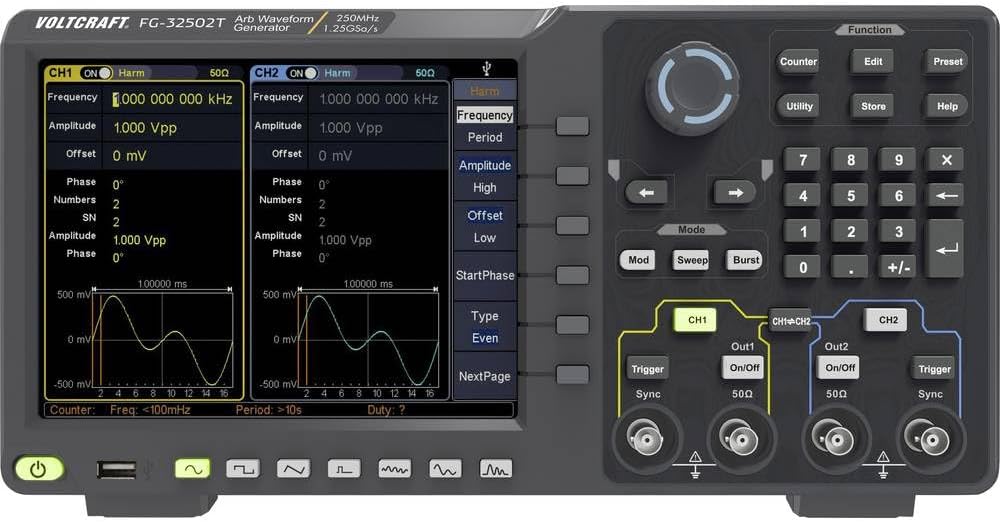
Immagine: Front panel of the VOLTCRAFT FG-32502T Function Generator, showing the display with two active channels (CH1 and CH2) displaying sine waves, various function buttons, a rotary encoder, and output connectors.
4.2 Pannello posteriore
The rear panel includes the power input, USB host, USB device, LAN interface, external modulation input, external reference clock input, and external trigger input.
Immagine: Rear panel of the VOLTCRAFT FG-32502T Function Generator, featuring warning labels in German, various input/output ports such as USB, LAN, and power input, and regulatory markings.
5. Impostazione
- Posizionamento: Place the function generator on a stable, level surface with adequate ventilation.
- Collegamento elettrico: Connect the supplied power cord to the power input on the rear panel of the device, then plug the other end into a grounded AC power outlet (100-240V, 50/60Hz).
- Accensione: Press the power button located on the front panel to turn on the device. The display will illuminate, and the system will perform a self-test.
- Connessione di uscita: Connect your test leads or cables to the desired output channels (CH1 or CH2) on the front panel.
6. Istruzioni per l'uso
The FG-32502T offers a wide range of waveform generation and modulation capabilities. The main display shows the settings for both channels, and dedicated buttons and a rotary encoder allow for precise control.
6.1 Basic Waveform Generation (Sine, Square, Pulse, Ramp)
- Seleziona canale: Press the CH1 or CH2 button to select the channel you wish to configure.
- Seleziona forma d'onda: Press the 'Function' button, then use the navigation keys or rotary encoder to select the desired basic waveform (e.g., Sine, Square, Pulse, Ramp).
- Regola i parametri: Use the dedicated parameter buttons (e.g., Frequency, Amplitude, Offset) and the rotary encoder to adjust the waveform characteristics.
Example: Pulse Waveform Setup
To set up a pulse waveform, select 'Pulse' from the function menu. You can then adjust parameters such as Frequency, Amplitude, Offset, Width, Rising Edge, and Falling Edge.
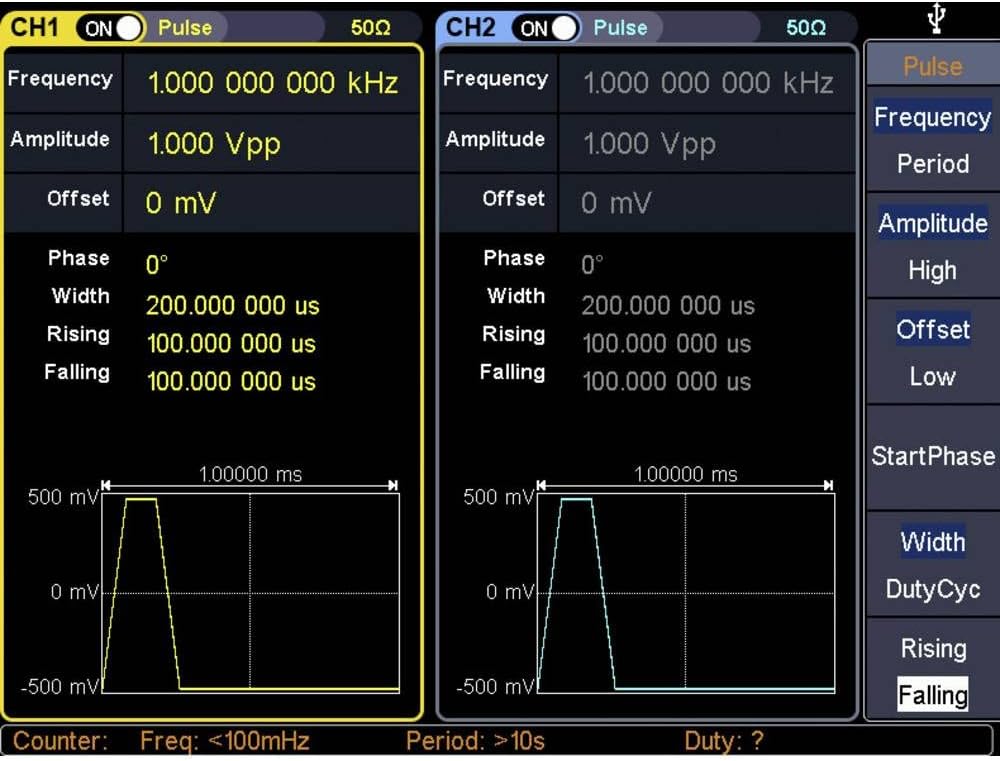
Immagine: Close-up of the VOLTCRAFT FG-32502T display, illustrating the settings for a Pulse waveform on both channels, including frequency, amplitude, offset, width, rising, and falling edge parameters.
Example: Square Waveform Setup
To set up a square waveform, select 'Square' from the function menu. You can adjust parameters such as Frequency, Amplitude, and Offset.

Immagine: Close-up of the VOLTCRAFT FG-32502T display, illustrating the settings for a Square waveform on both channels, including frequency, amplitude, and offset parameters.
6.2 forme d'onda arbitrarie
The device supports 152 built-in arbitrary waveform groups. To use an arbitrary waveform:
- Select 'Arb' from the function menu.
- Navigate through the available arbitrary waveform groups using the rotary encoder.
- Adjust parameters like frequency and amplitude secondo necessità.
6.3 Modulation Options
The FG-32502T offers various modulation types, including AM, FM, PM, FSK, ASK, BPSK, PSK, PWM, and 3FSK. To apply modulation:
- Select the desired waveform for the carrier signal.
- Press the 'Mod' button.
- Select the modulation type and adjust its parameters (e.g., modulation depth, frequency, source).
6.4 Counter Function
The device includes a frequency counter. To use the counter:
- Connect the signal to be measured to the counter input.
- Press the 'Counter' button to activate the function.
- The display will show the measured frequency.
7. Manutenzione
7.1 Pulizia
To clean the device, disconnect it from the power supply. Use a soft, dry cloth to wipe the exterior. For stubborn dirt, a slightly damp È possibile utilizzare un panno imbevuto di detergente delicato, assicurandosi che non penetri liquido nel dispositivo. Non utilizzare detergenti abrasivi o solventi.
7.2 Conservazione
When not in use for extended periods, store the function generator in a dry, dust-free environment, away from direct sunlight and extreme temperatures.
8. Risoluzione Dei Problemi
- Il dispositivo non si accende:
- Verificare che il cavo di alimentazione sia collegato saldamente sia al dispositivo sia alla presa di corrente.
- Assicurarsi che la presa di corrente sia funzionante.
- Nessun segnale in uscita:
- Verify that the output channel (CH1/CH2) is enabled.
- Controllare il amplitude settings; ensure it is not set to 0V.
- Ensure the output cables are correctly connected and not damaged.
- Incorrect waveform displayed:
- Review the waveform type and parameter settings on the display.
- Perform a factory reset if settings appear corrupted (refer to the utility menu for this option).
For issues not covered here, please contact VOLTCRAFT customer support.
9. Specifiche
| Caratteristica | Specificazione |
|---|---|
| Numero di modello | FG-32502T |
| Produttore | VOLTCRAFT |
| Canali | 2 |
| Gamma di frequenza | 1µHz - 250MHz (for basic waveforms) |
| Basic Waveforms | Seno, Quadrato, Impulso, Ramp, Rumore |
| Forme d'onda arbitrarie | 152 built-in groups, 2 points to 1 Mpts length |
| Modulation Options | AM, FM, PM, FSK, ASK, BPSK, PSK, PWM, 3FSK, Burst, Sweep |
| Interfacce di comunicazione | USB Host, USB Device, LAN, External Modulation, External Reference Clock, External Trigger |
| Frequency Counter Resolution | 7 digits (Input frequency range: 100 - 200 MHz) |
| Alimentazione elettrica | Mains Powered (100-240V, 50/60Hz) |
| Peso dell'articolo | 2.5 kg |
| Data prima disponibilità | 21 dicembre 2019 |
10. Garanzia e supporto
For warranty information, technical support, or service requests, please refer to the documentation included with your product or visit the official VOLTCRAFT websito. Conserva la ricevuta d'acquisto come prova d'acquisto.


