1. Introduzione
This manual provides detailed instructions for the setup, operation, maintenance, and troubleshooting of your Oversteel Iron Mechanical Gaming Keyboard. Please read this manual thoroughly before using the product to ensure optimal performance and longevity.
The Oversteel Iron keyboard features Kailh Red mechanical switches, full RGB backlighting, anti-ghosting technology, and a detachable wrist rest for enhanced comfort during extended use.
2. Contenuto della confezione
- Oversteel Iron Mechanical Gaming Keyboard
- Poggiapolsi staccabile
- Manuale dell'utente (questo documento)
3. Impostazione
3.1 Collegamento della tastiera
- Posizionare la tastiera su una superficie piana e stabile.
- Attach the detachable wrist rest by aligning the clips and gently pressing until it clicks into place.
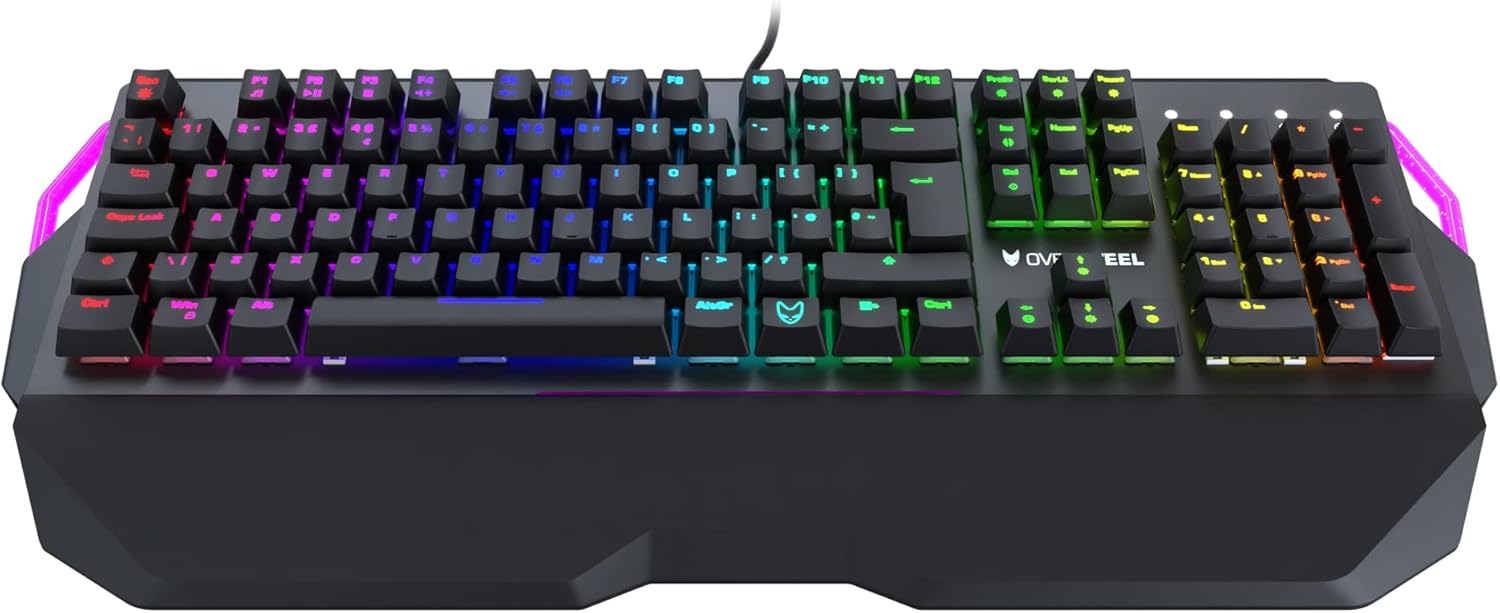
Image: Oversteel Iron keyboard with its detachable wrist rest. The wrist rest provides ergonomic support for comfortable typing.
- Individua una porta USB disponibile sul tuo computer (PC o laptop).
- Plug the USB connector of the Oversteel Iron keyboard into the USB port.
- Il sistema operativo dovrebbe rilevare e installare automaticamente i driver necessari. Questo processo potrebbe richiedere alcuni istanti.
3.2 Installazione del software (facoltativa)
For advanced customization of RGB backlighting and macro functions, dedicated software may be available. Please visit the official Oversteel websito per scaricare gli ultimi software e le istruzioni di installazione.
Note: The integrated software allows configuration of 19 standard lighting modes and 9 lateral lighting modes.
4. Istruzioni per l'uso
4.1 Funzioni di base della tastiera
The Oversteel Iron keyboard functions as a standard QWERTY keyboard. Key presses will register as expected in your operating system and applications.

Immagine: dall'alto verso il basso view of the Oversteel Iron keyboard, showcasinil suo layout completo e la vivace retroilluminazione RGB.
4.2 Controllo della retroilluminazione RGB
La tastiera è dotata di retroilluminazione RGB personalizzabile. Utilizza le seguenti combinazioni di tasti per regolare gli effetti di luce:
- Fn + [Tasto]: Specific function keys (F1-F12) may have secondary functions for lighting control. Refer to the keycaps for symbols indicating these functions.
- Dedicated Lighting Keys: Some keyboards include dedicated keys for cycling through lighting modes or adjusting brightness.
- Controllo del software: For granular control over individual key lighting, effects, and colors, use the Oversteel software (if installed).
Note: The keyboard offers 19 standard lighting modes and 9 lateral lighting modes. The software allows for full configuration.
4.3 tasti multimediali
The Oversteel Iron keyboard includes multimedia function keys, typically accessed by pressing the Fn key in combination with the F-keys (F1-F12). These allow control over media playback, volume, and other system functions.
- Fn+F1-F12: Common functions include Play/Pause, Stop, Previous Track, Next Track, Mute, Volume Up, Volume Down, Email, Web Browser, My Computer, Calculator.
4.4 Funzione anti-ghosting
The keyboard is equipped with an anti-ghosting effect, ensuring precise registration of simultaneous key presses. This is particularly beneficial for gaming, where multiple keys are often pressed at once.
5. Manutenzione
5.1 Pulizia della tastiera
- Scollegare la tastiera dal computer prima di pulirla.
- Utilizzare una bomboletta di aria compressa per rimuovere polvere e detriti dagli spazi tra i tasti.
- Pulisci i tasti e la superficie della tastiera con un panno morbido e leggermente abrasivo.amp, panno privo di lanugine. Evitare l'eccessiva umidità.
- Non utilizzare prodotti chimici aggressivi, detergenti abrasivi o solventi, poiché potrebbero danneggiare la finitura della tastiera e le legende dei tasti.
5.2 Cura generale
- Evitare di versare liquidi sulla tastiera. In caso di versamento, scollegare immediatamente la tastiera e lasciarla asciugare completamente prima di ricollegarla.
- Non esporre la tastiera a temperature estreme o alla luce solare diretta per periodi prolungati.
- Maneggiare con cura il cavo USB per evitare danni.
6. Risoluzione Dei Problemi
6.1 La tastiera non risponde
- Assicurarsi che il cavo USB sia collegato saldamente sia alla tastiera che al computer.
- Prova a collegare la tastiera a una porta USB diversa del computer.
- Riavvia il computer.
- Prova la tastiera su un altro computer per determinare se il problema riguarda la tastiera o il sistema.
6.2 Illuminazione RGB non funzionante o errata
- Check the keyboard's lighting control key combinations (e.g., Fn + F-keys) to ensure lighting is not turned off or set to a very dim level.
- If using the Oversteel software, ensure it is running and correctly configured. Try resetting lighting profileall'interno del software.
- Assicurati che il firmware della tastiera sia aggiornato (controlla Oversteel websito per gli aggiornamenti).
6.3 Tasti non registrati o digitati due volte
- Clean the affected key(s) using compressed air to remove any debris that might be obstructing the switch.
- Se il problema persiste, potrebbe trattarsi di un guasto hardware. Contattare l'assistenza clienti.
7. Specifiche
| Caratteristica | Dettaglio |
|---|---|
| Marca | sovraacciaio |
| Numero di modello | NAT-OV-IRON-RED-UK |
| Tecnologia di connettività | USB |
| Descrizione della tastiera | Tastiera meccanica da gioco |
| Tipo di interruttore | Interruttori meccanici rossi Kailh |
| Gestione del colore della retroilluminazione | RGB (19 standard modes, 9 lateral modes) |
| Caratteristiche speciali | Backlit, Anti-Ghosting, Detachable Wrist Rest, Adjustable Height |
| Dispositivi compatibili | Computer portatile, PC |
| Materiale | Acrilonitrile Butadiene Stirene, Alluminio |
| Colore | Red (referring to switch type/accent, product chassis is black) |
| Disposizione | UK Layout (as per model number and feature bullets) |
8. Garanzia e supporto
For warranty information and technical support, please refer to the documentation provided with your purchase or visit the official Oversteel websito. Conservare la prova d'acquisto per eventuali reclami in garanzia.
Produttore: sovraacciaio
Paese di origine: Cina


