1. Introduzione
This manual provides detailed instructions for the EDISION PROTON S2 Full HD Satellite Receiver, model 01-07-0024. This device is designed for receiving free-to-air (FTA) satellite television and radio programs in Full HD quality via DVB-S2. It is compatible with Unicable systems and includes a 2-in-1 remote control for convenient operation of both the receiver and your television. The receiver is also suitable for regions affected by ARD & ZDF SD signal discontinuation.

Image 1.1: EDISION PROTON S2 Receiver packaging.

Image 1.2: The EDISION PROTON S2 Receiver integrated into a home entertainment setup.
2. Contenuto della confezione
Si prega di selezionare la casella per i seguenti elementi:
- EDISION PROTON S2 Receiver
- Telecomando 2 in 1
- Adattatore di alimentazione 12V
- Quick User Guide (English/German/Greek)
- 2 batterie LR03 AAA
- 2 x Self-adhesive pads

Image 2.1: All items included in the EDISION PROTON S2 product package.
3. Prodotto finitoview
3.1 Pannello frontale e laterale

Image 3.1: Front and side panel features of the receiver.
- INGRESSO IR: Infrared connection port for an external IR eye.
- USB: Port for connecting storage devices (e.g., USB flash drives) or an optional USB WiFi antenna.
- Display a LED: Shows the current time or program number.
- Pulsanti CH+/CH-: Buttons for navigating through program lists.
- Pulsante di accensione: To turn the receiver on or off.
3.2 Connections on the Back
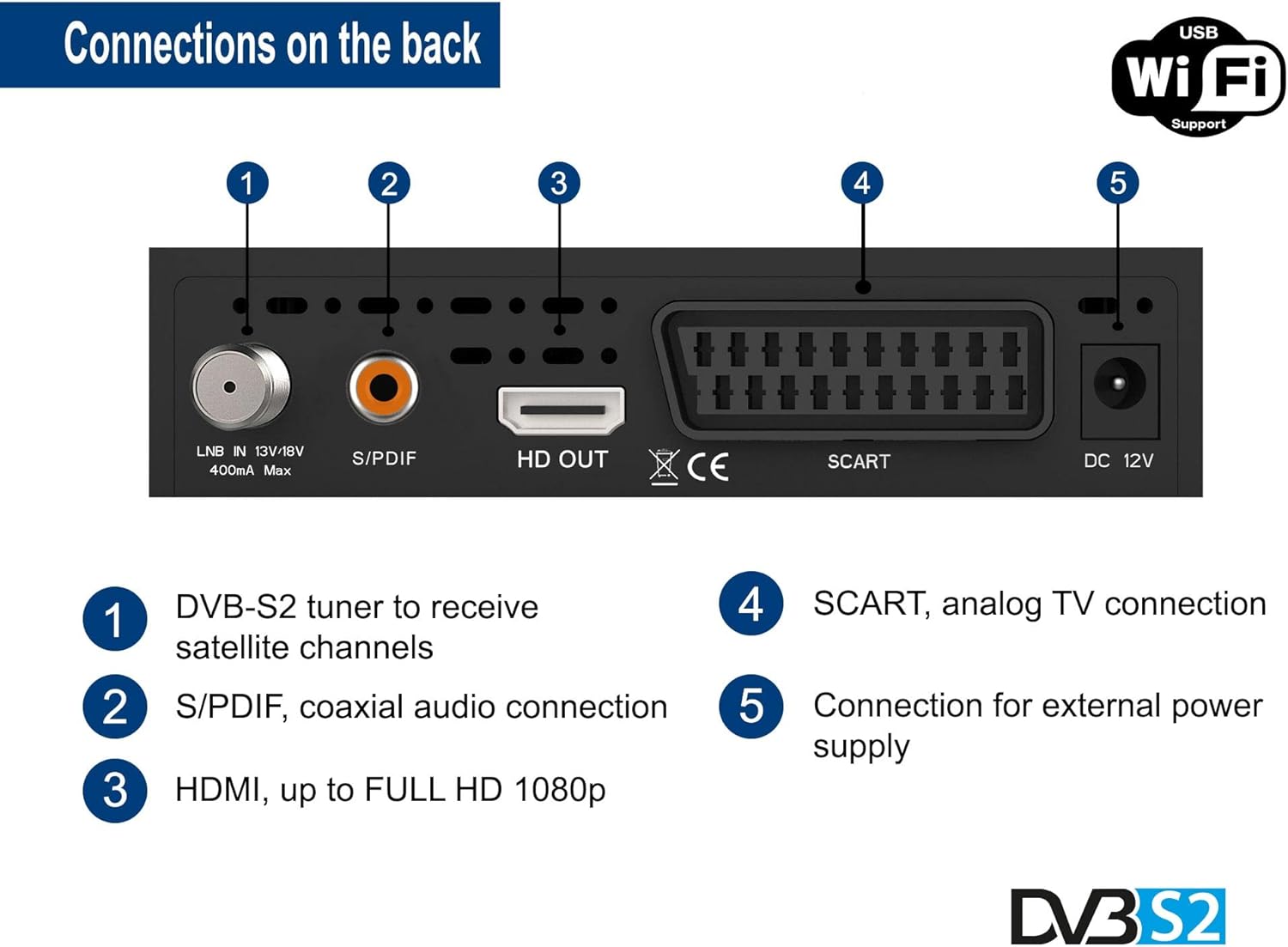
Image 3.2: Rear panel connections of the receiver.
- LNB IN (DVB-S2 Tuner): Input for the satellite antenna cable to receive satellite channels. Supports 13V/18V, 400mA Max.
- S/PDIF: Coaxial audio output for digital audio connection.
- USCITA HD (HDMI): High-Definition Multimedia Interface output, supporting up to Full HD 1080p.
- SCART: Analog TV connection for older televisions.
- CC 12V: Collegamento per l'alimentazione esterna.
4. Controllo remoto
The EDISION PROTON S2 comes with a 2-in-1 universal remote control (EDI-RCU 1 Learn) that can operate both the receiver and essential functions of your television. It is pre-programmed for the four most important functions of Samsung and LG TVs, but you can program these four buttons to control any TV as desired.

Image 4.1: The 2-in-1 universal remote control for the EDISION PROTON S2.
4.1 Programming TV Functions
Refer to the Quick User Guide for detailed instructions on how to program the TV control buttons on your remote control.
5. Impostazione
Follow these steps to set up your EDISION PROTON S2 receiver:
- Collegare il cavo satellitare: Connect the satellite antenna cable from your LNB to the Ingresso LNB porta sul retro del ricevitore.
- Collegamento alla TV:
- For High-Definition (HD) display, connect an HDMI cable from the receiver's HD OUT porta a un ingresso HDMI disponibile sul televisore.
- For Standard-Definition (SD) display or older TVs, connect a SCART cable from the receiver's SCART porta all'ingresso SCART del televisore.
- Connetti alimentazione: Collegare l'alimentatore da 12 V al CC 12V port on the receiver and then plug it into a power outlet.
- Inserire le batterie: Open the battery compartment of the remote control and insert the two LR03 AAA batteries, observing polarity.
- Accensione: Turn on your TV and select the correct HDMI or SCART input source. Then, press the ENERGIA button on the receiver or remote control to turn on the receiver.
- Configurazione iniziale: The receiver comes with a pre-programmed channel list for Astra 19.2°. If you are using a different satellite or need to perform a new scan, follow the on-screen instructions for initial setup or refer to the Quick User Guide for detailed menu navigation.

Image 5.1: Connection diagram for the EDISION PROTON S2 receiver.
6. Istruzioni per l'uso
Once your receiver is set up, you can begin using its various functions:
- Selezione canale: Utilizzare il CH+/CH- buttons on the remote control or the front panel to change channels. You can also enter channel numbers directly using the numeric keypad.
- Controllo del volume: Regolare il volume utilizzando il VOL+/VOL- pulsanti sul telecomando.
- Guida elettronica ai programmi (EPG): Premere il tasto EPG pulsante sul telecomando per view program information for current and upcoming broadcasts.
- Lettore multimediale: Connect a USB storage device to the USB port. Navigate to the multimedia menu to play compatible files such as MP3 audio, JPEG/BMP images, and AVI/DivX/VOB/MKV videos.
- Time Shift (PVR): With a connected USB storage device, you can pause live TV and resume watching later. Refer to the Quick User Guide for specific instructions on activating and using Time Shift.
- YouTube (Optional): If an optional WiFi stick is connected to the USB port and configured for network access, you can access YouTube content through the receiver's menu.
- Sottotitoli: Activate or deactivate subtitles for supported programs using the dedicated subtitle button on the remote control.
7. Manutenzione
To ensure optimal performance and longevity of your EDISION PROTON S2 receiver, follow these maintenance guidelines:
- Pulizia: Disconnect the receiver from the power supply before cleaning. Use a soft, dry cloth to wipe the exterior. Do not use liquid cleaners or abrasive materials.
- Ventilazione: Ensure the receiver has adequate ventilation. Do not block the ventilation openings on the top and sides of the device. Avoid placing it in enclosed spaces or on soft surfaces that could obstruct airflow.
- Aggiornamenti software: Controllare periodicamente le istruzioni del produttore website for available software updates. Updates can improve performance, add features, or resolve issues. Follow the instructions provided with the update carefully.
- Magazzinaggio: Se si conserva il ricevitore per un periodo prolungato, scollegarlo dall'alimentazione e conservarlo in un luogo fresco e asciutto.
8. Risoluzione Dei Problemi
If you encounter issues with your EDISION PROTON S2 receiver, refer to the following common problems and solutions:
| Problema | Possibile causa | Soluzione |
|---|---|---|
| No Picture/No Sound |
|
|
| Nessun segnale |
|
|
| Il telecomando non funziona |
|
|
If the problem persists after trying these solutions, please consult the full user manual or contact EDISION customer support.
9. Specifiche
| Caratteristica | Dettaglio |
|---|---|
| Numero di modello | Numero di telefono: 01-07-0024 |
| Produttore | EDIZIONE |
| Dimensioni del prodotto | 12.5 x 10 x 3 cm; 370 grammi |
| Tecnologia di connettività | HDMI, USB |
| Porte USB totali | 1 |
| Modalità di uscita audio | Circondare |
| Uscita video analogica | Composite (via SCART) |
| Batterie richieste | 2 batterie AAA (incluse) |
| Standard DVB | Digitale terrestre (DVB-S2) |
| Risoluzione | Risoluzione completa 1080p |
| Media Player Support | MP3/JPEG/BMP/AVI/DivX/VOB/MKV |
| Caratteristiche speciali | Unicable compatible, EPG, Subtitles, Time Shift, Optional WiFi for YouTube |
10. Garanzia e supporto
For warranty information, please refer to the documentation included with your product or visit the official EDISION website. For technical support or further assistance, please contact EDISION customer service through their official channels.


