Introduzione
This manual provides detailed instructions for the FANTECH USB RGB Gaming Headset (HG11) and its accompanying Headset Stand (AC3001S). This combo is designed for PC gaming, offering 7.1 surround sound, a 50mm driver, and RGB lighting for an immersive audio experience. Please read this manual thoroughly before using the product to ensure proper setup and operation.
Cosa c'è nella scatola
Verificare che tutti i componenti siano presenti nella confezione:
- Cuffie da gioco HG11
- AC3001S Headphone Stand
Prodotto finitoview e Caratteristiche

Image: The FANTECH HG11 Gaming Headset and AC3001S Headset Stand displayed together, showcasing their white and grey design with RGB lighting on the stand base.
Cuffie da gioco HG11
- Suono surround 7.1: Experience precise and clear audio with immersive 7.1 Surround-Sound technology, enhancing positional awareness in games.
- Driver da 50 mm: Equipped with 50mm drivers for a wider frequency range, richer sound fields, and high-fidelity audio.
- Design confortevole ed ergonomico: Features supple faux leather full-coverage earmuffs with high-quality memory foam padding for extended comfort. The ergonomically padded headband reduces fatigue during long gaming sessions.
- Connettività USB: Designed for PC use with a USB connection.
- Microfono con cancellazione del rumore: Ensures clear communication by filtering ambient noise.
- Inline Audio Control Unit: Convenient controls for volume up/down, microphone on/off, and RGB lighting switch.
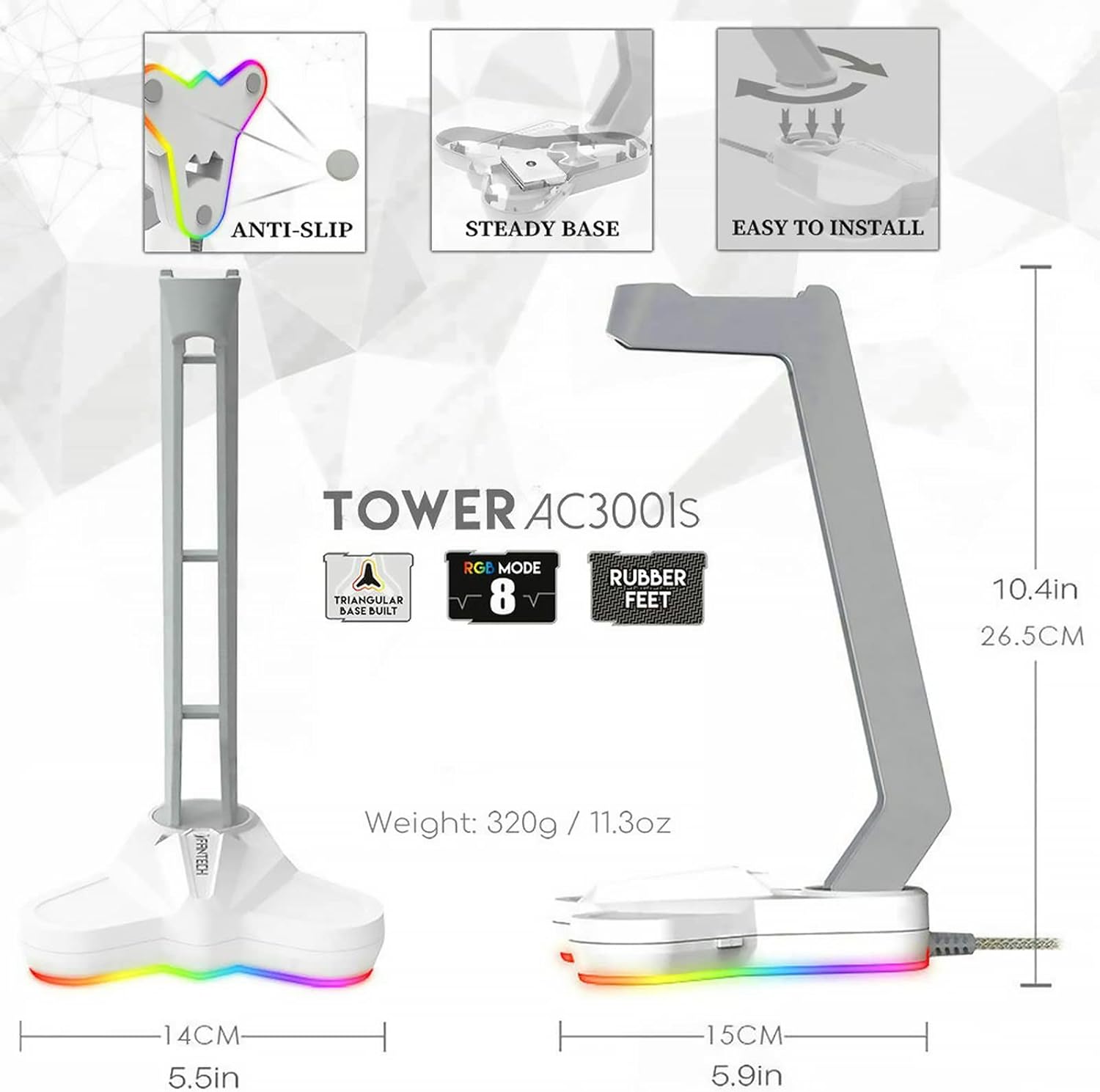
Image: The FANTECH AC3001S RGB Headset Stand, highlighting its stable triangular base and customizable RGB lighting effects.
AC3001S Headset Stand
- Base di illuminazione RGB: Features 8 lighting modes, including 1 RGB rolling subtitles light and 7 monochromatic lights, controllable via a backlit button.
- Durable Triangular Base: Provides stability and protection for your desk with anti-slip rubberized feet.
- Installazione semplice: Simple assembly process.
- Peso: Approximately 320g (11.3oz) with added internal weight for enhanced stability.
Impostare
Connecting the HG11 Gaming Headset
- Individua una porta USB disponibile sul tuo PC.
- Plug the USB connector of the HG11 Gaming Headset into the USB port.
- The headset will typically be recognized automatically by your operating system.
- For virtual 7.1 surround sound functionality, ensure you install the necessary drivers from the official FANTECH websito. (Note: Virtual 7.1 surround sound is only available on PC and requires drivers.)
Assembling the AC3001S Headset Stand
- Unpack the stand components.
- Align the stand arm with the base and gently push down until it clicks into place.
- Connect the stand's USB cable to an available USB port on your PC or a USB power adapter to activate the RGB lighting.


Image: Left: Close-up of the HG11 headset's USB connector and inline control unit. Right: Diagram illustrating the easy installation steps for the AC3001S headset stand.
Istruzioni per l'uso
Using the HG11 Gaming Headset
- Controllo del volume: Use the "VOL+" and "VOL-" buttons on the inline control unit to adjust the audio volume.
- Accensione/spegnimento microfono: Press the microphone button on the inline control unit to mute or unmute the microphone.
- RGB Lighting (Headset): The headset's RGB lighting is typically activated upon connection. Refer to driver software for advanced customization.
Using the AC3001S Headset Stand
- Placing the Headset: Hang your HG11 Gaming Headset on the stand when not in use.
- Controllo dell'illuminazione RGB: Press the backlit button on the stand's base to cycle through the 8 available lighting modes (1 RGB rolling subtitles light, 7 monochromatic lights).

Image: Close-up of the HG11 headset's inline control unit, showing buttons for volume adjustment, microphone toggle, and RGB switch.
Manutenzione
- Pulizia: Use a soft, dry cloth to wipe down the headset and stand. Avoid abrasive cleaners or solvents.
- Magazzinaggio: Store the headset on its stand in a cool, dry place away from direct sunlight and extreme temperatures.
- Cura del cavo: Evitare piegature o attorcigliamenti bruschi nel cavo USB per evitare danni.
- Cuffie: Periodically check earmuffs for wear and tear. While durable, gentle handling will prolong their lifespan.

Image: The FANTECH HG11 Gaming Headset resting on its AC3001S stand, demonstrating proper storage.
Risoluzione dei problemi
- Nessun suono dalle cuffie:
- Ensure the USB cable is securely plugged into the PC.
- Check the volume level on the inline control unit and your PC's sound settings.
- Verify that the HG11 headset is selected as the default audio output device in your PC's sound settings.
- Reinstall or update the headset drivers.
- Microfono non funzionante:
- Ensure the microphone is not muted via the inline control unit.
- Check your PC's sound settings to ensure the HG11 microphone is selected as the input device and its volume is not set to zero.
- Confirm that the microphone is positioned correctly near your mouth.
- Il suono surround 7.1 non funziona:
- Ensure you have installed the specific drivers for the HG11 headset. Virtual 7.1 surround sound requires these drivers and is only available on PC.
- Check the driver software settings to ensure 7.1 surround sound is enabled.
- RGB Lighting on Stand Not Working:
- Ensure the stand's USB cable is securely connected to a powered USB port.
- Press the backlit button on the stand's base to cycle through lighting modes and ensure it's not turned off.
Specifiche tecniche
| Caratteristica | Specificazione |
|---|---|
| Nome del modello | HG11CO |
| Tecnologia di connettività | Cablato (USB) |
| Presa per cuffie | USB |
| Unità di guida | 50mm |
| Risposta in frequenza | 20 Hz - 20 kHz |
| Sensibilità dell'altoparlante | 119 dB |
| Impedenza dell'altoparlante | 21 Ohm |
| Sensibilità del microfono | -42 dB ± 3 dB |
| Direttività per microfono | Omnidirezionale |
| Controllo del rumore | Cancellazione attiva del rumore (microfono) |
| Caratteristica del cavo | Senza grovigli |
| Colore | Bianco |
| Materiale | ABS, Faux Leather, Stainless Steel |
| Item Weight (Headset) | 11.7 once (circa 0.33 kg) |
| Dimensioni del prodotto | 10.5 x 4.5 x 7.5 pollici |
| Componenti inclusi | HG11 Gaming Headset, AC3001S Headphone Stand |

Image: A table summarizing the technical specifications of the FANTECH HG11 Gaming Headset and AC3001S Headset Stand.
Garanzia e supporto
Per informazioni sulla garanzia e supporto tecnico, fare riferimento al sito ufficiale FANTECH websito o contattare direttamente il servizio clienti. Conservare la ricevuta d'acquisto per eventuali reclami in garanzia.


