1. Introduzione
Welcome to the user manual for your Nokia 216 Dual SIM mobile phone. This guide provides essential information to help you set up, operate, and maintain your device. The Nokia 216 (RM-1187) is a classic feature phone designed for reliable communication, featuring dual SIM capability, a 2.4-inch display, and a VGA camera.
Please read this manual carefully to ensure proper use and to get the most out of your phone.
2. Contenuto della confezione
Assicurati che tutti gli articoli siano presenti nella confezione del prodotto:
- Nokia 216 Dual SIM Mobile Phone (RM-1187)
- Batteria
- Adattatore di alimentazione
- Cavo USB
3. Dispositivo suview
Familiarize yourself with the key components of your Nokia 216 phone.
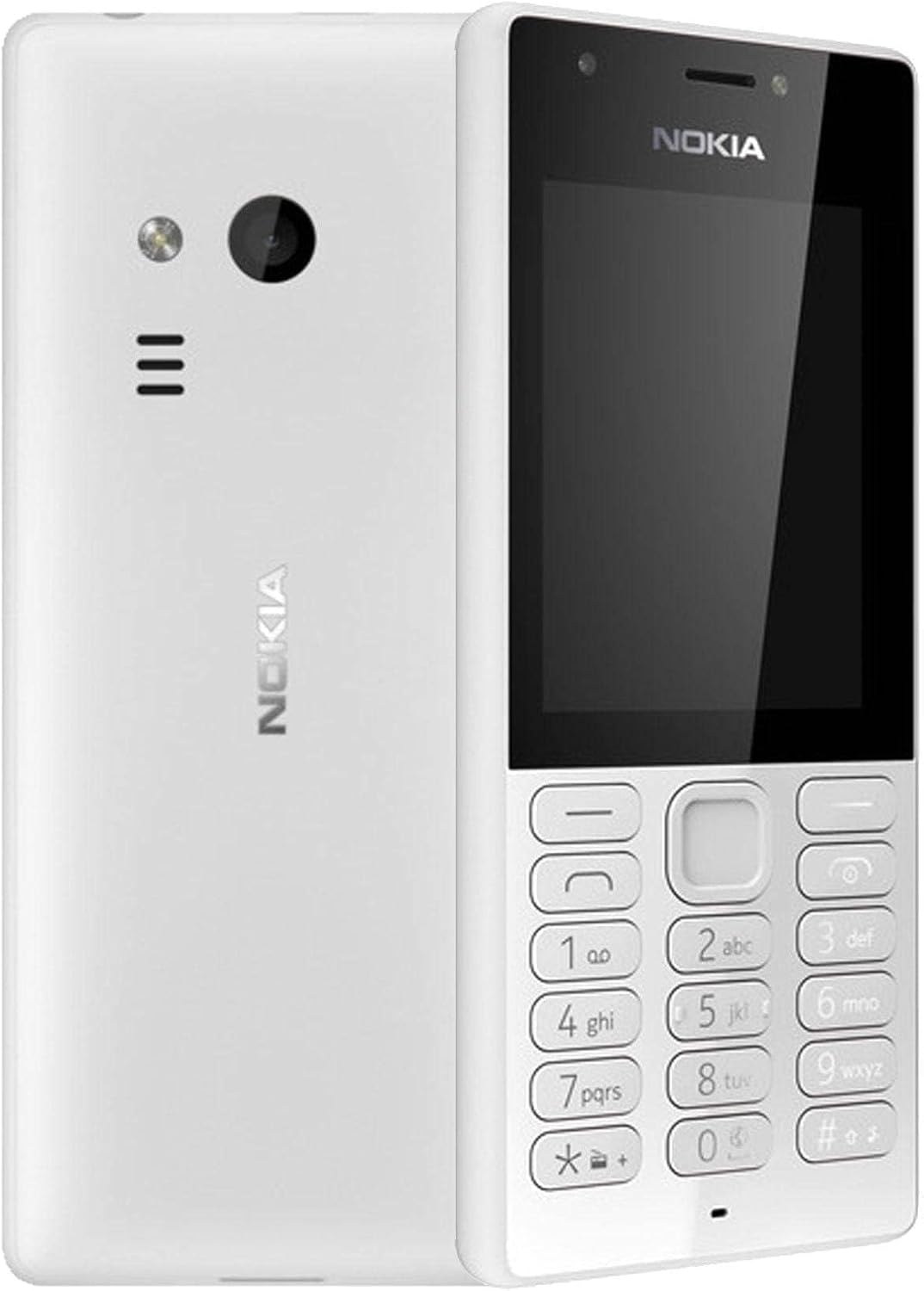
Figura 3.1: Davanti e dietro view of the Nokia 216 Dual SIM mobile phone. The front shows the display, earpiece, and numeric keypad. The back features the rear camera, LED flash, and loudspeaker grille.

Figura 3.2: Davanti view of the Nokia 216 Dual SIM mobile phone. This image highlights the 2.4-inch display, the navigation keys, and the alphanumeric keypad for dialing and text input.

Figura 3.3: Indietro view of the Nokia 216 Dual SIM mobile phone. This view shows the rear VGA camera lens, the LED flash, and the Nokia branding.
Componenti chiave:
- Display: Schermo QVGA da 2.4 pollici.
- tastiera: Alphanumeric keypad for dialing and text entry, with navigation keys.
- Telecamera posteriore: VGA camera with LED flash.
- Altoparlante: For audio playback and hands-free calls.
- Microfono: Per l'input vocale durante le chiamate e le registrazioni.
- Jack audio da 3.5 mm: Per cuffie o altoparlanti esterni.
- Porta di ricarica: Porta micro-USB per la ricarica e il trasferimento dati.
4. Impostazione
4.1. Inserire la/e scheda/e SIM
- Turn off the phone and disconnect any charger.
- Carefully remove the back cover by prying it open from the notch.
- Se la batteria è inserita, sollevala.
- Insert the SIM card(s) into the designated slot(s) with the gold contacts facing down. For dual SIM models, ensure both SIMs are correctly seated.
- If applicable, insert a microSD card into its slot for additional storage.
- Sostituire la batteria.
- Allineare la cover posteriore e premerla con decisione finché non scatta in posizione.
4.2. Caricare la batteria
- Collegare l'alimentatore a una presa a muro.
- Plug the micro-USB end of the cable into the phone's charging port.
- L'indicatore della batteria sullo schermo mostrerà lo stato di carica.
- Una volta caricata completamente, scollegare il caricabatterie dal telefono e poi dalla presa a muro.
5. Istruzioni per l'uso
5.1. Accensione/spegnimento
- Per accendere: Press and hold the power key (usually the red 'End Call' key) until the phone vibrates and the Nokia logo appears.
- Per spegnere: Press and hold the power key until the 'Power off' option appears on the screen, then select it.
5.2. Effettuare chiamate
- Dalla schermata iniziale, inserisci il numero di telefono utilizzando il tastierino numerico.
- Press the green 'Call' key to initiate the call.
- To end a call, press the red 'End Call' key.
5.3. Invio di messaggi di testo (SMS)
- Vai a Menu > Messaggi > Creare un messaggio.
- Digitare il messaggio utilizzando la tastiera.
- Inserisci il numero di telefono del destinatario o selezionalo dai contatti.
- Selezionare Inviare.
5.4. Utilizzo della fotocamera
- Vai a Menu > Telecamera.
- Inquadra il tuo scatto utilizzando il display.
- Premere il tasto di navigazione centrale per scattare una foto.
6. Manutenzione e cura
To ensure the longevity and optimal performance of your Nokia 216, follow these care guidelines:
- Mantenere il dispositivo asciutto: L'umidità può danneggiare i circuiti elettronici.
- Use original accessories: Only use batteries, chargers, and accessories approved by Nokia.
- Pulisci delicatamente: Use a soft, clean, dry cloth to clean the surface of the device.
- Evitare temperature estreme: Do not expose your device to very high or low temperatures.
- Maneggiare con cura: Evitare di far cadere o sottoporre il dispositivo a forti impatti.
7. Risoluzione Dei Problemi
If you encounter issues with your Nokia 216, try these common troubleshooting steps:
| Problema | Soluzione |
|---|---|
| Il telefono non si accende | Assicurarsi che la batteria sia carica. Collegare il caricabatterie e riprovare. Verificare che la batteria sia inserita correttamente. |
| Nessun segnale di rete | Controlla che la scheda SIM sia inserita correttamente. Spostati in una zona con una migliore copertura di rete. Riavvia il telefono. |
| Batteria non in carica | Ensure the charger is properly connected to both the phone and the power outlet. Try a different power outlet or charger. Check for any damage to the charging port. |
| Non è possibile effettuare o ricevere chiamate | Check network signal. Ensure your SIM card is active and has sufficient credit/plan. Verify that call barring is not enabled. |
8. Specifiche
| Caratteristica | Dettaglio |
|---|---|
| Marca | La Nokia |
| Nome del modello | RM-1187 |
| Sistema operativo | Symbian 9.1 (Series 30) |
| Dimensioni dello schermo | 2.4 pollici |
| Risoluzione dello schermo | 240 x 320 pixel |
| Frequenza di aggiornamento | Frequenza 90 Hz |
| Dimensione RAM installata | 256 MB |
| Capacità di archiviazione della memoria | 3.9 GB (Internal, likely for system/apps, expandable via microSD) |
| Modello CPU | A10 |
| Tecnologia cellulare | 2G |
| Tecnologie di comunicazione wireless | Cellulare |
| Tecnologie di connettività | USB, Bluetooth, Wi-Fi |
| GPS | A-GPS |
| Primary Device User Interface | Buttons, Numeric Keypad, Microphone |
| Altre caratteristiche della fotocamera | Rear Camera (VGA) |
| Presa audio | 3.5 millimetri |
| Fattore di forma | Classico |
| Colore | Grigio |
| Tempo di conversazione | Fino a 18 ore |
| Peso dell'articolo | 339 grammi |
| Dimensioni del pacco | Dimensioni: 13.4 x 12.6 x 3.6 cm |
| Cosa c'è nella scatola | Adattatore di alimentazione, cavo USB |
9. Garanzia e supporto
Per informazioni sulla garanzia, fare riferimento alla scheda di garanzia inclusa nella confezione del prodotto o visitare il sito ufficiale Nokia website. If you require further assistance or technical support, please contact Nokia customer service through their official channels.
Conservare la ricevuta d'acquisto come prova d'acquisto per eventuali reclami in garanzia.


