1. Introduzione
The upHere U1204 USB fan is designed to provide efficient and quiet cooling for a variety of electronic devices. This manual provides detailed instructions for setup, operation, maintenance, and troubleshooting to ensure optimal performance and longevity of your fan.
Key features include a multi-speed controller, dual ball bearings for extended lifespan, and robust protection features. The fan is suitable for cooling PCs, laptops, TV boxes, receivers, AV cabinets, PlayStation consoles, Xbox consoles, projectors, and routers.
2. Caratteristiche del prodotto
- Multi-Speed Controller: The U1204 fan features a speed switch with 3 adjustable levels (Low, Medium, High) to meet diverse cooling requirements. This allows users to balance cooling performance with noise levels.
- Ampia compatibilità: This USB cooling fan is ideal for various applications, including cooling PC/laptop components, TV boxes, receivers, AV cabinets, PlayStation 4/5, Xbox consoles, projectors, and routers. It helps protect your equipment from heat-related damage.
- Dual Ball Bearing: Equipped with high-quality dual ball bearings, the fan boasts an extended lifespan of up to 70,000 hours. This design ensures reliable and consistent performance over time. The fan can be used in both horizontal and vertical orientations.
- Portabilità: The fan is powered via standard USB ports, making it highly portable and versatile. It can be connected to USB ports found on AV cabinets, PlayStation consoles, and other equipment, offering flexible cooling solutions in various environments, including home, office, or even in a car.
- Protezione multipla: Black metal grilles are installed on both sides of the fan to protect users' hands from the rotating blades and prevent cables from interfering with fan operation. Additionally, cable protection adhesive is applied in the corners to enhance durability and prevent wear.
- Silicone Rubber Feet: The fan includes silicone rubber feet designed to absorb noise and reduce surface friction caused by fan vibrations, contributing to quieter operation.
3. Contenuto della confezione
Verificare che tutti i componenti siano presenti nella confezione:
- upHere U1204 Dual 120mm USB Fans (2 units)
- USB Power Cable with 3-Speed Controller
- Metal Grilles (4 units)
- Silicone Rubber Feet/Mounts (8 units)
- Viti di montaggio

Figure 1: Package Contents. This image displays all items included with the upHere U1204 dual fan kit, including the two fans, USB cable, grilles, and mounting hardware.
4. Configurazione e installazione
Follow these steps to set up your upHere U1204 USB fan:
- Fissare i piedini in gomma: Secure the silicone rubber feet to the corners of each fan. These feet help absorb vibrations and provide stability.
- Posizionamento: Place the fan(s) in the desired location for cooling. Common placements include on top of game consoles, under laptops, next to routers, or mounted within PC cases or AV cabinets. Ensure proper airflow direction for optimal cooling.
- Connetti alimentazione: Plug the USB connector of the fan cable into an available USB port on your device (e.g., PC, game console, router) or a USB power adapter.
- Secure Grilles: If desired, attach the metal grilles to the fan(s) using the provided screws to protect fingers and cables.
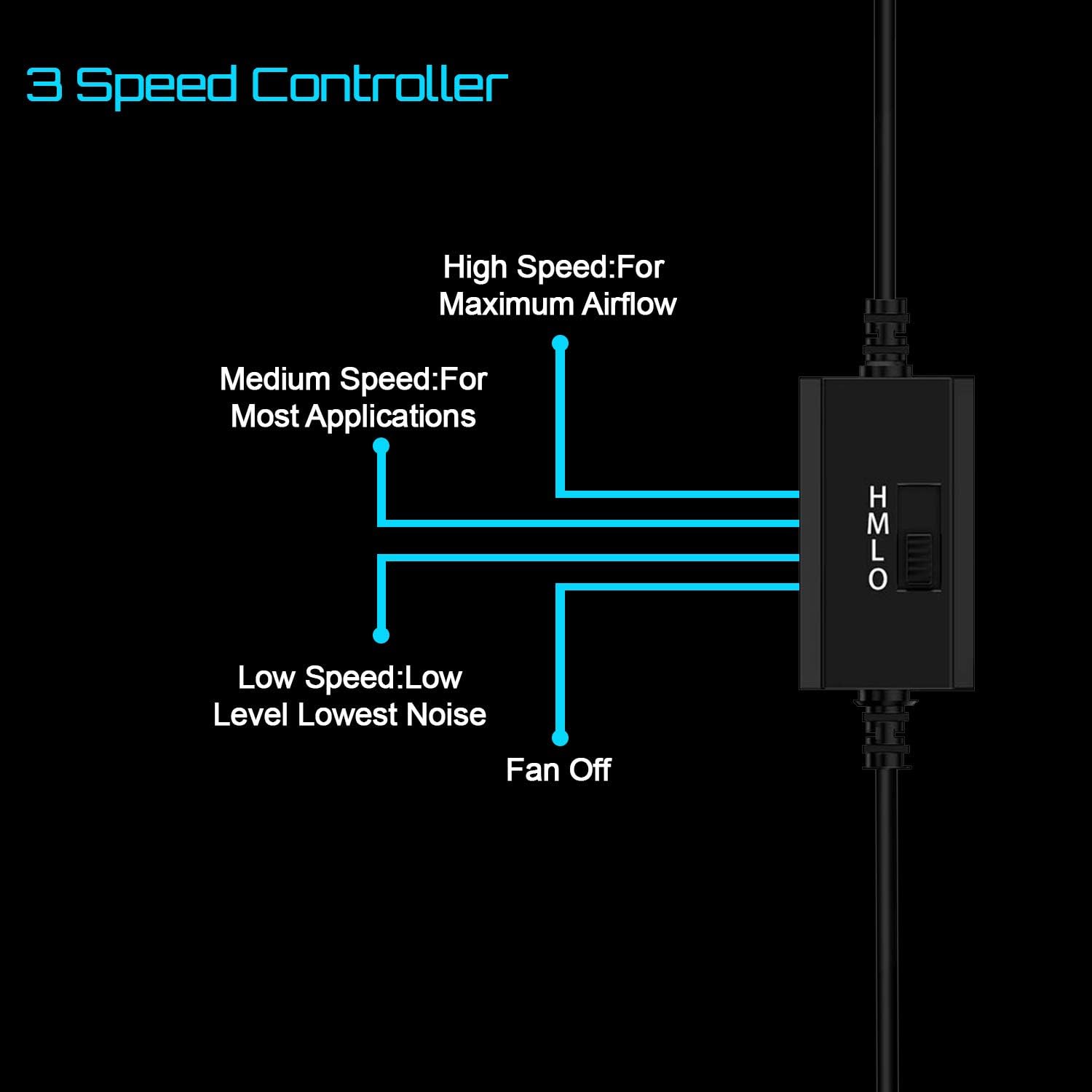
Figure 2: Anti-Vibration Rubber Feet. This image shows the detail of the anti-vibration rubber feet attached to the fan, designed to minimize noise and movement.
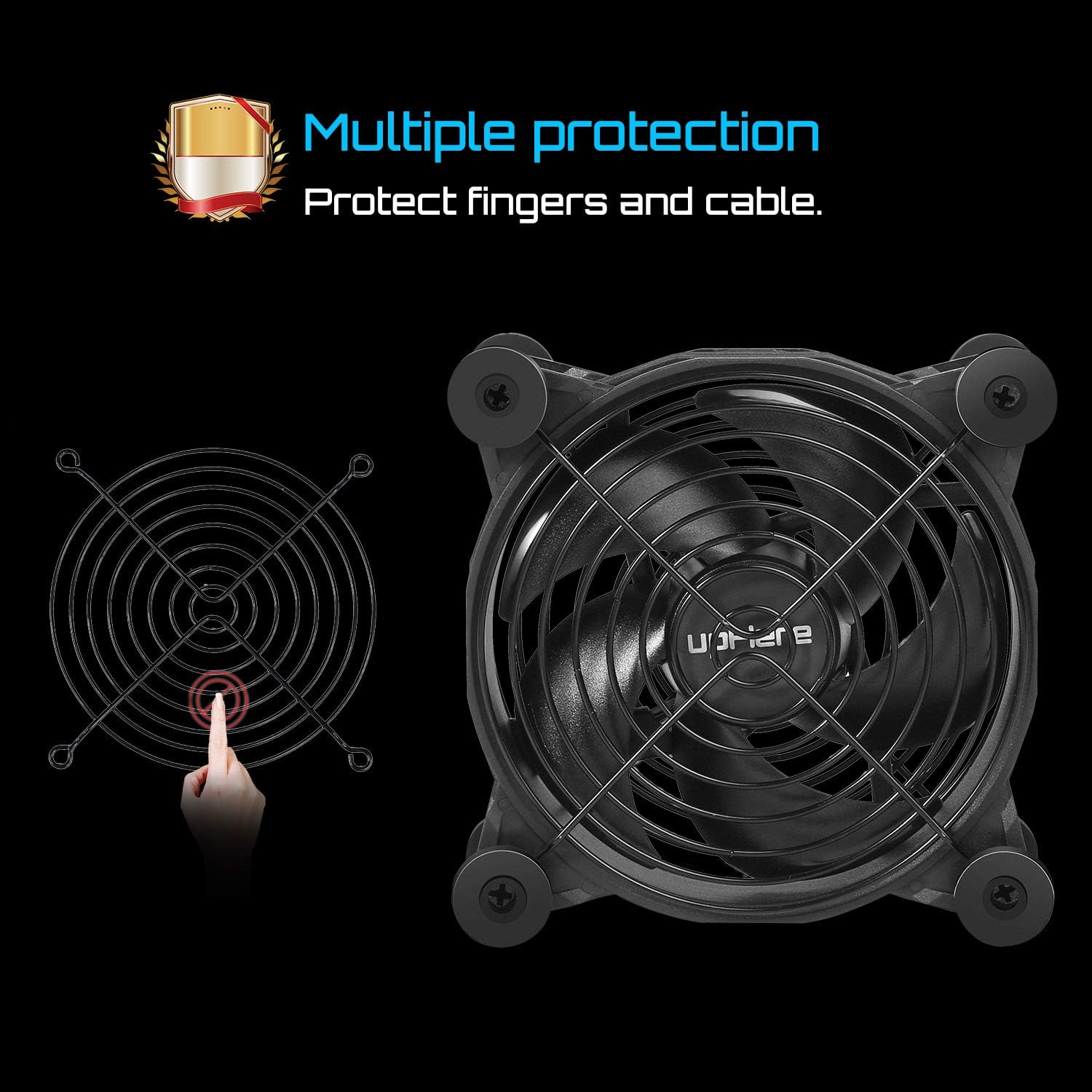
Figure 3: Device Cooling Application. This image demonstrates how the upHere U1204 fan can be positioned to cool an Xbox console, illustrating its versatility for various devices.
Video 1: upHere U1204 USB Fan Overview. This video demonstrates the features and various installation methods for the upHere U1204 USB fan, including its use with game consoles, laptops, routers, and computer cases.
5. Istruzioni per l'uso
The upHere U1204 fan is equipped with an inline 3-speed controller for easy operation:
- Accensione/spegnimento: Once connected to a USB power source, the fan will power on.
- Regola la velocità: Use the switch on the inline controller to select your desired fan speed:
- L (Basso): Provides quiet operation with reduced airflow.
- M (medio): Offers a balance between airflow and noise, suitable for most applications.
- H (Alto): Delivers maximum airflow for intensive cooling needs.

Figure 4: 3-Speed Controller. This diagram visually explains the functions of the fan's 3-speed controller, indicating settings for low, medium, and high airflow.
6. Manutenzione
To ensure the longevity and optimal performance of your upHere U1204 fan, follow these maintenance guidelines:
- Pulizia: Periodically clean the fan blades and grilles to remove dust accumulation. Use a soft, dry cloth or compressed air. Ensure the fan is disconnected from power before cleaning.
- Ispezione: Regularly inspect the USB cable and connections for any signs of wear or damage. If damage is found, discontinue use and replace the unit.
- Magazzinaggio: Quando non viene utilizzato per lunghi periodi, conservare il ventilatore in un luogo fresco e asciutto, lontano dalla luce solare diretta e da temperature estreme.
7. Risoluzione Dei Problemi
If you encounter issues with your upHere U1204 fan, refer to the following common troubleshooting steps:
- La ventola non gira:
- Assicurarsi che il cavo USB sia collegato saldamente a una porta USB funzionante.
- Try plugging the fan into a different USB port or power adapter to rule out a faulty power source.
- Check the speed controller switch to ensure it is not in the 'Off' position or stuck between settings.
- Rumore eccessivo:
- Verify that the silicone rubber feet are properly installed to absorb vibrations.
- Assicurarsi che nessun cavo o oggetto estraneo ostruisca le pale della ventola.
- Lower the fan speed using the controller. Higher speeds naturally produce more noise.
- Raffreddamento insufficiente:
- Check for dust buildup on the fan blades or grilles and clean if necessary.
- Ensure the fan is positioned to draw hot air away from the device or blow cool air onto it, depending on the desired airflow direction.
- Increase the fan speed using the controller.
8. Specifiche
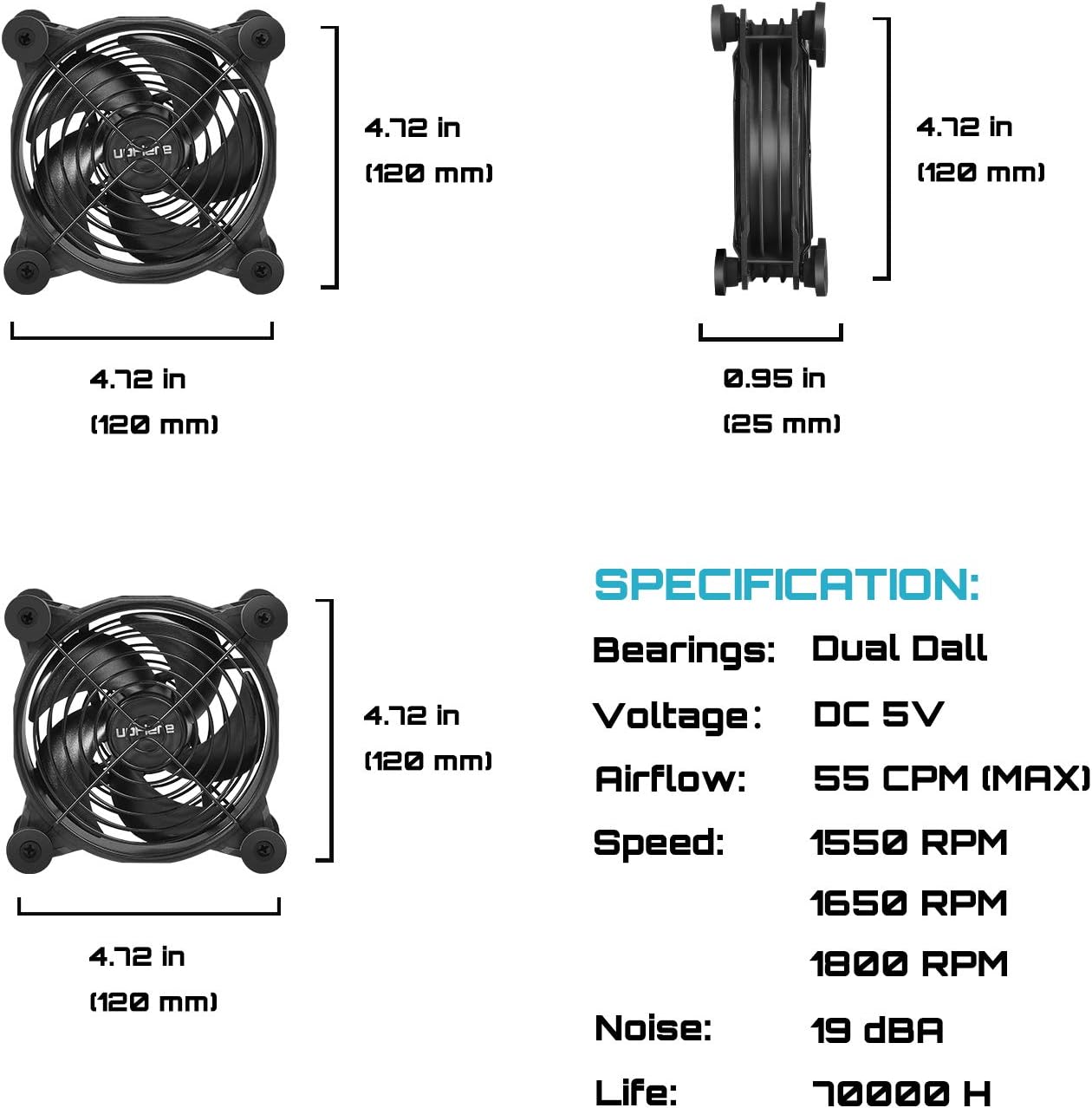
Figure 5: Product Specifications. This image provides a visual summary of the fan's key technical details.
| Caratteristica | Dettaglio |
|---|---|
| Dimensioni del prodotto | 4.72"L x 0.98"W x 4.72"H (120 mm x 25 mm x 120 mm) |
| Marca | qui sopra |
| Tipo di connettore di alimentazione | USB (4 pin) |
| Voltage | 5 Volt |
| Cosatage | 1.8 watt |
| Metodo di raffreddamento | Aria forzata |
| Dispositivi compatibili | Desktop, Laptop, Game Consoles, Routers, AV Cabinets |
| Livello di rumore | Up to 50 Decibels (depending on speed setting) |
| Materiale | Plastica |
| Tipo di cuscinetto | Doppio cuscinetto a sfere |
| Durata | 70,000 ore |
| Numero modello articolo | Minore 1204 |
| Peso dell'articolo | 0.32 ounces (per fan) |
9. Garanzia e supporto
For warranty information and technical support, please refer to the product packaging or contact upHere customer service directly. Keep your purchase receipt as proof of purchase for any warranty claims.
For further assistance, visit the official upHere websito o contattare i loro canali di supporto.
