Introduzione
This manual provides essential instructions for the safe and effective use of your Salter 9192 BK3R Curve Bluetooth Smart Electronic Scale. Please read this manual thoroughly before using the device and retain it for future reference.
The Salter 9192 BK3R Curve Bluetooth Smart Electronic Scale is designed to measure weight, body fat, body water, muscle mass, bone mass, Body Mass Index (BMI), and Basal Metabolic Rate (BMR). It features an easy-to-read LCD screen, memory for up to 8 users, and specialized modes for athletes and children. Data can be tracked and managed via the intuitive Salter Health (MiBody) application on your smartphone.
Informazioni sulla sicurezza
- Always place the scale on a firm, flat surface. Uneven surfaces can affect accuracy.
- Do not use on wet or slippery floors.
- Do not immerse the scale in water or use chemical cleaning agents. Wipe with a damp stoffa.
- This scale is not intended for medical diagnosis or treatment. Consult a healthcare professional for any health concerns.
- Individuals with pacemakers or other internal medical devices should not use this scale as it uses Bio-electrical Impedance Analysis (BIA).
- Pregnant women should use the scale for weight measurement only, as BIA readings may not be accurate.
- Tenere fuori dalla portata dei bambini quando non in uso.
Impostare
1. Installazione della batteria
- Individuare il vano batterie nella parte inferiore della bilancia.
- Aprire il coperchio del vano batterie.
- Inserire 3 batterie AAA, assicurandosi della corretta polarità (+/-).
- Chiudere saldamente il coperchio del vano batterie.
 Un dettagliato view of the Salter 9192 BK3R scale's large, easy-to-read LCD display, indicating the current unit as kilograms (KG) and showing the control buttons for switching between metric and imperial measurements (KG, ST/LB). This image shows the display where battery status might be indicated.
2. Download e associazione dell'app
- Download the "Salter Health" (or "MiBody") app from your smartphone's app store (Apple App Store or Google Play Store).
- Assicurati che il Bluetooth sia abilitato sul tuo smartphone.
- Open the Salter Health app and follow the on-screen instructions to create your user profile.
- The app will guide you through the pairing process with your scale. This typically involves stepping on the scale or pressing a button on the scale to activate Bluetooth.
- Once paired, your profile information (age, height, gender) will be synced to the scale, and the scale will be ready for use.
 An infographic detailing the Salter Health App's features, including data synchronization with Apple Health, setting personal goals, sharing challenges, automatic weigh-in reminders, profile sharing, and data export capabilities. The image also shows the scale and a smartphone displaying the app.
 An image highlighting the Salter Health App, showing a person interacting with a smartphone, with a dumbbell in the foreground, suggesting fitness tracking.
Istruzioni per l'uso
Prendere una Misurazione
- Posizionare la bilancia su una superficie dura, piana e stabile.
- Gently tap the center of the scale with your foot to turn it on. The display will show "0.0 kg" (or your selected unit).
- Ensure the Salter Health app is open on your smartphone and Bluetooth is active for automatic data transfer.
- Sali sulla bilancia a piedi nudi, restando fermo e con il peso distribuito uniformemente.
- The scale will display your weight, then cycle through other measurements such as body fat, body water, muscle mass, bone mass, BMI, and BMR.
- Your measurements will automatically sync to the Salter Health app.
 Un primo piano view of a foot stepping onto the Salter 9192 BK3R scale, emphasizing its durable toughened glass platform and the 'Step on for instant weight reading' functionality.
Switching Units (KG/ST/LB)
The unit conversion button is located on the underside of the scale. Press this button to cycle between kilograms (KG), stones (ST), and pounds (LB).
Athlete Mode and Child Mode
These modes can be activated within the Salter Health app during profile setup or editing. Athlete Mode is designed for individuals who engage in intense physical activity, while Child Mode provides appropriate measurements for younger users.
 An infographic illustrating the comprehensive health metrics measured by the Salter 9192 BK3R scale, including weight, body water, body fat, bone mass, BMI, BMR, and muscle mass, along with features like Athlete Mode, Child Mode, and support for 8 users.
Using the Salter Health App
L'app ti consente di:
- View your measurement history and progress over time.
- Set personal health goals.
- Condividi il tuo profile or challenge friends/family (Linked Accounts, Groups).
- Export your data in PDF or CSV formats.
- Receive automatic weigh-in reminders.
- Sync data with other health platforms like Apple Health.
 Screenshots from the Salter Health App demonstrating the user dashboard for tracking progress, the ability to link accounts for sharing data, and options to export data in PDF or CSV formats.
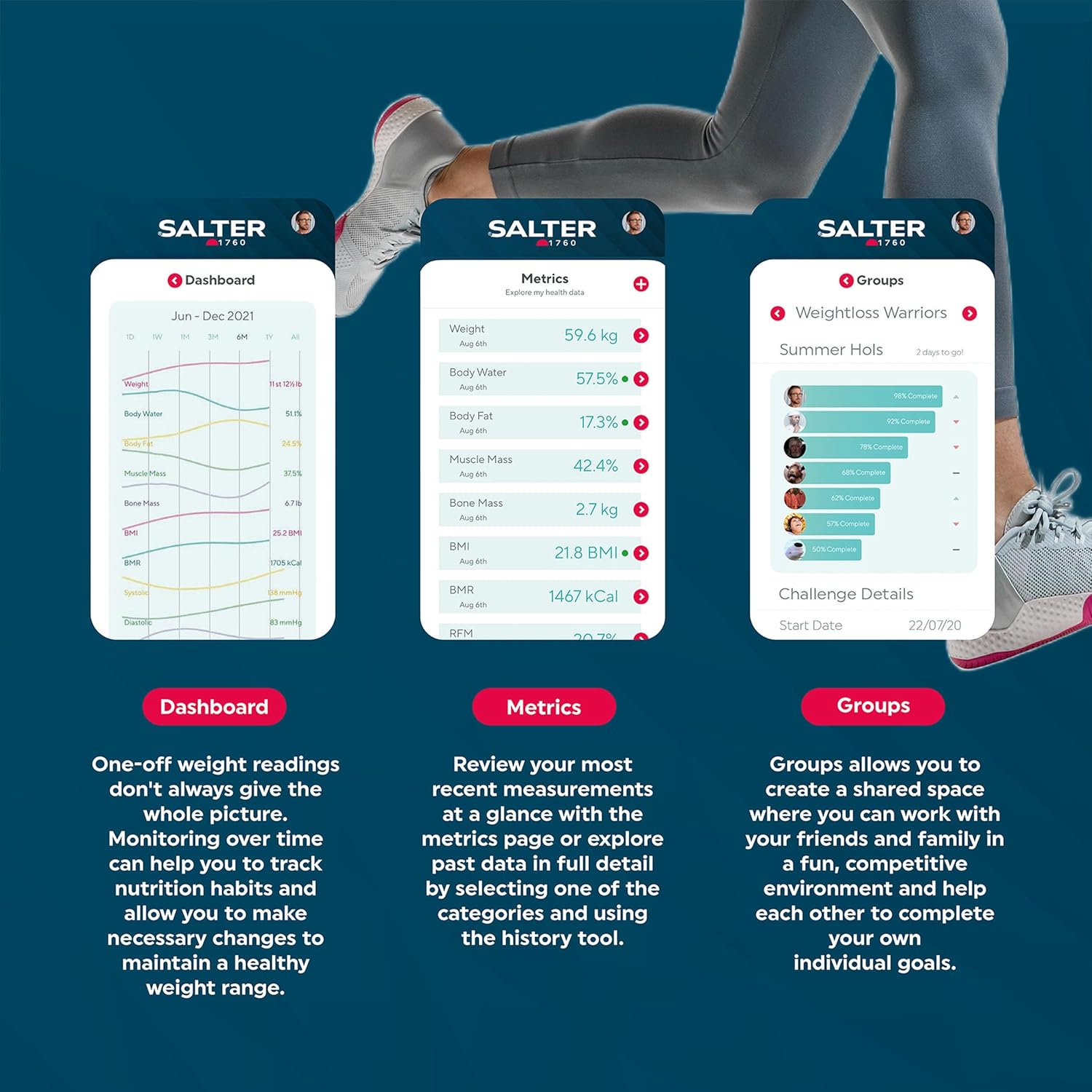 Screenshots from the Salter Health App illustrating the dashboard for overall progress, detailed metrics view with historical data, and the 'Groups' feature for shared challenges.
Manutenzione
Pulizia
Pulisci la superficie della bilancia con un damp cloth and mild detergent if necessary. Do not use abrasive cleaners or immerse the scale in water. Ensure the scale is dry before storage or next use.
Magazzinaggio
Conservare la bilancia in un luogo fresco e asciutto, lontano dalla luce solare diretta e da temperature estreme. Evitare di posizionare oggetti pesanti sulla bilancia quando non in uso.
 The Salter 9192 BK3R Curve Bluetooth Smart Electronic Scale is shown stored upright on a white shelf inside a bathroom cabinet, demonstrating its compact storage.
Sostituzione della batteria
When the battery indicator appears on the display, replace all 3 AAA batteries with new ones. Dispose of old batteries responsibly.
Risoluzione dei problemi
| Problema | Possibile causa | Soluzione |
|---|---|---|
| Letture imprecise o incoerenti | Scale not on a firm, flat surface; scale moved between readings; user not standing still; low battery. | Ensure scale is on a hard, flat floor. Do not move the scale. Stand still with weight evenly distributed. Replace batteries if low. Take measurements at the same time each day for consistency. |
| Messaggio di "Errore" sul display | Scale overload (exceeds 150 kg); improper use; internal error. | Ensure weight is within the maximum capacity (150 kg). Step off and then back on the scale correctly. If the error persists, remove batteries for 10 seconds and reinsert. |
| Errore di connessione Bluetooth | Bluetooth not enabled on smartphone; app not open; scale not activated; interference. | Ensure Bluetooth is on. Open the Salter Health app. Tap the scale to activate it. Move closer to the scale. Try restarting your phone or the app. |
| No body composition readings (fat, water, muscle, bone) | User is wearing socks/shoes; profile not set up correctly in app; scale not recognizing user. | Step on the scale barefoot. Ensure your profile (age, height, gender) is accurately entered in the Salter Health app. Ensure you are selecting your user profile on the scale if it doesn't auto-detect. |
Specifiche
- Marca: Saltatore
- Numero modello: 9192BK3R
- Colore: Nero
- Dimensioni (L x P x A): Dimensioni: 30.6 cm x 33.6 cm x 3 cm
- Capacità di peso massima: 150 kg (330 libbre / 23 st 8 libbre)
- Precisione della misurazione: 100 grammi
- Energia: 3 batterie AAA (incluse)
- Tipo di visualizzazione: LCD
- Materiale della piattaforma: Vetro temperato
- Caratteristiche speciali: Measures Weight, Body Fat, Body Water, Muscle Mass, Bone Mass, BMI, BMR; 8 User Memory; Athlete Mode; Child Mode; Bluetooth Connectivity.
- Peso dell'articolo: 1.88 kg
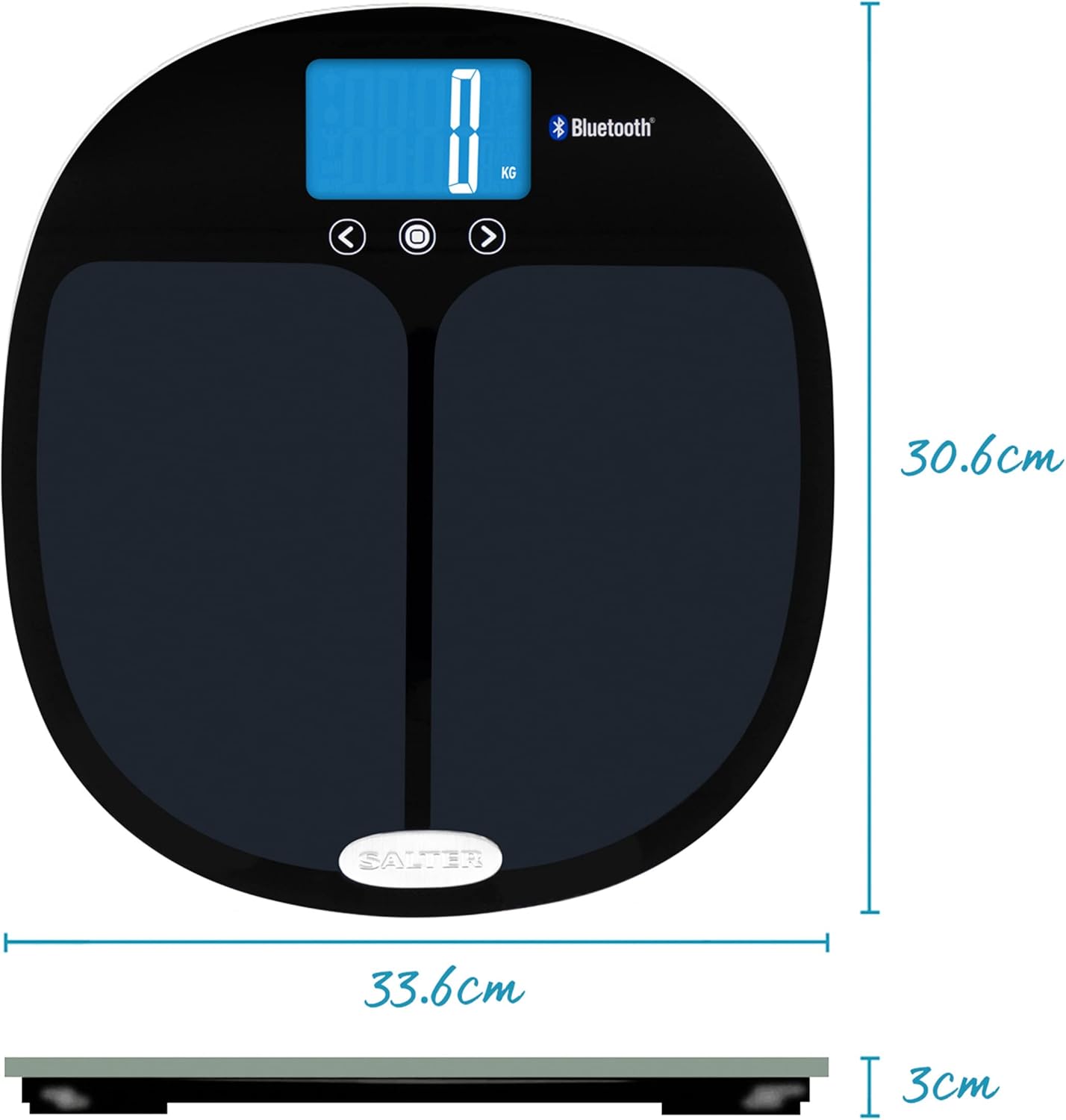 A technical diagram illustrating the physical dimensions of the Salter 9192 BK3R scale, with measurements of 33.6 cm in width, 30.6 cm in length, and 3 cm in height.
Garanzia e supporto
Informazioni sulla garanzia
Specific warranty details for your Salter 9192 BK3R Curve Bluetooth Smart Electronic Scale are typically provided with your purchase documentation or can be found on the official Salter websito. Per i termini e le condizioni di garanzia completi, fare riferimento a queste risorse.
Assistenza clienti
For further assistance, technical support, or inquiries regarding your scale, please visit the official Salter website or contact their customer service department. Contact information can usually be found on the product packaging or the Salter websito.


