Introduzione
This manual provides essential information for the proper use and maintenance of your VOLT PLUS TECH Bright LED MicroUSB Cable. Please read this manual thoroughly before using the product to ensure optimal performance and safety.
The Bright LED MicroUSB Cable is an all-in-one solution designed for efficient charging and data transfer, compatible with devices such as the Plantronics Voyager 6200 UC Black P/N 211718-01. Its sleek design incorporates Fast Charge Technology for quicker power delivery and data synchronization.
Caratteristiche principali
- Touch-Activated LED Sensor: A simple touch-to-activate LED sensor on the connector emits light, facilitating easy connection in low-light conditions or dark rooms.
- Indicatore di stato di carica: The LED indicator illuminates when touched while charging and turns off when not touching, providing clear status feedback.
- Compatibilità universale: Designed to work with any USB-A wall or car adapter, and compatible with a wide range of devices including Android, iOS, Mac, Windows, and specifically the Plantronics Voyager 6200 UC Black P/N 211718-01.
- Valutazione di corrente elevata: Features a full 5 Amp rating, ensuring consistent and solid performance and adds in at least 1,500 input/output operations per second.
- Costruzione robusta: Made with full zinc alloy body interior and ABS Plastic, offering scratch resistance, flexibility, and long-lasting durability.
- Ampia gamma di temperature di esercizio: Guaranteed to operate under high pressure situations from -13°F to 185°F (-25°C to 85°C).
- Energy Conserving Micro Draw Technology: Automatically reduces power consumption when not actively charging a device.
- AuDetect IC Technology: Automatically detects the device type and its specific charging needs for improved compatibility and efficient power delivery (5-9V/5A output).
- Data Transfer Capability: Supports 480Mbps data transfer speeds.

Image: The Bright LED MicroUSB Cable showing both the USB-A connector and the MicroUSB connector with its integrated LED light.
Impostare
- Disimballare il cavo: Carefully remove the Bright LED MicroUSB Cable from its packaging.
- Connetti alla fonte di alimentazione: Insert the USB-A end of the cable into a compatible USB-A wall adapter, car charger, computer USB port, or power bank.
- Connetti al dispositivo: Insert the MicroUSB end of the cable into the MicroUSB charging port of your device (e.g., Plantronics Voyager 6200 UC, smartphone, tablet).
- Verifica connessione: The LED light on the MicroUSB connector will illuminate when touched, indicating a proper connection and charging activity.
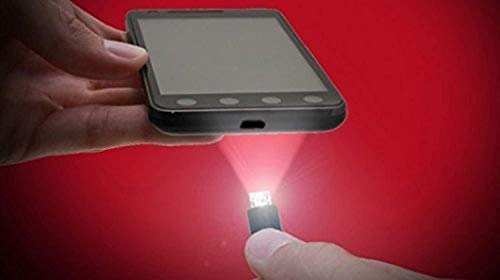
Image: Demonstrates connecting the MicroUSB cable to a device, highlighting the LED light for easy alignment in dark environments.
Istruzioni per l'uso
Caricare il tuo dispositivo
- Once connected, the cable will automatically begin charging your device. The 5 Amp rating and Fast Charge Technology ensure efficient power delivery.
- To check if the cable is actively charging, gently touch the LED area on the MicroUSB connector. The LED will light up if charging is in progress.
- The cable's AuDetect IC Technology will identify your device's specific charging requirements to optimize the charging speed.
Trasferimento dati
- Connect the USB-A end to a computer's USB port and the MicroUSB end to your device.
- Il computer dovrebbe riconoscere il dispositivo connesso, consentendoti di trasferire filecon velocità fino a 480 Mbps.
- Follow your device's instructions for enabling data transfer mode if necessary.
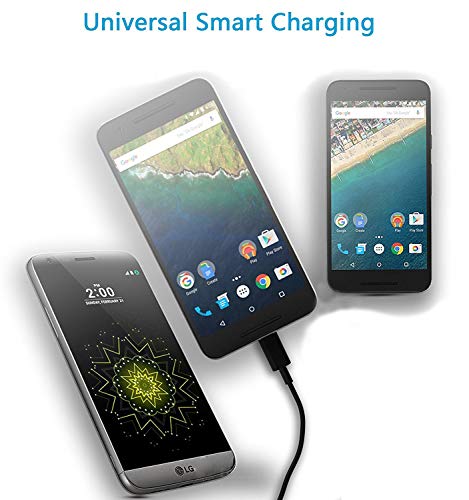
Image: Depicts the cable's universal smart charging feature, showing compatibility with various devices.
Cura e manutenzione
- Pulizia: Use a soft, dry cloth to wipe the cable. Do not use liquid cleaners or abrasive materials.
- Magazzinaggio: Store the cable in a cool, dry place away from direct sunlight and extreme temperatures. Avoid tightly coiling or bending the cable excessively, especially near the connectors, to prevent internal damage.
- Gestione: Always grasp the connector ends when plugging or unplugging the cable. Avoid pulling on the cable itself, as this can damage the internal wires.
- Condizioni ambientali: The cable is designed to operate within -13°F to 185°F (-25°C to 85°C). Avoid exposing it to conditions outside this range.
Risoluzione dei problemi
| Problema | Possibile causa | Soluzione |
|---|---|---|
| Cable not charging device. |
|
|
| La luce LED non si illumina. |
|
|
| Velocità di ricarica lenta. |
|
|
Specifiche
| Attributo | Dettaglio |
|---|---|
| Numero di modello | VPT-1106 |
| Marca | VOLT PIÙ TECNOLOGIA |
| Dimensioni del prodotto | 2 x 1 x 0.7 inches (connectors); 5ft cable length |
| Peso dell'articolo | 1.8 once |
| Tipo di connettore | USB-A to MicroUSB with LED Light |
| Tipo di cavo | MicroUSB, USB-A to MicroUSB |
| Velocità di trasferimento dati | Fino a 480 Mbps |
| Valutazione attuale | 5 Amp (5-9V/5A output) |
| Caratteristica speciale | Rapid Quick Fast Charger Cable, Touch-Activated LED |
| Dispositivi compatibili | Android, iOS, Mac, Plantronics Voyager 6200 UC Black P/N 211718-01, Windows |
| Temperatura di esercizio | Da -13°C a 185°C (da -25°F a 85°F) |
| Materiale | Zinc Alloy Interior, ABS Plastic Exterior |
Garanzia e supporto
VOLT PLUS TECH offers a worry-free service for this product. If you have any questions or concerns regarding your Bright LED MicroUSB Cable, please contact our customer service team.
Our reliable Customer Service will be sure to reply within 24 hours and offer proper solutions for you. Please refer to your purchase documentation for specific warranty terms and contact information.
Per ulteriore assistenza, puoi visitare il VOLT PLUS TECH brand page on Amazon.


