1. Informazioni importanti sulla sicurezza
Please read this entire manual carefully before assembling or operating the Tunturi T20 Treadmill. Retain this manual for future reference.
- Consultare sempre un medico prima di iniziare qualsiasi programma di esercizi.
- This equipment is intended for home use only.
- Tenere i bambini e gli animali domestici lontani dal tapis roulant durante il funzionamento.
- Assicurarsi che il tapis roulant sia posizionato su una superficie piana e stabile, con spazio sufficiente attorno.
- Indossare abbigliamento sportivo e scarpe da ginnastica adeguati.
- Use the safety key at all times. In an emergency, pulling the safety key will immediately stop the treadmill.
- Non utilizzare il tapis roulant se è danneggiato o non funziona correttamente.
- Peso massimo dell'utente: 120 kg (264 libbre).
2. Installazione e assemblaggio
2.1 Disimballaggio
Carefully remove all components from the packaging. Verify that all parts listed in the 'Included Components' section (see Specifications) are present. Keep packaging materials until assembly is complete.
2.2 Montaggio
The Tunturi T20 treadmill requires some assembly. Follow the detailed instructions provided in the separate assembly guide included with your product. Ensure all bolts and nuts are securely tightened before use.
2.3 Posizionamento e collegamento elettrico
Place the treadmill on a level surface, ensuring at least 2 meters (6.5 feet) of clear space behind it and 0.5 meters (1.6 feet) on each side. Connect the power cord to a grounded electrical outlet. Ensure the power switch is in the OFF position before plugging in.

Immagine: Demonstrating the folding mechanism of the Tunturi T20 treadmill. The treadmill can be folded vertically for compact storage, making it suitable for home environments with limited space.
3. Istruzioni per l'uso
3.1 Accensione/spegnimento
To power on, plug in the treadmill and flip the main power switch located near the front base to the 'ON' position. The console display will illuminate. To power off, flip the switch to 'OFF' and unplug the unit.
3.2 Console finitaview

Immagine: The Tunturi T20 treadmill console. This display shows key workout metrics such as time, distance, incline level, and current speed. It also features a visual 400-meter track and indicators for Bluetooth and heart rate connectivity.
The console features an LED or LCD display showing time, distance, incline, calories burned, and steps. Control buttons for speed, incline, program selection, start, stop, and mode are located below the display.
3.3 chiave di sicurezza
Attach the safety key clip to your clothing before starting any workout. Insert the magnetic end of the safety key into the designated slot on the console. The treadmill will not operate without the safety key in place. Removing the safety key will immediately stop the treadmill.
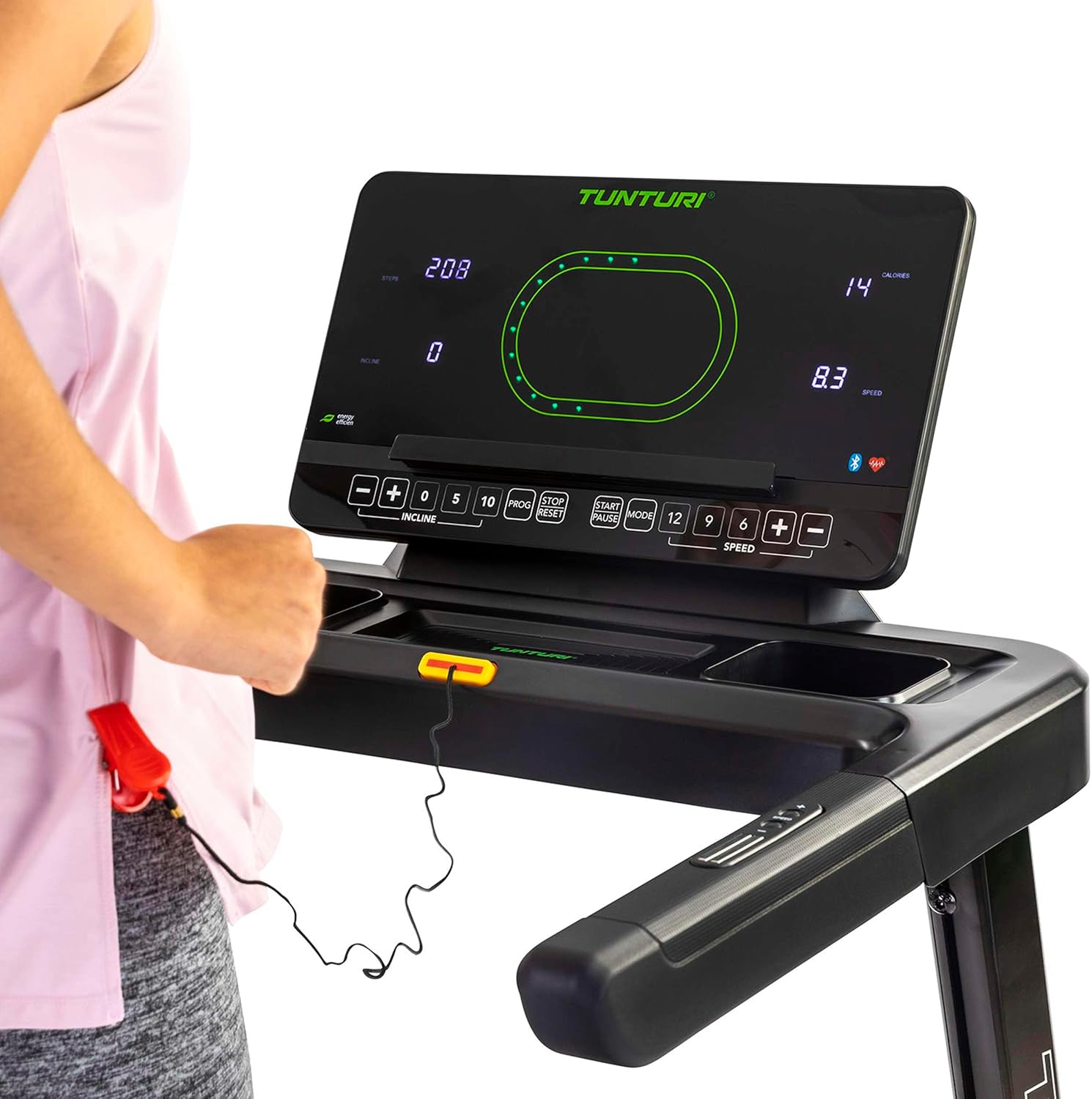
Immagine: Close-up of the Tunturi T20 console, showing the red safety key attached. The safety key is a crucial safety feature that must be engaged for the treadmill to operate.
3.4 Iniziare un allenamento
- Assicurati che la chiave di sicurezza sia inserita correttamente e agganciata ai tuoi vestiti.
- Salire sui corrimano laterali del tapis roulant.
- Press the 'START' button. The belt will begin moving at a low speed.
- Carefully step onto the moving belt and adjust your speed using the '+' and '-' buttons or quick speed buttons (e.g., 5, 10 km/h).
3.5 Regolazione della velocità e dell'inclinazione
- Velocità: Use the 'SPEED +' and '-' buttons to increase or decrease the belt speed. Quick speed buttons (e.g., 5, 10, 12 km/h) allow for rapid adjustments. The maximum speed is 16 km/h.
- Inclinazione: Use the 'INCLINE +' and '-' buttons to adjust the electronic incline level. The treadmill offers 12 incline options. Quick incline buttons (e.g., 0, 5, 10) are also available.
3.6 Programmi di formazione
The Tunturi T20 offers 47 pre-set training programs. To select a program, press the 'PROG' button repeatedly until your desired program number is displayed. Follow the on-screen prompts to start the program. Each program automatically adjusts speed and incline according to its profile.
3.7 Connettività e app Bluetooth
The treadmill features Bluetooth connectivity, allowing you to connect to various fitness applications for an enhanced training experience.
- Percorsi Tunturi: Connect to the Tunturi Routes app to experience virtual routes from around the world. The treadmill automatically adjusts incline to match the terrain of the chosen route.
- AnyRun & Kinomap: The treadmill is also compatible with AnyRun and Kinomap applications, offering additional training videos and interactive experiences.

Immagine: A tablet displaying the Tunturi Routes application on the treadmill console. This illustrates the integration of smart fitness apps with the Tunturi T20 for interactive workouts.

Immagine: A user interacting with the Tunturi Routes app on a tablet mounted on the treadmill console. This demonstrates the ease of controlling and monitoring virtual routes during a workout.
3.8 Monitoraggio della frequenza cardiaca
The Tunturi T20 treadmill supports heart rate monitoring, typically via a compatible chest strap (not always included, check product contents). Connect your chest strap via Bluetooth to the treadmill console to display your heart rate during your workout.
3.9 Interruzione di un allenamento
To stop the treadmill, press the 'STOP' button. The belt will gradually slow down and come to a complete stop. Alternatively, pull the safety key to immediately stop the treadmill in an emergency.
4. Manutenzione
Regular maintenance ensures the longevity and safe operation of your Tunturi T20 Treadmill.
- Pulizia: Pulire il tapis roulant dopo ogni utilizzo con un pannoamp panno per rimuovere sudore e polvere. Non utilizzare detergenti abrasivi.
- Lubrificazione: The running belt requires periodic lubrication. Refer to the separate lubrication instructions provided with the included lubrication tool. Frequency depends on usage.
- Regolazione della cintura: Over time, the running belt may become misaligned or loose. Consult the assembly guide for instructions on how to adjust the belt tension and centering.
- Ispezione: Controllare regolarmente tutti i bulloni, i dadi e le parti mobili per verificarne il serraggio e l'usura. Serrare eventuali elementi di fissaggio allentati.
5. Risoluzione Dei Problemi
If you encounter issues with your Tunturi T20 Treadmill, refer to the following common solutions:
- Il tapis roulant non si avvia:
- Assicurarsi che il cavo di alimentazione sia collegato saldamente a una presa con messa a terra.
- Verificare che l'interruttore di alimentazione principale sia in posizione "ON".
- Verify the safety key is correctly inserted into the console.
- La cinghia slitta o esita:
- The running belt may require tension adjustment. Refer to the maintenance section or assembly guide.
- The belt may need lubrication. Follow the lubrication instructions.
- Rumori insoliti:
- Verificare la presenza di componenti allentati e serrarli se necessario.
- Assicurarsi che il tapis roulant sia posizionato su una superficie piana.
- Lubricate the running belt if a squeaking noise is heard from the belt area.
- Il display della console non funziona:
- Assicurarsi che tutti i collegamenti elettrici siano saldi.
- Se il problema persiste, contatta l'assistenza clienti.
For issues not covered here, please contact Tunturi customer support.
6. Specifiche del prodotto
| Caratteristica | Specificazione |
|---|---|
| Modello | T20 (22TRN20000) |
| Marca | Tunturi |
| Potenza motore | 1.5 CV |
| Gamma di velocità | 1 - 16 km/h |
| Opzioni di inclinazione | 12 (Electronic Adjustment) |
| Programmi di formazione | 47 |
| Superficie di corsa | Dimensioni: 125 x 45 cm |
| Peso massimo dell'utente | 120 kg |
| Dimensioni assemblate (L x P x A) | Dimensioni: 155 x 74 x 137 cm |
| Dimensioni piegate (L x P x A) | Dimensioni: 87 x 74 x 139 cm |
| Peso del prodotto | 62 kg |
| Materiale del telaio | Acciaio legato |
| Tipo di visualizzazione | LED o LCD |
| Connettività | Bluetooth (Tunturi Routes, AnyRun, Kinomap compatible) |
| Componenti inclusi | Treadmill base, Motor housing, Safety key, Power cord, User manual, Assembly hardware, Lubrication tool, Remote control, Warranty documentation |
7. Garanzia e supporto
Your Tunturi T20 Treadmill comes with a manufacturer's warranty. Please refer to the separate warranty documentation included with your product for details on coverage, terms, and conditions.
For technical support, spare parts, or any questions regarding your treadmill, please contact Tunturi customer service. Contact information can typically be found on the warranty documentation or the official Tunturi websito.


