1. Introduzione
The KAIWEETS HT106D Socket Tester is designed to quickly and accurately detect common wiring faults in standard electrical sockets and RCD (Residual Current Device) protected circuits. It features a clear LED display for voltage measurement and intuitive LED indicators for wiring status. This manual provides essential information for the safe and effective use of your device.
2. Informazioni sulla sicurezza
Si prega di leggere attentamente tutte le avvertenze e le istruzioni di sicurezza prima di utilizzare questo prodotto. Il mancato rispetto di queste istruzioni può causare scosse elettriche, incendi o lesioni gravi.
- This device is rated CAT II 300V. Do not use it for measurements exceeding this rating.
- Non utilizzare il tester se appare danneggiato o non funziona correttamente.
- Non utilizzare il tester in condizioni di umidità o con le mani bagnate.
- Assicurarsi sempre che la presa sia diseccitata prima di eseguire qualsiasi lavoro di cablaggio. Questo tester è solo a scopo di verifica.
- The RCD test function may trip the circuit breaker. Ensure all sensitive equipment is saved or turned off before performing an RCD test.
- Important Note for 3x230V installations without neutral (common in Belgium): This tester may not function correctly or provide accurate readings in 3x230V installations without a neutral wire. It is primarily designed for systems with a neutral connection.
- Tenere fuori dalla portata dei bambini.
3. Prodotto finitoview
The KAIWEETS HT106D Socket Tester is a compact and robust device designed for ease of use. It features a digital display for voltage and a series of LED indicators to show wiring status.

Figura 1: Davanti view of the KAIWEETS HT106D Socket Tester, showing the digital voltage display, LED indicators, and RCD test button.
3.1 Componenti
- Pin della spina: Da inserire nella presa elettrica.
- Indicatori LED: Red LEDs that illuminate in various patterns to indicate wiring status.
- Display digitale: Mostra il volume misuratotage.
- Pulsante di prova RCD: Initiates the RCD trip test.
- Wiring Status Chart: Printed on the device for quick reference.
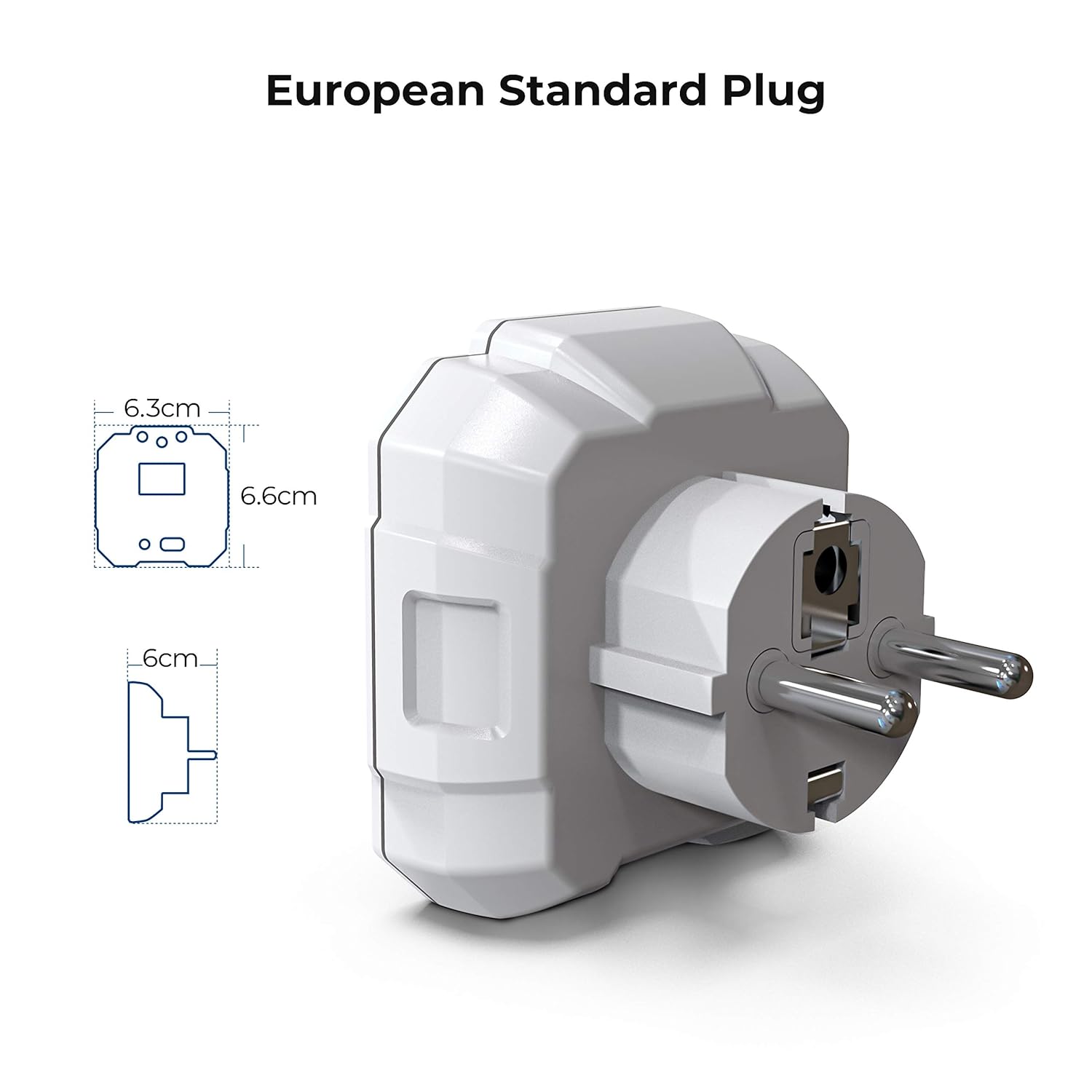
Figura 2: Diagram illustrating the dimensions of the KAIWEETS HT106D European standard plug.
4. Impostazione
The KAIWEETS HT106D Socket Tester comes with 2 AAA batteries included and pre-installed. No initial setup is required beyond ensuring the batteries are correctly seated if the device does not power on.
4.1 Installazione/sostituzione della batteria
If battery replacement is needed, carefully open the battery compartment, insert 2 AAA batteries observing polarity, and close the compartment securely.

Figura 3: Posteriore view of the KAIWEETS HT106D Socket Tester, showing the battery compartment location.
5. Istruzioni per l'uso
The HT106D is designed for simple plug-and-play operation. Once plugged into a live socket, it automatically performs a wiring check and displays the voltage.
5.1 Test di cablaggio di base
- Insert the KAIWEETS HT106D Socket Tester into the socket you wish to test.
- Observe the LED indicators on the front panel. The pattern of illuminated red LEDs will correspond to a specific wiring condition.
- Refer to the wiring status chart printed on the device or in Section 5.4 of this manual to interpret the results.

Figura 4: Visual representation of the 7 circuit conditions detected by the HT106D, with corresponding LED patterns.
5.2 volumitage Misurazione
Upon insertion into a live socket, the digital display on the HT106D will automatically show the measured voltage of the socket. This provides an immediate reading of the electrical supply.

Figura 5: Avvicinamento view of the digital display showing the measured voltage.
5.3 RCD Test
The RCD test function verifies the operation of Residual Current Devices (RCDs) by simulating an earth fault condition. This test should only be performed on RCD-protected circuits.
- Plug the HT106D into an RCD-protected socket.
- Ensure the wiring status indicates 'Correct' before proceeding.
- Premere il tasto Pulsante di prova RCD (located at the bottom of the device).
- If the RCD is functioning correctly, it should trip, cutting power to the circuit. The tester's lights will go out.
- If the RCD does not trip, it indicates a potential fault with the RCD device, and further investigation by a qualified electrician is recommended.
- To restore power, reset the RCD at your consumer unit.
Caution: Performing an RCD test will temporarily cut power to the circuit. Save any unsaved work on computers or other electronic devices before initiating the test.

Figura 6: The KAIWEETS HT106D plugged into a socket, ready for or performing an RCD test.
5.4 Comprensione degli indicatori LED
The HT106D uses a combination of three red LEDs to indicate the wiring status. Refer to the table below for interpretation:
| Modello LED | Condizioni di cablaggio | Descrizione |
|---|---|---|
| ● ● ● (All three LEDs ON) | Corretto | The wiring is correct. |
| ● ○ ○ (Left LED ON) | Terra aperta | The earth wire is not connected. |
| ○ ● ○ (Middle LED ON) | Aprire Neutrale | The neutral wire is not connected. |
| ○ ○ ● (Right LED ON) | Apri dal vivo | The live wire is not connected. |
| ● ● ○ (Left & Middle LEDs ON) | Inversione di fase/terra | The live and earth wires are reversed. |
| ○ ● ● (Middle & Right LEDs ON) | Inversione di fase/neutro | I fili di fase e neutro sono invertiti. |
| ● ○ ● (Left & Right LEDs ON) | Inversione di fase/terra, terra mancante | The live and earth wires are reversed, and the earth connection is missing. |
Nota: '●' indicates an illuminated LED, '○' indicates an unlit LED.
6. Specifiche
| Caratteristica | Specificazione |
|---|---|
| Modello | HT106D |
| Volume di eserciziotage Gamma | 48 V - 250 V CA |
| Gamma di frequenza | 50Hz - 60Hz |
| Corrente di prova RCD | >30mA |
| Valutazione di sicurezza | CAT II 300V, CE |
| Fonte di alimentazione | 2 batterie AAA (incluse) |
| Dimensioni | Circa 7.9 x 7.5 x 7.5 cm |
| Peso | Circa 80 grammi |
| Tipo di spina | European Standard 2-pin |
| Colore | Bianco |
7. Manutenzione
- Pulizia: Pulire il dispositivo con un panno asciutto e morbido. Non utilizzare detergenti abrasivi o solventi.
- Magazzinaggio: Store the tester in a cool, dry place, away from direct sunlight and extreme temperatures. If storing for extended periods, remove the batteries to prevent leakage.
- Ispezione: Ispezionare periodicamente il dispositivo per individuare eventuali segni di danneggiamento, come crepe nel casing o perni piegati. Non utilizzare se danneggiati.
8. Risoluzione Dei Problemi
- Il dispositivo non si accende: Controllare che le batterie siano installate correttamente e abbiano una carica sufficiente. Sostituirle se necessario.
- No LED indication or voltage visualizzazione: Ensure the socket is live and functioning. Test with a known working socket. If still no indication, the device may be faulty.
- RCD test does not trip the circuit: Ensure the socket is RCD-protected. If it is, and the RCD does not trip, the RCD itself may be faulty and requires inspection by a qualified electrician.
- Vol. imprecisotage lettura: Ensure the tester is fully inserted into the socket. If the reading is consistently off, compare with another calibrated voltage metro.
9. Garanzia e supporto
KAIWEETS offre un 36-month service and technical support for the HT106D Socket Tester. If you encounter any issues or require assistance, please contact KAIWEETS customer support through their official websito o rivenditore presso cui è stato acquistato il prodotto.
For technical support or warranty claims, please have your model number (HT106D) and proof of purchase ready.


