Introduzione
Thank you for choosing the MAONO AU-PM320S XLR Condenser Microphone Kit. This professional-grade microphone is designed to deliver high-quality audio for various applications, including streaming, podcasting, singing, voice-overs, and home studio recording. This manual provides essential information for setting up, operating, and maintaining your microphone kit to ensure optimal performance.
Cosa c'è nella scatola
Your MAONO AU-PM320S kit includes the following components:
- XLR Condenser Microphone (AU-PM320S)
- Braccio regolabile
- Metal Shock Mount
- Filtro pop
- Parabrezza
- Cavo da XLR a XLR
- Manuale d'uso

Guida all'installazione
Follow these steps to set up your MAONO AU-PM320S microphone kit:
- Attach the Boom Arm: Secure the adjustable boom arm to your desk or table using the stable table mounting clamp. Ensure it is tightened firmly to prevent movement.
- Install the Shock Mount: Mount the metal shock mount onto the boom arm. The shock mount helps to isolate the microphone from physical vibrations, reducing unwanted noise.
- Inserire il microfono: Carefully place the AU-PM320S condenser microphone into the shock mount.
- Collegare il cavo XLR: Connect one end of the provided XLR to XLR cable to the bottom of the microphone and the other end to a 48V phantom power supply, audio interface, or mixer.
- Connessione al computer: Connect your 48V phantom power supply, audio interface, or mixer to your computer (laptop or desktop) using the appropriate cable (not included with the microphone kit, typically USB or other audio cables).
- Attach Pop Filter and Windscreen: Position the pop filter in front of the microphone to reduce plosive sounds (P, B, T, K sounds). For additional wind noise reduction, place the foam windscreen over the microphone capsule.
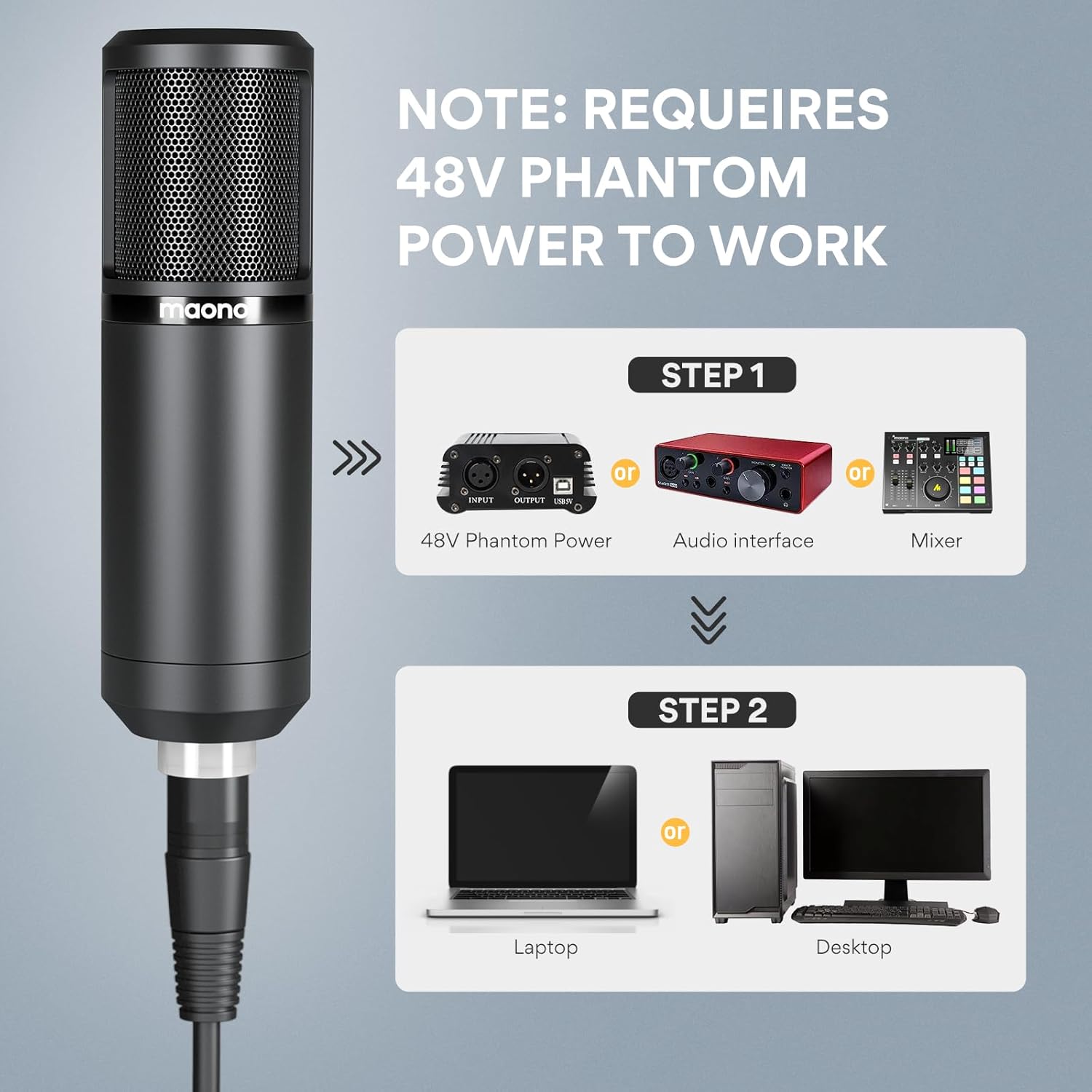
Nota importante sulla potenza:
The MAONO AU-PM320S is an XLR condenser microphone and requires 48V phantom power to operate correctly. This power is typically supplied by an audio interface, mixer, or dedicated phantom power supply. Ensure your setup includes a compatible 48V power source.
Video: How It Works
Istruzioni per l'uso
The MAONO AU-PM320S is designed for ease of use while delivering professional audio quality.
Posizionamento del microfono:
- The microphone features a cardioid pickup pattern, meaning it is most sensitive to sounds coming from the front and less sensitive to sounds from the sides and rear. This helps to reduce background noise.
- For optimal vocal recording, speak directly into the front of the microphone (where the MAONO logo is located) at a distance of 6-12 inches.
- Utilize the adjustable boom arm to position the microphone comfortably and effectively for your recording needs.

Sound Quality and Features:
- The built-in large Dia.16 mm condenser capsule provides an extended frequency response and superior transient response, capturing clear and detailed audio.
- High-SPL handling and a wide dynamic range make this microphone versatile for various sound sources.
- The included pop filter and windscreen effectively reduce plosives, wind noise, and saliva interference, ensuring a clean vocal recording.
- The shock mount further minimizes noise caused by vibrations transmitted through the desk or stand.

Applicazioni:
This microphone is ideal for:
- Podcasting
- Streaming (YouTube, Skype, Twitch)
- Singing and Vocal Recording
- Voice-overs
- Home Studio Recording

Manutenzione
To ensure the longevity and optimal performance of your MAONO AU-PM320S microphone, follow these maintenance guidelines:
- Pulizia: Use a soft, dry cloth to clean the microphone body and boom arm. Avoid using liquid cleaners or solvents, as they may damage the finish or internal components.
- Magazzinaggio: Quando non lo si utilizza, conservare il microfono in un luogo pulito e asciutto, lontano da temperature e umidità estreme.
- Gestione: The microphone features a full metal construction for durability. However, avoid dropping or subjecting the microphone to harsh impacts, as this can damage the internal capsule.
- Cura del cavo: Handle the XLR cable carefully. Avoid sharp bends or kinks, which can damage the internal wiring.
Risoluzione dei problemi
If you encounter issues with your MAONO AU-PM320S microphone, refer to the following common troubleshooting tips:
| Problema | Possibile causa | Soluzione |
|---|---|---|
| Nessuna uscita audio | No 48V phantom power; Incorrect cable connection; Incorrect input selection on computer/interface. | Ensure 48V phantom power is enabled on your audio interface/mixer. Check all XLR cable connections. Verify the correct input device is selected in your computer's sound settings or recording software. |
| Low Volume/Weak Signal | Low gain setting on interface/mixer; Microphone too far from sound source. | Increase the gain level on your audio interface or mixer. Position the microphone closer to the sound source (6-12 inches is recommended for vocals). |
| Rumore di fondo eccessivo | Microphone picking up ambient noise; Vibrations from desk/stand. | Ensure the microphone's cardioid pattern is facing the desired sound source. Use the included pop filter and windscreen. Ensure the microphone is securely in the shock mount and the boom arm is stable. Record in a quiet environment. |
| Popping Sounds (Plosives) | Air blasts from speaking directly into the microphone. | Ensure the pop filter is correctly positioned between your mouth and the microphone. Adjust microphone distance. |
Specifiche
| Caratteristica | Dettaglio |
|---|---|
| Nome del modello | AU-PM320S |
| Tipo di microfono | Condensatore |
| Modello polare | Unidirezionale (cardioide) |
| Dimensioni del diaframma | Dia.16 mm |
| Tecnologia di connettività | XLR |
| Fonte di alimentazione | 48V Phantom Power Required |
| Risposta in frequenza | 18 KHz (20-18,000 Hz as per A+ content) |
| Sensibilità Audio | 82 Decibels (-34dB±3dB high sensitivity as per A+ content) |
| Impedenza | 200 Ohm |
| Signal-to-Noise Ratio | 75 dB |
| Materiale | Metal, Plastic (Full metal casing) |
| Peso dell'articolo | 3.25 libbre |
| Dimensioni del pacco | 17.17 x 8.23 x 3.58 pollici |
Garanzia e supporto
For warranty information, technical support, or any inquiries regarding your MAONO AU-PM320S microphone kit, please refer to the official MAONO website or contact their customer service directly. Details can typically be found in the included User Manual or on the product packaging.


