1. Introduzione
The AVMatrix SC2030 is a professional-grade cross converter designed for seamless conversion between SDI and HDMI signals. This versatile device supports up/down scaling and frame rate conversion, making it suitable for various broadcasting and AV post-production applications. It also features analog audio embedding for comprehensive signal management. Control and configuration are easily managed via built-in DIP switches or PC software through a micro USB connection.
Caratteristiche principali:
- Input: 1x HDMI or 1x SDI, 1x Analog Audio
- Output: 2x 3G-SDI, 1x HDMI
- Up/down scaling and frame rate conversion capabilities
- Analog audio embedding
- Automatic detection and configuration for HDMI/SDI inputs
- Easy control via DIP switches or PC software (Micro USB)
- Dual threaded locking power for redundant power supply
- Design della staffa staccabile per il montaggio a parete
2. Informazioni sulla sicurezza
Si prega di leggere attentamente tutte le istruzioni di sicurezza prima di utilizzare questo dispositivo. La mancata osservanza di queste istruzioni può causare scosse elettriche, incendi o danni al prodotto.
- Alimentazione elettrica: Use only the specified power adapter. Ensure the power source voltage is compatible with the device. The device supports dual threaded locking power for redundancy.
- Ventilazione: Non ostruire le aperture di ventilazione. Garantire un flusso d'aria adeguato attorno all'unità per evitare il surriscaldamento.
- Umidità: Do not expose the device to rain, moisture, or liquids. Avoid placing objects filled with liquids on or near the device.
- Pulizia: Scollegare l'alimentazione prima della pulizia. Utilizzare un panno asciutto e morbido. Non utilizzare detergenti liquidi o spray.
- Manutenzione: Non tentare di riparare questo prodotto da soli. Affidare tutte le operazioni di manutenzione a personale di assistenza qualificato.
- Posizionamento: Place the device on a stable, flat surface. Avoid placing it in direct sunlight or near heat sources.
3. Prodotto finitoview
The AVMatrix SC2030 is a compact and robust converter designed for professional video environments. Below is a visual guide to its various ports and controls.

Figura 3.1: Pannello anteriore e posteriore sopraview of the SC2030 Converter. This image displays the input ports (SDI In, HDMI In, Audio In, USB) on one side and output ports (DC Power 2, DC Power 1, HDMI Out, SDI Out 2, SDI Out 1) on the other side, along with the DIP switches.
Porte di ingresso:
- INGRESSO SDI: Connect your 3G/HD/SD-SDI source here.
- INGRESSO HDMI: Connect your HDMI source here.
- INGRESSO AUDIO: Connect an analog audio source (3.5mm jack) for embedding into the output signal.
- USB: Micro USB port for PC software control and power supply.
Porte di uscita:
- SDI OUT 1 & 2: Two 3G-SDI outputs for connecting to SDI monitors or other devices.
- USCITA HDMI: HDMI output for connecting to HDMI displays.
- POWER 1 & 2: Dual threaded locking power inputs for redundant power supply, ensuring continuous operation.

Figura 3.2: Lato view of the SC2030 Converter highlighting the DIP switches for configuration.
4. Configurazione e connessione
Follow these steps to set up your AVMatrix SC2030 converter:
- Collegamento elettrico: Connect the provided power adapter to either POWER 1 or POWER 2 input on the converter. For redundancy, connect a second power adapter to the other power input.
- Connessione sorgente di ingresso:
- For SDI input: Connect your SDI source device (e.g., camera, SDI DVR) to the SDI IN port using a BNC cable.
- For HDMI input: Connect your HDMI source device (e.g., camera, Blu-Ray DVD, game console) to the HDMI IN porta utilizzando un cavo HDMI.
- For analog audio embedding: Connect your analog audio source to the INGRESSO AUDIO (3.5mm jack) port.
- Collegamento del dispositivo di output:
- For SDI output: Connect your SDI display or other SDI devices to the USCITA SDI1 e/o USCITA SDI2 ports using BNC cables.
- For HDMI output: Connect your HDMI display or projector to the Uscita HDMI porta utilizzando un cavo HDMI.
- Configuration (DIP Switches): Before powering on, configure the desired output format, audio embedding, and control mode using the DIP switches. Refer to the "Operating Instructions" section for detailed DIP switch settings.
- Accensione: Once all connections are secure and DIP switches are set, connect the power adapter(s) to a power outlet. The device will power on automatically.
5. Istruzioni per l'uso
The SC2030 offers flexible control options via DIP switches or PC software. The device automatically detects the input signal (HDMI or SDI).
5.1 Configurazione degli interruttori DIP
The DIP switches allow you to set the output resolution, frame rate, audio embedding options, and control mode. The table below details the functions of each DIP switch (1=ON, 0=OFF).
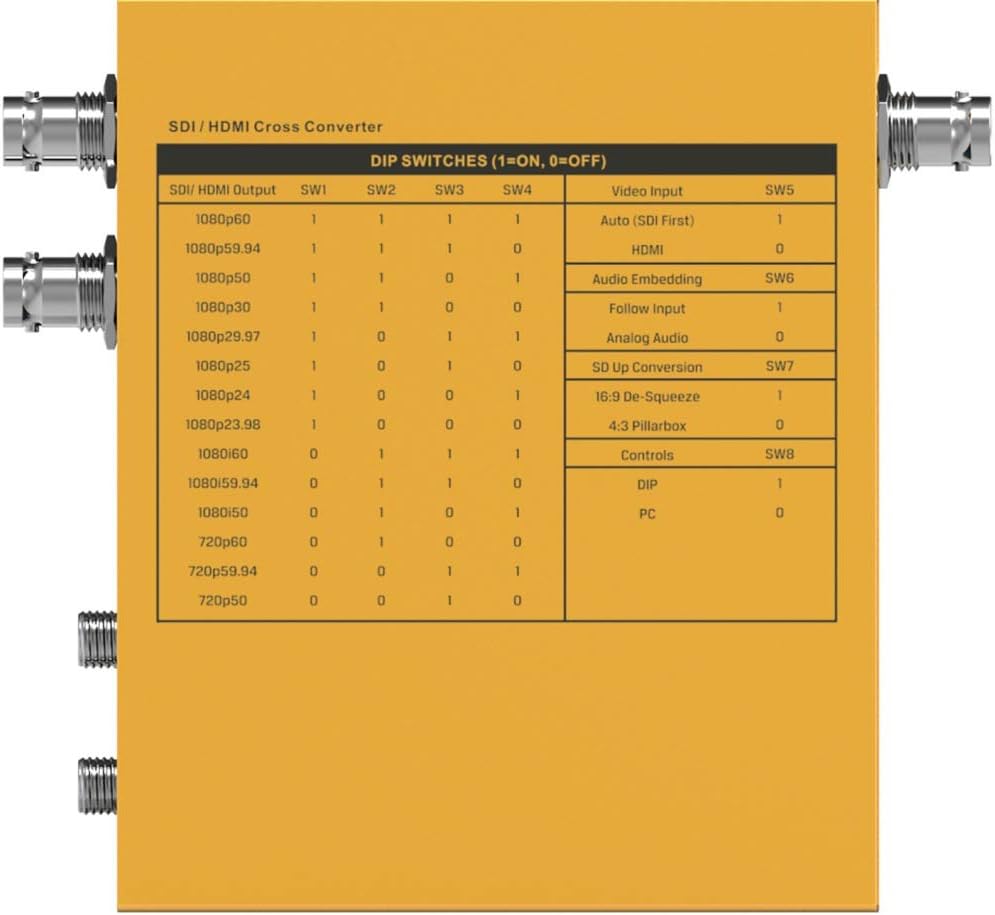
Figura 5.1: Detailed DIP Switch Settings for the SC2030. This table shows how to configure SDI/HDMI output, video input, audio embedding, SD up conversion, and control modes using the 8 DIP switches.
Funzioni dell'interruttore DIP:
- SW1-SW4 (SDI/HDMI Output): These switches control the output resolution and frame rate. Refer to the table in Figure 5.1 for specific combinations (e.g., 1080p60, 1080p59.94, 720p60).
- SW5 (Video Input):
- 1: Auto (SDI First) - Prioritizes SDI input.
- 0: HDMI - Forces HDMI input.
- SW6 (Audio Embedding):
- 1: Follow Input - Audio follows the selected video input.
- 0: Analog Audio - Embeds audio from the 3.5mm analog audio input.
- SW7 (SD Up Conversion):
- 1: 16:9 De-Squeeze - Converts 4:3 SD input to 16:9.
- 0: 4:3 Pillarbox - Maintains 4:3 aspect ratio with pillarbox bars.
- SW8 (Controls):
- 1: DIP - Control via physical DIP switches.
- 0: PC - Control via PC software connected via USB.
5.2 Controllo del software per PC
For advanced configuration and real-time monitoring, connect the SC2030 to a PC via the Micro USB port. Ensure SW8 is set to '0' (PC control mode). Download and install the official AVMatrix control software from the manufacturer's website. The software provides a graphical interface to adjust all settings available via DIP switches, plus potentially more granular control and firmware updates.
6. Manutenzione
Proper maintenance ensures the longevity and optimal performance of your SC2030 converter.
- Pulizia: Regularly wipe the exterior of the device with a soft, dry, lint-free cloth. Do not use harsh chemicals, solvents, or abrasive cleaners.
- Ventilazione: Ensure that the ventilation holes are free from dust and obstructions.
- Connessioni via cavo: Periodically check all cable connections for tightness and wear. Loose connections can lead to signal degradation.
- Magazzinaggio: Se si conserva il dispositivo per un periodo prolungato, scollegarlo dall'alimentazione e conservarlo in un luogo fresco e asciutto, lontano dalla luce solare diretta e da temperature estreme.
- Aggiornamenti del firmware: Check the AVMatrix webperiodicamente per gli aggiornamenti del firmware. Mantenere il firmware aggiornato può migliorare le prestazioni e aggiungere nuove funzionalità.
7. Risoluzione Dei Problemi
If you encounter issues with your SC2030 converter, refer to the following common problems and solutions:
- Nessuna uscita video:
- Verify all cables (HDMI, SDI) are securely connected.
- Ensure the input source is active and outputting a signal.
- Check DIP switch settings for correct output resolution and input selection (SW5).
- Try a different input source or output display to isolate the problem.
- Assicurarsi che l'adattatore di alimentazione sia collegato e che il dispositivo sia acceso.
- Nessuna uscita audio:
- Controllare i collegamenti dei cavi audio.
- Verify DIP switch SW6 is set correctly for audio embedding (Follow Input or Analog Audio).
- Ensure the audio source is active and outputting sound.
- Check audio settings on the connected display or receiving device.
- Incorrect Resolution/Frame Rate:
- Adjust DIP switches SW1-SW4 to match the desired output resolution and frame rate.
- Ensure the connected display supports the selected resolution and frame rate.
- Device Not Responding to PC Software:
- Ensure SW8 is set to '0' (PC control mode).
- Verify the Micro USB cable is properly connected.
- Check if the AVMatrix control software is correctly installed and running on your PC.
- Try restarting the PC and the converter.
- Surriscaldamento:
- Ensure the device has adequate ventilation and is not covered.
- Operate the device within its specified operating temperature range.
8. Specifiche
Below are the technical specifications for the AVMatrix SC2030 Updown Cross Converter:
| Caratteristica | Specificazione |
|---|---|
| Marca | AVmatrix |
| Numero di modello | SC2030 |
| Tipo di montaggio | Montaggio a parete |
| Tipo di interfaccia | HDMI, SDI |
| Numero di canali | 2 |
| Dimensioni del prodotto | 6.8 x 6.7 x 3.7 pollici |
| Peso dell'articolo | 2.44 libbre |
| Ingresso video SDI | SD/HD/3G-SDI x 1 |
| Ingresso video HDMI | HDMI type A x 1 |
| Ingresso audio analogico | 1/8" (3.5mm) jack x 1 |
| Uscita video SDI | SD/HD/3G-SDI x 2 |
| Uscita video HDMI | HDMI type A x 1 |
| Supporto del formato di input SDI | 1080p 60/59.94/50/30/29.97/25/24/23.98, 1080i 60/59.94/50, 720p 60/59.94/50/30/29.97/25/24/23.98, 625i, 525i |
| Supporto del formato di ingresso HDMI | 1080p 60/59.94/50/30/29.97/25/24/23.98, 1080i 60/59.94/50, 720p 60/59.94/50, 480i, 60/59.94 |
| Conformità SDI | SMPTE 292M, SMPTE 259M, SMPTE 424M |
| Spazio colore e precisione SDI | JUV 4: 2: 2 |
| HDMI Input Color Space and Precision | RGB 4:4:4, YUV 4:2:2, YUV 4:4:4 |
| SDI/HDMI Output Format Support | 1080p 60/59.94/50, 1080i 60/59.94/50, 720p 60/59.94/50 |
| Connettore di alimentazione | Threaded locking connector, Micro USB |
| Voltage Gamma | USB 3.3-5V, DC 6-23V |
| Consumo energetico | 4W |
| Temperatura di esercizio | Temperatura ambiente -20°C ~ 60°C |
| Temperatura di conservazione | Temperatura ambiente -30°C ~ 70°C |
| Umidità relativa | 0% ~ 90% senza condensa |
| Garanzia | Garanzia limitata di 3 anni |

Figura 8.1: Detailed Technical Specifications of the SC2030 Converter, including inputs, outputs, supported formats, power, and environmental conditions.
9. Garanzia e supporto
9.1 Informazioni sulla garanzia
The AVMatrix SC2030 converter comes with a Garanzia limitata di 3 anno from the date of purchase. This warranty covers defects in materials and workmanship under normal use. It does not cover damage caused by misuse, accident, unauthorized modifications, or external causes such as power surges.
For warranty claims, please retain your proof of purchase and contact AVMatrix customer support.
9.2 Assistenza clienti
For technical assistance, troubleshooting, or general inquiries regarding your AVMatrix SC2030, please visit the official AVMatrix website or contact their customer support team. You may find FAQs, driver downloads, and additional resources online.


