1. Introduzione
The Epomaker Ajazz i610T is a compact 61-key mechanical keyboard designed for versatility and performance. It supports both Bluetooth wireless and wired (Type-C) dual-mode connectivity, allowing connection to up to three devices simultaneously. Featuring N-key rollover and 17 distinct backlight effects, this keyboard is suitable for various applications, including gaming and professional work environments.
This manual provides detailed instructions for setting up, operating, maintaining, and troubleshooting your Ajazz i610T keyboard.
2. Contenuto della confezione
Si prega di controllare la confezione per verificare la presenza dei seguenti elementi:
- 1 x Ajazz i610T Mechanical Keyboard
- 1 x cavo di tipo C
- 1 x Manuale utente
3. Impostazione
3.1 Connessione in modalità cablata
- Locate the Type-C port on the keyboard, typically on the side or back.
- Collegare un'estremità del cavo Type-C in dotazione alla tastiera.
- Collegare l'altra estremità del cavo Type-C a una porta USB disponibile sul computer.
- The keyboard will automatically be recognized and function in wired mode. The keyboard will also charge its internal battery while connected via USB.
3.2 Bluetooth Wireless Mode Connection
The Ajazz i610T supports connecting to up to three different Bluetooth devices.
- Ensure the keyboard is powered on. The power switch is usually located on the back or side of the keyboard.
- Premere Fn + Q, Fn + W, O Fn + E to select one of the three Bluetooth device channels. The corresponding key (Q, W, or E) will flash to indicate pairing mode.
- Sul tuo dispositivo (computer, tablet, smartphone), attiva il Bluetooth e cerca nuovi dispositivi.
- Select "Ajazz i610T" (or similar name) from the list of available devices to pair.
- Once paired, the flashing light on the selected key will become solid, indicating a successful connection.
- Per passare da un dispositivo associato all'altro, premere semplicemente Fn + Q, Fn + W, O Fn + E per il canale desiderato.

Immagine: Lato view of the Epomaker Ajazz i610T keyboard, highlighting the Type-C port for wired connection and charging.
4. Istruzioni per l'uso
4.1 Combinazioni di tasti funzione (Fn)
Due to its compact 61-key layout, many functions are accessed via the Fn key in combination with other keys. Refer to the keycaps for specific markings indicating secondary functions.
- Fn + [Number Row]: Access F1-F12 functions (e.g., Fn + 1 = F1, Fn + 2 = F2, etc.).
- Fn + P: Stampa schermo (PrtSc).
- Fn+;: Scroll Lock (ScrlK).
- Fn + ': Pausa.
- Fn+J: Inserisci.
- Fn+K: Casa.
- Fn + L: Pagina su (PgUp).
- Fn+M: Elimina (Canc).
- Fn+,: FINE.
- Fn + .: Pagina giù (PgDn).
- Fn + tasti freccia: Navigate (Up, Down, Left, Right).
- Fn + Spacebar (hold for 3 seconds): Reset to default mode or exit special modes.
4.2 Controllo della retroilluminazione
The keyboard features 17 monochrome backlight effects. Specific key combinations are used to cycle through these effects and adjust brightness.
- Fn+\|: Cycle through different backlight effects.
- Fn + [: Riduce la luminosità della retroilluminazione.
- Fn+]: Aumenta la luminosità della retroilluminazione.
4.3 N-Key Rollover (NKRO)
The Ajazz i610T supports N-Key Rollover, meaning all keys pressed simultaneously will be registered accurately. This feature is particularly beneficial for fast typists and gamers, preventing ghosting or missed key presses.
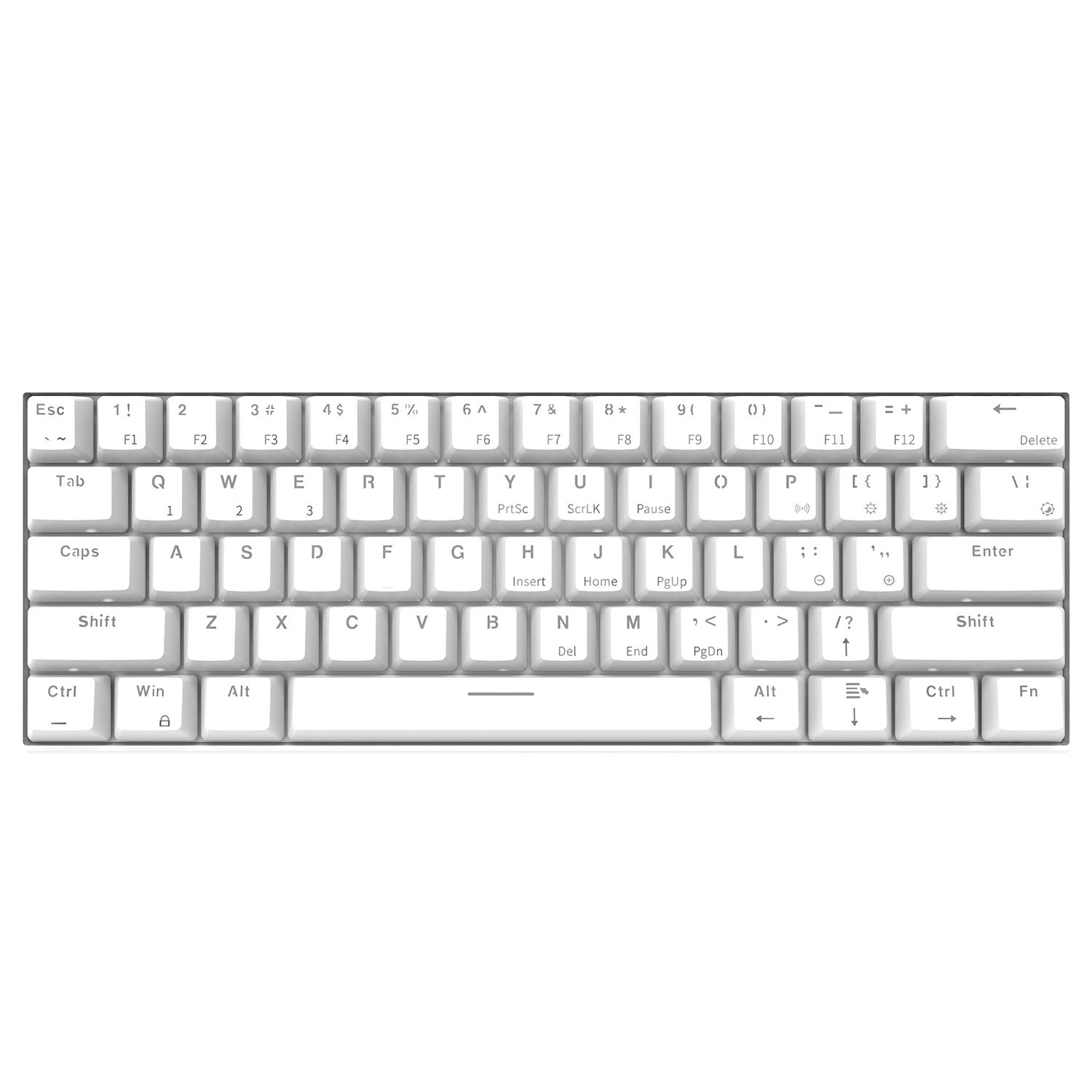
Immagine: angolata dall'alto verso il basso view of the Epomaker Ajazz i610T keyboard, showcasing its compact 61-key layout and keycap legends.
5. Manutenzione
Una corretta manutenzione garantisce la longevità e le prestazioni ottimali della tastiera.
- Pulizia: Use a soft, dry cloth to wipe the keyboard surface. For deeper cleaning, use a can of compressed air to remove dust and debris from between the keycaps. For stubborn stains, a slightly damp È possibile utilizzare un panno imbevuto di sapone neutro, assicurandosi che non penetri liquido nella tastiera.
- Magazzinaggio: Conservare la tastiera in un luogo fresco e asciutto, lontano dalla luce solare diretta e da temperature estreme.
- Evitare fuoriuscite: Tenere i liquidi lontani dalla tastiera per evitare danni ai componenti interni.
- Cura del cavo: Avoid bending or twisting the Type-C cable excessively to prevent internal wire damage.
6. Risoluzione Dei Problemi
If you encounter issues with your Ajazz i610T keyboard, refer to the following common solutions:
| Problema | Possibile soluzione |
|---|---|
| La tastiera non risponde in modalità cablata. |
|
| La tastiera non si connette tramite Bluetooth. |
|
| La retroilluminazione non funziona o è bloccata. |
|
| Some keys are not responding. |
|
7. Specifiche
| Caratteristica | Dettaglio |
|---|---|
| Marca | EPOMAKER / Ajazz |
| Modello | i610T |
| Disposizione | 61 tasti (60% compatto) |
| Connettività | Bluetooth 3.0 Wireless / USB Type-C Wired Dual Mode |
| Retroilluminazione | Monochrome Backlight (17 effects) |
| Rollover chiave | Rollover N-chiave (NKRO) |
| Tipo di interruttore | Mechanical (Black Switch, White color variant) |
| Materiale | addominali |
| Capacità della batteria | 1000mAh agli ioni di litio |
| Lunghezza del cavo | Circa. 1.5m |
| Supporto del sistema operativo | Windows 2000/XP/Vista/7/8/10 |
| Dimensioni del prodotto (L*W*H) | 29.1 x 10.1 x 4 cm (x 11.46 3.98 x 1.57 a) |
| Peso del prodotto | ca. 580 g (20.46 once) |

Immagine: Angolata view of the Epomaker Ajazz i610T keyboard, demonstrating its compact form factor.
8. Garanzia e supporto
For warranty information and technical support, please refer to the documentation provided with your purchase or contact the manufacturer directly through their official websito. Conservare la prova d'acquisto per eventuali reclami in garanzia.


