1. Introduzione
This manual provides detailed instructions for the HXSJ J600 Mechanical Gaming Mouse. Please read this guide thoroughly to understand the features, setup, and operation of your new gaming mouse. Proper use and maintenance will ensure optimal performance and longevity of the product.
2. Prodotto finitoview
The HXSJ J600 is a high-performance mechanical gaming mouse designed for precision and customization. It features a human body engineering design for comfortable use, 9 programmable keys, adjustable DPI settings up to 6400, and cool LED lighting effects.
Caratteristiche principali:
- Full-key 9 customizable macro programming.
- Six-level adjustable DPI (800-1600-2400-3200-4800-6400).
- Integrated aluminum alloy sandblasted metal floor design.
- Electroplated apron wheel with 3D carving for enhanced grip.
- 16 million color backlight with multiple mode changes.
- Durable switches with a 20 million click cycle life.
Contenuto della confezione:
- 1 mouse da gioco HXSJ J600
- 1 x Manuale utente in inglese
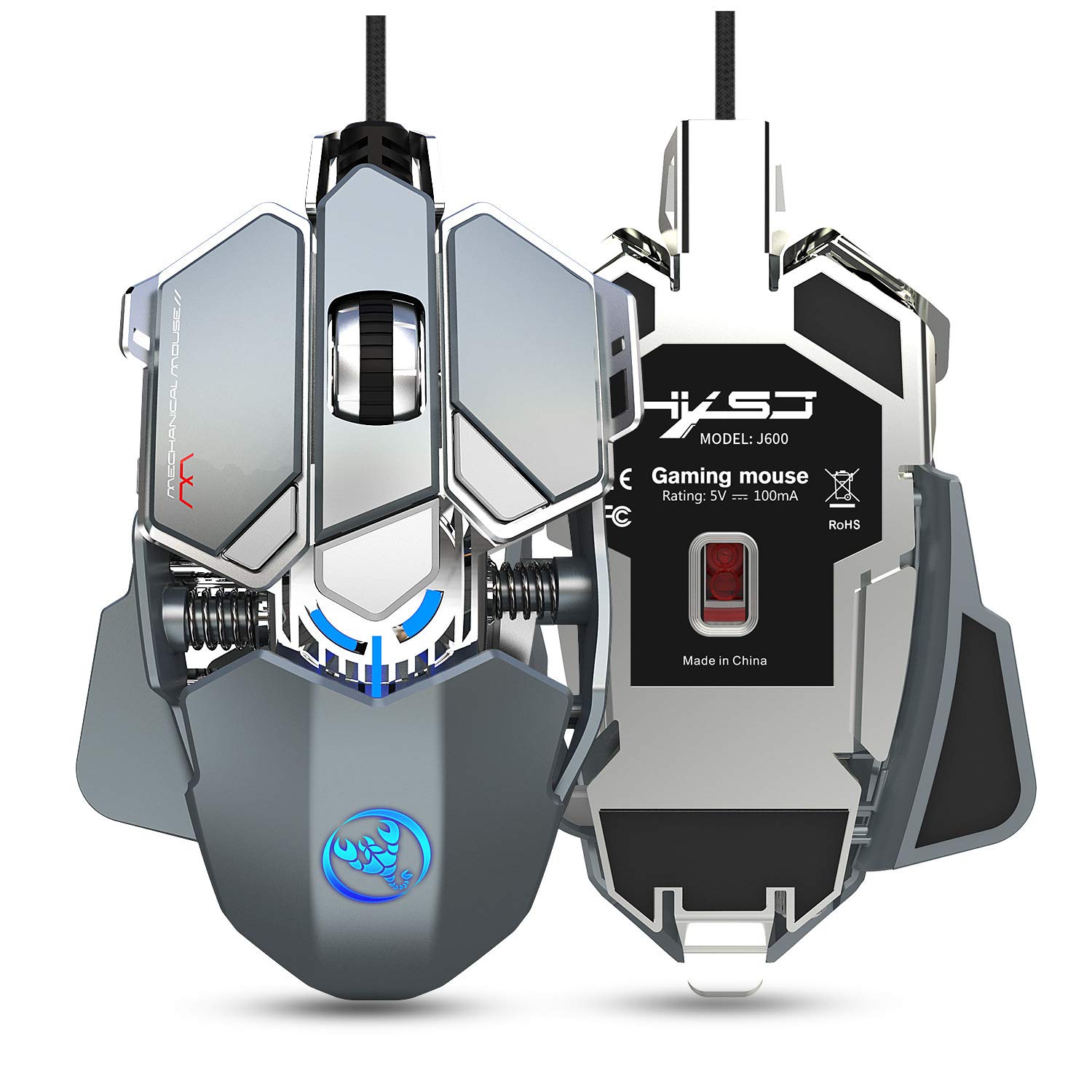
Figure 2.1: HXSJ J600 Mechanical Gaming Mouse. This image shows the overall design of the mouse, highlighting its mechanical aesthetic and wired connection.
3. Istruzioni per l'installazione
Follow these steps to set up your HXSJ J600 Mechanical Gaming Mouse:
- Collega il mouse: Plug the USB connector of the HXSJ J600 mouse into an available USB port on your computer. The mouse is plug-and-play, and your operating system should automatically detect and install the necessary basic drivers.
- Install Macro Programming Software: For full customization of the 9 programmable keys, DPI settings, and LED effects, you need to install the dedicated macro programming software.
- Locate the software download link. This is typically provided on the manufacturer's official website or a designated support page.
- Download the software package (e.g., "setup.exe") to your computer.
- Esegui il programma di installazione e segui le istruzioni visualizzate sullo schermo per completare l'installazione.
- Once installed, a "J600" drive icon should appear on your desktop. Double-click this icon to launch the software.
Nota: Ensure your mouse is connected and functioning normally before attempting software installation. The software is compatible with Windows 2000 / XP / Win7 / Win8 / Win10 / Vista 32bit / IOS or later operating systems.
4. Istruzioni per l'uso
The HXSJ J600 mouse offers various customizable features to enhance your gaming experience.
4.1 Impostazioni dei pulsanti e programmazione delle macro
The mouse features 9 programmable buttons. These buttons can be customized using the macro programming software to perform specific actions or complex sequences (macros) in games or applications.

Figure 4.1: Button Layout. This diagram illustrates the numbered programmable buttons on the HXSJ J600 mouse, including the left, right, middle, and various side buttons.
To customize buttons:
- Launch the J600 macro programming software.
- Navigate to the "Button Settings" or "Custom Settings" section.
- Select the desired button (1-9) you wish to program.
- Choose an action from the available options (e.g., single key, macro, multimedia function).
- For macro editing, record your desired key presses and delays.
- Click "Applications" to apply the changes, then "Save Configuration" to store your settings.

Figure 4.2: Macro Programming Interface. This image displays the software interface for setting up hardware macros, including examples for various in-game weapon configurations.
4.2 Regolazione DPI
The mouse supports 6-level adjustable DPI settings, ranging from 800 to 6400 DPI. You can cycle through these settings using the dedicated DPI buttons on the mouse or customize them via the software.

Figure 4.3: DPI Switching and LED Indicators. This image shows the DPI adjustment buttons and the corresponding LED light colors for each DPI level (800 Green, 1600 Purple, 2400 Blue, 3200 Red, 4800 Yellow, 6400 Cyan-blue).
Per regolare i DPI:
- Use the DPI+ and DPI- buttons on the mouse to cycle through the preset DPI levels.
- The LED light on the mouse will flash in a specific color to indicate the current DPI setting.
- In the software, you can customize the exact DPI values for each of the six segments.
4.3 Impostazioni LED
The HXSJ J600 features customizable LED lighting. You can configure the lighting effects through the software:
- Sempre attivo: The LED lights remain constantly illuminated.
- Respiro personalizzato: The lights pulse in a breathing effect with customizable colors.
- Ciclo spettrale: The lights cycle through a spectrum of colors.
- Spento: Le luci LED sono spente.
4.4 Parametri del mouse
Within the software, you can also fine-tune general mouse parameters:
- Precisione del puntatore: Regola la precisione del puntatore del mouse.
- Velocità della ruota: Controlla la velocità di scorrimento della rotellina del mouse.
- Velocità del doppio clic: Impostare la velocità richiesta per registrare un doppio clic.
5. Manutenzione
To ensure the longevity and optimal performance of your HXSJ J600 Mechanical Gaming Mouse, follow these maintenance guidelines:
- Pulizia: Regularly clean the mouse with a soft, dry cloth. For stubborn dirt, slightly dampPulire il panno con acqua o una soluzione detergente delicata. Evitare l'uso di prodotti chimici aggressivi o materiali abrasivi.
- Pulizia del sensore: Di tanto in tanto, pulire il sensore ottico sul lato inferiore del mouse con un batuffolo di cotone per evitare problemi di tracciamento.
- Cura del cavo: Evitare di piegare bruscamente o tirare eccessivamente il cavo USB per evitare danni interni.
- Magazzinaggio: Quando non lo si utilizza, conservare il mouse in un ambiente pulito e asciutto, lontano da temperature estreme.

Figure 5.1: Alloy Plating Rubber Roller. This image highlights the durable and sensitive scroll wheel, designed for anti-slip performance and smooth rolling.
6. Risoluzione Dei Problemi
If you encounter issues with your HXSJ J600 mouse, refer to the following troubleshooting tips:
6.1 Il mouse non risponde
- Controllare la connessione USB: Ensure the USB cable is securely plugged into a functioning USB port on your computer. Try a different USB port.
- Riavvia il computer: Spesso un semplice riavvio del sistema può risolvere i problemi di connettività.
- Prova su un altro computer: Se possibile, prova il mouse su un altro computer per determinare se il problema riguarda il mouse o il sistema.
6.2 Problemi software/driver
- Download del software: Ensure you have downloaded the correct and latest version of the macro programming software for the J600 model. Verify the source of the download.
- Reinstallare il software: If the software is not functioning correctly, uninstall it from your system, restart your computer, and then perform a fresh installation.
- Privilegi di amministratore: Run the software installer and the application itself with administrator privileges.
6.3 LED Lights Not Working or Incorrect Colors
- Controllare le impostazioni del software: Open the macro programming software and verify the LED settings. Ensure they are not set to "Off" or an unintended mode.
- Conflitto software: If other lighting control software is running, it might conflict with the mouse's LED settings. Close other lighting applications.
6.4 Buttons Not Responding or Performing Incorrect Actions
- Check Macro Settings: Review your button assignments and macro configurations in the software. Ensure they are saved correctly.
- Attivazione del software: After saving configurations, ensure you restart the driver or software as instructed to activate all customizations.
- Impostazioni predefinite: If issues persist, try resetting the mouse to its default settings via the software.
7. Specifiche
Detailed technical specifications for the HXSJ J600 Mechanical Gaming Mouse:
| Caratteristica | Specificazione |
|---|---|
| Modello del prodotto | Le macro meccaniche J600 definiscono il mouse da gioco |
| Chiavi | 9 tasti programmabili |
| Livelli DPI | 800-1600-2400-3200-4800-6400 (adjustable) |
| Voltage / Corrente | DC 5V / 100mA |
| Interfaccia | USB (Plug and Play) |
| Cambia vita | 20 milioni di cicli |
| Lunghezza del cavo | 150 centimetri |
| Peso dell'articolo | 137.5 g (circa 4.85 once) |
| Dimensioni dell'articolo | 130 x 80 x 35 mm (L x P x A) |
| Sistema operativo supportato | Windows 2000 / XP / Win7 / Win8 / Win10 / Vista 32bit / IOS or latest |
| Orientamento della mano | Ambidestro |
| Caratteristica speciale | Soundless (referring to click sound) |
8. Garanzia e supporto
For warranty information and technical support, please refer to the documentation included with your purchase or visit the official HXSJ websito. Conservare la prova d'acquisto per eventuali reclami in garanzia.
If you require further assistance, please contact HXSJ customer support through their official channels.


