1. Introduzione
The BOYA BY-M800 is a large cardioid diaphragm condenser microphone designed for high-quality audio capture in studio environments. It features a smooth, flat, wide-range frequency response, making it ideal for vocal and general instrument recording. This manual provides detailed instructions for setting up, operating, and maintaining your BY-M800 microphone.
Caratteristiche principali:
- Large gold-sputtered diaphragm for accurate sound reproduction.
- Cardioid polar pattern effectively rejects off-axis sound.
- Switchable -10dB pad for handling high SPL sources.
- Two-position low-cut filter switch to reduce unwanted low-frequency noise.
- Sturdy all-metal construction for durability.
- Requires standard 24V or 48V phantom power via XLR connector.
- Includes shockmount, pop filter, and 3m (10ft) XLR cable.
2. Contenuto della confezione
Si prega di controllare attentamente il pacco per assicurarsi che tutti gli articoli siano presenti e in buone condizioni.
- Microfono a condensatore BOYA BY-M800
- Supporto antiurto
- Filtro pop
- 3m (10ft) XLR Cable
- Manuale dell'utente (questo documento)
- Scheda di garanzia
3. Prodotto finitoview
Familiarize yourself with the components of your BY-M800 microphone.

Figura 3.1: The BOYA BY-M800 condenser microphone assembled with its included shockmount and pop filter, ready for studio use.
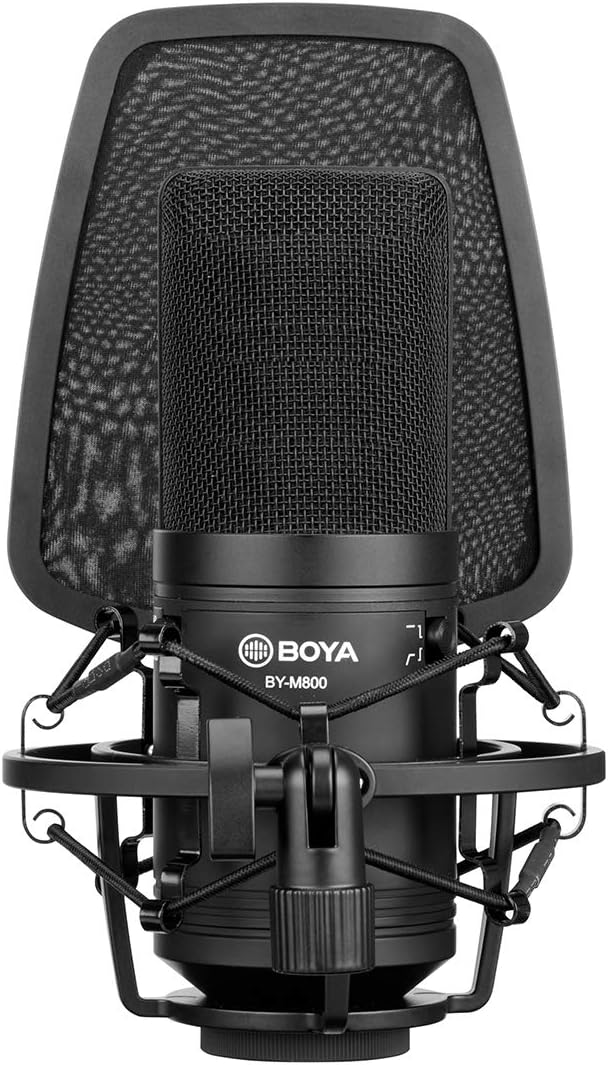
Figura 3.2: Un dettagliato view of the BOYA BY-M800 microphone body, highlighting the model number "BY-M800" and the switches for -10dB pad and low-cut filter.
Componenti:
- Capsula microfono: Large gold-sputtered diaphragm.
- -10dB Pad Switch: Reduces input sensitivity by 10dB for loud sound sources.
- Interruttore filtro low-cut: Engages a low-frequency roll-off to reduce rumble and unwanted bass.
- Connettore XLR: Standard 3-pin XLR output for connecting to audio interfaces or mixers.
- Shockmount: Isolates the microphone from vibrations and handling noise.
- Filtro anti-pop: Reduces plosive sounds (P, B) and protects the microphone capsule.
4. Impostazione
Follow these steps to set up your BOYA BY-M800 microphone for recording.
- Fissare il supporto antiurto: Secure the BY-M800 microphone into the included shockmount. Ensure it is firmly seated to prevent accidental dislodging.
- Montaggio su supporto: Attach the shockmount to a microphone stand using the standard 3/8" or 5/8" thread adapter. Tighten securely.
- Posizionare il filtro anti-pop: Attach the pop filter to the microphone stand and position it approximately 1-2 inches in front of the microphone capsule. This helps to reduce plosive sounds and protect the diaphragm.

Figura 4.1: The BY-M800 microphone mounted on a stand with the pop filter correctly positioned, demonstrating a typical setup for vocal recording.
- Collegare il cavo XLR: Connect one end of the supplied 3m (10ft) XLR cable to the XLR output on the bottom of the microphone. Connect the other end to an audio interface, mixer, or preamplifier that provides 24V or 48V phantom power.

Figura 4.2: Illustration of the BY-M800 microphone connected via its XLR cable, emphasizing the requirement for 24V or 48V phantom power from the connected device.
- Attivare l'alimentazione fantasma: Ensure phantom power is enabled on your audio interface or mixer. The BY-M800 requires phantom power to operate.
- Adjust Switches (if needed):
- If recording very loud sound sources (e.g., drums, loud vocals), engage the -10dB interruttore pad per evitare distorsioni.
- If experiencing low-frequency rumble or unwanted bass noise (e.g., air conditioning, traffic), engage the low-cut filter switch.
5. Utilizzo del microfono
Once set up, the BY-M800 is ready for use. Here are some tips for optimal performance.
Posizionamento del microfono:
- Voce: For vocal recording, position the microphone 6-12 inches from the vocalist, directly facing the sound source. Always use the pop filter.
- Strumenti: Placement will vary depending on the instrument. Experiment with distance and angle to capture the desired tone. The cardioid pattern is most sensitive directly in front of the microphone.

Figura 5.1: A person speaking into the BY-M800 microphone, illustrating the ideal distance and angle for capturing clear vocal recordings.
Monitoring and Gain Stagin:
- Monitor your audio through headphones connected to your audio interface to hear the microphone's output.
- Adjust the gain (input level) on your audio interface or mixer so that the signal is strong but does not clip or distort. Aim for peak levels around -6dB to -3dB on your recording software's meters.
6. Manutenzione
Proper care will extend the life and performance of your BY-M800 microphone.
- Pulizia: Use a soft, dry cloth to wipe down the microphone body. Do not use liquid cleaners or solvents, as they can damage the microphone.
- Magazzinaggio: Quando non lo si utilizza, conservare il microfono in un ambiente asciutto e privo di polvere, preferibilmente nella confezione originale o in una custodia protettiva.
- Gestione: Avoid dropping the microphone or subjecting it to strong impacts, as this can damage the delicate internal components.
- Umidità: Tenere il microfono lontano dall'umidità e dalle temperature estreme.
7. Risoluzione Dei Problemi
If you encounter issues with your BY-M800 microphone, refer to the following common problems and solutions.
| Problema | Possibile causa | Soluzione |
|---|---|---|
| Nessuna uscita audio |
|
|
| Audio distorto |
|
|
| Excessive background noise/hum |
|
|
8. Specifiche
Detailed technical specifications for the BOYA BY-M800 microphone.
| Caratteristica | Specificazione |
|---|---|
| Principio acustico | Condensatore |
| Modello polare | cardioide |
| Dimensioni del diaframma | Large Gold-sputtered Diaphragm |
| Risposta in frequenza | 20 Hz - 20 kHz |
| Sensibilità | -33dB ±3dB (0dB=1V/Pa @ 1KHz) |
| Impedenza di uscita | 200 Ohm |
| Signal-to-Noise Ratio | 80 dB |
| Requisiti di potenza | 24V or 48V Phantom Power |
| Connettore di uscita | XLR a 3 pin |
| Materiale | Metallo |
| Dimensioni | Circa 10.59 x 8.19 x 6.06 pollici (confezione) |
| Peso | Circa 2.49 libbre |
9. Garanzia e supporto
BOYA provides a one-year warranty for the BY-M800 microphone from the date of purchase. This warranty covers manufacturing defects and workmanship under normal use.
Esclusioni di garanzia:
- Danni causati da uso improprio, abuso, incidente o negligenza.
- Danni causati da riparazioni o modifiche non autorizzate.
- Normale usura.
- Damage from external causes such as power surges or natural disasters.
Assistenza clienti:
For technical support, warranty claims, or further assistance, please contact BOYA customer service through their official website or the retailer where you purchased the product. Please have your proof of purchase and product model number (BY-M800) ready when contacting support.
You can find more information and contact details on the official BOYA websito: www.boya-mic.com


